creator of HOLYGATC64 (work in progress)
rapped for four days straight
quit rapping to learn 中文
sumtimes我hack
@bsidestwo @bsideseight
Advanced Persistent Treatꙮ
GATC PAINT Update: Every Colour Now Tells You What It Makes
GATC PAINT has always rested on one idea: every colour is a codon, and every codon is a colour. Until now, each colour also told you which instruction it encodes in DNAcompiler's virtual machine. This update adds the other half of the story, what each codon means in a living cell.
What's new
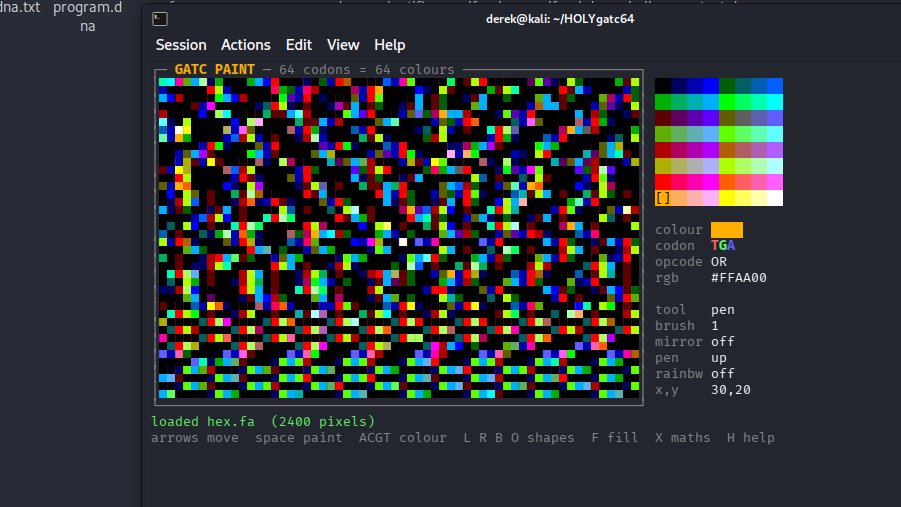
Pick a colour, type a codon or click any pixel, and the bottom of the screen now shows its biological meaning next to its machine meaning, for example:
TCC: VM IN, amino acid Serine (Ser/S)
Stop codons are marked as stop codons, the signals that end a protein. A new line in the side panel always shows the current codon's amino acid in its three-letter and one-letter codes.
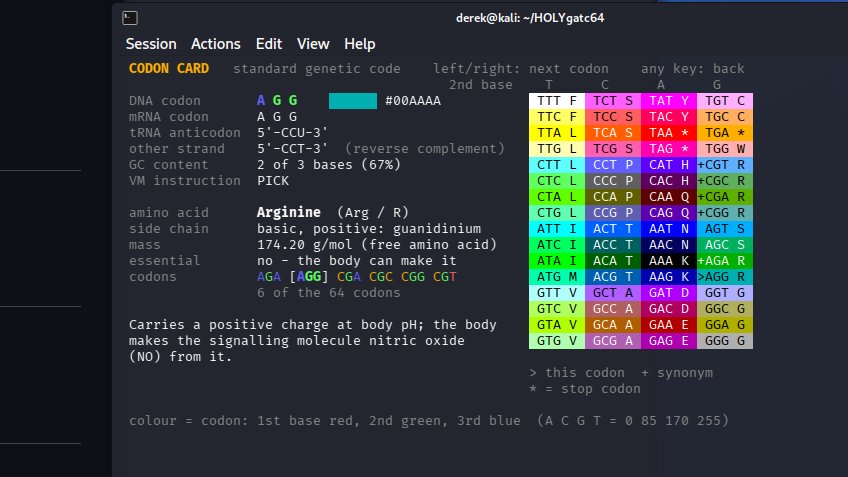
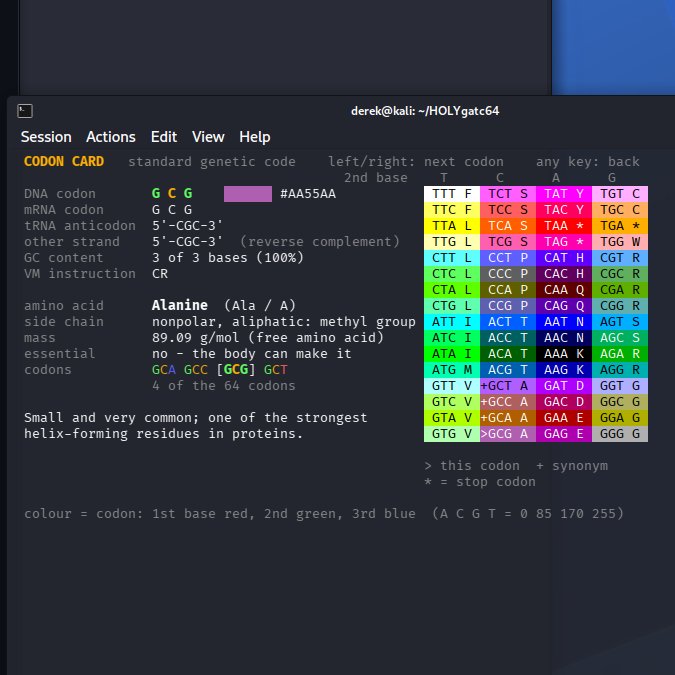
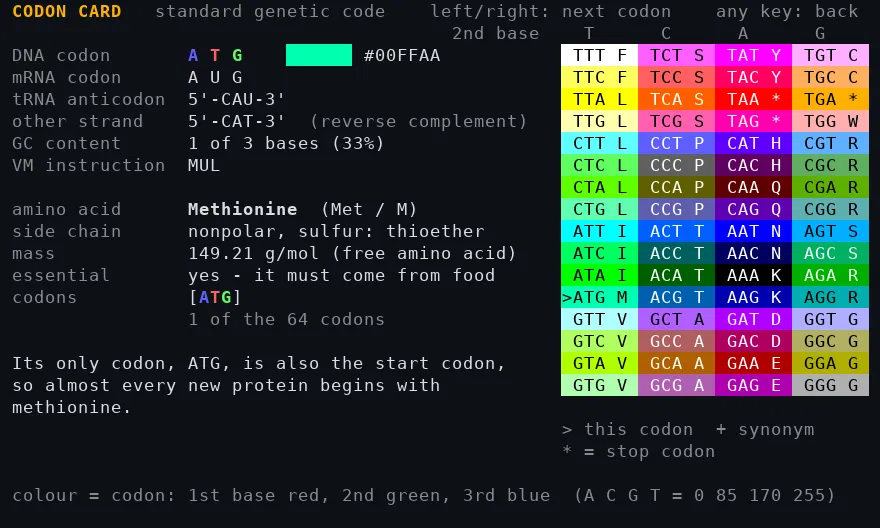
The codon card
Press D at any time, while painting or while scrolling through a genome, to open a full reference card for the current codon. It brings together:
The codon itself: its DNA bases in colour, the matching mRNA codon (with U in place of T), the tRNA anticodon that reads it, the sequence on the opposite DNA strand, and its GC content.
The amino acid it encodes: full name, three-letter and one-letter codes, the chemistry of its side chain, its molecular mass, and whether humans must get it from food.
Its synonyms: every codon in the genetic code that makes the same amino acid, which shows the code's redundancy at a glance. Leucine, serine and arginine each have six codons; methionine and tryptophan have only one.
A short scientific note on why the amino acid matters. For example, valine replacing glutamic acid in hemoglobin causes sickle cell disease, and asparagine was the first amino acid ever isolated, from asparagus juice in 1806. ATG is flagged as the start codon where protein synthesis begins.
The three stop codons get their traditional names, ochre, amber and opal, along with their special roles. TGA can encode selenocysteine, the 21st amino acid, and is read as tryptophan in mitochondria. TAG can encode pyrrolysine in some microbes and is used in labs to add new amino acids to proteins.
Beside all of this, the card draws the complete 64-codon genetic code table in the standard textbook layout. Each codon is shown in its own GATC PAINT colour, with the current codon and its synonyms marked. The arrow keys step through the codons one by one, so the card doubles as an interactive tour of the genetic code.
Why it matters
Paired with the FASTA viewer, this turns GATC PAINT into a hands-on way to explore sequence data. Scroll through a genome, click any pixel, and see its exact base position, its codon, the amino acid it codes for and the chemistry behind it. Switch the reading frame with a key press and watch both the colours and the translation change. For teaching the genetic code, codon redundancy, reading frames and stop signals, the connection between colour, sequence and biology is immediate.
The genetic code built into the program is the standard code (NCBI translation table 1), and it was checked codon by codon against an independent reference. As always, GATC PAINT is an exploratory and teaching tool, not a replacement for established bioinformatics software.
Under the hood
The virtual machine has only 4,096 memory cells, and the editor already used nearly all of them. So the entire genetic code and every amino acid description live in the program's code rather than its memory: a 64-entry lookup table built from jump instructions, with text printed straight from code. The new reference material added only about 40 memory cells.
The extra code pushed the compiled program past the original size limit of DNAcompiler's genome format, so the loader, https://t.co/zWmSdFjoBH, now uses an extended length header for very large programs. The extension is fully backward compatible. Every existing genome encodes exactly as before, bit for bit, and all earlier programs run unchanged. GATC PAINT itself now compiles into a genome of about 316,000 bases, and that genome runs exactly like the source.
To try it, run:
python3 https://t.co/zWmSdFjoBH run paint.aa --no-banner --tty --fs --max-steps 2000000000
Type three bases to pick a codon, press D, and explore.
The project is available at https://t.co/nVOPhzrPgL
GATC PAINT: See Your Sequences as Colour, Paint in Codons
GATC PAINT is a 64-colour pixel editor and FASTA viewer that runs inside the terminal. It's written entirely in the amino-acid assembly language of DNAcompiler, an experimental virtual machine whose 64 instructions map one-to-one onto the 64 DNA codons. It's built on one simple, exact idea: every codon is a colour, and every colour is a codon.
The colour model
Each of the three bases in a codon sets one colour channel. The first base is red, the second green, the third blue, and each base is a brightness level: A is off, C is low, G is high and T is full. GCA is a warm brown, TGA is orange, TTT is white and AAA is black. The mapping is complete and reversible, so any colour on screen tells you exactly which codon produced it. You never need a legend. You can also pick a colour by typing its three bases, which makes the codon table something you learn by eye, not by memorising.
Because the machine's instruction set uses the same 64 codons, the editor also shows which VM instruction each colour encodes. In GATC PAINT a picture, a DNA sequence and a program are three views of the same data.
Viewing real sequence data
Open any standard FASTA file and GATC PAINT shows it as a field of colour, 2,400 codons per screen, scrolling through the whole file. It reads only the visible window straight from disk and computes the exact position of any base from the file's line layout. That keeps memory use tiny and gives every screen the same speed: jumping to the end of a five-million-base genome takes the same half-second as opening a small gene.
The viewer handles the formats found in real data. It reads lowercase (soft-masked) sequence, Windows and Unix line endings, files without a trailing newline, and multi-record files. N and other ambiguity codes show as black and still count as bases, so the reading frame never drifts across a gap. The < and > keys shift the reading frame by one base, so you can flip between all three frames and watch the picture change completely. Clicking any pixel reports its exact base position, its codon and the instruction it encodes.
What can you see this way? Structure that is hard to spot in a wall of letters:
runs of N where an assembly has gaps
low-complexity and repetitive stretches, which form visible stripes and blocks
shifts in base composition from one region to the next
how different the same sequence looks in each reading frame
That makes GATC PAINT useful for a quick visual first look at a new sequence, for spotting gaps and repeats before deeper analysis, and as a teaching tool for the genetic code, codon structure and reading frames. To be clear, it's an exploratory visualiser, not a substitute for established tools like genome browsers or alignment software when results need to be validated.
A complete pixel editor
GATC PAINT is also a full drawing program, and it works the same way on a blank canvas or on a screen of real sequence. Press K in the viewer and the current screen becomes an editable painting.
The canvas is 60 by 40 pixels in all 64 codon colours, drawn with half-block characters so it fits a standard 80-by-24 terminal. You can draw with the keyboard or the mouse:
a pen with four brush sizes
lines, rectangles, filled boxes and circles
flood fill and a spray tool
left-right and four-way mirror modes for symmetric designs
a rainbow pen that steps to the next codon with every dab
A maths mode fills the canvas with one of eight formulas, including XOR patterns, interference rings, Sierpinski triangles, and a map of the entire codon table. A colour-cycle key shifts every pixel to the next codon, which animates the picture when held down. Undo, a full on-screen help page and a palette you can click round it out.
Paintings save in two formats. One is a FASTA file holding the image as DNA, one codon per pixel, which can be opened again, shared, or read like any other sequence. The other is a 480-by-320 BMP that any image viewer opens. The two always agree, and saving then reopening returns the identical image.
How it's built
Every part of GATC PAINT is GATC assembly: the canvas memory, line and circle drawing, flood fill, screen rendering, the FASTA parser and the BMP encoder. It fits within the virtual machine's 4,096 memory cells. The loader, https://t.co/zWmSdFjWrf, adds only a small opt-in terminal bridge for raw keystrokes, mouse input and fast screen output, plus an optional file bridge for saving and opening. Both are off unless requested, and all earlier DNAcompiler programs run unchanged. The editor itself also compiles into a DNA genome of about 166,000 bases, and that genome runs exactly like the source.
To try it, run:
python3 https://t.co/zWmSdFjWrf run paint.aa --no-banner --tty --fs --max-steps 2000000000
Then press E to open a FASTA file, or start painting.
The project is available at https://t.co/nVOPhzsn6j
I'm so excited for this to be finished.
Left: a classic program compiled with HOLYGATC64. Right: a DNA sequence from an Ebola strain. The viewer shows the first 2,400 codons — scrolling for long files is next.
The goal: turn FASTA DNA sequences into images, and paint pictures with codons — which paint.aa already does:
https://t.co/LbW4vPZs7V
#DNAstorage #synbio #compilers
Stay tuned
I'm about to store images as FASTA DNA sequences.
Every DNA sequence can be read back as an image: one codon per pixel. That means the same .dna pipeline that carries executable code can carry pictures and with 64 codons mapping to a 64-value palette, DNA becomes a native 64-color image format.
Put together with the compiler, the picture is:
Code → DNA → molecules → back → executes. (Already running in silico; physical run is the next step.)
Image → DNA → molecules → back → renders. (Next demo.)
One format, two payloads. A single A/C/G/T string is simultaneously a program and a picture, depending on how you read it.
Why this matters: it turns "DNA as storage" into "DNA as a readable medium." Any sequencer output becomes an image. Any image becomes sequence. The bridge from code to sequence now has pictures standing on it too.
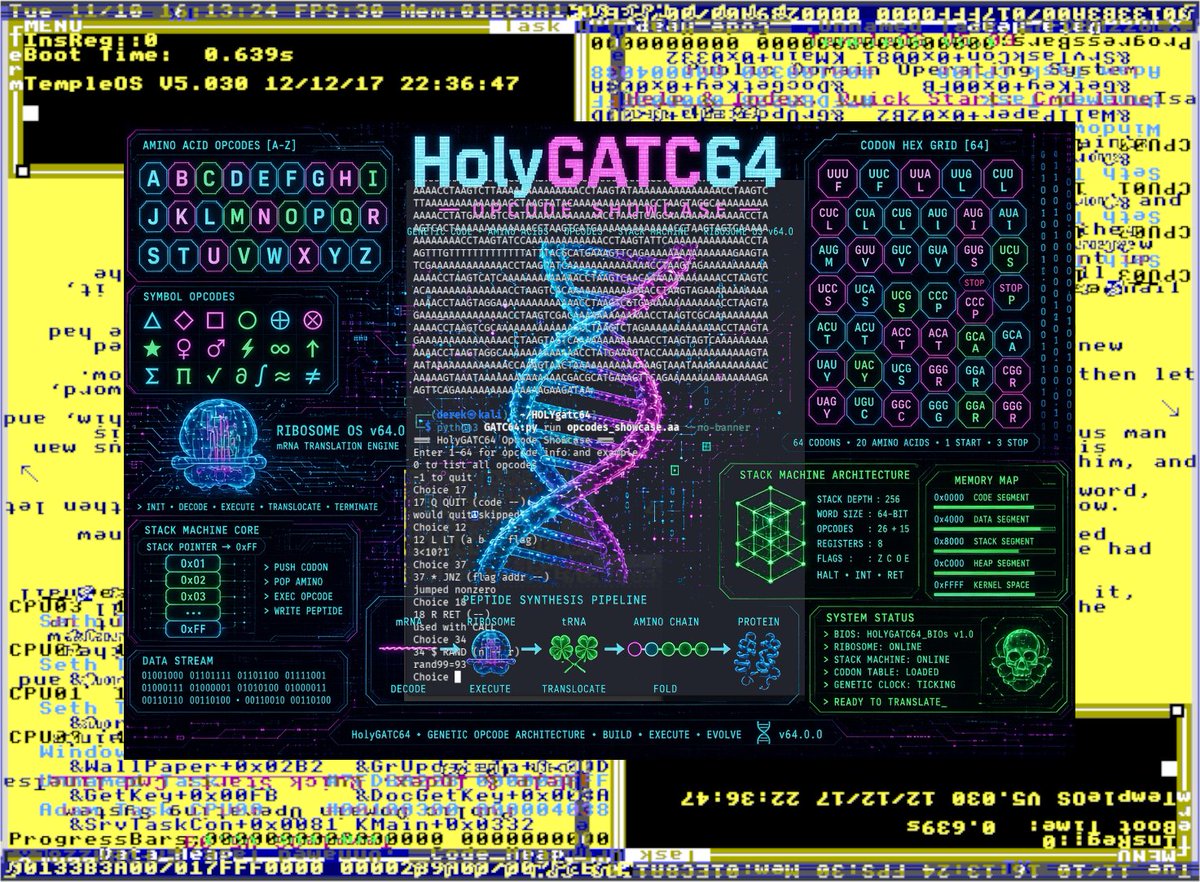
HolyGATC64 turns DNA into a programming language. 64 codons. 64 opcodes. One stack machine that thinks like a ribosome.
Write programs as amino-acid assembly. Each letter is an instruction. K pushes a number. A adds. Y prints. H stops. You can jump, call subroutines, store memory, and even turn your code into a real FASTA genome that runs in gene mode.
I built a free interactive opcode showcase. Drop the .aa file in and it walks you through all 64 instructions with live examples. Type a number, see the stack effect, watch it run. Perfect for learning the basics without drowning in docs.
Quick start to writing your own code:
Push numbers with bare digits or K.
Add, subtract, multiply with A S M.
Print a number with Y. Print a character with W.
Comments start with #.
Labels look like :LOOP. Jump with the label name then B.
Call a subroutine with the label then C. Return with R.
Read input with I.
Tiny example that doubles a number:
"Enter a number "
I
D
A
Y
H
That is the whole language. Stack on top, letters as verbs, DNA as storage.
The compiler is open source. The showcase is ready to run. If you want to play with a machine that treats code like genetics, this is the simplest way in.
Grab it, run the showcase, write three lines, and watch it execute. The ribosome OS is waiting.
https://t.co/brEWNYDhMJ
I wrote this song from intrusive thoughts we all have
We wonder if we’ve done enough,
where the time went,
and how far we’ve come.
It’s suffocating
And you feel like you’re drowning
So..
I hope my song, drowning, makes you feel a little less alone 💙
https://t.co/hz8CeT0aFS
@TiffanyFong one time i was in NYC at Mahayana temple an tol them i was hungry. She said "what do you want to eat"
I looked her with a straight face an said "HORSE"
30 seconds later she came out with a tray ov Crispy Duck
FROM ATG TO LS: A LINUX SWISS ARMY KNIFE ENCODED AS A DNA SEQUENCE
shell.aa: A Familiar Linux-Style Toolkit for the DNAcompiler Virtual Machine
DNAcompiler is an experimental programming system with a simple core idea: every DNA codon does a specific job. Its virtual machine has exactly 64 instructions—one for each possible three-letter codon. Programs are written in a compact “amino-acid assembly” language and saved as `.aa` files. These can be compiled into packed FASTA “genomes” (sequences of A, C, G, and T) that the machine executes directly.
The project already includes a hex editor and a network toolkit. The newest addition is **shell.aa**, an interactive command shell that brings a familiar set of everyday Linux tools to the platform.
What shell.aa Can Do
It provides 31 commands that feel natural if you’ve used a Linux terminal:
- Navigating and inspecting the file system
`ls` (with long, all, human-readable, and directory modes), `ll`, `cd`, `pwd`, `tree`, `find`, `stat`, `realpath`, `du`, `df`
- Managing files and directories*
`cp` (including recursive), `mv`, `rm` (including recursive and forced), `touch`, `mkdir`, `rmdir`, `ln`, `chmod`
(supports both numeric modes like `755` and symbolic modes like `u+x,go-w`)
- Working with text
`cat`, `head`, `tail`, `wc`, `grep`, `echo`
- Working with raw data*
`xxd` and `hexdump` views, plus `crc32` checksums
The shell also supports wildcards, quoted arguments, and redirecting output to a file with `>` and `>>`.
Important: These Are Not Linux Programs
shell.aa does **not** call the real system’s `ls`, `rm`, `grep`, or any other binary, and it does not invoke a shell. Every tool is an original program written in DNAcompiler’s own assembly language, designed to behave like its Linux counterpart.
How It Accesses the File System
The virtual machine itself has no instructions for reading directories or deleting files. The solution is a small, optional file-system bridge added to the loader script (`GATCnux[.]py`). It is turned on only when you pass the `--fs` flag.
When shell.aa needs to touch the disk, it places a request in a reserved set of memory cells. The loader then performs exactly one low-level operation (such as reading file details, listing a directory, opening/reading/writing a file, renaming, or removing an entry) and returns the result. These map directly onto the operating system’s own system calls—the same primitive requests that real Linux tools use.
Everything above that level is written in GATC assembly. This includes:
- Parsing the command line and options
- Matching wildcard patterns
- Recursively walking directory trees (for copying, deleting, searching, and measuring)
- Formatting directory listings
- Converting timestamps into readable dates
- Counting lines and words
- Reading files backward for `tail`
- Searching and highlighting text for `grep`
- Producing hexadecimal dumps
- Computing CRC-32 checksums bit by bit
All of this runs inside a machine with only 4,096 memory cells (the shell uses 3,930 of them). Even so, it can copy a 20-megabyte file byte-for-byte in about three seconds.
Testing and Portability
The toolkit was tested command-by-command against the standard Linux utilities so its output matches. Because every value is encoded in a DNA-safe way, the entire shell compiles into a genome of roughly 168,000 bases, and that genome behaves identically to the source program.
Safety Features
Safety was a design priority:
- File access stays off unless you explicitly supply `--fs`.
- The `--fs-root` option confines the shell to a single directory and blocks any path that tries to escape it (including through symbolic links).
- The shell refuses to remove the root directory or the special entries `.` and `..`.
- It asks for confirmation before recursively deleting a directory, unless you explicitly override that.
- The bridge is purely additive: no existing instruction was changed, so earlier programs (including the hex editor and network toolkit) continue to run exactly as before.
How to Run It
Start the shell with:
python3 GATCnux[.]py run shell.aa --no-banner --fs --max-steps 2000000000
To restrict it to a single folder, add `--fs-root` followed by the path.
You can also pipe commands in for scripted use, for example:
echo "ls -l" | python3 GATCnux[.]py run shell.aa --no-banner --fs
Current Limits
- `grep` searches for plain text only (no regular expressions yet).
- The shell does not yet support pipes between commands.
- Wildcards apply only to the last part of a path.
Why It Matters
shell.aa shows that a minimal, biologically inspired instruction set can support practical everyday software, and that a complete set of familiar system tools can be expressed in code that could also be written down as a strand of DNA.
The project is available at: https://t.co/nVOPhzrPgL