I wasted 6 months on Claude Code slop.
A free plugin fixed it in 30 seconds:
It's called Superpowers (built by Jesse Vincent).
It reached 208k stars on GitHub in 8 months.
Forces the agent to plan before any code.
Here's exactly how the 7 stages work:
Step 1. Brainstorm
✦ Asks you questions to refine the spec
✦ Locks nothing in until the design is clear
Step 2. Worktrees
✦ Spins up an isolated branch for the work
✦ Verifies the test baseline is clean
Step 3. Write the plan
✦ Breaks work into 2 to 5 minute tasks
✦ Lists exact file paths and steps per task
Step 4. Subagent
✦ Sends each task to a fresh helper agent
✦ Reviews the spec first, then code quality
Step 5. Run TDD
✦ Red, green, refactor: test, code, then cleanup
✦ Deletes any code shipped before a test
Step 6. Code review
✦ Checks every change against the plan
✦ Blocks progress on critical issues
Step 7. Ship it
✦ Runs the test suite and confirms it passes
✦ Opens a PR or merges, then cleans the branch
The result: Claude Code stops shipping slop.
Install it in one line:
/plugin install superpowers@claude-plugins-official
Free repo → https://t.co/tGNwFVYsEa
Repost ♻️ to help someone in your network.
You still use Claude like in 2025.
So here's a recap in a single cheat sheet:
1: Claude isn't 1 tool. It's 6.
Chat, Projects, Code, Cowork, Skills, Connectors.
If you don't code, Cowork should be the go-to one.
2: Pick the model before the prompt.
Opus 4.8 = thinking, analyzing, planning.
Sonnet 4.6 = grammar, brainstorming, formatting.
Haiku 4.6 = bulk tasks at 1M input tokens.
3: Toggle High Effort on Opus.
Model selector → Opus 4.8 → Turn on Effort → High Forces an internal monologue.
4: Cowork > Chat for serious work.
Desktop + Pro only. Reads your local files. Creates docs. Runs for minutes while you grab coffee.
5: Stop writing 500-word prompts.
Write 29 words: "I want to [task] so that [goal]. Read the files first. Ask me questions via AskUserQuestion before executing."
6: Build 3 folders inside Cowork.
ABOUT ME/ (identity + rules). TEMPLATES/ (reusable patterns). CLAUDE OUTPUTS/ (deliverables). Your prompts drop to 10 words.
7: Set Global Instructions once.
Settings → Cowork → Edit Global Instructions.
Prompt: "read ABOUT ME first, save in CLAUDE OUTPUTS, use AskUserQuestion when unclear, don't over-explain."
8: Connectors are free. Turn them on.
Slack, Gmail, Drive, Notion, Figma, Granola + 50 others. Claude reads your emails and messages mid-conversation. Zero copy-paste.
9: Force AskUserQuestion in every prompt.
Claude stops guessing. It generates a form with clarifying questions. You click. Claude executes. Prompting ends.
10: Install Claude in Excel (3 minutes).
Excel → Insert → Get Add-ins → Search "Claude by Anthropic" → Add → Sign in. Ctrl+Option+C to open. It now knows what cell D14 actually contains.
11: Install Plugins from claude .com/plugins.
Sales, Marketing, Legal, Finance, Data, Product, Support + more. Each adds skills and slash commands. Type / in the chat to see them.
12: Skills replace your prompt library.
Turn repeat workflows into slash commands. Type /negotiation-prep + one line. Claude pulls from Gmail, Slack, Granola. Drafts the email. Done.
13: Context > Prompts.
Feed your files, not just prompts. That's the game.
Download my own files at https://t.co/psB7XxB2Y4.
Don't pay anything. Reply to the email to get the link
14: Examples > Prescriptions.
Paste 3 posts you wrote. "Write like this." Claude copies voice faster from examples than from 500 words of description.
15: Images = Use ChatGPT Image (with Thinking).
Claude doesn't generate realistic images (yet).
16: Real-time search = Use Grok.
Connected to X. Covers 99% of what you need.
17: Videos = Use Google Veo-4
Right tool, right job. Stop wasting tokens.
-----
To download all of my Claude infographics:
Step 1. Go to https://t.co/psB7XxB2Y4.
Step 2. Subscribe for free. Don't pay anything.
Step 3. Open my welcome email (most skip this).
Step 4. Hit the automatic reply button inside.
Step 5. Download my infographics from my Notion.
Bonus. Enjoy my best copy-paste prompts, too.
Jack Dorsey construyó el agente de IA local más COMPLETO que existe.
Luego lo donó a la Linux Foundation para que nadie lo controle.
46.4k estrellas. 518 contribuidores. 137 releases. Actualizado hace unas horas.
Se llama Goose y es lo más cerca que he visto de un agente de IA de verdad corriendo en tu máquina.
No solo sugiere código.
Instala dependencias, ejecuta, edita, testea, depura y despliega.
Solo. Sin que le estés mirando.
Lo que lo hace diferente a Claude Code o Codex:
✅ App de escritorio nativa + CLI + API - elige cómo usarlo
✅ Funciona con cualquier LLM: Claude, GPT, Gemini, DeepSeek, Ollama y 15 más
✅ Usa tus suscripciones existentes - sin pagar más APIs
✅ 70+ extensiones MCP: GitHub, Google Drive, bases de datos, navegador y más
✅ Subagentes paralelos - divide tareas complejas y las ejecuta en paralelo
✅ Recipes: guarda flujos de trabajo como YAML y compártelos con tu equipo
✅ Modo adversario integrado - un revisor que detecta inyecciones de prompt y acciones inseguras
✅ Compatible con Claude Code y Codex como proveedores via ACP
✅ Rust nativo. Mac, Linux y Windows. Apache 2.0.
La parte que más me ha flipado:
Puedes conectarlo a Claude Code o Codex como subagente.
Goose orquesta. Ellos ejecutan.
El agente que coordina a otros agentes.
el enlace 👇
This is the best site on the internet to learn harness engineering.
Free. Completely.
Most AI engineers have never heard the term.
https://t.co/bwDbTTYsjM
Bookmark this site.
Then read this setup ↓
what is agent looping
for the last two years we prompted agents one task at a time. that is starting to change
instead of asking an agent to build the landing page and then driving every step yourself, you set up a loop that handles discovery, planning, the work, checking, and iterating until the goal is met
looping is a setup you build. almost any agent harness can run it, it just depends on how you wire it up
at its simplest, looping is one agent working on itself:
> researches
> drafts
> checks the draft against a goal
> fixes what is weak
> runs that cycle again until the work clears the requirements
you are not prompting each step anymore. the agent repeats the cycle for you
the bigger version is a fleet looping. you give an orchestrator agent a goal, it breaks the goal into pieces, hands each piece to a specialist agent, and those specialists hand smaller jobs to their own subagents
the whole tree keeps looping through discovery, planning, execution, and verification until the goal is met
one agent looping is like a person redoing their own draft. a fleet looping is a whole team running a project end-to-end
you create a goal, and the system runs the loop until it finishes within the reqs you set
open and closed looping:
OPEN LOOPING is exploratory. it still has conditions and a goal, but you give the agent or the fleet a wide space to move in. it can try different paths, discover things, build something you did not fully spec out
this is the exciting end, it is what Peter and others are doing, and tbh it is where I want to spend more time
the catch is cost, an open loop with real room to explore burns an insane amount of tokens. for the 90 percent of people without an unlimited budget it is not runnable yet, and pointed at projects with a loose standard it turns into a slop machine
CLOSED LOOPING is bounded. a human designs the end-to-end path first:
> clear goal
> defined steps
> an eval at each step
> a point where it stops or hands back to you (and feeds back performance data)
the agents still loop, but inside framework you built. it gets better every run because each pass feeds the next, and it runs on a normal budget because the path is tight.
for most marketing work, closed is the one that pays off today.
> the orchestrator owns the goal
> the specialists own the steps
> the subagents do the narrow work
> an eval gate make sure its not slop
3DGS is becoming a web-native way to publish spaces — detailed, navigable, shareable.
Great to see PortalCam + SuperSplat bringing Ferstel Passage to life. @willeastcott
Workflows like this can scale from across industries.
When SpatialAI is this accessible, everyone wins.
Anthropic engineer:
"You're not supposed to prompt Claude. You're supposed to build a system that prompts itself."
this is one of the best workflows I've seen in a long time
in this video she breaks down exactly how most people are using Claude:
- the 14% you lose to CLAUDE.md before typing a word
- the automation workflows most users don't know exist
- the daily task pipelines that run without touching the keyboard
- the daily workflows Anthropic's own engineers automated first
if you've been using Claude for more than a month and never left the chat window, you've been using one agent when you could be running a team of them
instead of another show tonight, watch this
make sure to bookmark it before it gets lost in your feed
the guide is in the article below
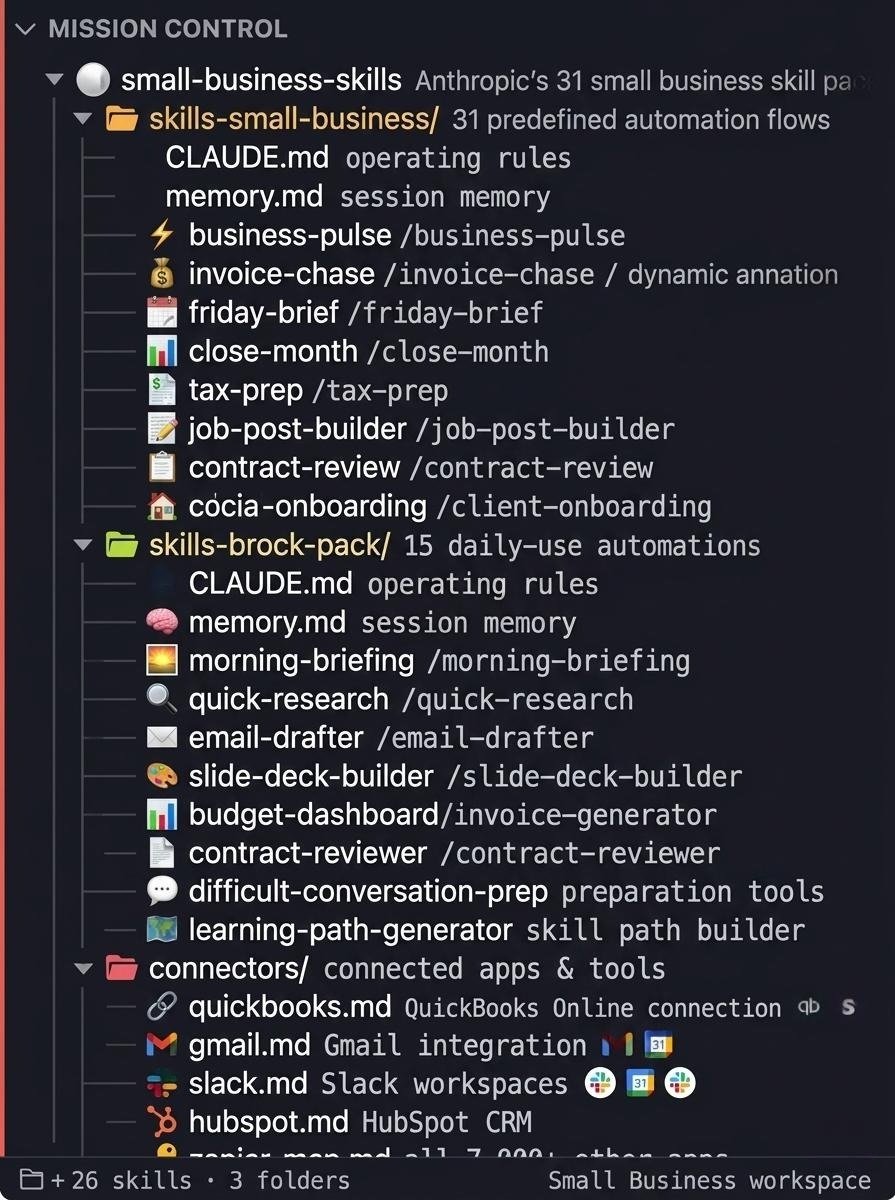
Claude For Small Business is INSANE.
I've built a complete breakdown of all 31 Anthropic Small Business skills that maps every workflow, connector, and automation in under 10 minutes.
The same skill stack that had 382,000 downloads on its first day.
Financial operations, sales and client work, HR and hiring, marketing and growth, reporting and dashboards.
Inside the breakdown:
- All 31 skills organised by function with the 5 to run first
- The 12 connector setup guide in priority order with permission settings for every sensitive action
- Worked examples for Business Pulse, Invoice Chase, and Job Post Builder with real output shown
Want a copy? Like + Comment "31" and I'll send it over ASAP
(Must be following)
I still don't think people understand what just happened with Claude Design.
Claude Design can now take you from rough idea to fully responsive, high-fidelity website design in 10 minutes.
Most builders are skipping Steps 1-3 and blaming the tool when results look generic.
This 4-step workflow gets you professional designs on the first pass:
(full breakdown in the article)
🚨NotebookLM + Google Antigravity is one of the most powerful combo available right now—and almost no one is using it.
If you’re not taking advantage of this, you’re missing out on serious leverage.
Here’s how to set it up in 2 minutes + what it can do 👇
splat-transform is a free and open source library and CLI tool for processing 3D Gaussian splats. It can create lightweight, accurate, voxel-based collision at scale. No human intervention required. This gym scene's voxels are perfectly generated - even large fully transparent windows are correctly filled. The voxel data file is 118KB.
Start building 3D Gaussian splat apps today with @playcanvas and splat-transform. 🧑💻


![rubenhassid's tweet photo. You still use Claude like in 2025.
So here's a recap in a single cheat sheet:
1: Claude isn't 1 tool. It's 6.
Chat, Projects, Code, Cowork, Skills, Connectors.
If you don't code, Cowork should be the go-to one.
2: Pick the model before the prompt.
Opus 4.8 = thinking, analyzing, planning.
Sonnet 4.6 = grammar, brainstorming, formatting.
Haiku 4.6 = bulk tasks at 1M input tokens.
3: Toggle High Effort on Opus.
Model selector → Opus 4.8 → Turn on Effort → High Forces an internal monologue.
4: Cowork > Chat for serious work.
Desktop + Pro only. Reads your local files. Creates docs. Runs for minutes while you grab coffee.
5: Stop writing 500-word prompts.
Write 29 words: "I want to [task] so that [goal]. Read the files first. Ask me questions via AskUserQuestion before executing."
6: Build 3 folders inside Cowork.
ABOUT ME/ (identity + rules). TEMPLATES/ (reusable patterns). CLAUDE OUTPUTS/ (deliverables). Your prompts drop to 10 words.
7: Set Global Instructions once.
Settings → Cowork → Edit Global Instructions.
Prompt: "read ABOUT ME first, save in CLAUDE OUTPUTS, use AskUserQuestion when unclear, don't over-explain."
8: Connectors are free. Turn them on.
Slack, Gmail, Drive, Notion, Figma, Granola + 50 others. Claude reads your emails and messages mid-conversation. Zero copy-paste.
9: Force AskUserQuestion in every prompt.
Claude stops guessing. It generates a form with clarifying questions. You click. Claude executes. Prompting ends.
10: Install Claude in Excel (3 minutes).
Excel → Insert → Get Add-ins → Search "Claude by Anthropic" → Add → Sign in. Ctrl+Option+C to open. It now knows what cell D14 actually contains.
11: Install Plugins from claude .com/plugins.
Sales, Marketing, Legal, Finance, Data, Product, Support + more. Each adds skills and slash commands. Type / in the chat to see them.
12: Skills replace your prompt library.
Turn repeat workflows into slash commands. Type /negotiation-prep + one line. Claude pulls from Gmail, Slack, Granola. Drafts the email. Done.
13: Context > Prompts.
Feed your files, not just prompts. That's the game.
Download my own files at https://t.co/psB7XxB2Y4.
Don't pay anything. Reply to the email to get the link
14: Examples > Prescriptions.
Paste 3 posts you wrote. "Write like this." Claude copies voice faster from examples than from 500 words of description.
15: Images = Use ChatGPT Image (with Thinking).
Claude doesn't generate realistic images (yet).
16: Real-time search = Use Grok.
Connected to X. Covers 99% of what you need.
17: Videos = Use Google Veo-4
Right tool, right job. Stop wasting tokens.
-----
To download all of my Claude infographics:
Step 1. Go to https://t.co/psB7XxB2Y4.
Step 2. Subscribe for free. Don't pay anything.
Step 3. Open my welcome email (most skip this).
Step 4. Hit the automatic reply button inside.
Step 5. Download my infographics from my Notion.
Bonus. Enjoy my best copy-paste prompts, too.](https://pbs.twimg.com/media/HKSWZS6bsAAskVi.jpg)