Kind of in shock at all the attention my app is getting, thank you everyone!
Just want to make it very clear that I am not a coder!
Anime Hair Studio is vibe coded using Codex/Chatgpt.
@Lemonade__Spice ohh I see, that's part of the browser so not much I can do about it I'm afraid.
You can orbit the viewport using the left mouse button though.
I'm probably going to lock down the navigation buttons in the future to avoid this.
@unichan_vrc Won't say never, but No plans for the foreseeable future.
I chose to go stand alone for a few reasons.
More control, focused UI/UX, and I'm a Maya user so if I went the add-on route it'd probably gatekeep a lot of people.
This way it stays platform agnostic.
Will likely push the next update this weekend.
Nothing huge, but I've made a lot of tweaks to the Gizmo, it should be way better now, especially in the scalp editor.
Added Live surface/layer drop downs menus in the viewport.
Also started adding support for 日本語
@Gu1Sparr0w You can do this by going to the title bar and clicking File>Import Head Mesh, or Guides>Edit Head and in the head editor you should see a button to import your mesh in the right hand panel.
New update is live!
I'll go through the features in this thread but to sum it up.
Added the Panel strand tool with the Zipper split controls.
Added editable Capsule guides.
UI changes, bug fixes, most importantly the save feature should now be working online.
https://t.co/vOiIPbkRJI
For now you can check out the patch notes on our all new discord server!
until I figure out how to do this on twitter that is.
How do people do this usually?
@Chuuya_sWife It’s not in the current version of the app yet, will probably be there by the end of the week though, just want to tweak some things first before release
@Cirius_VR Oof, yeah save has been weird because I’m testing offline, I can get it to work offline or online but can’t seem to do both in the same button.
I’ll revert save to work online on next update.
When I get home from work I’ll figure out the dm’s.
Remade the scalp guide system.
My goals were to make it:
- quick and easy to edit
- better define the hair regions
- be universal enough to fit for almost any head
Not super exciting stuff, but it's essentially the back bone of the whole system.
@Cirius_VR Agreed, the obscured points is something I encountered in testing as well and then forgot about.
Thanks for reminding me! it's going on the to do list.
As a work around, you can resize/reposition the head, and proportional editing (hotkey is b) can help nudge hidden points.
Since a lot of people are asking, the app is called anime hair studio, it’s a stand alone web app (eventually desktop, maybe mobile app)
I have a link in my bio to try it out.
The hair split feature hasn’t been added to the live version yet as I’m still tweaking things.
@MarcinMortus@Sacb0y It’s a stand alone web app (plan to make it an offline desktop app at some point).
You can export files to use out in your software of choice though
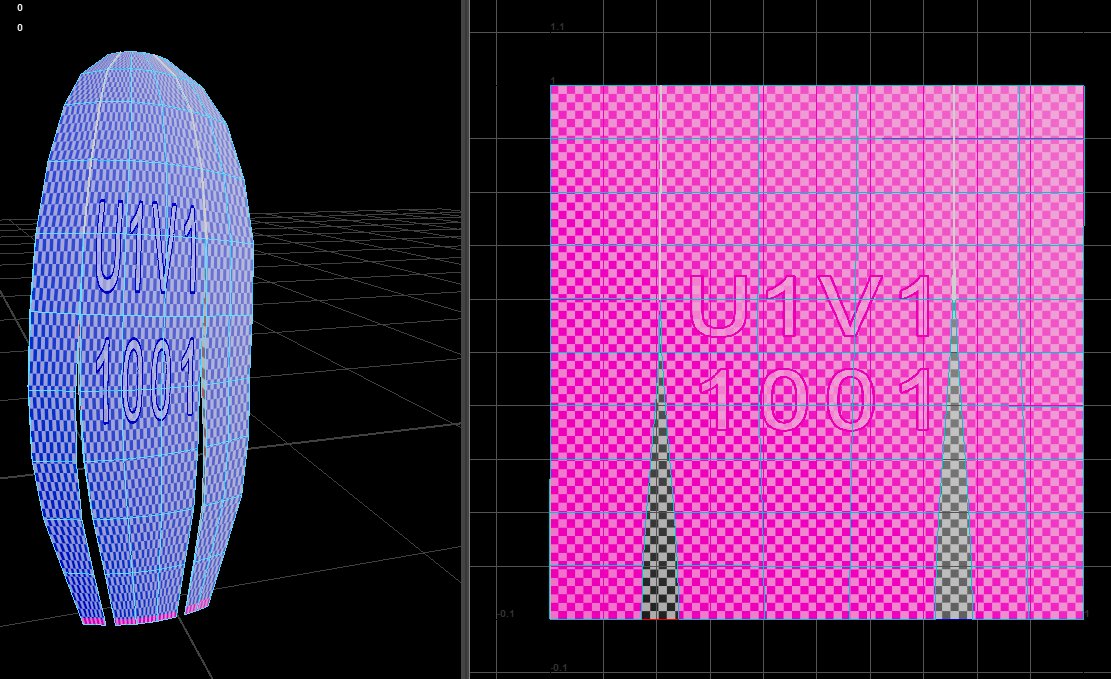
@migero_usausagi I personally prefer the straight UV’s, the issue here is that it’s not taking into account the extruded edges and back face which would cause some issues. They were also upside down which I fixed.
Not too hard to fix manually but would be nice if they came ready to go.
@migero_usausagi good question
Answer is, honestly a lot better than I expected, but they need work.
The tool works as a plane and then adds an extrusion so I guess this is to be expected.