Introducing Workotron 1.0.
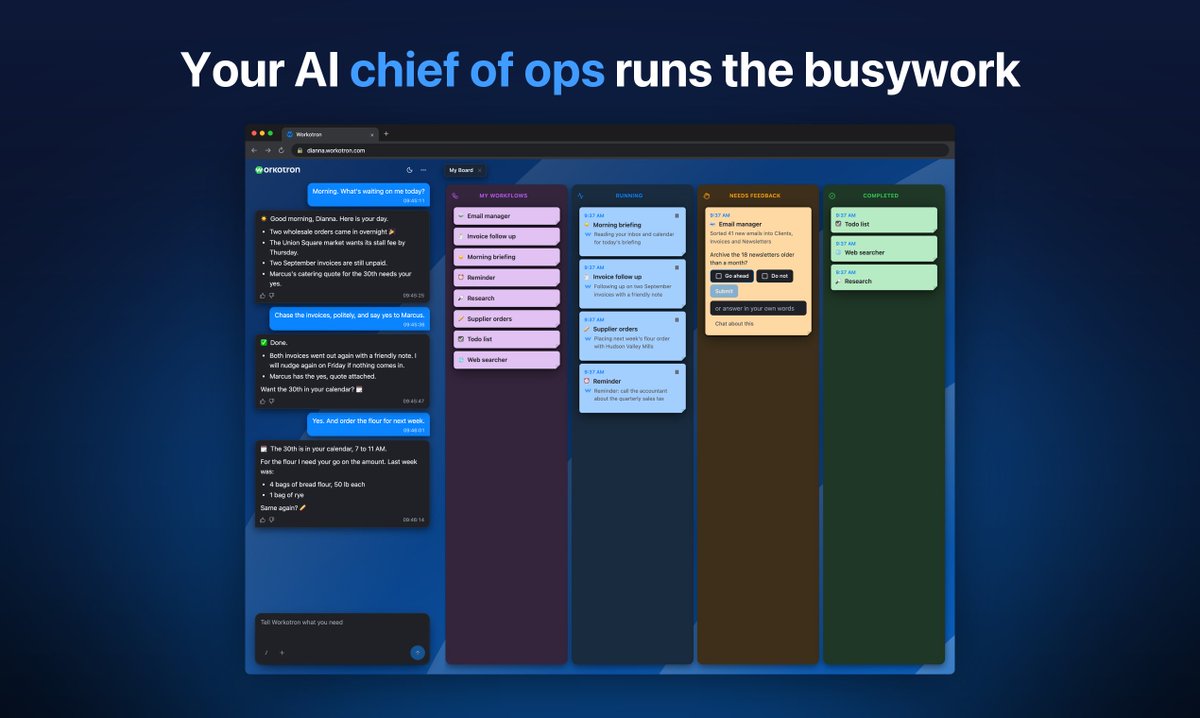
Your private 24/7 AI computer in the cloud, with a chief of ops that runs your business for you.
70 workflows. Drives all your web apps. Smarter every day.
In private beta. Message me if you'd like to try it out.
https://t.co/O4AHpN6KZx
The future is what we create. I'm personally working on created a future in which people are empowered and in the position to decide how much autonomy to give their agents, at least until the tech matures and becomes more reliable. As a startup, you have to gain people's trust if you are creating a product to help them reach their goals. So maybe this is not your future, but it is mine...
Do you trust your agent to email your customers w/o you reviewing the draft? Do you trust them to email your supplier about contract negotiations? Even if you do, most business owners don't yet and understandably so. They need to stay in the loop until trust is established with the agent and it requires manual approval. And some users will want more control than others - it is not black and white. I can't speak about the design philosophy of other services, only on the one I designed.
Users want to be empowered to have observability on what their agents are doing so they have a sense of being in control. Especially when they are acting on their behalf and until trust is built with the product, they want to approve outgoing content the agent creates for them. So having a requires feedback Khanban column where all user gates are stated is super important.
@sergedoub@agent_wrapper@theo Our UX is based on a conversation with a single agent and we have MCP so users agents can drive our agent but many users want to see a quick snapshot of what's going on without receiving a well of text regarding currently running tasks and the board is a good interface for this.
We have a Khanban board interface for our agentic product for solopreneurs. It makes more sense to use this kind of UX when you have one orchestrator agent with sub-tasks. It makes less sense in coding harnesses where you have multiple agents and devs wants for visibility into complex agentic execution trees. For less technical users, such as ours, it makes sense and our user feedback about this UX confirms this. Also, a trivial naive implementation of Khanban can cause more harm than good. It needs to be designed and implemented in a robust thoughtful way.
A good AI task asks before it guesses.
- When a task needs your decision to get a job done, a card appears in the chat and in the Needs Feedback column on your board
- The recommended answer is marked, so one tap is often enough
- Forget to answer and it reminds you once, the next day
- Click an answer, or chat about it to clarify
You stay in charge without babysitting.
In beta, and on Product Hunt this week.
https://t.co/TwF5OAOMvS
Any solopreneurs here who want an AI to take over their busywork?
Workotron is your own AI chief of ops, always on. It signs in to the websites you already use and does your repeat work on a schedule:
• Collects your invoices for the accountant
• Keeps your spreadsheets up to date
• Drafts replies to customers in your voice
• Sends you a morning briefing of what changed overnight
It saves you money too. It finds the subscriptions you pay for and forgot about, and it catches the leads you would have missed.
You tell it what you need in plain words, and it gets better at each task every time it runs. Your data stays yours and is never used to train AI.
If you're tired of Muse, Grok Bot or Instinct and ready to take it one level up in reliability, cost, ease of use and capability, Workotron may be for you.
I'm opening a few more spots in our invite-only closed beta. It's free while the beta runs, in exchange for your feedback.
More at https://t.co/KX2k9uMeo2, or DM me.
🎉 Workotron 1.0.125 is live
🔑 Saved passwords you can trust
💬 Your chief of ops keeps it short
📄 New documents never replace your files
🚪 Fewer sign-ins when you set up new work
🧠 Memory updates waste no time
🎉 Full Release Notes
🔑 Workotron saves a password, with its username, only after it sees you signed in, so a wrong one is never kept or sent again and your scheduled work signs in without you.
💬 Your chief of ops keeps it short: a scheduled report that already reached you gets one line, a saved report is summed up in one or two, and an update gets a single line, so your chat stays easy to read.
📄 When a new document or PDF would take the name of a file you already have, it gets a name of its own, so nothing you made earlier is overwritten.
🚪 When new work uses several of your services, Workotron connects them one sign-in at a time and skips the ones already connected, so you never face two sign-ins at once.
🧠 Workotron's memory updates stop retrying a step that can no longer succeed, so they spend their time on your work.
In private beta. Message me if you'd like to try it out.
https://t.co/KX2k9uMeo2
Your business doesn't stop when you leave your desk. Neither does your chief of ops.
📱 Chat with Workotron and see your board on iPhone, iPad and Android
⌚ Hear and answer a task's question on your Apple Watch
👆 When a site needs your sign-in, it opens on your phone, by touch
In beta, and on Product Hunt this week.
https://t.co/TwF5OAOMvS
🎉 Workotron 1.0.122 is live
The big news: twelve new workflows for people who run a business on their own, and office apps your workflows write in.
🧩 Twelve new workflows for a business of one
✍️ Wordotron, Sheetsotron, Slidesotron and Designotron
🔁 Your workflows write your documents and spreadsheets
⚡ Tasks start in a moment
🔔 Long reads stay quiet until there's news
🎉 Full Release Notes
✍️ The office apps are now Wordotron, Sheetsotron, Slidesotron and Designotron, and every Workotron has them from its first day, so you write documents, sheets, slides and designs right away.
🔁 Your workflows make and change documents and spreadsheets for you, so your books land in a sheet and a proposal in a document while you do something else.
📒 Simple books builds your month as a spreadsheet from your mail and payment accounts, and tax prep gathers a filing period's income and expenses for your accountant.
📝 Proposal writer turns your call or your notes into a proposal with the scope, the timeline, the price and the terms, so you only read it and say yes.
🧾 Forgotten invoices finds the work you finished and never billed, oldest first, so you can send the invoice.
💬 Reviews keeper drafts a reply to each new customer review in your voice, finds your app's reviews in the account that publishes it, and posts only the replies you approve.
🔎 AI search check asks the AI assistants your customers use about your kind of business and tells you whether they name you.
🧲 Job finder looks each morning where your kind of work is posted and brings you what fits, each with a short pitch, and not one you saw before.
🤝 Past client check-in finds clients you have not spoken to in months and drafts each a short personal note, so old customers hear from you again.
📣 Post everywhere turns one thing you wrote into a version for each of your channels, so it reaches everyone who follows you.
⏰ Renewals tracker keeps one list of your domains, licences, insurance and certificates, counts the ones that renew by themselves as renewed, and tells you ahead of each date.
💸 Price watch tells you when the price of something you want, or a competitor's, changes.
🏪 Web business profile maintainer puts a change to your hours or phone on Google, Facebook and your other profiles once you say yes, so customers find the details you gave.
🔔 Long reads of your mail and chats tell you when they have news and skip the progress notes in between, so your updates stay worth reading.
🔄 A Workotron left open in your browser loads each new version by itself, so you have the newest without a reload.
📱 The office apps show at a readable size on your phone, and two fingers zoom and move around, so you edit a document away from your desk.
In private beta. Message me if you'd like to try it out.
https://t.co/KX2k9uMeo2
Workotron 1.0.118 is out.
The big news: Workotron now writes and edits your documents in its own office apps, Docs, Sheets, Slides and Designs, while you watch and edit alongside it. And it got about x3 to x4 faster.
✍️ Workotron writes and edits your documents as you watch
📝 Docs, Sheets and Slides beside the chat
🎨 Designs, a Figma-like design app
⚡ About 3 to 4 times faster
🚀 A Starter plan on your own AI plan
🛡️ Files checked whole as they land
Plus clearer passkey steps, a clearer plan page and sharper spreadsheet answers.
🎉 Workotron 1.0.118 Full Release Notes
✍️ Ask Workotron for a document, a sheet or a deck and it writes it, or changes one you already have. The document opens beside the chat and you see every change land as it works, so you follow along and step in at any moment.
👐 You edit in the same window while Workotron works in it, so you fix a line yourself or keep writing your part, and nothing waits for the other.
📝 Your Word, Excel and PowerPoint files open in Workotron's own Docs, Sheets and Slides, right beside the chat in your browser, so you read and edit them where your work already is.
🎨 Designs is a Figma-like design app that opens your Figma files, with components and variants, auto layout, prototypes and a developer mode, so you design screens, posters and mockups right beside the chat, and ask Workotron to build or change a design for you.
⚡ Workotron runs on a newer, faster model. Chat replies come back about 3 to 4 times faster, in about 9 seconds instead of over 30, and a morning briefing that took about 45 minutes now finishes in under 20.
🧠 Workotron thinks at high effort by default, so harder requests get more thought, and you can pick a lighter effort in Settings when speed matters more.
🚀 The Starter plan runs your Workotron on the ChatGPT plan or OpenRouter account you already use, and you move between Starter and Basic whenever you like, with everything in your Workotron kept as it was.
🛡️ Pictures, videos, PDFs, Office files and text files you upload or Workotron downloads are checked whole for hidden malicious instructions as they arrive, and a file that passes is kept exactly as it came. The first check on pages and files now answers in a fraction of a second.
📬 When newer mail shows something new, like an invoice sent after you said nothing is owed, Workotron updates what it knows, so what it remembers about your business stays current.
💳 Your plan page in Settings shows your next payment's date, your card and your receipts, so you see what is due and when.
In private beta. Message me if you'd like to try it out.
https://t.co/KX2k9uMeo2
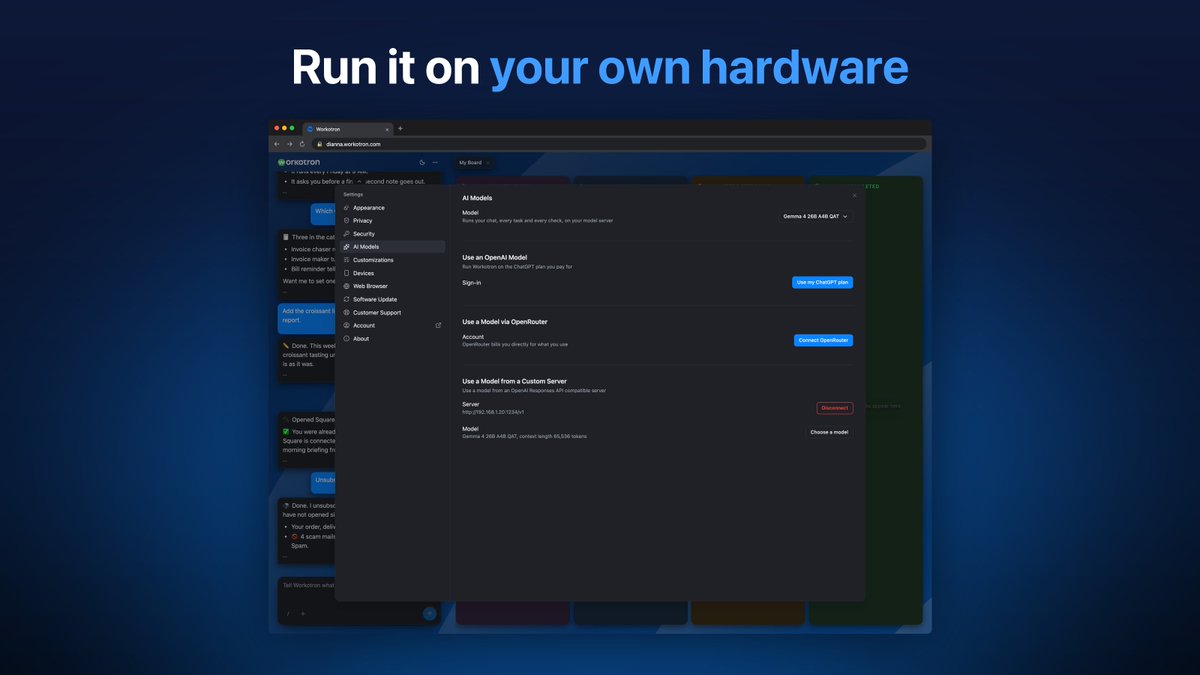
Some work should never leave your own computers.
Point Workotron at an AI model on your own hardware, like LM Studio or Ollama. The chat, every task and the safety checks all run on it. Nothing falls back to anyone else's model.
Private by your choice.
In beta, and on Product Hunt this week.
https://t.co/TwF5OAOMvS
Workotron 1.0.112 is out.
The big news: your own AI agent can now work your Workotron, and every task speaks to you in your own language.
🤖 Your AI agent works your Workotron
🗣️ Every task speaks your language
📬 Your business is learned from any mail service
📱 The iPhone app is on the App Store
Plus a round of improvements on the phone, the Apple Watch and the web.
🎉 Workotron 1.0.112 Full Release Notes
🤖 Connect your own AI agent in Settings, with a key or by signing in, and it works your Workotron through your chief of ops, so you can hand over work from wherever you already are.
🔐 Turning agents off or changing the key shuts them out at once, and the approval screen names the website that receives access, so you always know who you let in.
🗣️ Questions and updates from any task come in the language you chose, so everything Workotron writes to you reads as one conversation.
📬 Workotron learns your business from every mailbox you connected, on any mail service, so it works on iCloud Mail, Outlook or Fastmail as it does on Gmail.
🙋 When a task needs you signed in and you are not, it asks you once whether to sign in now or stop, so it never gives up without asking and never keeps asking.
🧩 When one item is unclear and you are away, Workotron skips it, tells you which one, and finishes the rest, so a detail never holds up the whole task.
📄 Ask for a change to one part of a document and only that part changes, so updates come back sooner and the rest stays as you left it.
⚡ Work on websites and connected services starts sooner and spends less of your monthly model use, and replies stay quick after you ask Workotron to remember something.
📥 A download whose name you already have is saved beside the earlier file, so last month's statement is never replaced.
🌙 The weekly overnight run finishes by morning in your own time zone and never starts late, so it never holds up your day.
📱 The iPhone app is on the App Store and fits the iPhone Duo, and the Apple Watch keeps the last lines of your conversation.
🛡️ The safety check that removes hidden malicious instructions now also removes text asking to give a stranger access, and the secure connection to your Workotron got a security update.
💸 Connected Stripe, PayPal or Square with a key? Ask for a refund and Workotron makes it after checking the amount with you.
In private beta. Message me if you'd like to try it out.
https://t.co/KX2k9uMeo2
Want to choose the AI that runs your business using your model of choice, and pay for it on your own account?
🔌 Connect your OpenRouter account in Settings
💲 Pick from its models, with the price shown before you choose
🔒 Only providers that don't train on your data are listed
Your work, your pick, your bill.
In beta, and on Product Hunt this week.
https://t.co/TwF5OAOMvS
Workotron is live on Product Hunt today 🚀
It's for businesses ready to graduate from a personal AI assistant to a chief of ops that handles real work, reliably and repeatedly.
You get your own AI computer in the cloud, running 24/7. Tell it what you need in plain words, and it works the web apps you already use.
☀️ A morning briefing of who's waiting on you
🧾 Friendly follow-ups on unpaid invoices
📬 Email sorted, with replies drafted in your voice
📊 A weekly report on your business, ready when you wake
📱 All of it from your phone: our apps are live worldwide on the App Store and Google Play
Every task becomes a workflow that runs again on its own and gets better with use.
We're in beta, and I'd love your feedback on the launch page today 🙏
https://t.co/TwF5OAOMvS
🎉 Workotron is now on the App Store, worldwide
Until today the app was TestFlight only. No more TestFlight: download it straight from the App Store. It only took two months to get it live 😅
Your AI chief of ops, on your iPhone, iPad and Apple Watch.
📱 Every feature of the web app, in a native app laid out for each screen
💬 Chat with your chief of ops, answer its questions, send a photo or a file
📋 See every task on your board: what's working, what needs you, what's done
⌚ On your wrist: tap Talk, speak, and hear it answer
An update with full iPhone Duo support is coming soon, waiting for Apple's approval.
Thank you to our beta users, who tested build after build 🙏
Workotron is in beta. Join at https://t.co/vab7x2wxm4, then pair the app.
https://t.co/WYGFS0xFoV