IT Specialist, Construction 🏗️ Pro, Farmer blending Tech, Creative Worker with Humor & Passion, illuminates a Vibrant Social Spirit & loves 💕 himself More
📱💡 Tech Hack
Your phone shows when an app is using your camera or microphone.
🟢 Green dot = Camera active
🟠 Orange dot = Microphone active
If you see one unexpectedly, check which app is running.
A tiny indicator that can protect your privacy. 🔒
☀️ Align solar panels
🔨 Check shelves and cabinets
🏗️ Verify construction work
🚀 How:
iPhone: Open the built-in Measure app → Level
Android: Search "Level" in your phone tools, or use a free level app
🎯 Pro Tip:
Place the edge of your phone against the surface
📱💡 Daily Tech Hack
Your phone can act as a level tool (spirit level) for construction, carpentry, and installation work.
Most smartphones have a built in level hidden inside the compass or measurement app
📐 Use it to:
🖼️ Hang pictures perfectly straight
👨👩👧 Family safety
🚕 Tracking arrivals
✅ Benefits:
📍 Real-time location updates
⏱️ Accurate arrival tracking
🔒 You control who sees it and for how long
🎯 Pro Tip:
Share your location only with trusted contacts and set an automatic expiration time.
📱💡 Daily Tech Hack
Your phone can instantly share your current location with family or friends
Use Google Maps:
1️⃣ Open Google Maps
2️⃣ Tap your profile picture
3️⃣ Select Location Sharing
4️⃣ Choose who to share with and for how long
Perfect for:
🚗 Road trips
🏡 Meeting friends
📱💡 Daily Tech Hack
Did you know you can copy text from a photo without typing it?
Use Google Photos or Google Lens.
How:
1️⃣ Open any photo containing text
2️⃣ Tap the Lens icon
3️⃣ Select the text
4️⃣ Copy and paste anywhere
Perfect for:
📄 Documents
🧾 Receipts
📞 Phone numbers
📈 Productivity display
Perfect for: 💼 Remote work
🎨 Editing
📚 Studying
📊 Multitasking
⚡ Bonus Tip:
Connect through USB for smoother performance and less lag.
One small screen can massively boost productivity. 🚀
#TechHack#Productivity#WorkFromHome#AndroidTips#iPhoneTips
📱💡 Daily Tech Hack
Your phone can become a second screen for your computer.
🖥️ How:
Use:
Spacedesk (Android/Windows)
Duet Display
Built-in Sidecar on Apple devices
✅ What it does:
Turn your phone or tablet into: 📊 Extra workspace
🎬 Video monitor
📝 Note-taking screen
📈
📱💡 Daily Tech Hack
Your phone can save and create strong passwords automatically.
Use Google Password Manager or iCloud Keychain.
✅ Strong passwords
✅ Auto-fill logins
✅ Leak alerts
✅ Safer accounts
One feature. Massive security upgrade. 🔐
📱💡 Daily Tech Hack
You can share files between phones without internet.
Use Nearby Share on Android or AirDrop on iPhone.
Share instantly:
📸 Photos
🎥 Videos
📄 Documents
📱 Apps
Why it’s useful:
⚡ Much faster than Bluetooth
📶 No mobile data needed
🔒 Secure direct transfer
📱💡 Daily Tech Hack
Use your phone to translate text instantly with your camera.
Open Google Lens or the Google Translate camera feature.
Point your camera at: 🌍 Signs
📄 Documents
📦 Product labels
📚 Books
Your phone translates the text in real time.
📱💡 Daily Tech Hack
Turn any YouTube video into written notes instantly.
Use Google Gemini, ChatGPT, or YouTube transcripts to summarize long videos.
How:
1️⃣ Open the YouTube video.
2️⃣ Tap Show transcript (if available)
3️⃣ Copy the transcript.
4️⃣ Paste it into an AI tool and ask
📱💡 Daily Tech Hack
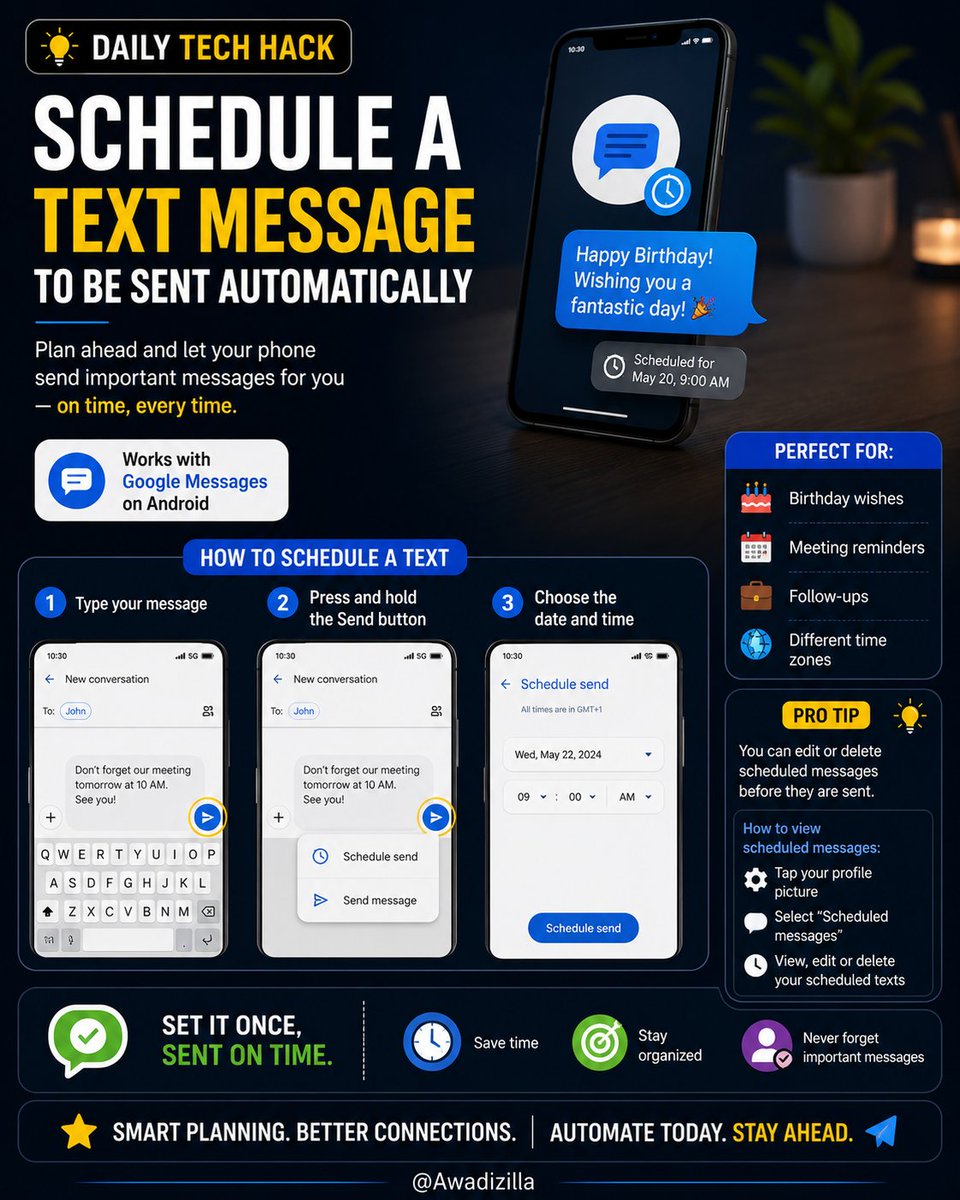
Schedule a text message 2 be sent automatically
In Google Messages: 1️⃣ Type your message
2️⃣ Press and hold the Send button
3️⃣ Choose the date and time
Perfect for: 🎂 Birthday wishes 📅 Meeting reminders 💼 Follow-ups 🌍 send 2 people in different time zones
📱💡 Daily Tech Hack
Use your phone as a measuring tape.
Open Google Measure alternatives built into many Android phones, or use the Measure app on iPhone.
Point your camera at an object to estimate: 📏 Length 📐 Height 🪑 Furniture dimensions
Perfect for:
Buying furniture
📱💡 Daily Tech Hack
Find a song playing around you in seconds.
1. On Android: Open the Google app and tap the microphone → Search a song.
2. On iPhone: Ask Shazam or say, “What song is this?”
Your phone listens for a few seconds and identifies the song instantly.