Chrome DevRel at Google (CSS + Web UI). @CSSWG Member. Former University Lecturer. PADI Divemaster. Blogs at @bramusblog. You should follow me on Bsky 🦋.
I might need to recount, but I think we cover 34 (!!) new #CSS and Web UI features in 45 minutes.
Every demo shown in the talk has a link, and there's also a ton of links to articles and explainers included.
And yes, we also have compat tables + baseline indicators throughout.
Here's the recording of this year's “What's new in Web UI” talk @Una and I gave at Google I/O earlier this week.
https://t.co/XqmGnyD3u5
Very happy with how it went, and I think you might find it useful, so give it a watch 😊
#ChromeDevRel#GoogleIO
@kurtextrem@fabiospampinato A third benchmark for `:is(.matching-class):first-child` would be needed here. My expectation is that it would perform the same as the nested version, which would explain things.
(Also: 76 match attempts at 0.053ms is pretty much neglible in the grand scheme of things)
The past years I’ve done a bunch of experiments with View Transitions, such as optimizing the keyframes or driving them by scroll.
I noticed I repeat a lot of code throughout those experiments … so I bundled that all up in a package.
👉 https://t.co/RHqq3DMJJD
@UtterDonkey@Arif_hossain921 This is a known shortcoming, and looking at the comments I believe you've already found your way to the bug.
https://t.co/gSHXPpLXs3
The bug is currently assigned which means someone is working on it.
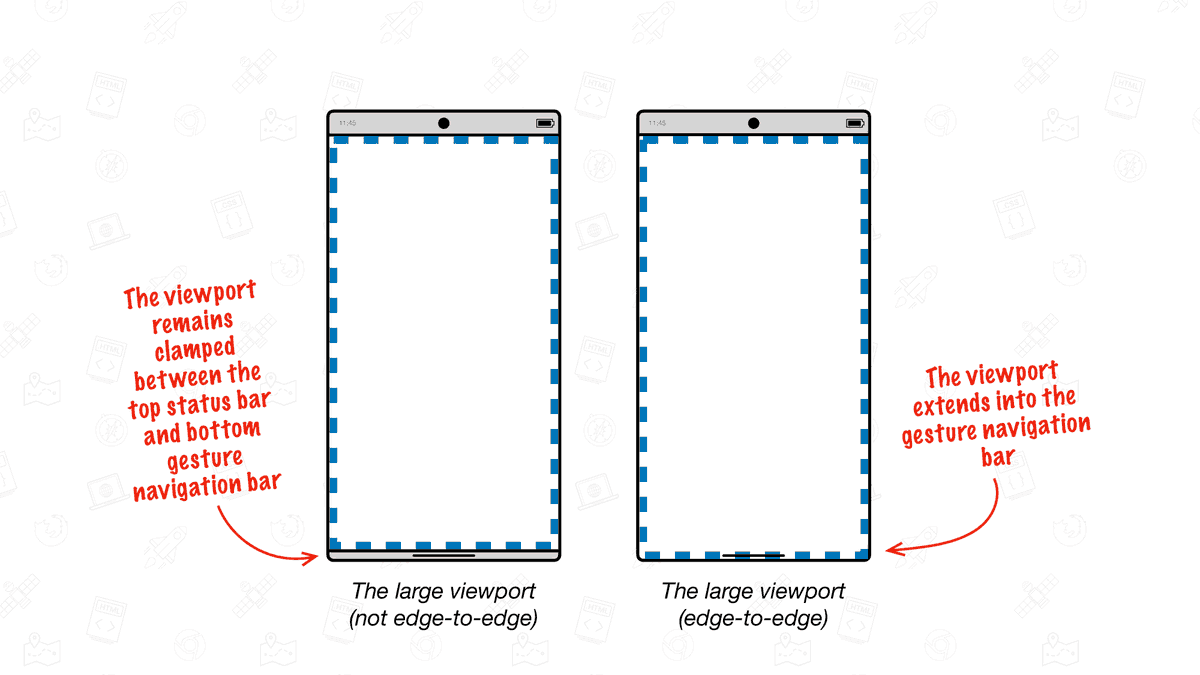
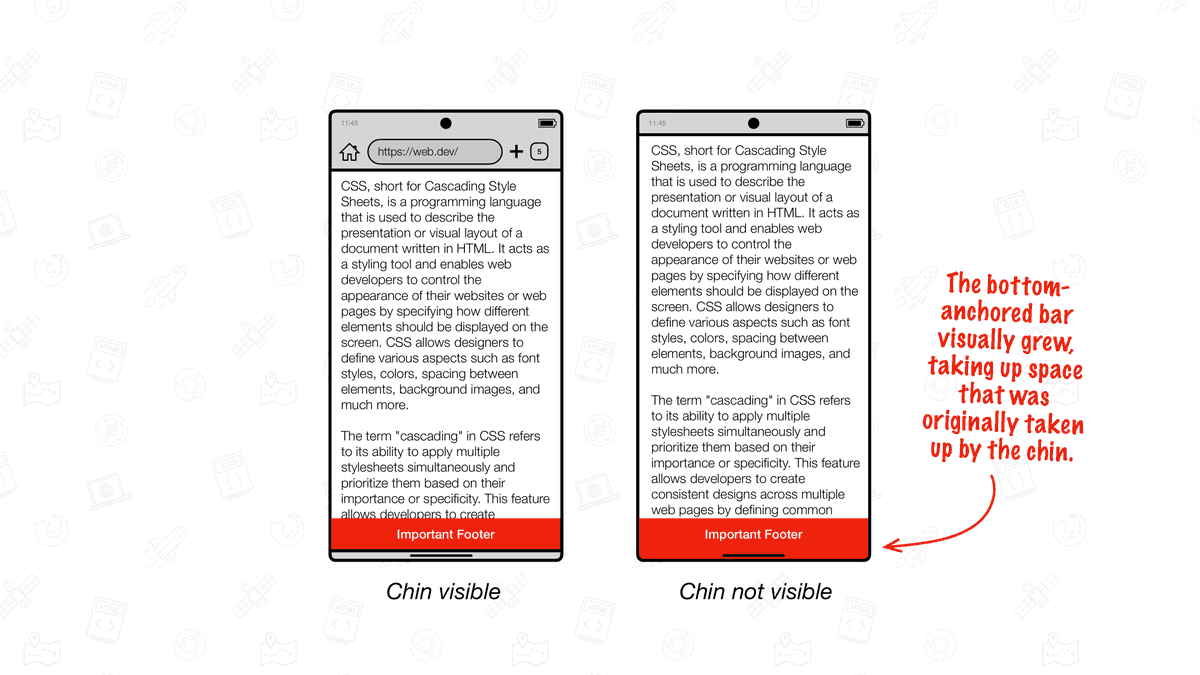
🗣️ PSA: Chrome on Android is getting an upgrade and will support edge-to-edge from Chrome 135.
Here’s all you need to know to migrate your website to support edge-to-edge: https://t.co/K8WOVKlvXC
(Be sure to check this guide if you have `position: fixed` content at `bottom: 0`)
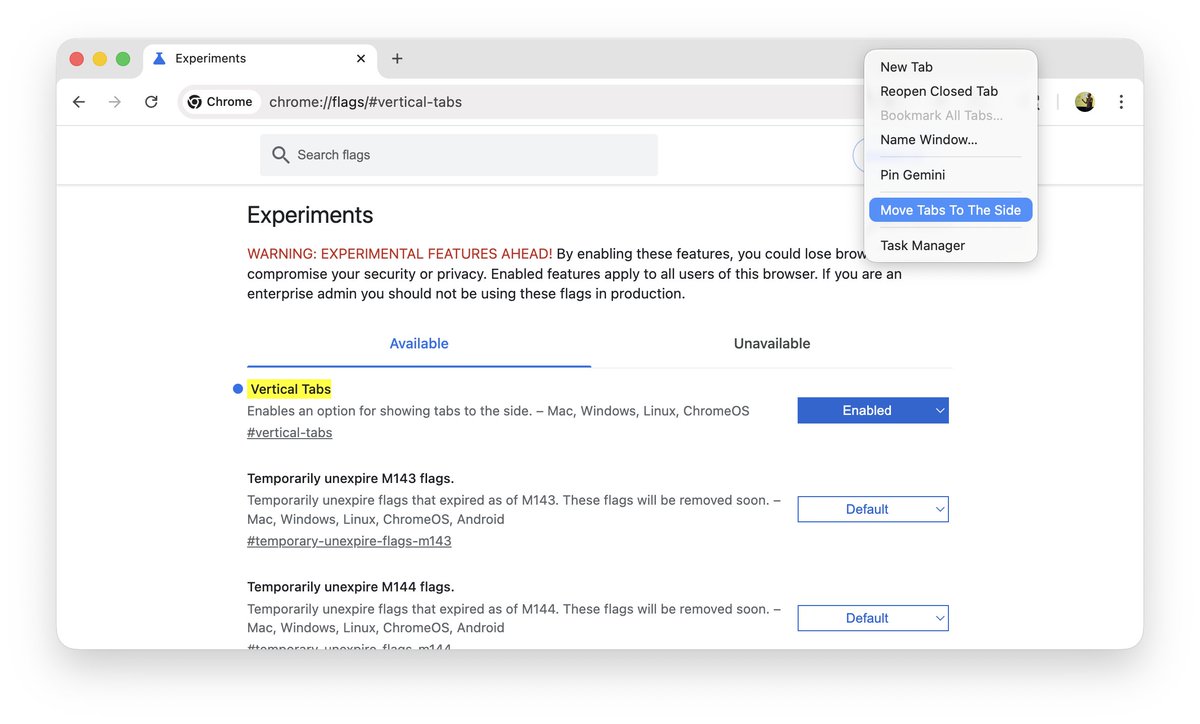
🌟 Vertical Tabs are available behind a flag in Chrome 145 (current beta)
1. Go to `chrome://flags/#vertical-tabs`
2. Set it to enabled
3. Relaunch Chrome
4. Right click the tabbar and choose “Move Tabs To The Side”
Attached are before and after screenshots.
More things you’ve missed:
- view-transitions-mock, a non-visual polyfill for Same-Document View Transitions
- Element-Scoped View Transitions excitement (see video)
- All DevTools can’t properly deal with scrollbars in the Box Model.
The sky is bluer on the other side 😉
Some more things you’ve missed while being here instead of there:
- Dynamic connections with CSS anchor() using REAL borders demo.
- Sneak Peek: Retargetable View Transitions (aka Interruptible View Transitions) demo
- CSS-only Scroll-Triggered Animations
@filos That’s the current Chrome Canary.
(Note that using Chrome Canary as your daily driver can be risky, so maybe it’s best to wait until that version reaches Chrome Beta (or Chrome Stable))
@theo Good feedback, I appreciate it. Thanks!
As for the laggy animation: have you tried Chrome 146 (current Chrome Dev and Canary) yet? AFAICT the feature is doing much better in those versions.
@Mr_Jfranklin That would be a bug, as it goes with flagged experimental features :)
I am mainly using Chrome Canary (146) which seems to do much better with this feature, so you’ll have to wait another release (or use Chrome Canary – which comes with its own challenges – or Chrome Dev)
@Dalton_Walsh I’ve heard several requests about this before, so I’m sure it will please a lot of folks out there.
(Personally I’m also sticking to horizontal ones … for now)