The Big Archive for System Design - 2023 Edition (PDF) is available now. And it's completely FREE.
The PDF contains 𝐚𝐥𝐥 𝐦𝐲 𝐭𝐞𝐜𝐡𝐧𝐢𝐜𝐚𝐥 𝐩𝐨𝐬𝐭𝐬 published in 2023.
What’s included in the PDF?
🔹 Netflix's Tech Stack
🔹 Top 5 common ways to improve API performance
🔹 Linux boot Process Explained
🔹 CAP, BASE, SOLID, KISS, What do these acronyms mean?
🔹 Explaining JSON Web Token (JWT) to a 10 year old Kid
🔹 Explaining 8 Popular Network Protocols in 1 Diagram
🔹 Top 5 Software Architectural Patterns
🔹 OAuth 2.0 Flows
🔹 What does API gateway do?
🔹 Linux file system explained
🔹 18 Key Design Patterns Every Developer Should Know
🔹 Best ways to test system functionality
🔹 Top 6 Load Balancing Algorithms
🔹 Top 12 Tips for API Security
🔹 𝐀𝐧𝐝 100+ 𝐦𝐨𝐫𝐞
–
Like, follow and subscribe to our newsletter to receive the PDF download link: https://t.co/FIzCeaWsZV
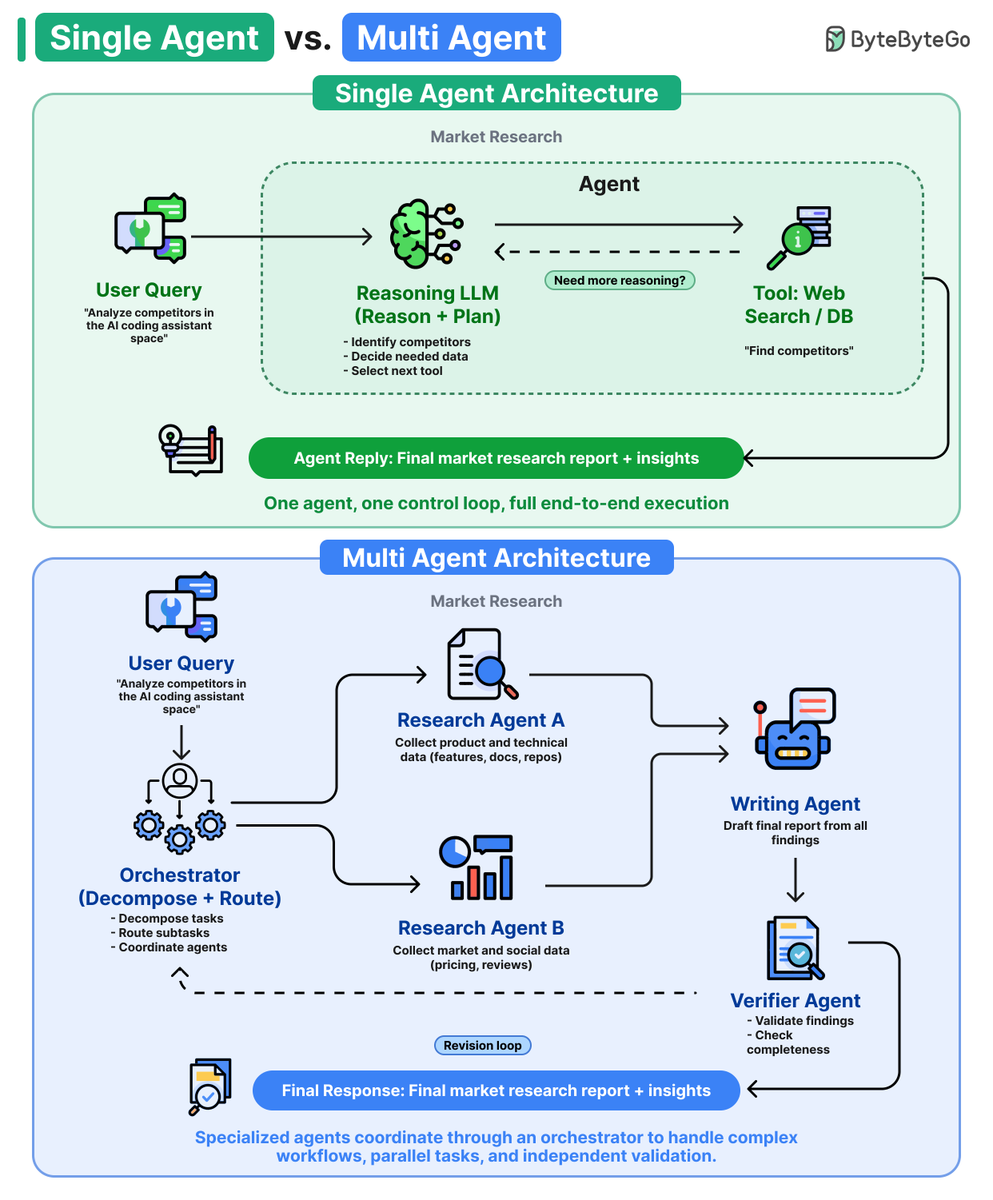
Single Agent vs. Multi-Agent Architecture
Some tasks need a single agent. Others need a whole team. Knowing the difference is the skill.
Single-agent system: One reasoning LLM that plans, picks a tool, and loops on its own until the task is done. Use a single agent when:
- the task is a clear, linear sequence
- one agent can hold the whole problem in its head
- you want something simple to build and easy to debug
Multi-agent system: An orchestrator that splits a task into subtasks and routes each one to a specialized agent. Use multi-agent when:
- subtasks can run in parallel
- one agent writes and another independently verifies the work
- the problem is too big for one agent to coordinate alone
Single agents are cheaper and easier to build, but they hit a ceiling on complex work.
Multi-agent systems are more capable and more reliable, but they add coordination cost.
Start with a single agent. Move to multi-agent only when context or reliability become the bottleneck.
Over to you: Are you running single-agent or multi-agent systems in production?
Salesforce deployed 20,000 enterprise AI agents. The biggest lesson? The work is inverted!
Traditional software → 90% of the effort comes before launch
AI agents → 90% comes after
We sat down with John Kucera, CPO of Agentforce, to learn what separates agents that deliver real value from those that stall after a good demo.
Teams that treat launch as the finish line stay stuck in pilot mode. Teams that treat it as the starting line scale.
The full playbook covers:
- Why most enterprise agents fail
- Pre-launch foundations (scope, KPIs, guardrails)
- The feedback loop that gates scaling
- 3 anti-patterns from 20,000 deployments
- Where agent architecture is heading next
Full article linked in the tweet below 👇
Token Spend Out of Control? The Case for Smarter Routing
Token spend has quietly become one of the biggest costs of running AI agents. An agent loops, resends its full context every step, and burns millions of tokens on a single task.
To see how teams keep this under control in production, we sat down with @s_breitenother and @sytses, co-founders of @kilocode, an open-source coding agent that runs through these loops every day.
Their answer: a smart router that sends each request to the cheapest model that can actually handle it, so you only pay frontier prices when the task truly needs it.
Full article linked in the tweet below 👇
We’re looking for multiple part-time instructors to teach AI and engineering cohort-based live courses.
This is a great fit if you love teaching, enjoy sharing what you know, and want a meaningful side thing alongside your main work.
The role has some upfront time investment to get familiar with the curriculum and prepare, but after that, it’s designed to be a limited commitment (2-5 hours bi-weekly). It offers stable income, good upside, and a chance to share your knowledge while working with ambitious learners.
We’re especially looking for instructors in:
- Building Production-Grade AI Systems
- System Design
- AI Security & LLM Red-Teaming
- AI Evals Intensive
- AI Cost Optimization
- Agentic AI Coding
- Build with Codex
- AI for Engineering Leaders
- AI Automation
- Others, please suggest
Ideal instructors are hands-on, clear communicators, and excited to teach.
If this sounds like you, email us at [email protected] with your background, the topics you’d be excited to teach, and any teaching, writing, or speaking samples.
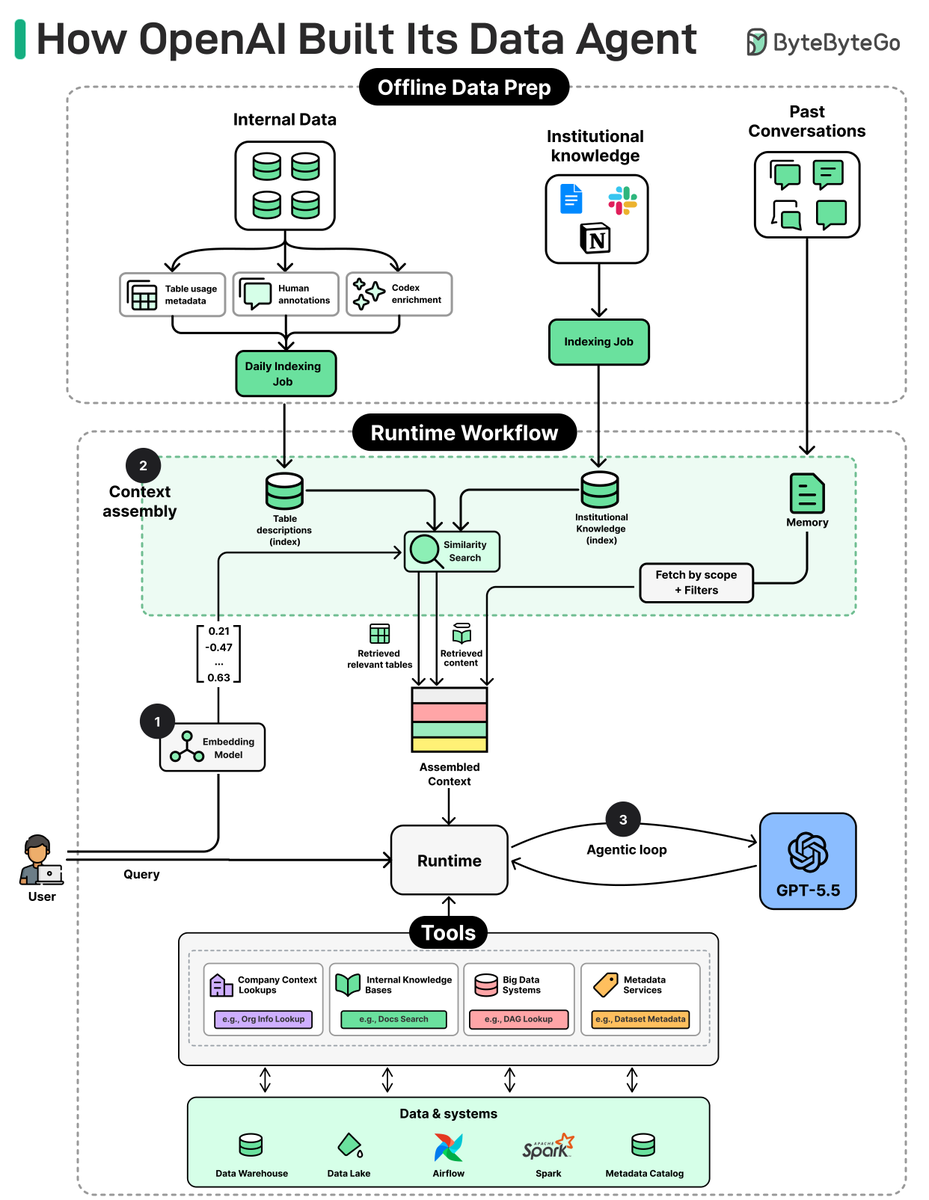
How OpenAI Built Its Data Agent
Most teams building data agents stack routers, fine-tunes, and complex retrieval pipelines on top of multiple LLMs. OpenAI didn't.
Their data agent runs on a single model and only 13 tools, across 1.5 exabytes and 90,000 tables. It's "pretty vanilla" by design.
We spoke with Emma Tang, Head of Data Platform Engineering at OpenAI, to better understand the architecture and the engineering decisions behind it.
The article covers:
- The architecture behind the data agent
- The six layers of context that make a single LLM reliable across 90,000 tables
- How OpenAI Uses Codex Internally: 3 Use Cases
- Five practical lessons for any team building a domain agent
- Where OpenAI's data platform is headed next
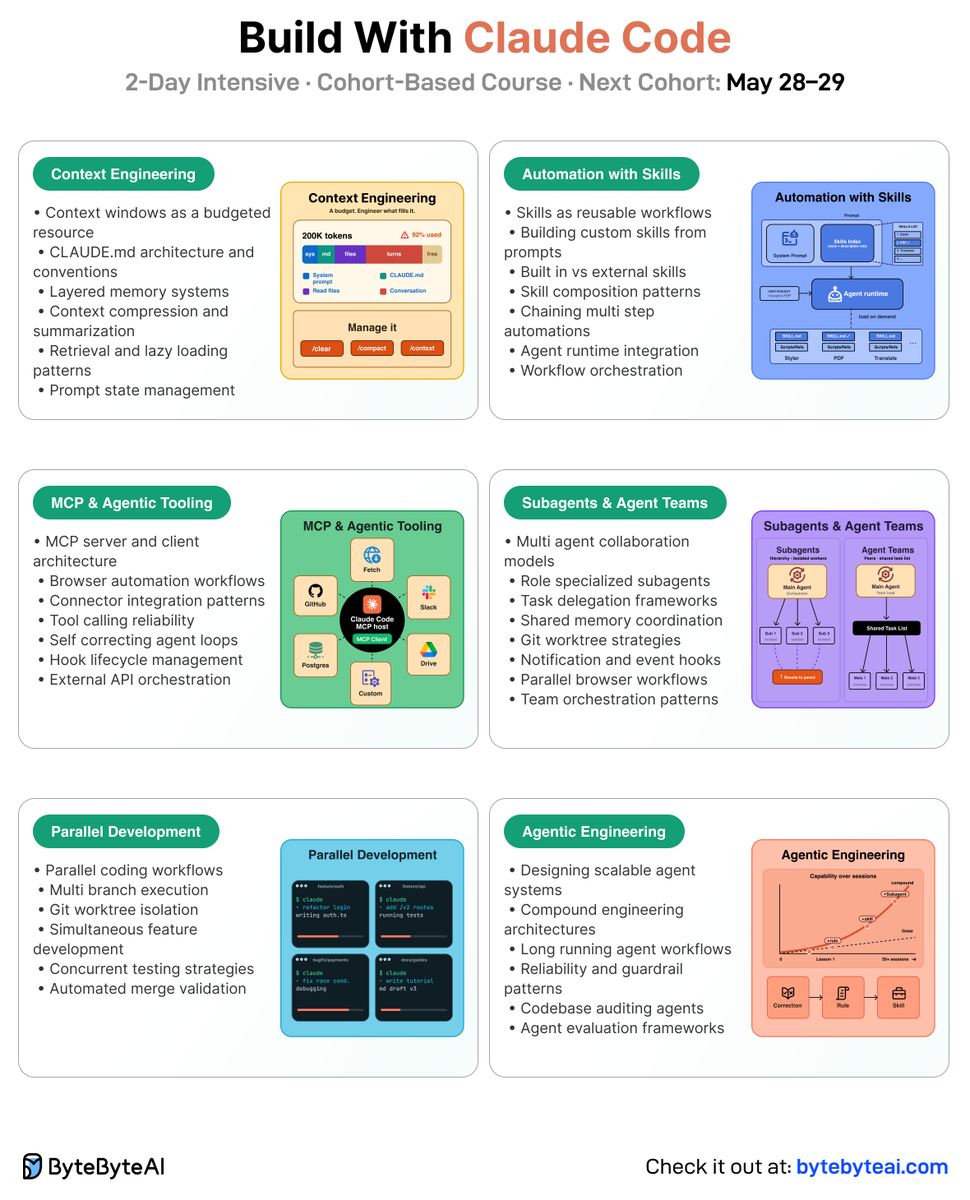
🚀 New cohort based course launch: Build with Claude Code
We’re launching a new 2 day intensive course called Build with Claude Code. It’s taught by John Kim, who has been deeply involved in AI engineering workflows and agentic development, and published by ByteByteGo.
A few things you’ll learn:
- The agentic loop, context engineering, and memory layers that make Claude Code useful for real projects
- How to build with Claude Code Skills, MCPs, and hooks to give Claude the tools and feedback loops it needs to self correct
- Parallel development with Git worktrees, subagents, and agent teams
- A capstone project where you ship something real on your own stack
The course includes live sessions, assignments, and office hours, so there’s plenty of room to ask questions and get unstuck.
The next cohort starts in about a week: May 28-29, 2026. If working alongside AI agents is becoming part of your job, this could be a great way to level up.
Check it out here: https://t.co/pjGYPQ1sUm
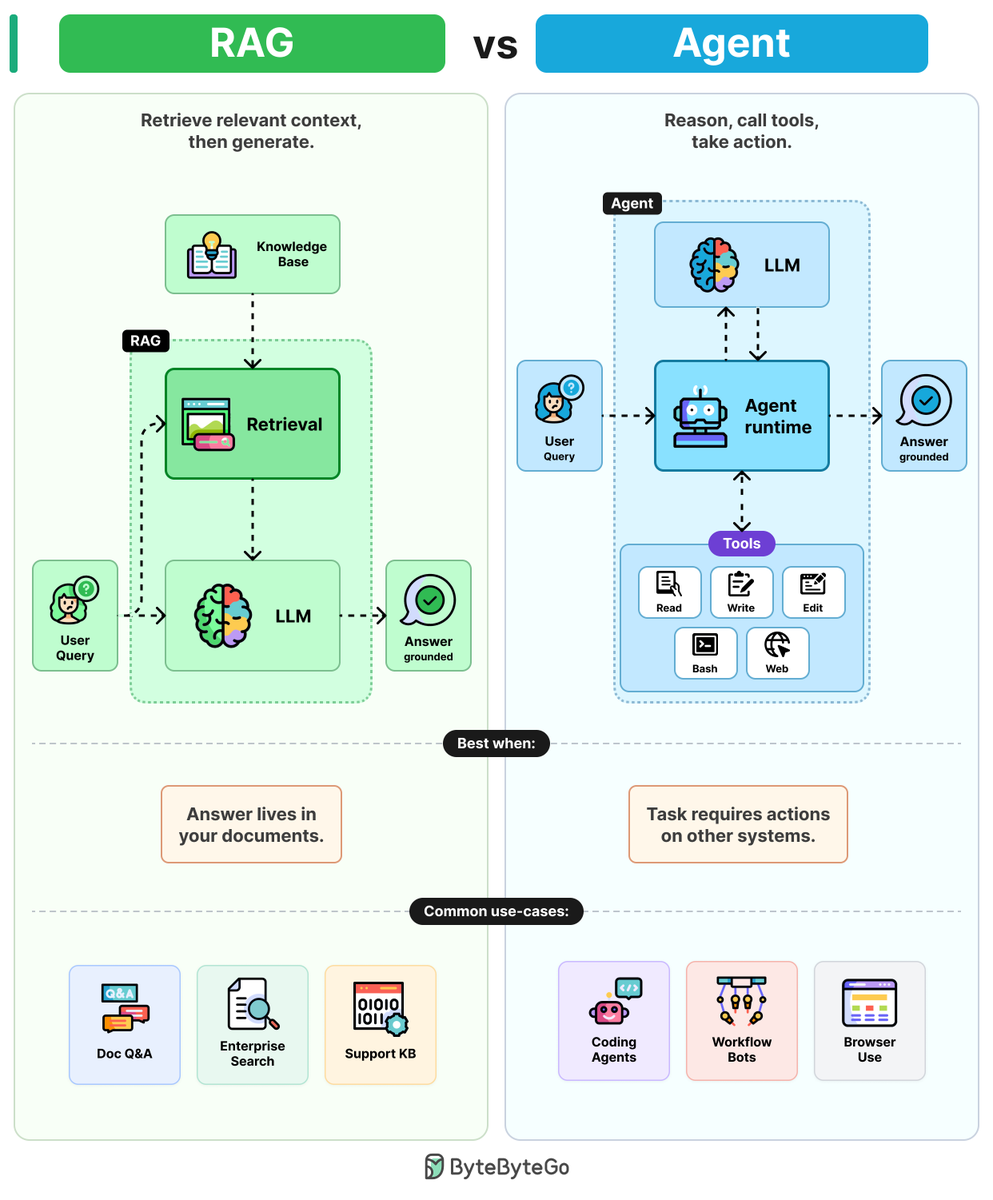
RAGs vs Agents
Ask an LLM about your company's data and it will guess. The two patterns that fix this are RAG and agents, and they solve different problems.
RAGs: RAGs combine LLMs with retrieval to ground answers in 4 steps.
Step 1: The user query is embedded and sent to a retrieval step.
Step 2: Retrieval pulls the most relevant chunks from a knowledge base (PDFs, wikis, etc.)
Step 3: Those chunks are pasted into the prompt as context.
Step 4: The LLM writes the answer, grounded in the retrieved text.
One retrieval. One generation. Cheap, predictable, and easy to debug.
Agents: Agents wrap LLMs in a reasoning loop with tools to take action.
Step 1: The user query goes into the agent runtime. A reasoning loop wrapped around an LLM.
Step 2: The LLM reads the goal and picks a tool (Read, Write, Edit, Bash, etc.)
Step 3: The runtime executes the tool and feeds the result back to the LLM.
Step 4: The LLM reasons again, picks the next tool, and loops until the task is done.
More flexible. More tokens. Harder to debug because errors drift across steps.
The rule of thumb: Use RAG when the answer lives in your documents. Use an agent when the answer requires action on other systems.
Over to you: When do you prefer RAG over agent?
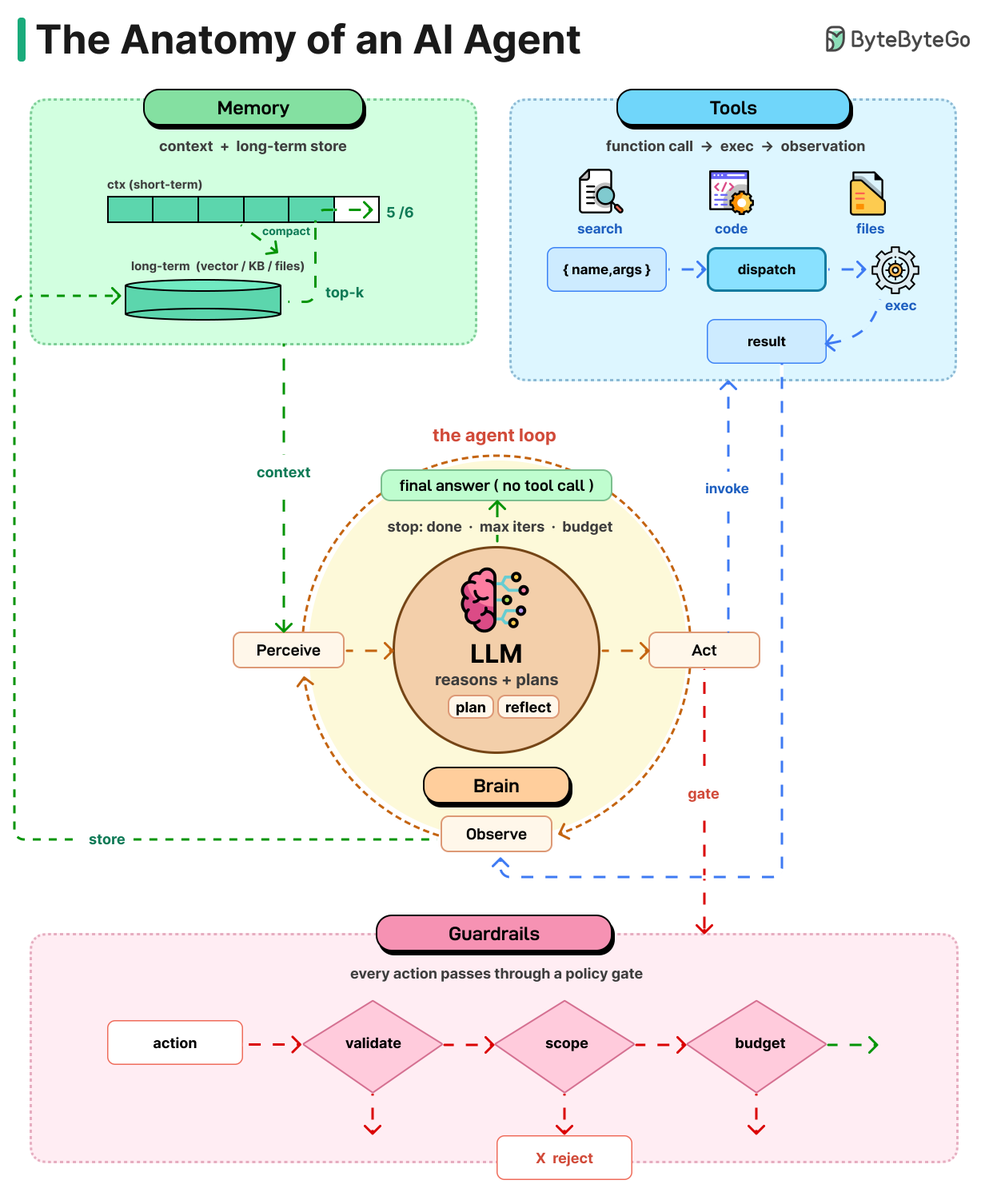
An AI agent can be thought of as a simple While-loop.
It uses an LLM to select an action, executes that action, evaluates the result, and repeats the process until the task is complete. Let’s take a closer look at each of these components:
Brain: The LLM is the core. It reads the situation, thinks, and decides what to do next. The big shift from chatbot to agent: the model isn't writing text anymore, it's making choices.
Planning: Hard tasks need more than one step. Agents break them down using methods like Chain of Thought (think step by step), Tree of Thoughts (try options, pick the best), or
Reflexion (learn from mistakes and retry). Planning turns a fuzzy goal into clear actions.
Tools: An LLM without tools is a brain in a jar. Tools are functions the model can call, like web search, code execution, APIs, files, or browsers (often using the MCP standard). The model requests a tool, the system runs it, and the result comes back.
Memory: Without memory, every turn starts from zero. Short-term memory is the context window. Long-term memory lives in vector stores, files, and knowledge bases. When the window fills up, agents summarize old turns and carry the summary forward.
Loop: All four pieces work together in a cycle. The agent looks at the current state, decides what to do, uses a tool, sees the result, and repeats. It keeps going until it gives a final answer.
Guardrails: Not strictly anatomy, but important. Sandboxing, human checks, token limits, output validation, and scope limits keep autonomy from turning into expensive chaos. The more autonomy you give, the more these matter.
Over to you: when you build an agent, which of these five takes the most work to get right?
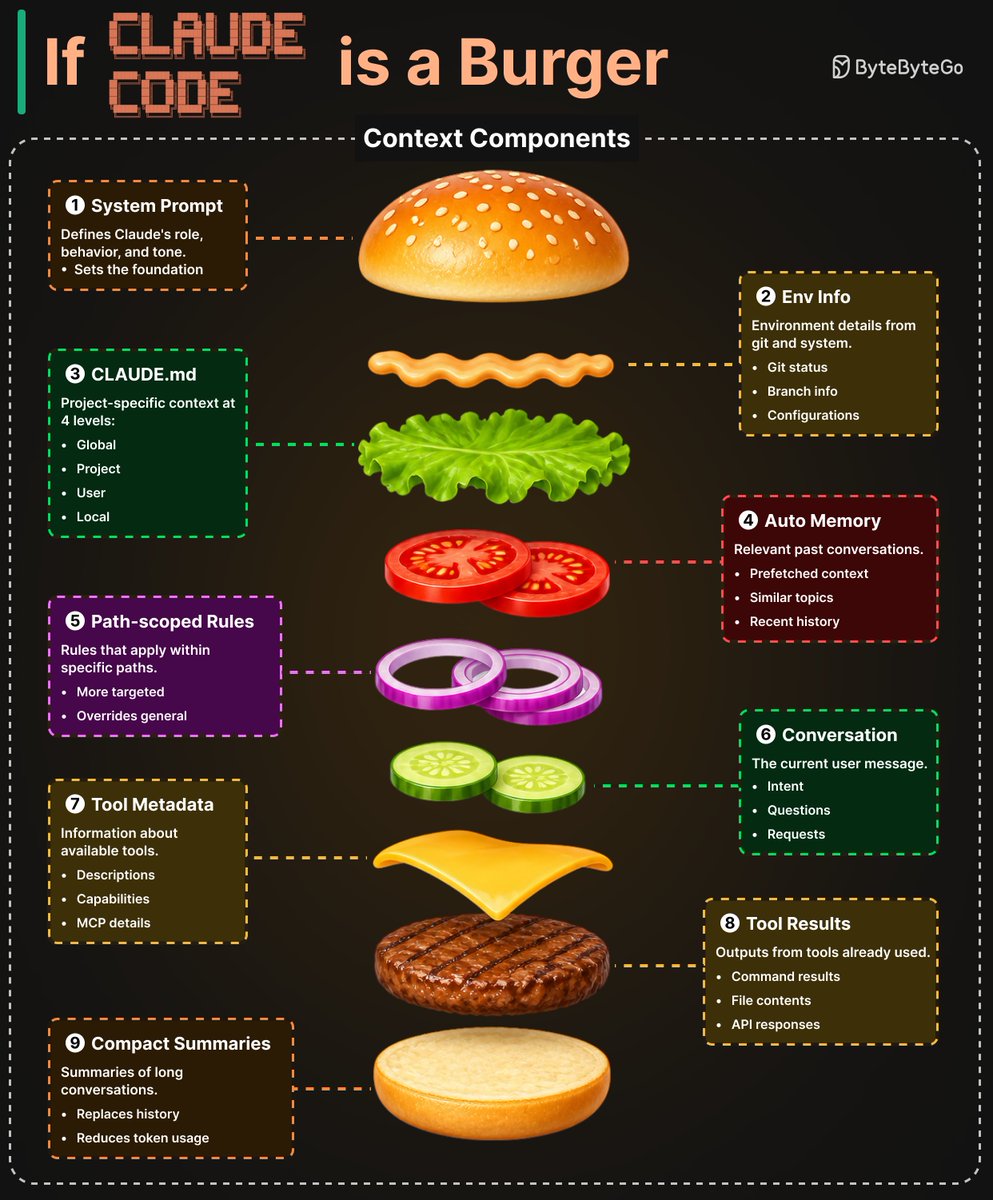
If Claude Code is a burger...
Before each model call, Claude Code assembles a context window from 9 distinct sources.
Think of it as a burger, each layer adds something different.
1. System Prompt: Defines Claude's role, behavior, and tone. This sets the foundation.
2. Environment Info: Git status, branch info, and current date. Pulled in via getSystemContext()
3. CLAUDE.md: A four-level instruction hierarchy: managed → user → project → local. Plain-text Markdown, so users can read, edit, and version-control everything the model sees.
4. Auto Memory: Contextually relevant memory entries prefetched asynchronously. An LLM scans memory-file headers and surfaces up to 5 relevant files on demand.
5. Path-scoped Rules: Conditional rules that load lazily when the agent reads files
6. Tool Metadata: Skill descriptions, MCP tool names, and deferred tool definitions.
7. Conversation History: Carried forward across iterations.
8. Tool Results: File reads, command outputs, and subagent summaries.
9. Compact Summaries: When history grows too long, older segments are replaced by model-generated summaries.