🍀 Support for Qwen3 MOE
🍀 Integration with GLM4-z1 (llama.cpp)
🍀 Now supports DeepSeek-R1-0528
🍀 Now supports MiniCPM-4 8B
🍀 Now supports Qwen2.5 VL series
13 bug fixes, 5 page and documentation updates
🔥 DB-GPT v0.7.2 is here — What’s new at a glance
🍀 Enhanced Dashboard with new visual components: pie charts, tables, bar charts, and more
🍀 Hybrid search now supported in Knowledge Base
🍀 New Chat Data template added
🍀 Hierarchical retrieval for unstructured document trees
Automated knowledge extraction and QA
If you're working on intelligent Q&A systems, data platforms, AI agents, or GBI
you might want to take a closer look at this open-source project.
👉 https://t.co/mUizxQG6Sk…
#LLMops#DataInfra#RAG#AIworkflow
Vector databases and agents are becoming key pillars of AI data infrastructure.
DB-GPT is building enterprise-ready AI-native data workflows, featuring:
Unified multi-model management
With AI-assisted advances making autonomous ride services safer and more reliable, intelligent systems are reshaping every industry. At DB-GPT, we’re applying that same spirit of innovation to database management.
#AI#Tesla#waymo
Large models can not only understand complex financial rules more accurately than humans, but also combine specialized knowledge to output sound analytical results
GitHub: https://t.co/mUizxQG6Sk…
Financial reporting analytics using big models is becoming a popular application for verticals.
This function can help you:
1) Answer questions about basic information about
2) financial reporting
3) Calculate and analyze financial report indicators
Financial report content
📝 Report analytics corresponds to the chat dashboard in DB-GPT, and smart report generation and analysis through natural language is one of the foundational capabilities of Generative BI (GBI).
👀 We will soon be launching a tutorial video on YouTube on “How to Use Report.
Complete database performance analysis and optimization by talking to the database.
👇Just a few steps to start the experience
1. Select the chat database
2. Add a data source (talk to the data)
3. Select the base model and database
4. Start chatting
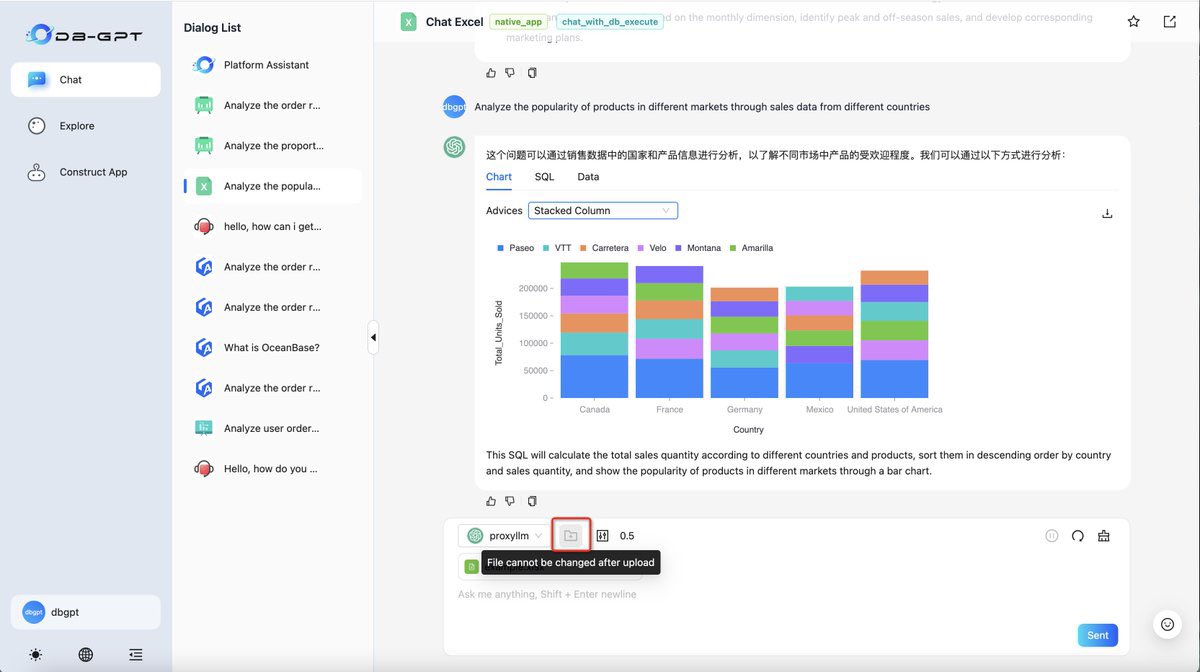
Now you can interpret and analyze Excel data through natural language dialogue.
👇Just three simple steps to get started
1. Select Chat Excel dialogue app
2. Upload Excel document
3. Start chat with your Excel
After the upload is successful, the content will be summarized.
Talking to your data, AI-driven data
tired of complex BI tools?
With DB-GPT's Chat Data, simply ask questions in plain English or natural language and get instant insights from your data.
No coding, no hassle.
Support import excel, database and plugin to grab data. You can easily get analysis reports and communicate with your data in a dialog.
#BusinessIntelligence#MultiLLM
😎Want to get a full picture of your data, come and try DB-GPT's GBI feature for free customized data analysis AI for your business!
🔥It's easy to use in just three steps:
- Add Data Source
- Select chat data
- Start the conversation!
In addition to the preview mode, the Editor mode is also provided. editor mode allows you to edit and modify the SQL. Synchronization can see the changes of the chart.
🔥Check out our latest YouTube tutorial on one-click Docker deployment!
This is Part 1 of our deployment series — perfect for developers, teams, or anyone building AI-native data apps.
Watch here: [https://t.co/BPHVHtGinp…]
#DBGPT#Docker#AIDeployment