Preparing for CKA, CKAD, or CKS?
Here is an opportunity to save on your Kubernetes certification journey!
The Linux Foundation has a limited-time KubeCon sale.
Use code 40KUBE26CT at https://t.co/C7Uw2BWcX6 to get 40% off individual certifications.
If you are planning to pursue multiple certifications,
You can save up to 47% by choosing the right Kubernetes certification bundle.
You can find all the certification bundle information in this repo 👇
𝗕𝘂𝗻𝗱𝗹𝗲 𝗗𝗶𝘀𝗰𝗼𝘂𝗻𝘁𝘀: https://t.co/78uNlQmbib
𝗡𝗼𝘁𝗲: It's a limited-time KubeCon sale.
So lock in the price before it expires.
♻️ PS: Repost and share it with the DevOps community.
#Kubernetes #cka #ckad #cks
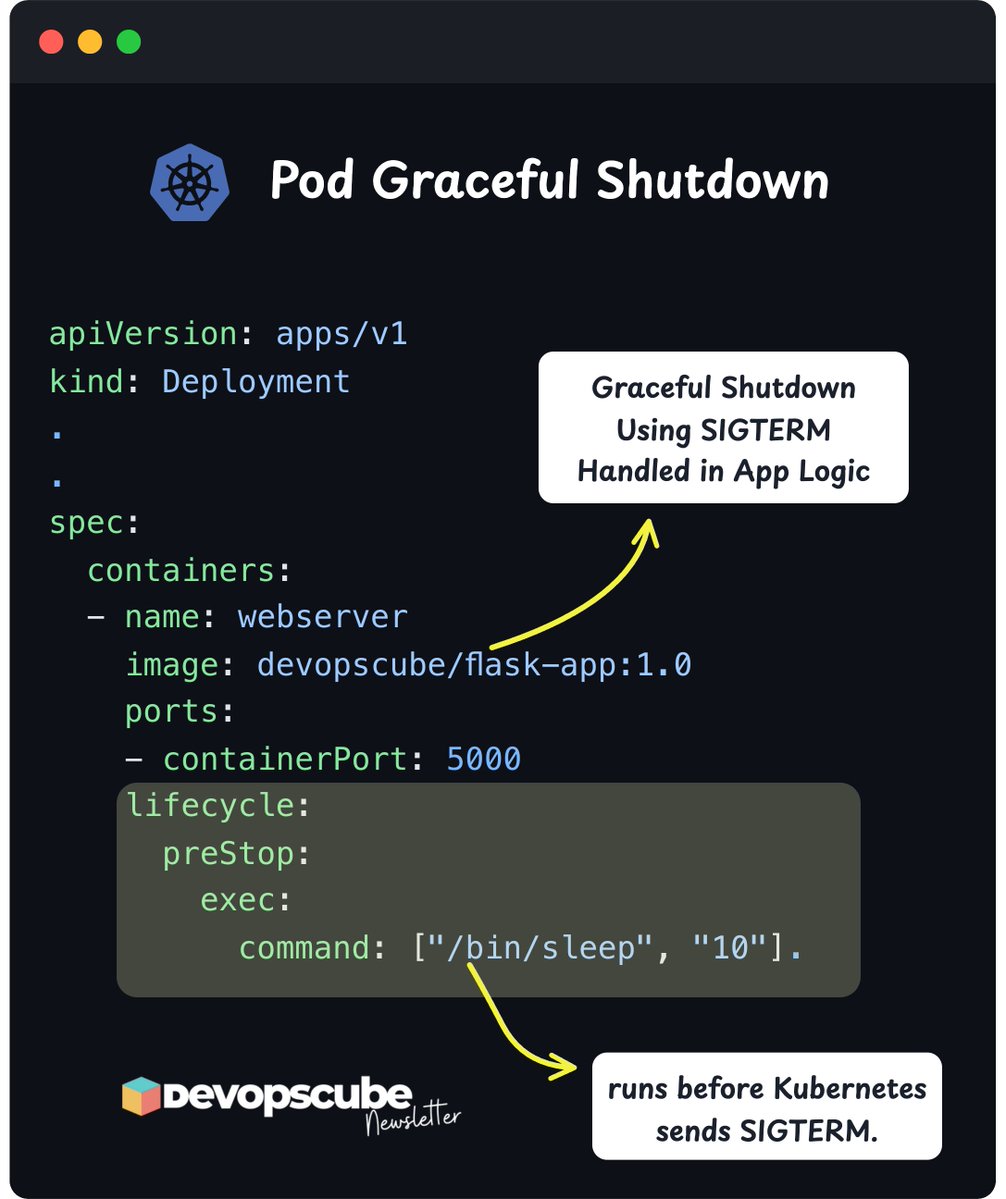
Kubernetes pod Graceful Shutdown a must know concept in Kubernetes.
When a pod shuts down in Kubernetes,
It sends a SIGTERM signal to the container.
If your app does not handle SIGTERM properly, it might stop in the middle of serving a user request, saving data or processing a file etc
To handle it, you can write custom logic in your application code.
Also, you can slow down your apps shutdown a bit using a preStop hook.
This hook runs before Kubernetes sends the SIGTERM, giving your app a buffer to clean up or finish tasks.
If you want to learn more about pod graceful shutdown, read our blog that covers the following.
- What are SIGTERM and SIGKILL
- How Kubernetes handles SIGTERM and SIGKILL
- How applications can handle SIGTERM for graceful shutdown
- The role of PreStop hooks and why it matters
- The link between SIGTERM and container PID 1
→ 𝗥𝗲𝗮𝗱 𝗶𝘁 𝗛𝗲𝗿𝗲: https://t.co/qzXsMMApRI
Also, Kubernetes sends SIGTERM to the process with PID 1 inside the container.
If your app is not running as PID 1, it will not receive the signal, and the code to handle graceful termination will not execute.
For example, if the Dockerfile runs a shell script that starts your app as a child process, the script becomes PID 1, not your app.
Over to you…
How are you handling graceful pod shutdown in your apps?
𝗡𝗼𝘁𝗲: The label “10 sec PreStop + 20 sec for SIGTERM” in the image is just an example.
In real setups, PreStop could run longer or shorter depending on what you configure and how long it takes.
#devops #kubernetes
Image Signing and Attestations in Kubernetes 🚀
This is one of the must know workflows for DevOps engineers.
One of the key aspects of container image management is supply chain security
For that image signing and attestation plays a key role in it.
We have published a detailed hands-on guide that teaches you the following.
- What image signing is and how it works
- Why SBOM and build provenance are necessary
- How to sign container images using Cosign
- How to attest provenance, SBOM and vulnerability reports
- How to enforce run-time verification at the Kubernetes admission layer using Kyverno.
𝗗𝗲𝘁𝗮𝗶𝗹𝗲𝗱 𝗚𝘂𝗶𝗱𝗲: https://t.co/XH81kJJqC8
Most organizations are giving importance to software supply chain security practices.
So if you are in DevOps, ensure you know these workflows and security standards.
♻️ PS: If you found this useful, please repost and share it with the community.
Got any tips/feedback or insights to share?
⬇️ Share and discuss in the comments below! ⬇️
#devops #devsecops
Kubernetes User Namespaces ⚡
It is a security feature that maps user and group IDs inside a container to a different set of IDs on the host (Rootless Isolation)
Here is the key idea.
A process running as root (UID 0) inside the container runs as an unprivileged user (eg, UID 100000) on the host.
Without user namespaces, when a container runs as root, it uses the same root identity as the host.
So if an attacker breaks out of the container, they get full host privileges.
We have published a hands-on guide covering the following.
- What are User Namespaces
- How the kernel does the root-to-non-root user mapping
- What changes when you set hostUsers: false
- Limiting host UID ranges using /etc/subuid file
- Hands-on deployment to understand User Namespace
- User Namespace limitations
𝗥𝗲𝗮𝗱 𝗶𝘁 𝗛𝗲𝗿𝗲: https://t.co/F6HmkliHvS
Have you tried this feature yet?
♻️ PS: Repost and share this with the community!
#devops #kubernetes
GPU scheduling in Kubernetes is becoming an important skill now.
Here is why 👇
Most organizations are either experimenting or running ML workloads in Kubernetes.
As Devops engineers you should know how to set up and manage GPU resources.
We have created a simple guide on setting up GPU node using NVIDIA GPU Operator
By the end of this blog, you will have a clear understanding of:
- Need for GPU operator on Kubernetes
- Setting up NVIDIA GPU Operator on a Kubernetes cluster
- Verify if Kubernetes detects GPUs
- How to deploy a real GPU-based workload to validate the full stack.
To be honest, it is not as complicated as it sounds once you understand the basics.
Even if you dont have access to GPU's, just go through the content to have an understanding on how it works.
𝗥𝗲𝗮𝗱 𝗶𝘁 𝗵𝗲𝗿𝗲: https://t.co/nTPpIb0rtW
#devops #mlops
🛠 DevOps Tool of the Week: Stern
When you want to check logs for your application in Kubernetes,
You run kubectl get pods, copy a Pod name, and then run kubectl logs.
But what happens when a Pod gets replaced during a deployment rollout?
You have to find the new Pod and follow its logs again.
That's where Stern helps.
Stern is an open-source CLI tool that lets you stream logs from multiple Kubernetes Pods and all their containers at the same time, directly in your terminal.
Here's what it can do 👇
- Shows logs from multiple pods and containers together.
- Automatically follows new matching Pods and stops following deleted ones.
- Filters pods using names, regular expressions, Kubernetes resources, or labels.
- Filters or highlights log messages.
- Color-codes log output so you can identify which pod produced each message.
- Supports timestamps, JSON output, and custom log formatting.
- Stern is useful when troubleshooting applications with multiple replicas or following logs during Kubernetes deployments.
𝗦𝘁𝗮𝗿𝘁 𝗵𝗲𝗿𝗲: https://t.co/XR76HjN2FJ
#devopstools
📚 𝟓 𝐞𝐧𝐠𝐢𝐧𝐞𝐞𝐫𝐢𝐧𝐠 𝐛𝐥𝐨𝐠𝐬 𝐰𝐨𝐫𝐭𝐡 𝐫𝐞𝐚𝐝𝐢𝐧𝐠
Here’s the reading list 👇
If you work in DevOps, SRE, Platform Engineering, Cloud, Data Infrastructure, or MLOps, these are worth checking out.
1/ Netflow found why more CPU cores slowed container scaling - https://t.co/V3jpw2woKV
2/ Github rebuilt Git storage for thousands of concurrent AI agents - https://t.co/FfIG8vXqwK
3/ AWS explains why one disaster recovery test isn't enough - https://t.co/y4UxpNKTPy
4/ Google explains how to safely run untrusted AI agents at scale - https://t.co/OjRVGXHu59
5/ Uber tested ways to make large Spark workloads faster - https://t.co/sw3vYQmEzg
🎓 𝐏𝐫𝐞𝐩𝐚𝐫𝐢𝐧𝐠 𝐟𝐨𝐫 𝐂𝐊𝐀?
If you are preparing for the Certified Kubernetes Administrator exam, check out our CKA course by industry experts. You can also use 𝗗𝗘𝗩𝗢𝗣𝗦𝟯𝟬 at checkout for a discount:
👉 https://t.co/ugC88YhYGF
Which one are you reading first?
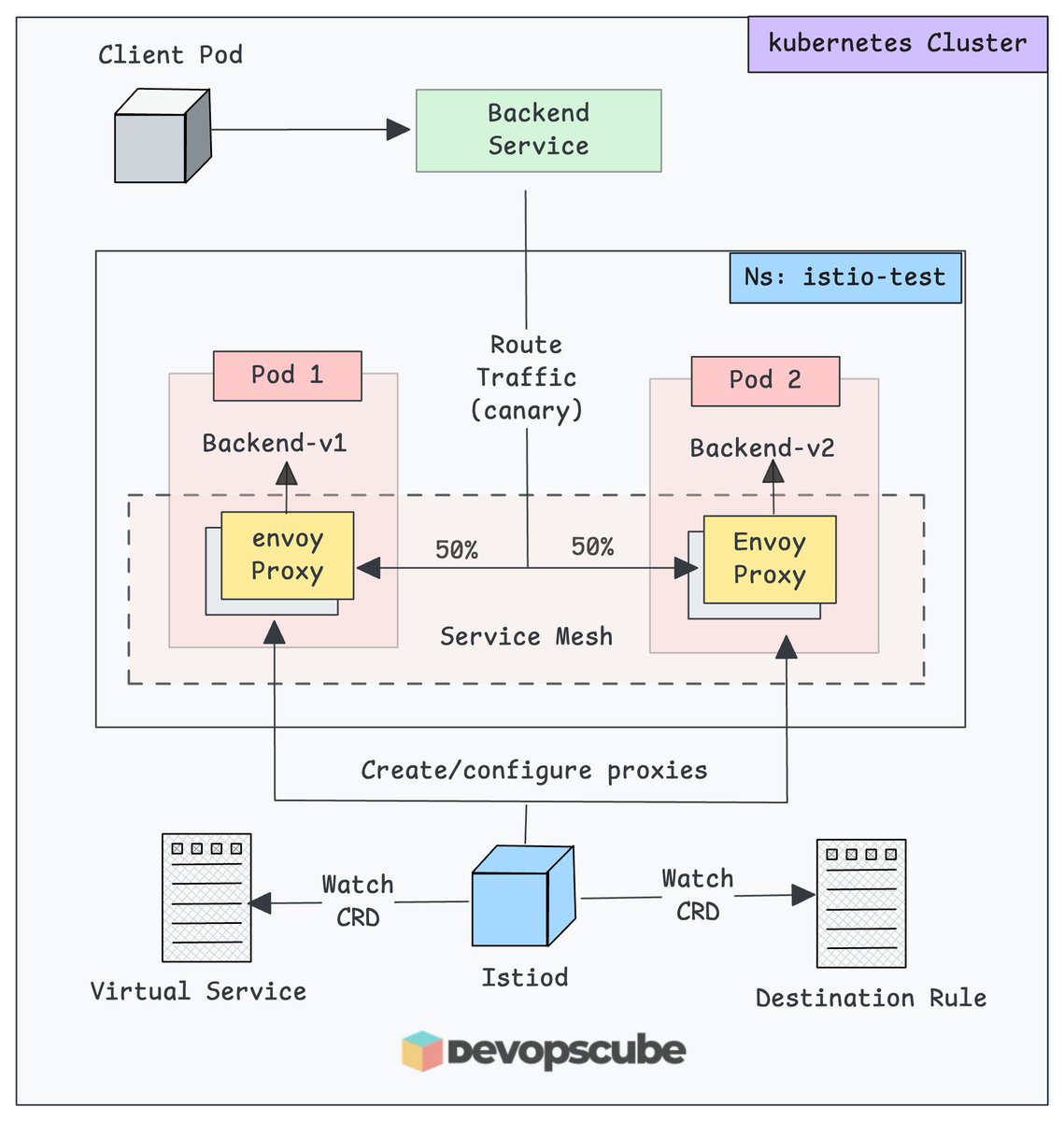
New to Istio?
We have a simple beginner fiendly guide to help you set up Istio on Kubernetes
By the end, you will understand,
- Different Istio installation modes
- Setting up Istio using Helm
- How to validate the setup with a demo application & canary release strategy.
- Key concepts like DestinationRule and VirtualService
and more..
𝗗𝗲𝘁𝗮𝗶𝗹𝗲𝗱 𝗚𝘂𝗶𝗱𝗲: https://t.co/g9vEOniCeI
#Istio #Kubernetes #DevOps
In Kubernetes, you can get deeper node-level insights with NFD
Here is how 👇
By default, Kubernetes nodes have only basic labels from the kubelet.
On cloud setups like EKS, you will see a few extra ones for instance types or zones.
But these default labels dont tell you anything about the hardware, kernel, or device capabilities.
A common use case where you need these features is in AI and GPU workload scheduling.
That is where Node Feature Discovery (NFD) helps.
We also talked briefly about NFD in our Kubernetes Swap newsletter
If you have used Ansible facts before, NFD works in a similar way.
NFD collects system details from Kubernetes nodes and exposes them as node labels.
In our newsletter, we covered,
- What is NFD in Kubernetes
- Key Use Cases
- NFD Architecture
- Hands on NFD example
- Avoiding avoid label explosion when using NFD.
𝗥𝗲𝗮𝗱 𝗶𝘁 𝗛𝗲𝗿𝗲: https://t.co/IXvjAjDPxh
Have you come across NFD before?
♻️ Repost if you think others will find it useful too
#kubernetes #mlops
[20% OFF] KubeCon + CloudNativeCon North America 🚀
This event has it all:
- Expert-led talks
- The latest innovations from leading vendors
- 11 CNCF-hosted co-located events
- Unforgettable parties, swag, and
- Unmatched networking opportunities with TeamCloudNative.
You can get a flat 20% discount on registration.
Use code COMTECHIES20 at https://t.co/ke92cIfBcq
From KubeCon, you can:
- Learn directly from engineers solving real production problems
- Meet the cloud native community in person
- Discover what top companies are actually doing with Kubernetes and AI
- Build connections that can genuinely help your career
♻️ PS: Repost and share this with your network.
Are you planning to attend KubeCon this year? Comment below
#kubecon #CloudNativeCon
Planning to take the CKA certification?
Here is a complete CKA exam Guide with study notes.
You can use it for other certifications as well.
This repo covers key areas like Gateway API, Network Policies, Cluster administration, and more.
𝗚𝗶𝘁𝗛𝘂𝗯 𝗥𝗲𝗽𝗼: https://t.co/F3DhC9dU1n
Bookmark the repo and start your CKA prep.
If you waiting for a CKA promo code,
Use code 40KUBE26CT to get a flat 40% off for the next few days!
Found it useful?
Star the repo ⭐ and share it with someone prepping for CKA.
Got questions on any CKA topic? Drop them in the comments 👇
#cka #kubernetes
Kubernetes Swap 🚀
When you deploy a Pod in Kubernetes, each node uses its physical RAM to run containers.
If a node runs out of memory, Kubernetes may start killing Pods to keep the node stable.
With Kubernetes swap, you can avoid this by allowing the node to use a part of its disk as extra virtual memory.
In our newsletter, we explained the following in detail.
- How Kubernetes Swap Works
- Key Use Cases for Swap
- Pod QoS Classes and Swap Behavior
- How Swap is Allocated for Pods
- Hands-on: Testing Swap on Worker Nodes
- Identifying Swap-Enabled Nodes using NFD.
- Swap Observability Using Metrics
𝗥𝗲𝗮𝗱 𝗶𝘁 𝗛𝗲𝗿𝗲: https://t.co/EIlJKMme0A
Have you tried or used this feature?
What was your use case?
Let us know in the comments.
#kubernetes
This is the cleaner way to manage kubectl aliases
Before Kubernetes v1.33,
We had to manually add them inside .bashrc or .zshrc, mixing them with other shell configs.
It was not a native or structured approach.
Now, with kuberc, you can define all your kubectl aliases in a dedicated YAML file.
It is clean, simple, and you can even version control it.
We have created a complete hands-on guide to help you get started.
𝗗𝗲𝘁𝗮𝗶𝗹𝗲𝗱 𝗚𝘂𝗶𝗱𝗲: https://t.co/PDMQhI0cy1
Have you tried kuberc yet?
How are you managing your aliases? Share your setup or tips in the comments.
#kubernetes #devops
This is a must-read for DevOps Engineers 👇
A real-world incident where Netflix encountered significant network performance degradation across different regions.
The article provides an in-depth analysis of how the engineering teams at Netflix identified, investigated, and ultimately resolved the issue.
Key lesson?
When there's a network issue, after blaming network and application teams,
Don't forget to check the kernel upgrade 😁
𝗗𝗲𝘁𝗮𝗶𝗹𝗲𝗱 𝗕𝗹𝗼𝗴: https://t.co/Sf1xG45nAD
A few concepts from the blog.
1. Window size in TCP - TCP mechanism that controls the flow of data between a sender and receiver. It determines how much data the receiver can accept before it must acknowledge receipt
2. /proc/sys/net/ipv4/ directory contains many TCP-related kernel parameters that can be tweaked to adjust the behavior of the TCP stack in Linux
3. You can check the TCP window scaling from the /proc/sys/net/ipv4/tcp_window_scaling file. You can temporarily enable and disable it using sysctl.
#DevOps #SRE #NetworkTroubleshooting
DevOps to MLOPS 🚀
How is MLOPS different from usual DevOps workflows?
MLOps is different from the usual DevOps workflows, just like machine learning is different from traditional software development.
For example,
In MLOps,
You need to track three components: code, data, and models
While in DevOps, you only track code.
Additionally, MLOps introduces the following.
- 𝗗𝗮𝘁𝗮 𝘃𝗲𝗿𝘀𝗶𝗼𝗻𝗶𝗻𝗴: To track changes in datasets using tools like DVC (Data Version Control) or LakeFS
- 𝗘𝘅𝗽𝗲𝗿𝗶𝗺𝗲𝗻𝘁 𝘁𝗿𝗮𝗰𝗸𝗶𝗻𝗴: To log hyperparameters, metrics, and model versions for each training run
- 𝗠𝗼𝗱𝗲𝗹 𝗿𝗲𝗴𝗶𝘀𝘁𝗿𝘆: To version and manage models separately from application artifacts
- 𝗖𝗼𝗻𝘁𝗶𝗻𝘂𝗼𝘂𝘀 𝗧𝗿𝗮𝗶𝗻𝗶𝗻𝗴 (𝗖𝗧): Beyond CI/CD, models need regular retraining as data changes
In our newsletter edition,
We break down everything about what MLOps means for DevOps engineers. It covers,
- What is MLOPS
- Skills Required For DevOps Engineers
- Key MLOPS Tools
- Do you need GPU-based clusters to learn MLOps?
So if you are ready to go “all in” with MLOPS, this edition is for you.
𝗥𝗲𝗮𝗱 𝗶𝘁 𝗵𝗲𝗿𝗲: https://t.co/yeIfrl0Pp3
Are you working on any MLOps projects right now?
Or are you planning to upskill in MLOps?
Either way, share your thoughts in the comments.
#devops #MLOPS
Deleting a pod ≠ stopping it instantly
Here is the hidden shutdown flow Kubernetes follows👇
- The API server sends a deletion event.
- Kubernetes executes the PreStop hook if any exists.
- kubelet sends a SIGTERM signal to the container's main process (PID 1).
- Applications have 30 seconds by default to handle the signal and shut down gracefully.
- If the application process does not exit within the grace period, Kubernetes sends a SIGKILL signal to terminate the pod.
𝗡𝗼𝘁𝗲: Kubernetes does not give extra time for the PreStop hook. If your pod has a 30-second grace period, the PreStop hook and your app’s shutdown process must both finish within those same 30 seconds.
We covered the following in detail in our newsletter edition.
- What are SIGTERM and SIGKILL
- How Kubernetes handles SIGTERM and SIGKILL
- How applications can handle SIGTERM for graceful shutdown
- The role of PreStop hooks and why it matters
- The link between SIGTERM and container PID 1
→ 𝗥𝗲𝗮𝗱 𝗶𝘁 𝗛𝗲𝗿𝗲: https://t.co/jGjVUm0aSa
Over to you…
Have you written any custom logic to handle SIGTERM?
#devops #kubernetes
🛠 DevOps Tool of the Week: Kubeshark
Kubernetes logs can show which service failed, but
They don't always explain what happened between services.
To find the answer, you switch between pod logs and traces.
That's where Kubeshark helps.
Kubeshark is like Wireshark for Kubernetes. It captures cluster-wide network traffic using eBPF and displays it with Kubernetes context.
Here is what it does 👇
• Shows API requests and responses between services.
• Supports HTTP, gRPC, GraphQL, Redis, Kafka, DNS, and more.
• Decrypts TLS traffic using eBPF, without sidecars or proxies.
• Filters traffic by Pod, namespace, node, IP, or API details.
• Visualizes service communication and captures PCAP snapshots.
• Exposes traffic data through MCP for AI tools like Claude.
𝗦𝘁𝗮𝗿𝘁 𝗵𝗲𝗿𝗲: https://t.co/LMHtp0ixPm
#devopstools
Weekend DevOps learning project 🚀
This guide aims to teach you the following practically.
- Client to Site VPN
- Client and Server Certificates Generation using EasyRSA
- Mutual TLS Authentication (mTLS)
So, why is it important to learn these?
VPN and mTLS are essential and must-know concepts for DevOps engineers
Every organization uses VPN connectivity to securely connect to cloud resources.
The best way to understand VPN & mTLS is by setting up one.
𝗦𝗲𝘁𝘂𝗽 𝗚𝘂𝗶𝗱𝗲: https://t.co/bCGEUCQyXt
The following topics are covered in a theoretical format:
- SAML/Active Directory-based authentication.
- TCP vs UDP
Do further research to gain a detailed understanding of the topics above. They are fundamental for DevOps engineers
PS: ♻️ Repost if you find this useful. It helps the Learning community 🙂
Got any tips or info to share with the community?
Drop a comment :)
#devops #aws #devopsengineer #practicaldevops
5/ Celonis - Migrating from Kubernetes v1.16 to v1.32
Celonis shares how it used automation and gradual workload migrations to move to managed Kubernetes across three cloud providers.
🔗 https://t.co/IHMP4a1VUL
Cloudflare cut AI inference costs by 68%.
Meta reduced GPU cluster interruptions by 99%.
Shopify found apps accidentally exposed to the internet.
Here are 5 engineering blogs worth reading if you work in DevOps, SRE, or Platform Engineering.
🧵👇
4/ Airbnb - Building Its Own Observability Platform
Airbnb shares what worked, what failed, and what it learned while building its own observability infrastructure.
🔗 https://t.co/RM8CFchSDd