[Update to Third Report on Unauthorized Access]
Our Oct. 21 report now specifies the previously undetermined upload date ranges for approx. 2.4 million image metadata records.
We also corrected the number of accounts associated with deleted-image metadata.
https://t.co/yQhaDCdtlt
Gyazo Security Incident – Update 3
The external forensic investigation has concluded. We have published a report detailing the findings, scope of impact, and security measures.
We regret the concern and disruption caused by this incident.
https://t.co/yQhaDCdtlt
【Notice of Service Resumption】
Gyazo service was temporarily suspended and resumed on September 27, 2026. We sincerely apologize for the prolonged inconvenience and concern this has caused.
For details: https://t.co/IWFpfg4QHA
Second Update on the Gyazo Incident
We have published a second update on newly identified findings and the scope of impact.
We deeply apologize for the concern and inconvenience caused by this incident and the prolonged service disruption.
https://t.co/lpLwEgWwf0
Maintenance is taking longer than expected. We apologize for the inconvenience and concern.
We’re working to make Gyazo safer. Thank you for your patience.
Your saved data remains intact. We’re preparing a way for you to review it before making it viewable and shareable again.
Notice of Temporary Gyazo Service Suspension
We have temporarily suspended the Gyazo service as a precautionary measure for maintenance. We sincerely apologize for the inconvenience and appreciate your patience while we work to restore service.
Following our previous announcement regarding emergency maintenance for Gyazo, we have published an update regarding unauthorized access.
We apologize for the inconvenience and concern this may have caused.
For more details: https://t.co/0wnbWnC9tC
We have temporarily disabled some Gyazo editing features, including “Annotate” and “Rotate and crop.” We sincerely apologize for the inconvenience.We will restore each feature as soon as the necessary checks are completed. Thank you for your patience
Image Viewing Partially Restored
Newly uploaded images are now available as usual. Some images remain unavailable due to emergency maintenance. We sincerely apologize for the inconvenience.
Notice Regarding Temporary Image Viewing Restrictions
We have currently suspended the image delivery servers for some images due to emergency maintenance. Errors will appear for the affected images. We sincerely apologize for the inconvenience.
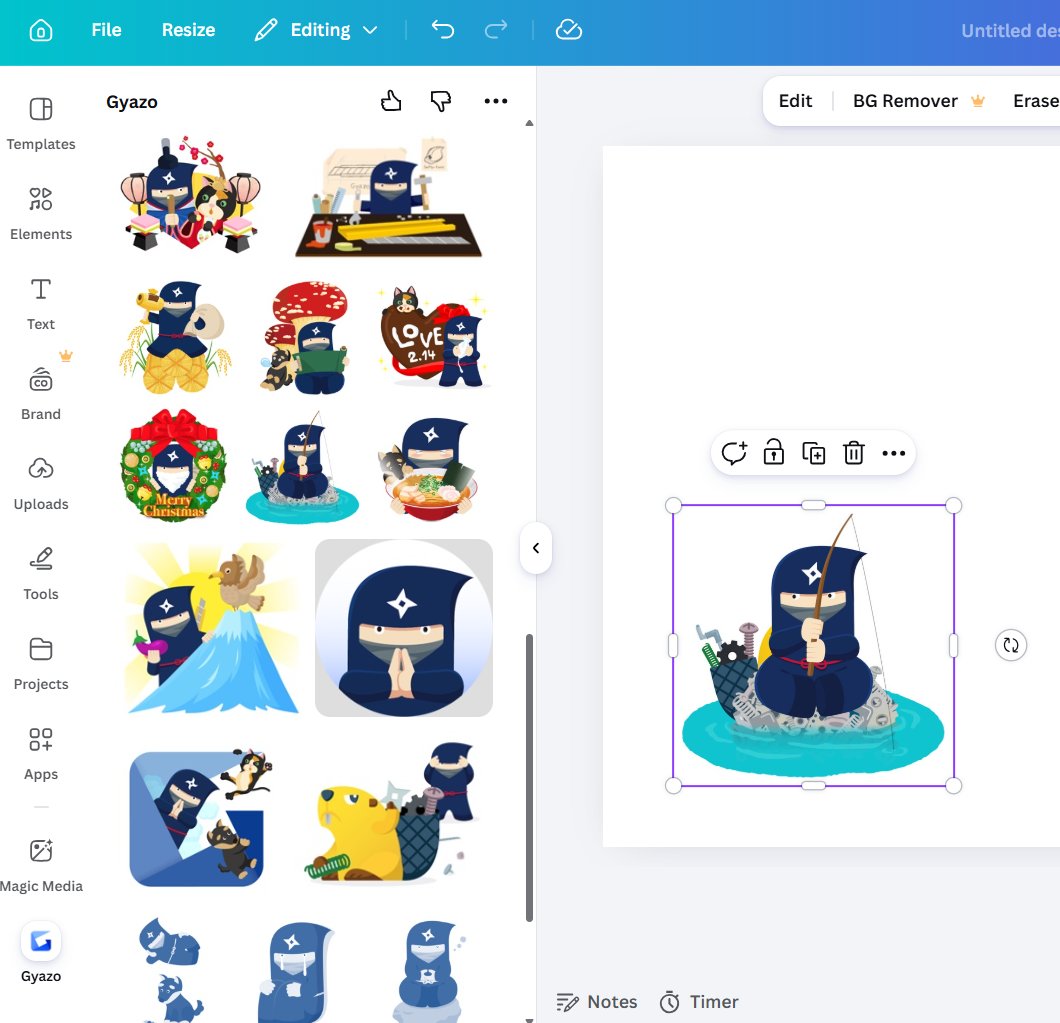
Gyazo is now available in #Canva Apps. 🚀
Search “Gyazo” in Apps, add it, then sign in to Gyazo in the same browser to connect your gallery. Place saved captures directly into designs—great for presentations, social posts, and anyone who regularly reuses screenshots.
#Canva
[Mac Update]
Set your maximum video recording time in Gyazo for Mac!🎥
Gyazo Pro users can choose from 7 sec, 30 sec, 1, 3, 5, or 10 min—making it easier to match each recording to what you need.
[Web Update]
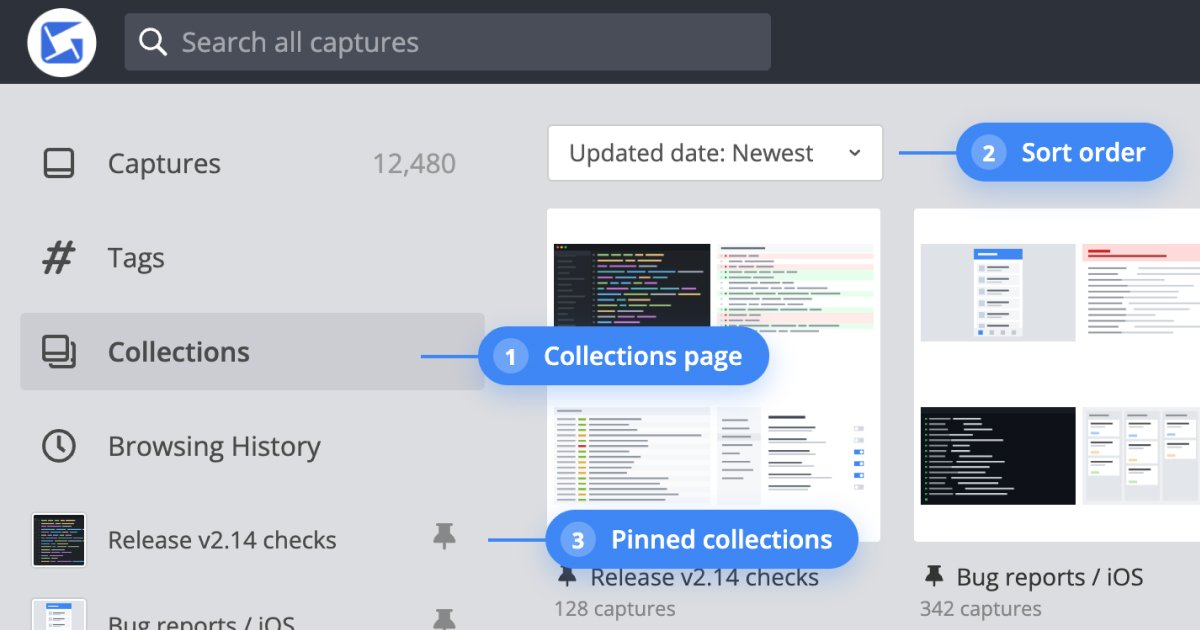
Collections are now easier to organize and revisit. 🚀
Browse them from the new Collections page, sort by updated date or name, and pin the ones you use most to keep them in the sidebar.
[Web Update] Viewing tall images on Gyazo is now easier! 🔍
Click an image to fit it to your viewport, then use the new controls to zoom in or out in 10% steps—making details easier to inspect without losing sight of the whole capture.
[Gyazo Chrome Extension Update] 🚀
A smarter way to copy captures directly from notifications!
Click the "..." button on the capture notification to instantly copy the URL, image, HTML, or Markdown snippet. Share your captures faster without interrupting your browser workflow.
[Android Update] Launch and upload instantly from your home screen📱
Long-press the Gyazo app icon to access new App Shortcuts. Quickly trigger the camera to capture photo or open photo picker to upload images from your library. Experience a more seamless workflow on Android.
Gyazo Pro Summer Sale is live! ☀️
Upgrade your capture workflow with summer savings:
* Monthly: 50% off first 3 months
* Annual: 25% off first year
Period: July 22 – July 31
*Credit card payments only.
[iOS Update] Direct screen recording is now available inside the Gyazo app! 📱
No more recording with OS defaults and uploading manually. Instantly start video recordings directly within the app and manage them seamlessly for a smarter workflow.
[Android Update] Introducing Overlay Capture! 📱
Capture your screen seamlessly while using other apps. Just tap the floating button to instantly upload to Gyazo. The button can be dragged anywhere and automatically hides during capture so it won't appear in your image.
[Web Update] Track your video uploads at a glance! 🎥
We’ve added a loading indicator when uploading videos from the web captures page. Now you can clearly see the progress, ensuring a seamless and worry-free experience.