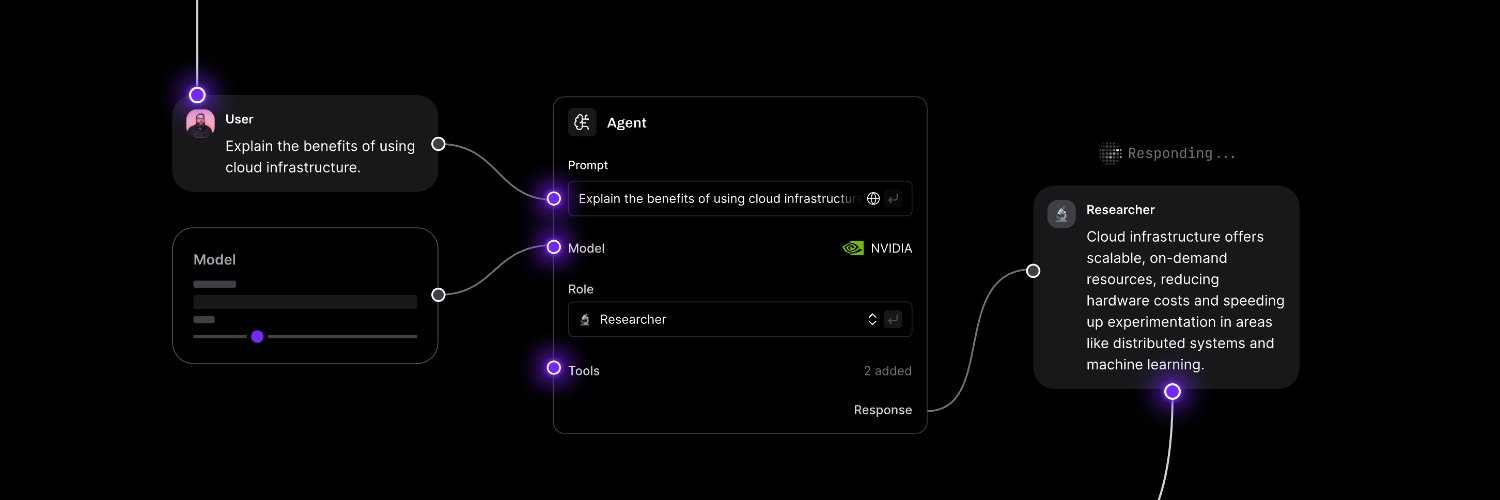
🚀 Langflow 1.9 is live
Langflow 1.9 introduces new capabilities for building, operating, and integrating AI workflows, with updates focused on in-product AI assistance, flow deployment tooling, and MCP-based interoperability.
This release adds native support for AI-assisted component generation, standardized tooling for managing flows outside the visual builder, and new interfaces that allow external agents to create and execute Langflow flows programmatically.
What’s new in this release:
🔹 Langflow Assistant
A native AI assistant embedded directly into Langflow that allows users to generate custom components from natural language, troubleshoot flows in context, and get real-time guidance directly on the canvas—turning Langflow into an interactive AI-assisted development environment.
🔹 Flow DevOps Toolkit
A new SDK and tooling layer that brings software engineering practices to Langflow flows, enabling exportable flow artifacts, version control, CI validation, automated testing, and structured deployment workflows beyond the visual builder.
🔹 MCP support for IDEs and coding agents
Langflow can now be used programmatically by coding agents such as Claude Code, Cursor, and Copilot, enabling them to create, configure, and execute flows through MCP-based integrations.
🔹 Token Usage Display
LLM components now expose input and output token counts directly in the flow interface after execution, giving developers immediate visibility into token consumption for cost monitoring and prompt optimization.
Updates in 1.9:
🔹 Policies Component (Beta)
A new ToolGuard-powered component that converts natural language business policies into executable guard code, enabling runtime validation over tool execution without requiring custom rule scripting.
🔹 Environment variables to block custom component execution
Adds runtime controls that allow administrators to disable execution of custom Python components through environment configuration, improving governance and security in controlled deployments.
🔹 Gemini 3 tool calling support
Adds native tool-calling compatibility for Gemini 3 models, enabling Langflow agents to invoke tools directly through Gemini-powered workflows.
🔹 Data renamed to JSON / DataFrame renamed to Table
Updated naming improves semantic clarity in flow design, making structured data components easier to understand and more intuitive for developers building complex pipelines.
👉 Explore Langflow 1.9:
https://t.co/xibTzvRnnj
Working with Tabular Data in Langflow using Table Operations
The Table Operations component applies dataframe-style operations to Table objects inside a Langflow workflow. It can be used to filter rows, sort values, select columns, merge tables, rename fields, and remove duplicates.
What this component does
Table Operations processes structured tabular data generated by other components in the workflow.
Common use cases include:
• Filtering rows based on conditions
• Sorting records before passing them to another stage
• Selecting only relevant columns
• Merging tables from multiple sources
• Removing duplicated rows
Available Operations
• Add Column
• Concatenate
• Drop Column
• Filter
• Head / Tail
• Merge
• Rename Column
• Replace Value
• Select Columns
• Sort
• Drop Duplicates
Example Workflow
API Request → Smart Transform → Type Convert → Table Operations
In this workflow:
• API Request retrieves JSON data
• Smart Transform extracts or restructures relevant fields
• Type Convert converts the JSON into a Table
• Table Operations applies dataframe-style transformations to the resulting table
How It Works
The component receives a Table object as input and applies a selected operation to generate a modified Table. For multi-step transformations, multiple Table Operations components can be chained together in the workflow.
How to get started
Add the Table Operations component after any component that produces Table data. If the workflow still returns JSON, components such as Type Convert can convert the data into a Table before processing.
Learn more about Langflow:
https://t.co/bCnOtdAyL3
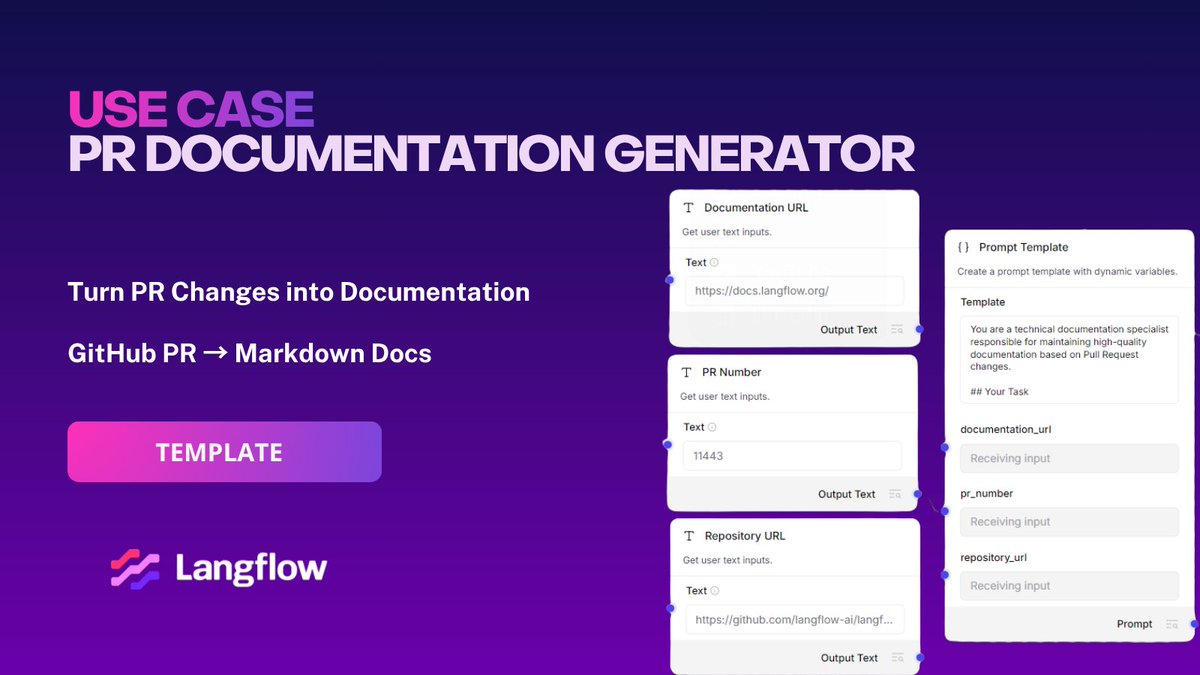
Langflow Use Case: PR Documentation Generator
Keep technical documentation aligned with code changes automatically.
This Langflow workflow analyzes GitHub PR diffs, identifies documentation impact, and generates Markdown updates that match your existing docs structure and writing standards. It can detect API changes, new configuration options, deprecated behavior, and missing documentation gaps directly from PR context.
Use it to reduce documentation drift, generate consistent release notes, and streamline docs reviews across engineering teams without adding manual overhead to the shipping process.
🔗 Template: https://t.co/HLuBKtjfKd
Use Google Docs inside Langflow agents
With Composio components in Langflow, you can connect Google Docs directly into a Langflow workflow and let agents create, search, and update documents automatically.
Typical operations include:
- Creating documents from agent outputs
- Inserting structured text into existing docs
- Searching documents by context or title
- Updating documentation automatically
- Generating reports, notes, or summaries from workflows
All of this can be composed visually alongside LLMs, APIs, databases, and other tools inside the same flow.
Example: automated documentation workflow
A common pattern is using Google Docs as a dynamic output layer for AI workflows:
1. Process incoming data or conversations
2. Generate structured summaries or reports with an LLM
3. Create or update a Google Doc automatically
4. Keep documentation synchronized as new information arrives
This makes Google Docs useful for workflows involving meeting notes, internal documentation, AI-generated reports, research summaries, or collaborative knowledge sharing.
👉 Learn more about Langflow:
https://t.co/TD8VZnSwNL
Langflow Assistant: Video
Building custom components usually requires writing boilerplate code, configuring inputs and outputs manually, and validating component structure before it can be used inside a workflow.
With the launch of Langflow 1.9, Langflow Assistant introduces an in-product AI workflow assistant capable of generating reusable components directly from prompts:
- Natural language → Python component generation
- Automatic creation of inputs, outputs, metadata, and component structure
- Real-time code generation using the Langflow component SDK
- Direct validation and insertion into the canvas
- Tool Mode support for agent-compatible components
Example:
In this demo, the assistant generates a "NewsFinderComponent" from a single prompt requesting a tool that searches news articles from a user query. The generated component is validated and added directly to the flow canvas, where it can immediately be connected to agents and other workflow nodes.
Why it matters:
- Reduces manual component boilerplate
- Speeds up workflow prototyping and iteration
- Makes custom tool creation accessible directly inside the Langflow interface
👉 Explore Langflow Assistant in Langflow 1.9:
https://t.co/xibTzvRVcR
Multi-Agent Travel Planning Workflows in Langflow
This template implements a multi-agent workflow where different agents handle separate parts of a travel planning task.
Instead of relying on a single agent to search, validate, calculate, and generate responses, the workflow distributes responsibilities across multiple agents and tools.
The flow combines:
• Web search for travel-related information
• URL content extraction
• Budget and arithmetic calculations
• Final itinerary generation
Each agent operates on a narrower scope and passes its output to the next stage.
Workflow Structure
One agent performs search and information gathering using external tools. Another agent processes and structures the retrieved content. A calculator tool handles numerical operations such as budget estimation. The final agent combines all previous outputs into a consolidated travel plan.
This architecture can be adapted for:
• Travel itinerary generation
• Multi-step research workflows
• Financial or cost estimation systems
• Task-specific assistant orchestration
• Agent pipelines that require tool usage across multiple stages
How to get started
This template is already available inside Langflow.
Click New Flow, search for Travel Planning Agents, and run the template in the Playground.
Learn more about Langflow:
https://t.co/8LAc4u9kG6
Langflow Use Case: Voice of Customer Report Generator
Turn unstructured user feedback into structured, actionable Voice of Customer reports.
This Langflow workflow collects comments from YouTube and Reddit, normalizes the data, analyzes sentiment and recurring themes, and generates a structured report with key insights, representative quotes, and prioritized recommendations.
Use it to identify real customer pain points, track sentiment shifts, and turn public feedback into product, support, and marketing decisions without manual research.
🔗 Template: https://t.co/jj0S9B5ckT
Flow DevOps Toolkit - Langflow 1.9 Feature
The Flow DevOps Toolkit (LFX SDK) provides a CLI-based workflow for versioning, testing, and deploying Langflow flows.
Instead of exporting and importing flow JSON through the UI, flows are managed as code within a project structure.
Using the CLI, you can:
- pull flows from a Langflow instance into local files
- track changes through version control
- validate flows before deployment
- push updates back to the server
- generate dependencies (requirements.txt)
- serve flows as API endpoints
A typical workflow:
lfx pull
lfx status
lfx validate
lfx push
Flows are stored as JSON and can be versioned and tested alongside application code.
The toolkit supports multiple environments (local, staging, production) using environment variables for API keys and instance configuration.
Flows move across environments using the same deployment patterns as application services.
What the video shows
In the video, the workflow is executed in a local environment using the CLI. A project is initialized, generating a structured directory with folders for flows, configuration, and test scaffolding. A flow is then pulled from a Langflow instance into the flows/ directory, where it is stored as a JSON file.
An API key is configured as an environment variable, enabling authenticated communication with the Langflow server. The flow is then validated locally, ensuring that its structure and dependencies are correct before execution. After validation, the flow is served locally, exposing it as a runnable endpoint.
Finally, the same flow is opened in the Langflow interface, confirming that the version managed via CLI is synchronized with the runtime.
Available in Langflow. https://t.co/XuSd54Rwyj
Block Custom Components - Langflow 1.9 Feature
Langflow allows custom components to execute Python code inside the runtime.
The Block Custom Components setting disables this capability at the server level.
When the environment variable is set:
LANGFLOW_ALLOW_CUSTOM_COMPONENTS=false
the system prevents:
- creating new custom components
- editing component code in the visual editor
This restricts arbitrary code execution within the Langflow environment.
When unset or set to true, custom components remain enabled and behave as before.
In controlled environments, this can be combined with an allow-list by specifying trusted component paths, ensuring that only predefined components are available while blocking others.
This feature is useful when running Langflow in shared or production environments where executing untrusted or generated code is not allowed.
Available in Langflow.
https://t.co/ddS0uILeIa
Token Usage Display - Langflow 1.9 Feature
LLM components now expose token usage directly in the flow interface after execution.
For each run, the system displays:
- input tokens
- output tokens
This removes the need for external logging or manual estimation when analyzing model usage.
Token counts are tied to each component execution, making it possible to inspect usage at specific steps within the flow.
This allows you to:
- identify high-cost components
- compare token usage across different steps
- debug prompt size and response behavior
- optimize flows based on real usage data
The information is available immediately after execution, without requiring additional configuration.
Available in Langflow:
https://t.co/5y0vuBYXup
Langflow Assistant - Langflow 1.9 Feature
The Langflow Assistant generates and updates custom components from natural language prompts directly within the Playground.
It has access to the current flow structure, allowing it to produce components that integrate with existing inputs, outputs, and data types.
Instead of writing component code manually, you define the behavior in a prompt, and the assistant generates executable code that can be inspected, added to the canvas, and connected to the flow.
In the example shown, a prompt defines a component that:
- extracts and validates URLs
- fetches page titles with concurrency control
- handles timeouts and per-URL errors
- returns a structured DataFrame
The generated component is immediately available in the canvas, where it can be connected, executed, and iterated on.
If changes are needed, the prompt can be updated and a new version of the component is generated, replacing or extending the previous implementation.
This introduces a fast iteration loop:
prompt → component → run → refine
The assistant runs a separate internal flow with its own language model, using the currently active flow as context.
Available in Langflow 1.9: https://t.co/Xn8zrxmppT
Use Google Sheets inside Langflow agents
With Composio components in Langflow, you can connect Google Sheets directly into a Langflow pipeline and let agents read from and write to spreadsheets as part of their execution logic.
Typical operations include:
- Reading rows from spreadsheets for processing
- Appending new structured data automatically
- Updating existing records based on agent output
- Creating rows from form submissions, emails, or API events
- Using spreadsheet data as input context for LLM workflows
All of this can be composed visually in a flow, alongside models, APIs, parsers, and other tools. Example: automated structured data workflow
A common pattern is using Google Sheets as a live data layer for operational workflows:
- Read incoming rows from a spreadsheet
- Process each row with an LLM or agent logic
- Classify, enrich, or transform the data
- Write results back into new columns automatically
This makes Google Sheets useful for workflows such as lead qualification, ticket triage, CRM enrichment, reporting pipelines, and structured data tracking.
👉 Learn more about Langflow:
https://t.co/XTp7zV55At
How to Build Structured AI Outputs for Image Analysis in Langflow
Language models often return unstructured text, making outputs inconsistent and harder to process. This workflow solves that by forcing the model to generate structured, predictable results for image sentiment analysis.
What this flow solves:
Free-form model responses can be difficult to parse and automate.
With this approach, you can:
• Standardize model outputs into fixed fields
• Improve consistency across responses
• Format results for downstream automation
• Turn raw model reasoning into structured data
Step-by-step Setup
Chat Input
Receives the image-related input or image description to analyze.
Prompt Template
Defines the task instructions for the model.
Example: classify the image into positive, neutral, or negative sentiment.
Language Model
Processes the prompt and generates the initial response.
Structured Output
Transforms the model response into a defined schema. Example schema:
• Sentiment
• Description
Parser
Formats the structured data into readable text using a template.
How It Works
Instead of returning unpredictable free-text answers, the model is constrained into a structured schema.
This makes outputs easier to validate, display, and integrate into applications.
Key Takeaway
Structured Output makes AI workflows more reliable by transforming flexible model responses into predictable data formats.
That’s how you build production-ready AI systems with consistency and control.
How to get started
This template is already available inside Langflow.
Simply click New Flow, select the Image Sentiment Analysis template, and follow the same structure shown above.
Learn more about Langflow:
https://t.co/kHcYDiUzUa
Langflow Use Case: Newsletter to Podcast Converter
Turn unread Gmail newsletters into structured audio you can listen to.
This Langflow workflow reads emails from Gmail, extracts the relevant content, converts it into a conversational script, and generates audio using ElevenLabs. The output is saved to Google Drive, creating a repeatable pipeline from inbox to audio.
Use it to convert written updates into hands-free content for commutes, workouts, or asynchronous consumption.
🔗 Template: https://t.co/LLqsAht9Tq
How to Build a Research Agent with Multi-Step Reasoning in Langflow
A research agent goes beyond simple responses. Instead of answering directly, it plans, searches, and synthesizes information before generating an output. This workflow shows how to structure a multi-step research process using tools and reasoning.
What this flow solves
Single-step agents are limited. They often generate shallow responses and fail to explore external information properly.
With this approach, you can:
• Plan how to answer a question
• Search external sources
• Structure retrieved information
• Generate more complete and reliable outputs
Step-by-step Setup
Chat Input
Receives the initial research question.
Prompt Template (Planning)
Defines how the model should create a research plan.
Language Model
Generates a structured plan based on the user input.
Prompt Template (Plan Structuring)
Formats the previous output into a clearer research plan.
Tavily AI Search
Provides access to external information through search.
Agent
Uses the search tool to retrieve relevant information.
Prompt Template (Context Structuring)
Organizes the retrieved search results into structured context.
Prompt Template (Final Synthesis)
Defines how the final response should be generated using the query and results.
Language Model
Generates the final synthesized answer.
Chat Output
Returns the final response.
How It Works
Instead of answering immediately, the system follows multiple steps. It first plans what to search, retrieves external data using tools, organizes that information, and then generates the final answer.
This structured approach improves both reasoning and output quality.
How to get started
This template is already available inside Langflow.
Simply click New Flow, select the Research Agent template, and follow the same structure shown above.
Learn more about Langflow:
https://t.co/zvakc64y4O