We are continuing to receive reports of email phishing campaigns asking users to "verify" their wallet to comply with KYC regulations, along with other types of "verification mandates". These emails are SCAMS! MetaMask wallets are NOT ASSOCIATED with user email addresses!
📣 MetaMask Support has a new home.
Our official support site has changed to https://t.co/9dG01N2hnU.
It used to be support.metamask.[io], but we've moved to a new domain with a new look and feel.
Please update your bookmarks and be cautious when clicking links. Stay vigilant! 🦊
@LT_Navarro We're very sorry to hear this happened. Please reach out to our Support Team so we can assist you with the investigation.
Go to https://t.co/2n8coHXGRq, scroll down to "Contact support," connect your wallet using the compromised address, and you will receive assistance.
Funds may not display for a few common reasons. Work through these checks:
- Confirm the funds arrived. Use the block explorer to check your wallet address.
- Wait if you made a recent purchase. Purchases can take a few minutes to a few hours. If funds still don't arrive, contact the purchase provider.
- Check your account and network. Make sure you're on the correct account, and that the correct network is selected. Funds sent on Ethereum won't appear if your wallet is set to Polygon.
- Import the token. MetaMask doesn't show all tokens automatically. Follow steps here (https://t.co/FIjhlhPYzL) to add it.
- Check the "Hide tokens without balance" setting. Turn it off under Settings > Assets (extension) or Settings > General (mobile) if you want to see tokens with a zero balance.
- Update MetaMask. Make sure you're on the latest version.
- Refresh your balances. In Portfolio, click "Token actions" (three dots) and select "Resync balance" for one token, or go to Settings > Accounts, click the three dots next to your account, and select "Resync balances" for all tokens.
- Switch to another network and back.
- Close and reopen the browser or app.
@Chrisp7xo@ethereumfndn@Veritylab Visit https://t.co/xxkf7FeC5L and click the 'Contact Support' button. our support team can help you investigate this.
@vancova_heis@umangkapuriya@MetaMask Did you get an option to open a ticket from the queue to hold your place (for your safety, please do not share ticket #'s on X)?
@drcrypt77954474 MetaMask flagged this site as malicious, so please don't interact with it. For help with your wallet, visit https://t.co/FbOqu5HOr8 and select "Contact us" to reach our support team, and they can look into it with you.
@Mazrael_shib@MetaMask@takehypotenuses Head to https://t.co/FbOqu5HgBA & reach us through 'Contact Support'. If you've already created a ticket, continue through the conversation there. Please avoid communicating with anybody DMing you claiming to be MetaMask Support -- our team will never DM you to initiate support.
@nancy_c813@metamask_zh@MetaMask Hey there, we're aware of an issue affecting transactions on BNB network -- could you confirm this is the network you're using?
Your funds are safe, and you can follow live updates at https://t.co/yiH0tf8k8d. Thanks for your patience!
We are aware of a security issue affecting Web3Auth’s services used by some third parties. As an extra precaution, we have temporarily suspended the embedded wallet service until the issue is resolved.
In the meantime, you are able to log-in using your Secret Recovery Phrase (SRP).
@0xNode_ch Please reach out to our Card Support by opening your MetaMask app and going to your Card page. From there, tap Contact Support to reach our Priority Support team directly so we can help investigate.
@aravind1996cbe Winners from all weeks of Money Sweepstakes have been notified in-app.
If you haven't already received a winning notification for the Money Sweepstakes, then you did not win.
Keep an eye on the Rewards tab for future campaigns and competitions!
Markets move fast, and scammers move with them.
Review this MetaMask security checklist 🦊
- Read before you sign. Never rush to sign a transaction.
- Revoke approvals you no longer use.
- Never share your Secret Recovery Phrase.
- Only use and bookmark official links.
@lex_node Here’s how to connect your hardware wallet: create a new wallet or import a MetaMask wallet using its SRP on the screen before the one shared above, then go to “Add a wallet” > “Connect a hardware wallet.”
Never import your hardware wallet’s SRP.
Guide: https://t.co/8GPwc9Ozh1
@daddyysmiley We're sorry to hear this. Please reach us at https://t.co/FbOqu5HgBA through 'Contact Support' with your transaction hash.
Until you hear back, don't enter your SRP anywhere, don't send more funds to this wallet, and avoid connecting to or signing anything on unfamiliar sites.
@emeka07039 Sorry to hear this! Please reach out to us at https://t.co/FbOqu5HgBA through 'Contact Support' where we'll be able to collect more details.
We will never DM you to initiate support -- anybody who DMs you claiming to be MetaMask Support is trying to scam you.
@byhnkk Ensure 0.1 TRX balance, required for activation.
If trying to send the full balance, leave some TRX for fees. Tron uses bandwidth for transactions, and if you don't have enough, TRX is burnt to cover the cost.
If you're still having an issue, reach us at https://t.co/FbOqu5HOr8
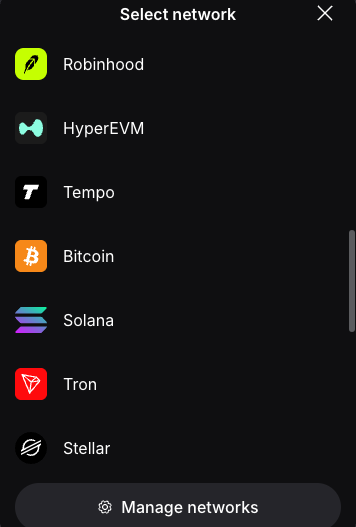
@0xDesigner With MetaMask, you can access Tempo, Solana, Base, and many other EVM and non-EVM networks, all in the same place!
Just go to 'All default networks' > 'Manage networks' > then add your desired network!
Visit our support site for the latest: https://t.co/frXtcUGCK6
@riyadkishi Really sorry to hear this. Please refrain from using this wallet & ignore any DMs from people claiming to be support - MetaMask will never DM you to initiate support.
Reach out to us at https://t.co/FbOqu5HOr8 and we'd be happy to take a closer look into what happened.