I'm excited to announce that the latest set of Excel functions are generally available. 🎉 They simplify common text manipulation tasks and unlock dynamic array scenarios.
TEXTBEFORE/AFTER, TEXTSPLIT, EXPAND, TAKE, DROP, V/HSTACK, CHOOSEROWS/COLS, TOROW/COL and WRAPROWS/COLS.
New DAX function in #PowerBI: EvaluateAndLog. This will be incredibly useful for debugging! See the great Jeffrey Wang’s blog for details: https://t.co/w43vB6Lf16
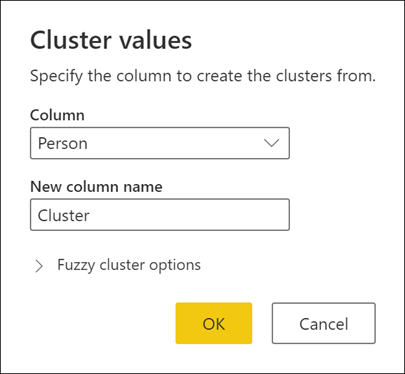
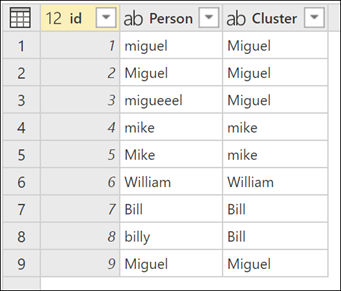
Have you ever tried the Cluster values feature in #PowerQuery? Cluster values automatically create groups with similar values using a fuzzy matching algorithm, and then maps each column's value to the best-matched group #TransformTuesday https://t.co/8ugaMdC4oT
Just updated "Literal Attributes" in Power Query M Primer (part 21) - Identifier Scope & Sections.
Now features a slightly more commonplace use case for literal attributes.
https://t.co/5OY6LAmGWN
#PowerQuery#MLanguage
Besides potential performance degradation, you should avoid filtering whole tables in #DAX in #PowerBI because sometimes you may get unexpected results: https://t.co/GidfDDySqO
We are bringing 14 new functions to Excel. These functions will help you manipulate text and arrays via formulas. TEXTBEFORE, TEXTAFTER, TEXTSPLIT, VSTACK, HSTACK,TOROW, TOCOL, WRAPROWS, WRAPCOLS, TAKE, DROP, EXPAND, CHOOSEROWS and CHOOSECOLS https://t.co/ZmnlzrL5bm
My next Ask Skillwave livestream with @ExceleratorBI is happening on Mar 16 @ 2pm PDT (which is Mar 17 @ 8am for Matt). Join us here on the @skillwave_ account, or on YouTube at https://t.co/blhn7ZJZAr. If you have a question or topic idea, submit it at https://t.co/2PA5i5cEs5
@NicoleHorwitz Hi Nicole, thanks! No guides unfortunately. I feel like I need to record a video to explain how to work with it. Will try to spare some time on that soonish
Come join Reid and me tomorrow when we do a live stream/chat about the fabulous InfoRiver custom visual. See how easy it is to get "spreadsheet like" features right inside Power BI.
Excited to share that I'll be speaking at #sqlbits this year. Looking forward to sharing some #powerbi#maps magic. Celebrating by playing Space Invaders inside Power BI! Have a go: https://t.co/0gUPvx3AkN
Heads-up: the Microsoft Certified: Data Analyst Associate certification (exam DA-100) will be renamed to Microsoft Certified: #PowerBI Data Analyst Associate (exam PL-300): https://t.co/cFeV0EvGKQ
In #PowerBI dataflows, you can now select the data type when writing your #PowerQuery custom column formula!
The feature uses Table.TransformColumnTypes instead of the fourth argument of Table.AddColumn.