🚨🚨🚨
We moved on too quickly.
The hashtags faded, the noise died, and life continued, but families are still trapped in the pain of that day.
47 days now 😭 😭 💔 💔 😭
We found another headline, another distraction, another story… but someone is still waiting, praying, and hurting.
A tragedy does not end because the world stops talking.
Remember the victims.
Remember the families.
Never let their pain become forgotten news.
@seyimakinde@officialABAT
#bringbackourchidren
@NigeriaStories We run to the EFCC for online strangers, but dance for the ones who steal our roads, schools, and hospitals every four years.
When did we decide our future was cheaper than a meal?
No plan, no progress.
Funded Cobra backs traders who respect risk, follow discipline, and treat trading like a business.
🌐 https://t.co/dDMCjcEE11
#Forex#TradingMindset#FundedCobra#PropFirmTrading
Built for traders who want things clear from day one.
Instant funding, 1-step & 2-step challenges, MT5 + Cobra Terminal, and rules that are actually visible before you start.
No hidden conditions. No confusion later.
Trade smart. Stay disciplined. 🐍
https://t.co/Pfat9DSwoD
#FundedCobra #ForexTrading #PropFirm #FundedTrader #MT5 #Cobraterminal
🐧 Day 22/30 — #Linux
One of the biggest advantages of Linux is automation.
Instead of repeating the same commands every day, you can write Bash scripts to automate tasks, save time, and reduce human error.
Linux Bash Scripting – Variables, Loops, and Conditionals
Bash (Bourne Again SHell) is the default shell on most Linux distributions and a powerful scripting language for system administration and automation.
Variables
Variables store values that can be reused throughout a script.
Example:
→ name="Linux"
→ echo $name
Output:
→ Linux
Variables make scripts more flexible and easier to maintain.
Conditionals
Conditionals allow your script to make decisions based on specific conditions.
Example:
→ if [ -f file.txt ]; then
→ echo "File exists"
→ else
→ echo "File not found"
→ fi
Common conditional operators:
→ -f = File exists
→ -d = Directory exists
→ -z = String is empty
→ -n = String is not empty
Loops
Loops execute commands repeatedly without duplicating code.
For Loop Example:
→ for file in *.txt; do
→ echo $file
→ done
Processes every .txt file in the current directory.
While Loop Example:
→ count=1
→ while [ $count -le 5 ]; do
→ echo $count
→ count=$((count+1))
→ done
Prints numbers from 1 to 5.
Running a Bash Script
Make the script executable:
→ chmod +x https://t.co/iNxinHGYrh
Run the script:
→ ./script.sh
Why Bash Scripting Matters:
→ Automate repetitive tasks
→ Simplify system administration
→ Schedule maintenance jobs
→ Deploy applications efficiently
→ Increase productivity and reduce errors
Learning variables, loops, and conditionals is the foundation of Bash scripting and opens the door to powerful Linux automation.
🐧 Grab Linux Ebook: https://t.co/DeHjJ1Wubf
#Linux #LinuxTutorial #Bash #ShellScripting #Automation #LinuxCommands #DevOps #SystemAdministration #OpenSource #100DaysOfCode
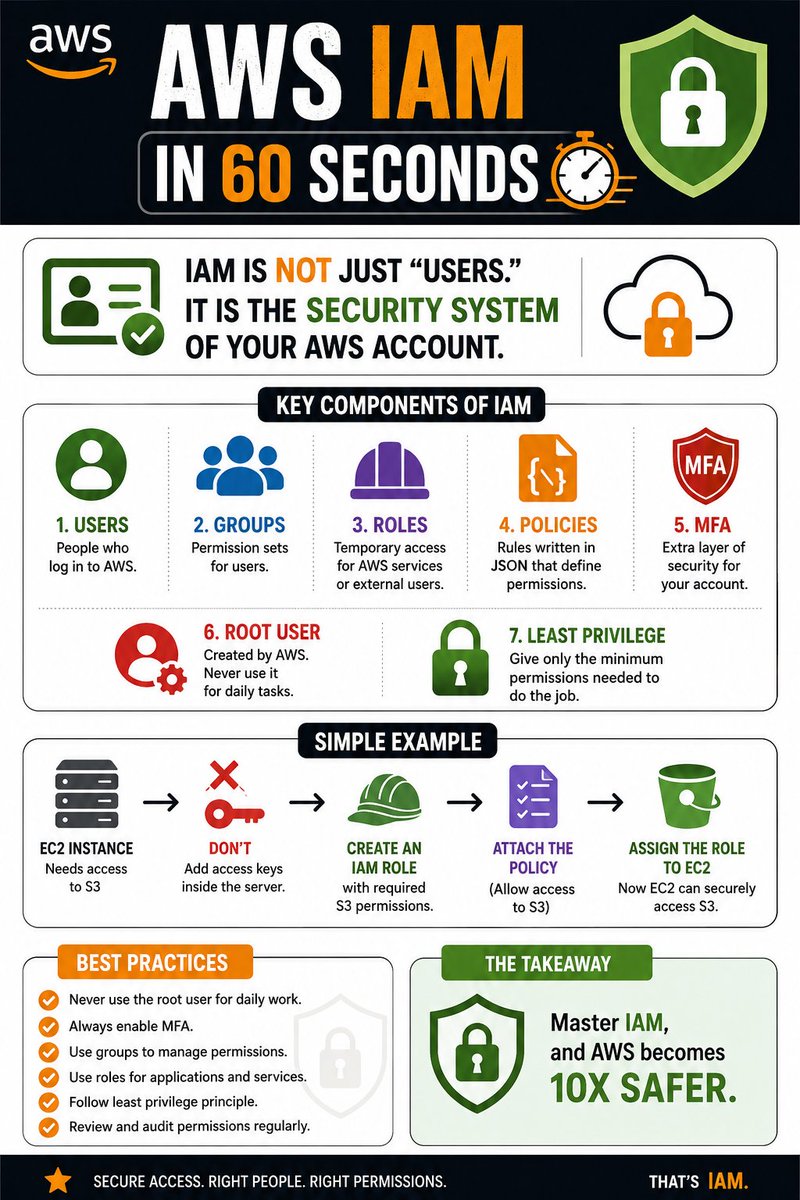
AWS IAM in 60 seconds:
IAM is not just “users.”
It is the security system of your AWS account.
• Users → people who log in
• Groups → permission sets for users
• Roles → temporary access for services
• Policies → rules written in JSON
• MFA → extra login protection
• Root user → never use daily
• Least privilege → give only needed access
Simple example:
EC2 needs to access S3?
Don’t add keys inside the server.
Create an IAM Role
attach S3 permissions
and assign it to EC2.
That’s how real AWS security works.
Master IAM
and AWS becomes 10x safer.




![e_opore's tweet photo. 🐧 Day 22/30 — #Linux
One of the biggest advantages of Linux is automation.
Instead of repeating the same commands every day, you can write Bash scripts to automate tasks, save time, and reduce human error.
Linux Bash Scripting – Variables, Loops, and Conditionals
Bash (Bourne Again SHell) is the default shell on most Linux distributions and a powerful scripting language for system administration and automation.
Variables
Variables store values that can be reused throughout a script.
Example:
→ name="Linux"
→ echo $name
Output:
→ Linux
Variables make scripts more flexible and easier to maintain.
Conditionals
Conditionals allow your script to make decisions based on specific conditions.
Example:
→ if [ -f file.txt ]; then
→ echo "File exists"
→ else
→ echo "File not found"
→ fi
Common conditional operators:
→ -f = File exists
→ -d = Directory exists
→ -z = String is empty
→ -n = String is not empty
Loops
Loops execute commands repeatedly without duplicating code.
For Loop Example:
→ for file in *.txt; do
→ echo $file
→ done
Processes every .txt file in the current directory.
While Loop Example:
→ count=1
→ while [ $count -le 5 ]; do
→ echo $count
→ count=$((count+1))
→ done
Prints numbers from 1 to 5.
Running a Bash Script
Make the script executable:
→ chmod +x https://t.co/iNxinHGYrh
Run the script:
→ ./script.sh
Why Bash Scripting Matters:
→ Automate repetitive tasks
→ Simplify system administration
→ Schedule maintenance jobs
→ Deploy applications efficiently
→ Increase productivity and reduce errors
Learning variables, loops, and conditionals is the foundation of Bash scripting and opens the door to powerful Linux automation.
🐧 Grab Linux Ebook: https://t.co/DeHjJ1Wubf
#Linux #LinuxTutorial #Bash #ShellScripting #Automation #LinuxCommands #DevOps #SystemAdministration #OpenSource #100DaysOfCode](https://pbs.twimg.com/media/HMH8URkWUAIkVsc.jpg)