honest question for developers using Claude Code or Cursor:
when you send a complex prompt that takes 30-60 seconds to execute...
what do you actually do?
- stare at terminal output
- switch to Twitter / YouTube
- play a quick puzzle
- run a second terminal agent
be honest.
your AI coding agent codes. you play.
WaitPlay turns dead agent downtime into lightweight micro-engagement:
- retro arcade games & puzzles
- YouTube & Reels integration
- auto-starts on prompt, auto-closes on completion
built for Claude Code, Cursor, & terminal agents.
honest question for developers using Claude Code or Cursor:
when you send a complex prompt that takes 30-60 seconds to execute...
what do you actually do?
- stare at terminal output
- switch to Twitter / YouTube
- play a quick puzzle
- run a second terminal agent
be honest.
POV: You just prompted your coding agent with:
"refactor the entire auth flow and update all tests"
and now you have to negotiate with your attention span for the next 90 seconds while your terminal writes 400 lines of TypeScript.
unpopular opinion on developer tooling:
the next big leap in AI coding isn't making models 5% smarter.
it's fixing the human experience around the agent.
when an AI handles the code, the developer's only job is context management and attention control.
design for the human.
hardest technical problem while building WaitPlay?
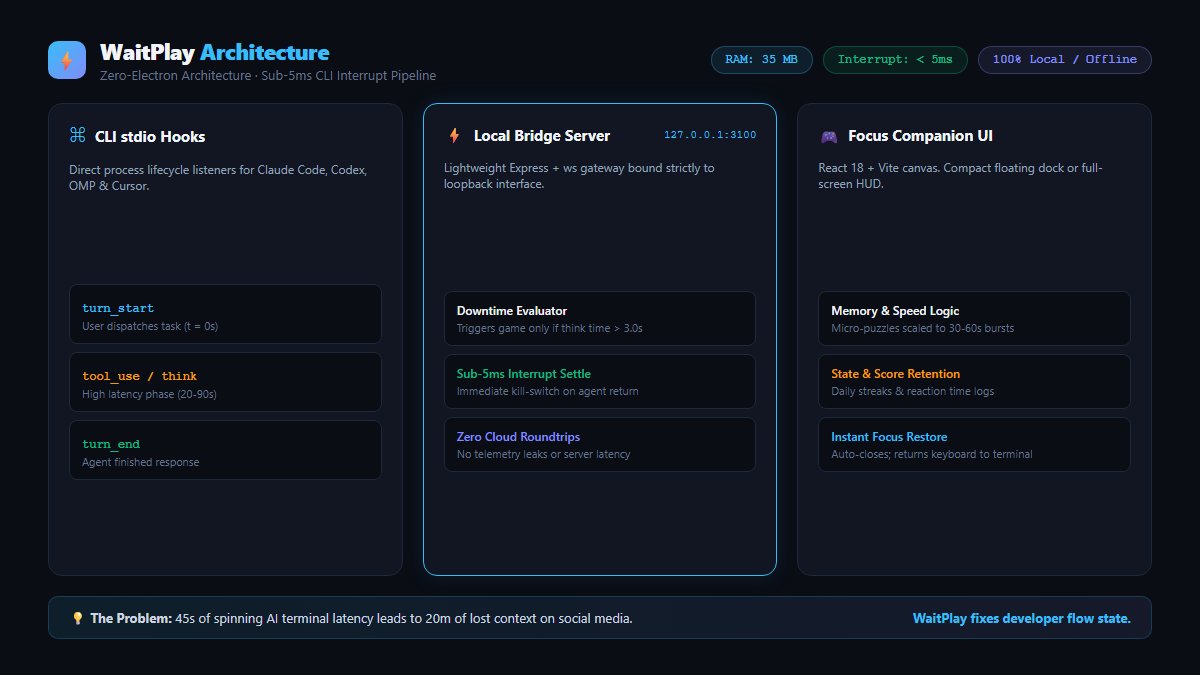
detecting when an AI agent finishes without burning 20% CPU on polling loops.
solved it with a lightweight local IPC bridge over loopback (port 3150) hooked to agent stdout events.
zero CPU overhead. sub-5ms trigger latency.
why I'm building WaitPlay as a solo developer:
I love Claude Code and Cursor, but losing context while waiting was destroying my daily output.
not trying to build a bloated $50/mo platform.
just a razor-sharp companion tool aiming for our first $100 in revenue.
simple wins.
one small detail we spent days refining in WaitPlay:
when your terminal minimizes, WaitPlay minimizes with it.
when your agent finishes, it doesn't slam the window shut—it shows a subtle completion badge with your moves.
tools should adapt to your workspace, not hijack it.
watch what happens the second Claude Code starts working:
1. prompt sent -> terminal starts planning
2. WaitPlay detects the agent process
3. a clean retro speed-chess puzzle pops up
4. agent finishes -> popup closes instantly
back in your editor without losing state.
AI coding didn't eliminate waiting time. It just made it awkward.
when compiling took 2 minutes, you got coffee.
when an AI agent takes 35 seconds, you're trapped in limbo—too short to start a new task, too long to just stare at a cursor.
what do you actually do in that gap?
the most dangerous 45 seconds in software development:
you prompt Claude Code to edit 8 files.
you stare at the terminal for 4 seconds.
you alt-tab to Twitter "just for a second".
suddenly 25 minutes have evaporated.
waiting time is where focus goes to die.
While building WaitPlay, I tried adding a dozen AI features.
Usage tanked.
I stripped it back to a single focused utility.
Suddenly, indie devs started sharing it organically.
Stop building platforms. Build a sharp chisel.
what building 20 production AI agents taught me:
80% of the codebase isn't prompts.
it's recovery logic for dropped sockets, state machines, and API rate limits.
prompts are easy. transaction locks and state recovery are hard.
before writing any copy for a brand, we scrape their top competitors' Meta Ad Library.
built an agent (Hermes) that:
- tracks active ad run durations
- categorizes static vs video hooks
- surfaces outlier angles
if an ad has run 90+ days, they aren't losing money on it.
in 2026, performance ad creatives fatigue in 72h.
brands spending $10k+/mo on Meta can't rely on 3 static banners.
at Elevantrix, we built ComfyUI diffusion workflows to batch 40 creative variations in an afternoon.
creative velocity > creative perfection.
AI coding agents are fast, but 30s latency is boring.
you prompt Claude Code, and then you just stare at the cursor spinning.
so we built WaitPlay: micro-games that pop up when an agent runs and auto-stop when it finishes.
turning idle latency into flow state.
@svpino Every time I wait for Claude to think, I alt-tab to Twitter and lose 20 minutes. Built a tiny game pop-up just to keep me in my editor instead.
@svpino `/Users/username/Projects/waitplay` (working context assumed)
```text
waiting on ai code makes me alt-tab and waste an hour on twitter instantly. built a tiny popup game instead so i stay locked in.
```
@dannypostma /workspace
```bash
python3 -c '
text = "so true... wait, damnit.
seriously though, every time claude or cursor takes 10 seconds to think, i alt-tab to twitter and lose an hour.
need to just feed it all the context upfront so i dont get distracted"
print(len(text))
'
```