💥Learn how to use Pi DEX?
⚡It’s that simple!
➡️Open your Pi Wallet and select the Testnet Wallet.
➡️Go to Tokens, then choose the action you need. Try it out now!
🔄In the future, once the Open Mainnet is live, you’ll already have mastered the rules of Pi DEX and be ready to become a market maker, earning massive amounts of Pi!💰💰
#PiNetwork #BTC #BNB #ETH #SOL #DOGE $PI
Happy Pi Day, pioneers! Muxed Accounts are coming soon to PCM Wallet! 🎉🎉
Our team is diligently preparing this innovative feature to elevate your experience with us. With the upcoming launch of Muxed Accounts, every user will receive a unique deposit address for Pi. This means you’ll be able to deposit Pi seamlessly, without the hassle of binding your wallet beforehand. Plus, Muxed Accounts will allow you to deposit Pi directly into PCM Wallet from all Pi wallets and exchanges, giving you the freedom to manage your assets no matter where they’re held.
This new functionality is all about convenience, security, and simplicity. Whether you’re a seasoned user or just getting started, Muxed Accounts will make managing your Pi deposits smoother and more efficient. We’re committed to bringing you the best tools to interact with your digital assets, and this is just one of many exciting updates on the horizon.
Keep an eye out for more details as we get closer to the launch—Muxed Accounts are almost here, and we’re confident you’ll love what’s in store!
In Open Network, the community’s contributions and engagement with Pi’s utilities, features, and communications are more important than ever. Make sure you follow and get information from the authentic official Pi social media accounts! Go to the Pi Safety Center at https://t.co/r4rh8Vs30i to see all official Pi communication channels—do not trust any channel or account not listed on the Safety Center webpage and beware impersonators.
Are you new to Pi Network and wondering how to earn more Pi?
Do you have a digital skill? Start earning Pi by offering your services on WorkforcePool! Whether you're a designer, writer, developer, or marketer, there’s work waiting for you. Join now and turn your skills into #Pi
Congratulations, GCV Pioneers! Zypto Limited is now live! @ZyptoApp is the first company to start operations on the Pi blockchain at the GCV of $314,159. They offer goods and services while converting Pi to other currencies at the same GCV rate through the Pi Browser.
To access their services, open the Pi Browser, type the https://t.co/0uwaSMWEFo, on the address bar, and use their platform at the GCV rate. You can also download their mobile app from the Play Store.
Zypto app offers you to deposit $1 = 0.000001π or less at GCV. The GCV of $314,159 per Pi represents the real ecosystem value, aligning with Pi’s vision and mission. Pi is not associated with any exchanges.
No one is urging you to spend your Pi on exchanges when numerous businesses within the Pi Blockchain Ecosystem are ready to accept Pi for goods and services at the GCV rate of $314,159—even enabling you to buy a car for just 0.02π.
Stay patient!
#PiNetwork2025 #PiNetwork
#himanshumgr #zypto
#CryptoNews
🚨 PI HACK: Migration
If your Pi is not migrated to your Pi wallet yet, do this to migrate it immediately.
1. Go to your profile and click "update" beside password.
2. Update the password to a new one
3. Then come back to profile and click on the "sign out" button
4. Log in again with your new password
Your Pi will be migrated immediately ✅
NOTE: While this hack has worked for many pioneers, some pioneers have tried it without any result. You can as well try and see.
Keep holding
dont sell cheap.
You mined 6 years dont waste your effort in just 1 hr.
Platform level utility of Pi Ad Network is coming and this is bullish🚀🚀🚀🚀
#PiNetwork
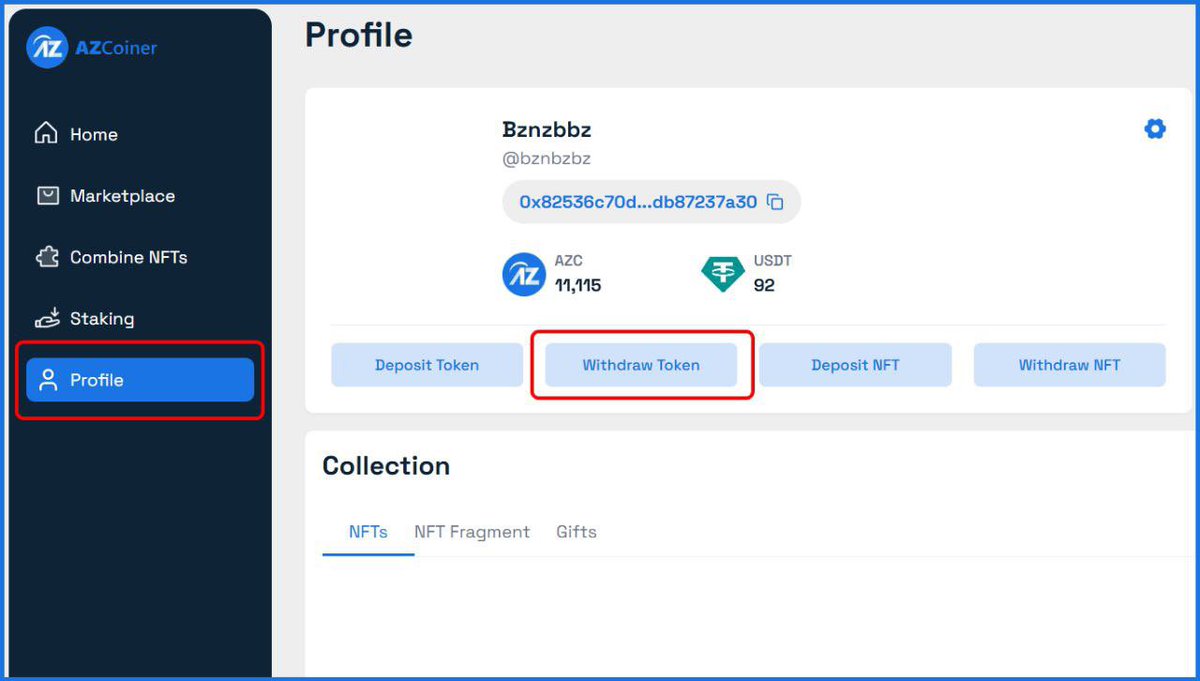
🎉 Withdraw $AZC to MEXC Exchange or your DEX wallet e.g OKX wallet, Bitget Wallet, or Metamask Wallet, If you complete KYC on AZCOINER
🔲 Despite the fact that majority of the users haven't gotten KYC invitation, and some that got KYCʼ invite have theirs pending for a while.
❗Note: you can only withdraw the unlocked amount, with 10 AZC deducted as a withdrawal fee and a minimum withdrawal of 30 AZC
🛡Login & Withdraw Here : ⤵️
https://t.co/ci4jVlWnGb
➖Log in to AZCoiner Marketplace with your AZCoiner account
➖Select Profile, then choose Withdraw.
➖Go to Mexc,click on deposit and search $AZC token copy the withdrawal address
➖Paste the $AZC wallet address you copied earlier from Mexc
➖Enter the amount you want to withdraw
➖Confirm Withdraw.
Done ✅
▪️Information about $AZC ⤵️
➖Ticker: $AZC
➖Token contract address: 0x2eAf707440974deba88F5b2425caDcc4821aA954
➖Token network: Bep20
➖Token decimals: 18
📢 KYC is still ongoing..!
👉 Access the Menu (top left corner of the screen) -> go to do KYC
❗Keep Note- The more active you are, the sooner you'll receive the KYC
Join TG group to update: https://t.co/1WsKuvAZnJ
🎯 The group always opens chat so you can discuss buying and selling and to ensure your transactions are as safe as possible.
Exchange,Sell or Buy :
🎯Pi Network
🎯Sidra Coin
Join the group for safe trading :
https://t.co/qnZm1VmCT3
AZC Balance Unlocked 🔐
You’re surprised because your AZC balance has changed. You don’t understand what’s going on 🤔
Why is there a change?
Don’t worry, the answer is simple: Your AZC balance has been unlocked and transferred to the L2 wallet.
If you don't see the balance in your L2 wallet, click on "Send" to transfer to the marketplace, then go to the "Profile" section, and you will see the AZC balance there.
📲Vesting Plan: https://t.co/KrbvlRQh4r
You’ve probably already guessed what’s coming next! 🔜 Let’s share your thoughts! 💬👇
#AZCoiner $AZC
Don't miss out on 2025's major crypto event, Pi Network open mainnet. If you were a Pi pioneer before and forget your login password, the following steps help you regain access to Pi Network.
Steps to reset your PI password:
1. Open Pi Network App.
2. Choose continue with phone number.
3. Input phone number then submit.
4. Look for the "Forgot Password?" option and select.
5. Tap recover account.
6. Input your phone number and submit.
7. You are going to receive a SMS text with a pre-written draft.
8. Copy the SMS text and send it to the phone number which the message is originated.
9. Wait for the automatic verification process. Be patient as it might take some time for the system to acknowledge the SMS and proceed.
10. After verification, you should be able to set a new password for your account and reactivate your account.
#PiNetwork #accountrecovery