@ProtonVPN What I've figured out is that when I connect, if I don't open a website, the connection is stable, but the moment I open a website, the connection drops.
It's been about a week that when I connect to the servers, it times out in under 3 minutes and tries to reconnect. I've tested all the protocols, and they behave the same way. @ProtonVPN
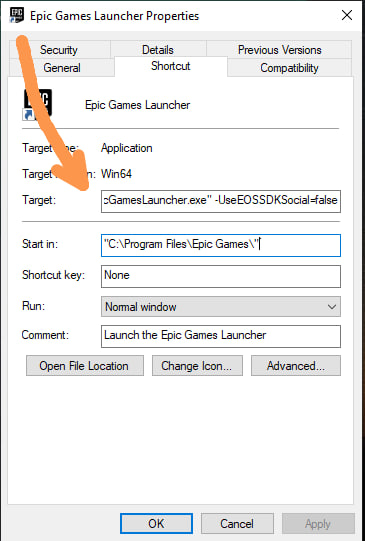
@KithOmoro@FortniteStatus copy this on here and press ok try again :
"C:\Program Files\Epic Games\Launcher\Portal\Binaries\Win64\EpicGamesLauncher.exe" -UseEOSSDKSocial=false
@EpicGames
II-E1003 happens immediately at 0% when trying to install ANY game through Epic Games Launcher.
Reinstalled Epic multiple times, cleared cache, changed DNS, and tested 2 different internet connections.
Is there currently an issue with Epic's download/CDN service?
@EpicGames
II-E1003 happens immediately at 0% when trying to install ANY game through Epic Games Launcher.
Reinstalled Epic multiple times, cleared cache, changed DNS, and tested 2 different internet connections.
Is there currently an issue with Epic's download/CDN service?
@EpicGames
II-E1003 happens immediately at 0% when trying to install ANY game through Epic Games Launcher.
Reinstalled Epic multiple times, cleared cache, changed DNS, and tested 2 different internet connections.
Is there currently an issue with Epic's download/CDN service?
@EpicGames
II-E1003 happens immediately at 0% when trying to install ANY game through Epic Games Launcher.
Reinstalled Epic multiple times, cleared cache, changed DNS, and tested 2 different internet connections.
Is there currently an issue with Epic's download/CDN service?
@SeriWTR_@EpicGames@FortniteStatus@Fortnite Several people have resolved the issue by installing an older version of the launcher, but personally, I won't do that for security reasons.