the chatgpt moment for small gpus is coming. and most of you are sleeping on it.
a 5 month old open weight model running on a 10 year old gpu just executed tool calls cleanly, autonomously, end to end. no cloud. zero api. a gtx 1080 from 2016 running current agentic workloads. that's the present tense.
the training breakthroughs are stacking. the architectures are getting smarter. the quantization tricks are getting sharper. every month the floor moves up and the hardware required moves down.
right now we're at the inflection. most people don't see it yet because they're still buying h100s and renting api credits.
when it finally lands, the shock will be the hardware in your drawer doing more than the cloud subscription you've been paying for. you'll feel it. then you'll dust off the gpu. then you'll start the actual quest.
the quest to own your cognition stack. the quest to not let dario or sam own your thinking on their servers.
that's the era this leads to. and it's closer than the discourse admits.
Yay, finally! Introducing Vision Banana🍌 from @GoogleDeepMind, our unified model that outperforms SoTA specialist models on various vision tasks!
By treating 2D/3D vision tasks as image generation, we unlock a new foundation for CV.
Project page: https://t.co/GQgRi6mWwC
(1/5)
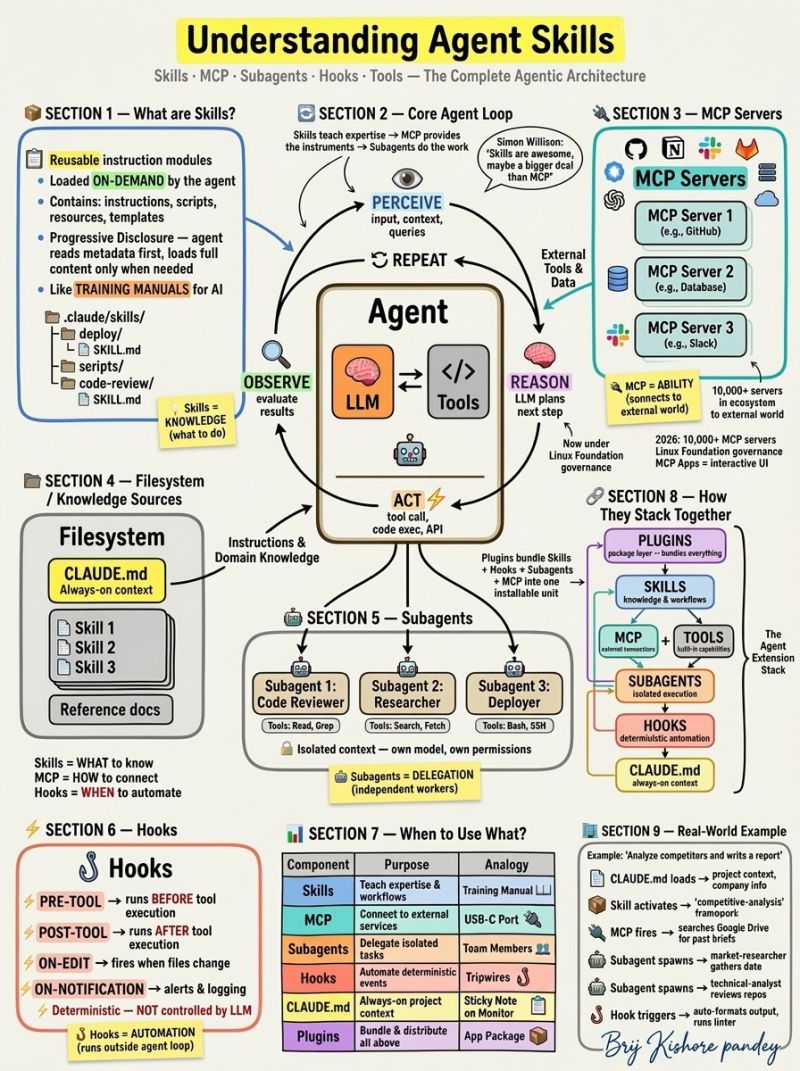
Most people think Skills and MCP are the same thing.
They're not. And confusing them is costing you
weeks of wasted architecture decisions.
I just mapped the entire Agentic AI extension stack
on a whiteboard — here's the breakdown:
𝗦𝗸𝗶𝗹𝗹𝘀
Reusable knowledge modules that agents load on-demand.
The agent scans metadata first, then loads full instructions
only when relevant. This is called Progressive Disclosure —
it keeps your context window clean while giving agents
deep domain expertise when they need it.
Think of them as training manuals for AI.
𝗠𝗖𝗣 (𝗠𝗼𝗱𝗲𝗹 𝗖𝗼𝗻𝘁𝗲𝘅𝘁 𝗣𝗿𝗼𝘁𝗼𝗰𝗼𝗹)
The universal connection layer between agents and external tools.
Standardized protocol — like USB-C for AI.
10,000+ MCP servers in the ecosystem today.
Now governed by Linux Foundation's Agentic AI Foundation.
If Skills teach you to cook, MCP gives you the kitchen.
𝗦𝘂𝗯𝗮𝗴𝗲𝗻𝘁𝘀
Independent agent instances running in isolated context.
They can use a different model, different tools,
different permissions than the parent agent.
Like specialized team members with their own workspace.
You delegate. They execute. They return summaries.
𝗛𝗼𝗼𝗸𝘀
Deterministic scripts that fire outside the agent loop entirely.
Pre-tool, post-tool, on-edit, on-notification triggers.
The LLM does NOT control these. Pure event-driven automation.
Think of them as tripwires — when X happens, do Y. Always.
𝗖𝗟𝗔𝗨𝗗𝗘. 𝗺𝗱
Always-on project context loaded every single session.
Your conventions. Your patterns. Your team preferences.
The sticky note permanently on your monitor.
𝗣𝗹𝘂𝗴𝗶𝗻𝘀
The packaging layer that bundles everything above —
Skills + Hooks + Subagents + MCP configs
into one installable, shareable unit.
Here's what most architects miss:
These are not competing approaches.
They are layers that stack:
Skills = WHAT to know
MCP = HOW to connect
Subagents = WHO does the work
Hooks = WHEN to automate
CLAUDE. md = WHERE you ground it
Plugins = HOW you ship it
The real power is in the combination:
CLAUDE. md loads project context
→ Skill provides domain expertise
→ MCP connects to external systems
→ Subagent executes in isolation
→ Hook automates the handoff
→ Plugin packages it all for the team
If you want to excel at building agents in 2026, stop picking one layer over another. Learn to orchestrate all six together. That's what separates demo agents from production agents.
Which layers are you actually using today?
Another blow to Anthropic!
Devs built a free and better Claude alternative that:
- runs locally
- works with any LLM
- beats it on deep research
- has Cowork-like capabilities
- connects to 40+ data sources
- self-hosts via Docker, and more.
100% open-source (20k+ stars).
What's Remotion? A way to compose your video with code!
• Use React, a powerful frontend technology, to build sophisticated videos with code.
• Put together building blocks - like <Video>, <Img>, <Audio> as well as your custom components, in any way you want!
• Break down problems into smaller components and re-use them for all your videos.
Bringing all the nice things about frontend programming to video creation - that's what Remotion is all about!
Best YouTube Channels To Learn in 2026
1. Cybersecurity – John Hammond
2. Artificial Intelligence – Andrej Karpathy
3. AI Research Breakdown – Yannic Kilcher
4. Web Development – The Net Ninja
5. Python Programming – Corey Schafer
6. DevOps – TechWorld with Nana
7. Cloud Computing – AWS re:Invent
8. Data Analytics – Luke Barousse
9. System Design – Gaurav Sen
10. Databases – Hussein Nasser
11. Low-Level Programming – The Cherno
12. Linux – Learn Linux TV
13. Networking – David Bombal
14. Math for ML – 3Blue1Brown
RAG vs. Graph RAG, explained visually!
RAG has many issues.
For instance, imagine you want to summarize a biography, and each chapter of the document covers a specific accomplishment of a person (P).
This is difficult with naive RAG since it only retrieves the top-k relevant chunks, but this task needs the full context.
Graph RAG solves this.
The following visual depicts how it differs from naive RAG.
The core idea is to:
- Create a graph (entities & relationships) from documents.
- Traverse the graph during retrieval to fetch context.
- Pass the context to the LLM to get a response.
Let's see how Graph RAG solves the above problem.
First, a system (typically an LLM) will create a graph from documents.
This graph will have a subgraph for the person (P) where each accomplishment is one hop away from the entity node of P.
During summarization, the system can do a graph traversal to fetch all the relevant context related to P's accomplishments.
The entire context will help the LLM produce a complete answer, while naive RAG won't.
Graph RAG systems are also better than naive RAG systems because LLMs are inherently adept at reasoning with structured data.
👉 Over to you: Have you used Graph RAG in production?
____
Find me → @_avichawla
Every day, I share tutorials and insights on DS, ML, LLMs, and RAGs.
Most people treat CLAUDE.md like a prompt file.
That’s the mistake.
If you want Claude Code to feel like a senior engineer living inside your repo, your project needs structure.
Claude needs 4 things at all times:
• the why → what the system does
• the map → where things live
• the rules → what’s allowed / not allowed
• the workflows → how work gets done
I call this:
The Anatomy of a Claude Code Project 👇
━━━━━━━━━━━━━━━
1️⃣ CLAUDE.md = Repo Memory (keep it short)
This is the north star file.
Not a knowledge dump. Just:
• Purpose (WHY)
• Repo map (WHAT)
• Rules + commands (HOW)
If it gets too long, the model starts missing important context.
━━━━━━━━━━━━━━━
2️⃣ .claude/skills/ = Reusable Expert Modes
Stop rewriting instructions.
Turn common workflows into skills:
• code review checklist
• refactor playbook
• release procedure
• debugging flow
Result:
Consistency across sessions and teammates.
━━━━━━━━━━━━━━━
3️⃣ .claude/hooks/ = Guardrails
Models forget.
Hooks don’t.
Use them for things that must be deterministic:
• run formatter after edits
• run tests on core changes
• block unsafe directories (auth, billing, migrations)
━━━━━━━━━━━━━━━
4️⃣ docs/ = Progressive Context
Don’t bloat prompts.
Claude just needs to know where truth lives:
• architecture overview
• ADRs (engineering decisions)
• operational runbooks
━━━━━━━━━━━━━━━
5️⃣ Local CLAUDE.md for risky modules
Put small files near sharp edges:
src/auth/CLAUDE.md
src/persistence/CLAUDE.md
infra/CLAUDE.md
Now Claude sees the gotchas exactly when it works there.
━━━━━━━━━━━━━━━
Prompting is temporary.
Structure is permanent.
When your repo is organized this way, Claude stops behaving like a chatbot…
…and starts acting like a project-native engineer.
NEW: Interview Coach, an AI interview app, not a demo. Upload your resume + job description, answer behavioral and technical questions, and get a performance summary.
Built with .NET, Microsoft Agent Framework, Foundry, MCP, and Aspire. https://t.co/6E5yStnFVY
#AIAgents#dotnet
We’re teaming up with Google’s Flutter team to bring Impeller to .NET
Impeller is Flutters new GPU-optimised renderer, replacing Skia for better performance on mobile and embedded devices.
This is what open collaboration looks like 🚀
https://t.co/0LDs5zDNsp
The low-code platform powering 500+ apps at Bosch and saving Toyota 30% in work hours trusts Avalonia as their UI framework 🤝
Enterprise-grade platforms deserve enterprise-grade UI technology.
https://t.co/k53blQ8ujC