🚀 𝗔𝗻𝗴𝘂𝗹𝗮𝗿 𝗔𝗜 𝗜𝗻 𝗗𝗲𝗽𝘁𝗵 𝗶𝘀 𝗻𝗼𝘄 𝗹𝗶𝘃𝗲!
Master AI-assisted Angular development with 𝗖𝗹𝗮𝘂𝗱𝗲 𝗖𝗼𝗱𝗲 + the 𝗔𝗻𝗴𝘂𝗹𝗮𝗿 𝗠𝗖𝗣 𝗦𝗲𝗿𝘃𝗲𝗿 🤖
Learn how to build modern Angular applications faster using AI that understands Angular best practices, Signals, standalone components, zoneless architecture, and TypeScript.
🛠️ Build a complete full-stack application:
✅ Angular Signals AI Chat Interface
✅ Node + Express REST API
✅ OpenAI Integration
✅ JWT Authentication & Route Protection
✅ Generate UI from Figma Screenshots
💡 Most importantly, learn how to work professionally with AI coding agents:
→ What to delegate
→ What to review
→ How to write effective prompts
→ How to stop AI from repeating mistakes
𝗧𝗵𝗲 𝗳𝘂𝘁𝘂𝗿𝗲 𝗼𝗳 𝘀𝗼𝗳𝘁𝘄𝗮𝗿𝗲 𝗱𝗲𝘃𝗲𝗹𝗼𝗽𝗺𝗲𝗻𝘁 𝗶𝘀𝗻’𝘁 𝘄𝗿𝗶𝘁𝗶𝗻𝗴 𝗲𝘃𝗲𝗿𝘆 𝗹𝗶𝗻𝗲 𝗼𝗳 𝗰𝗼𝗱𝗲.
It's designing systems, making architectural decisions, and guiding AI effectively.
👉 https://t.co/GvrD84JTqO
#Angular #AI #ClaudeCode #TypeScript #WebDevelopment
🚀 𝗔𝗻𝗴𝘂𝗹𝗮𝗿 𝗔𝗜 𝗜𝗻 𝗗𝗲𝗽𝘁𝗵 𝗶𝘀 𝗻𝗼𝘄 𝗹𝗶𝘃𝗲!
Master AI-assisted Angular development with 𝗖𝗹𝗮𝘂𝗱𝗲 𝗖𝗼𝗱𝗲 + the 𝗔𝗻𝗴𝘂𝗹𝗮𝗿 𝗠𝗖𝗣 𝗦𝗲𝗿𝘃𝗲𝗿 🤖
Learn how to build modern Angular applications faster using AI that understands Angular best practices, Signals, standalone components, zoneless architecture, and TypeScript.
🛠️ Build a complete full-stack application:
✅ Angular Signals AI Chat Interface
✅ Node + Express REST API
✅ OpenAI Integration
✅ JWT Authentication & Route Protection
✅ Generate UI from Figma Screenshots
💡 Most importantly, learn how to work professionally with AI coding agents:
→ What to delegate
→ What to review
→ How to write effective prompts
→ How to stop AI from repeating mistakes
𝗧𝗵𝗲 𝗳𝘂𝘁𝘂𝗿𝗲 𝗼𝗳 𝘀𝗼𝗳𝘁𝘄𝗮𝗿𝗲 𝗱𝗲𝘃𝗲𝗹𝗼��𝗺𝗲𝗻𝘁 𝗶𝘀𝗻’𝘁 𝘄𝗿𝗶𝘁𝗶𝗻𝗴 𝗲𝘃𝗲𝗿𝘆 𝗹𝗶𝗻𝗲 𝗼𝗳 𝗰𝗼𝗱𝗲.
It's designing systems, making architectural decisions, and guiding AI effectively.
👉 https://t.co/GvrD84JTqO
#Angular #AI #ClaudeCode #TypeScript #WebDevelopment
Angular v22 is right around the corner!
The Release Candidate (RC) is live, and we need your help to cross the finish line. Take the new features for a spin, test them on your projects, and share any last-minute feedback with us!
Try the RC today: https://t.co/0QqzRpPiLa
The countdown to Angular v22 has officially begun! 🚀 Something big is coming early June, and we can’t wait to share it with you.
What feature or improvement are you hoping for most in v22? Drop your wishlist below 👇
🚀 𝗔𝗜 𝘁𝗶𝗽 𝗳𝗼𝗿 𝗔𝗻𝗴𝘂𝗹𝗮𝗿 𝗱𝗲𝘃𝘀: Have Claude Code use the Angular CLI + Puppeteer to reproduce a bug and iterate on it until it’s fixed. 🤯
Here is a sample prompt:
"start the frontend with npm start on 4200, and take screenshots of the chat home page
with puppeteer and iterate on it until it matches closely the Figma design.
Fix the layout issues."
📸 Alternatively, take screenshots yourself and feed them directly to the AI.
🔁 But full iteration with Puppeteer usually produces much better results and saves you multiple manual feedback cycles.
This approach changes frontend development completely. Give it a shot 😉
#Angular #AI #ClaudeCode #Puppeteer #WebDevelopment #TypeScript #Frontend #Programming
🚀 𝗔𝗻𝗴𝘂𝗹𝗮𝗿 𝗱𝗲𝘃𝘀: connecting Claude Code to the Angular MCP Server massively improves AI-generated Angular code and cuts outdated patterns + hallucinations. 🔥
It gives AI agents direct access to:
✅ Your Angular version
✅ Latest Angular APIs
✅ Official Angular best practices
✅ Signals & zoneless patterns
✅ Up-to-date Angular examples
This dramatically reduces outdated Angular code generation like:
❌ ngModel-era patterns
❌ pre-signals architecture
❌ obsolete APIs
Think of it as a bridge between Claude Code and the official Angular knowledge base for your specific Angular version.
The result:
Much better Angular code with far fewer hallucinations. 🔥
#Angular #AI #ClaudeCode #WebDevelopment #Programming
🚀 𝗔𝗻𝗴𝘂𝗹𝗮𝗿 𝗱𝗲𝘃𝘀: connecting Claude Code to the Angular MCP Server massively improves AI-generated Angular code and cuts outdated patterns + hallucinations. 🔥
It gives AI agents direct access to:
✅ Your Angular version
✅ Latest Angular APIs
✅ Official Angular best practices
✅ Signals & zoneless patterns
✅ Up-to-date Angular examples
This dramatically reduces outdated Angular code generation like:
❌ ngModel-era patterns
❌ pre-signals architecture
❌ obsolete APIs
Think of it as a bridge between Claude Code and the official Angular knowledge base for your specific Angular version.
The result:
Much better Angular code with far fewer hallucinations. 🔥
#Angular #AI #ClaudeCode #WebDevelopment #Programming
This is a game-changer for modern, reactive @angular: a linked signal can now write back to its source of truth. The logic for this is defined when setting up the linked signal.
Impressive, how small changes make a huge impact.
https://t.co/oaoSJHgFGB
🚨 𝗗𝗶𝗱 𝘆𝗼𝘂 𝗸𝗻𝗼𝘄 𝘁𝗵𝗮𝘁 𝘁𝗵𝗲𝗿𝗲 𝗶𝘀 𝗺𝗼𝗿𝗲 𝘁𝗵𝗮𝗻 𝗼𝗻𝗲 𝗖𝗟𝗔𝗨𝗗𝗘.𝗺𝗱? 🤯
𝗖𝗹𝗮𝘂𝗱𝗲 𝗖𝗼𝗱𝗲 looks for 𝗖𝗟𝗔𝗨𝗗𝗘.𝗺𝗱 files in multiple locations and merges them together, with a clear hierarchy: 🧠⚡
𝟭. 𝗘𝗻𝘁𝗲𝗿𝗽𝗿𝗶𝘀𝗲 𝗿𝗼𝗼𝘁 CLAUDE.md
Enforce non-negotiables: banned libraries, security policies, data handling rules
Keep it lean; it loads for every session company-wide so noise costs everyone.
𝟮. 𝗨𝘀𝗲𝗿-𝗹𝗲𝘃𝗲𝗹 (~/.claude/CLAUDE.md)
Personal workflow: preferred tools, editor conventions, tabs over spaces, how you like things explained.
Avoid project-specific content — it'll bleed into unrelated projects.
��. 𝗣𝗿𝗼𝗷𝗲𝗰𝘁 𝗿𝗼𝗼𝘁 (./CLAUDE.md)
Lead with the essentials: how to build, test, and run the project.
Document non-obvious architectural decisions so Claude doesn't refactor them away.
List libraries and preferences between similar options (dayjs not moment)
Commit it — it's documentation for teammates as much as for Claude.
𝟰. 𝗡𝗲𝘀𝘁𝗲𝗱 𝗖𝗟𝗔𝗨𝗗𝗘.𝗺𝗱 𝗳𝗶𝗹𝗲𝘀
Instructions valid only inside that folder, like frontend and backend project decisions, /mobile vs /api for example.
Great for monorepos where many folders have little in common.
Document "why" for weird local patterns, not just "what"
𝟱. 𝗜𝗺𝗽𝗼𝗿𝘁𝗲𝗱 𝗳𝗶𝗹𝗲𝘀 (@path/to/file.md)
Share a single source of truth across multiple CLAUDE.md files in a monorepo.
Scope each imported file to one topic so it's reusable without dragging in noise.
Avoid deep import chains — they're hard to debug.
𝟲. 𝗣𝗿𝗼𝗷𝗲𝗰𝘁 𝗹𝗼𝗰𝗮𝗹 (./CLAUDE.local.md)
Gitignored personal overrides within a project — add to .gitignore explicitly.
Local credentials, machine-specific paths, Work in progress notes you don't want to share.
🚨 𝗗𝗶𝗱 𝘆𝗼𝘂 𝗸𝗻𝗼𝘄 𝘁𝗵𝗮𝘁 𝘁𝗵𝗲𝗿𝗲 𝗶𝘀 𝗺𝗼𝗿𝗲 𝘁𝗵𝗮𝗻 𝗼𝗻𝗲 𝗖𝗟𝗔𝗨𝗗𝗘.𝗺𝗱? 🤯
𝗖𝗹𝗮𝘂𝗱𝗲 ����𝗼𝗱𝗲 looks for 𝗖𝗟𝗔𝗨𝗗𝗘.𝗺𝗱 files in multiple locations and merges them together, with a clear hierarchy: 🧠⚡
𝟭. 𝗘𝗻𝘁𝗲𝗿𝗽𝗿𝗶𝘀𝗲 𝗿𝗼𝗼𝘁 CLAUDE.md
Enforce non-negotiables: banned libraries, security policies, data handling rules
Keep it lean; it loads for every session company-wide so noise costs everyone.
𝟮. 𝗨𝘀𝗲𝗿-𝗹𝗲𝘃𝗲𝗹 (~/.claude/CLAUDE.md)
Personal workflow: preferred tools, editor conventions, tabs over spaces, how you like things explained.
Avoid project-specific content — it'll bleed into unrelated projects.
𝟯. 𝗣𝗿𝗼𝗷𝗲𝗰𝘁 𝗿𝗼𝗼𝘁 (./CLAUDE.md)
Lead with the essentials: how to build, test, and run the project.
Document non-obvious architectural decisions so Claude doesn't refactor them away.
List libraries and preferences between similar options (dayjs not moment)
Commit it — it's documentation for teammates as much as for Claude.
𝟰. 𝗡𝗲𝘀𝘁𝗲𝗱 𝗖𝗟𝗔𝗨𝗗𝗘.𝗺𝗱 𝗳𝗶𝗹𝗲𝘀
Instructions valid only inside that folder, like frontend and backend project decisions, /mobile vs /api for example.
Great for monorepos where many folders have little in common.
Document "why" for weird local patterns, not just "what"
𝟱. 𝗜𝗺𝗽𝗼𝗿𝘁𝗲𝗱 𝗳𝗶𝗹𝗲𝘀 (@path/to/file.md)
Share a single source of truth across multiple CLAUDE.md files in a monorepo.
Scope each imported file to one topic so it's reusable without dragging in noise.
Avoid deep import chains — they're hard to debug.
𝟲. 𝗣𝗿𝗼𝗷𝗲𝗰𝘁 𝗹𝗼𝗰𝗮𝗹 (./CLAUDE.local.md)
Gitignored personal overrides within a project — add to .gitignore explicitly.
Local credentials, machine-specific paths, Work in progress notes you don't want to share.
🚀 𝗜’𝗺 𝘃𝗲𝗿𝘆 𝗵𝗮𝗽𝗽𝘆 𝘁𝗼 𝗮𝗻𝗻𝗼𝘂𝗻𝗰𝗲 𝘁𝗵𝗲 𝗻𝗲𝘅𝘁 𝗰𝗼𝘂𝗿𝘀𝗲 𝗵𝗲𝗿𝗲 𝗮𝘁 𝘁𝗵𝗲 𝗔𝗻𝗴𝘂𝗹𝗮𝗿 𝗨𝗻𝗶𝘃𝗲𝗿𝘀𝗶𝘁𝘆!
🤖 𝗔𝗻𝗴𝘂𝗹𝗮𝗿 𝗔𝗜 𝗜𝗻 𝗗𝗲𝗽𝘁𝗵 𝗖𝗼𝘂𝗿𝘀𝗲⚡ (𝗪𝗶𝘁𝗵 𝗖𝗹𝗮𝘂𝗱𝗲 𝗖𝗼𝗱𝗲)
We are going to vibe code an Angular AI assistant chatbot from scratch using the OpenAI API and the Claude Code AI coding agent.
📚 𝗔𝗯𝗼𝘂𝘁 𝘁𝗵𝗶𝘀 𝗰𝗼𝘂𝗿𝘀𝗲
Our job as developers is no longer to write most of the code ourselves.
It’s now about designing systems, making architectural decisions, choosing the right dependencies, and guiding AI to generate code that is clean, maintainable, and easy to verify.
The developers who know how to work effectively with AI already have a huge advantage. 🚀
This course is a complete, practical guide to AI-assisted modern Angular development with signals, focused on modern Angular with standalone components, signals, zoneless architecture, and coding agents like Claude Code.
We start by configuring Claude Code properly for Angular, Node, and TypeScript projects, including the Angular MCP Server, so the AI has access to up-to-date Angular documentation and best practices for your exact Angular version. 🧠
Then we use it to build a complete full-stack application from scratch:
✨ A signals-based Angular AI chat interface
⚙️ Backed by a Node + Express REST API
🤝 Integrated with the OpenAI API
🔐 Authentication, JWT sessions, route protection, and secure password handling
This includes generating the frontend UI from Figma screenshots, building the full chat experience, and implementing the backend architecture step by step.
Most importantly, you’ll learn how to actually work with AI professionally:
👉 What to delegate
👉 What to review
👉 How to structure prompts
👉 How to stop the AI from repeating the same mistakes
This is a practical, code-first course built around one real sample application.
⏳ The course will be pre-launched in the coming days.
𝗛𝗶𝘁 𝗿𝗲𝗽𝗹𝘆 — what do you think about this course? 👇🔥
#Angular #AI #ClaudeCode #OpenAI #TypeScript #WebDevelopment #SoftwareEngineering
🚀 I'm very happy to announce that the new 𝗔𝗻𝗴𝘂𝗹𝗮𝗿 𝗔𝗜 𝗜𝗻 𝗗𝗲𝗽𝘁𝗵 course is now available in pre-launch mode. 🎉
🔗https://t.co/ThwqXLJb3T
The first lessons will be published next week, and after that new lessons will be released weekly until the course is complete.
👉 Check out the table of contents
👉 Get the course: 𝗔𝗻𝗴𝘂𝗹𝗮𝗿 𝗔𝗜 𝗜𝗻 𝗗𝗲𝗽𝘁𝗵 (with Claude Code)
💬 Hit reply and let me know: what would you like to see added to the table of contents?
𝗔𝗯𝗼𝘂𝘁 𝘁𝗵𝗶𝘀 𝗰𝗼𝘂𝗿𝘀𝗲
Our job as developers is no longer writing most of the code ourselves anymore.
Today, it’s about:
⚡ Designing systems
⚡ Making architectural decisions
⚡ Choosing the right dependencies
⚡ Guiding AI to generate clean, maintainable, verifiable code
The developers who know how to work effectively with AI already have a huge advantage.
This course is a complete, practical guide to AI-assisted Angular development with:
🔥 Signals
🔥 Standalone Components
🔥 Zoneless Architecture
🔥 Claude Code & AI coding agents
We start by configuring Claude Code properly for Angular, Node, and TypeScript projects — including the Angular MCP Server, so the AI has access to up-to-date Angular documentation and best practices for your exact Angular version.
Then we build a complete full-stack application from scratch:
→ 🤖 A signals-based Angular AI chat interface
→ 🔌 A Node + Express REST API backend
→ 🧠 OpenAI API integration
→ 🔐 Authentication, JWT sessions & route protection
→ 🎨 Frontend UI generated from Figma screenshots
→ 🏗️ Full backend architecture step by step
Most importantly, you'll learn how to actually work with AI professionally:
✅ What to delegate
✅ What to review
✅ How to structure prompts
✅ How to stop AI from repeating the same mistakes
This is a practical, code-first course built around one real sample application.
🚀 First lessons are coming next week.
𝗛𝗲𝗿𝗲 𝗶𝘀 𝘁𝗼 𝟭𝟬 𝘆𝗲𝗮𝗿𝘀 𝗼𝗳 𝘁𝗵𝗲 𝗔𝗻𝗴𝘂𝗹𝗮𝗿 𝗨𝗻𝗶𝘃𝗲𝗿𝘀𝗶𝘁𝘆 🎉🥂
Over the years, more than 270,000 developers have taken my courses. Still very hard for me to fully wrap my head around that number.
That's 1,651 lessons recorded until today ( re-recordings included 🙂)
I just wanted to take a moment to thank to everyone who one way or the other has been part of all of this: The Angular team for building and evolving the framework through all these years, the Angular community, and to everyone who took the courses.
Thank you 🙏
Vasco
#angular
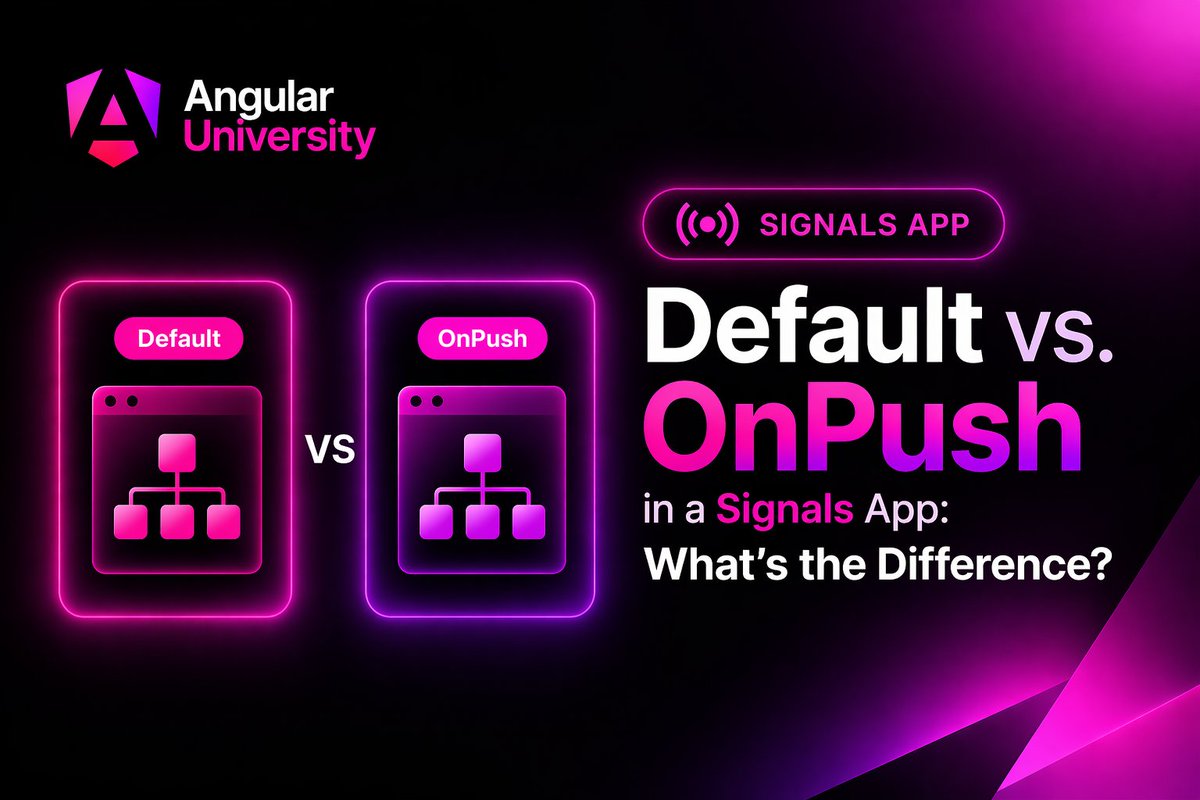
🚦💥𝗗𝗶𝗳𝗳𝗲𝗿𝗲𝗻𝗰𝗲 𝗯𝗲𝘁𝘄𝗲𝗲𝗻 𝗗𝗲𝗳𝗮𝘂𝗹𝘁 𝗖𝗵𝗮𝗻𝗴𝗲 𝗗𝗲𝘁𝗲𝗰𝘁𝗶𝗼𝗻 𝗮𝗻𝗱 𝗢𝗻𝗣𝘂𝘀𝗵 𝗶𝗻 𝗮 𝟭𝟬𝟬% 𝘀𝗶𝗴𝗻𝗮𝗹𝘀-𝗯𝗮𝘀𝗲𝗱 𝗭𝗼𝗻𝗲𝗹𝗲𝘀𝘀 𝗮𝗽𝗽𝗹𝗶𝗰𝗮𝘁𝗶𝗼𝗻?
In practice, no meaningful difference. But still very interesting to know why:
𝗛𝗼��� 𝘀𝗶𝗴𝗻𝗮𝗹𝘀 𝗱𝗿𝗶𝘃𝗲 𝗰𝗵𝗮𝗻𝗴𝗲 𝗱𝗲𝘁𝗲𝗰𝘁𝗶𝗼𝗻
When a signal is read in a template, Angular's reactive graph records that dependency. When the signal updates, Angular internally calls markForCheck() on that component — regardless of its change detection strategy.
Both Default and OnPush get marked dirty and re-rendered by the same mechanism.
𝗪𝗵𝗮𝘁 𝗢𝗻𝗣𝘂𝘀𝗵 𝘄𝗮𝘀 𝗮𝗰𝘁𝘂𝗮𝗹𝗹𝘆 𝘀𝗼𝗹𝘃𝗶𝗻𝗴
OnPush was designed to opt out of the Zone.js-driven "check everything" cycle.
Without it, Zone.js would patch every setTimeout, Promise, XHR, etc. and trigger a full top-down tree walk.
OnPush let you say "only check me if my inputs changed or Iwas explicitly marked dirty."
In a zoneless app, that problem doesn't exist. There is no global tick.
Either:
1 - A signal marks a component dirty
2 - Or you mark the component has dirty yourself explicitly
Notice that the async pipe will also mark the component as dirty, but here I'm assuming a signals-only app.
In a signal-based zoneless app, there's no runaway Zone.js cycle to protect against.
𝗪𝗵𝗮𝘁 𝗵𝗮𝗽𝗽𝗲𝗻𝘀 𝗶𝗳 𝘀𝗶𝗴𝗻𝗮𝗹𝘀 𝗮𝗿𝗲 𝗯𝘆𝗽𝗮𝘀𝘀𝗲𝗱
In this exact type of application, if you accidentally bypass signals — a direct property mutation, a class field updated without signal.set(), etc. — nothing happens.
This hold true for both Default and OnPush - again this is true for a zoneless application specifically.
In a disciplined signals-only codebase that's actually a non-issue - every data modification goes via a signal.
𝗔𝗻𝗴𝘂𝗹𝗮𝗿'𝘀 𝗱𝗶𝗿𝗲𝗰𝘁𝗶𝗼𝗻
In the long term, it looks like fine-grained signal reactivity replaces the more coarse-grained Default/OnPush distinction entirely.
The more concrete near-term step is https://t.co/2VC79F7Wcs,
which proposes making OnPush the schematic default in Angular 22 — because in a signals-first world, Default becomes the odd choice rather than OnPush.
#angular #angular21 #angular22 #onpush #changedetection
🚦💥𝗗𝗶𝗳𝗳𝗲𝗿𝗲𝗻𝗰𝗲 𝗯𝗲𝘁𝘄𝗲𝗲𝗻 𝗗𝗲𝗳𝗮𝘂𝗹𝘁 𝗖𝗵𝗮𝗻𝗴𝗲 𝗗𝗲𝘁𝗲𝗰𝘁𝗶𝗼𝗻 𝗮𝗻𝗱 ���𝗻𝗣𝘂𝘀𝗵 𝗶𝗻 𝗮 𝟭𝟬𝟬% 𝘀𝗶𝗴𝗻𝗮𝗹𝘀-𝗯𝗮𝘀𝗲𝗱 𝗭𝗼𝗻𝗲𝗹𝗲𝘀𝘀 𝗮𝗽𝗽𝗹𝗶𝗰𝗮𝘁𝗶𝗼𝗻?
In practice, no meaningful difference. But still very interesting to know why:
𝗛𝗼𝘄 𝘀𝗶𝗴𝗻𝗮𝗹𝘀 𝗱𝗿𝗶𝘃𝗲 𝗰𝗵𝗮𝗻𝗴𝗲 𝗱𝗲𝘁𝗲𝗰𝘁𝗶𝗼𝗻
When a signal is read in a template, Angular's reactive graph records that dependency. When the signal updates, Angular internally calls markForCheck() on that component — regardless of its change detection strategy.
Both Default and OnPush get marked dirty and re-rendered by the same mechanism.
𝗪𝗵𝗮𝘁 𝗢𝗻𝗣𝘂𝘀𝗵 𝘄𝗮𝘀 𝗮𝗰𝘁𝘂𝗮𝗹𝗹𝘆 𝘀𝗼𝗹𝘃𝗶𝗻𝗴
OnPush was designed to opt out of the Zone.js-driven "check everything" cycle.
Without it, Zone.js would patch every setTimeout, Promise, XHR, etc. and trigger a full top-down tree walk.
OnPush let you say "only check me if my inputs changed or Iwas explicitly marked dirty."
In a zoneless app, that problem doesn't exist. There is no global tick.
Either:
1 - A signal marks a component dirty
2 - Or you mark the component has dirty yourself explicitly
Notice that the async pipe will also mark the component as dirty, but here I'm assuming a signals-only app.
In a signal-based zoneless app, there's no runaway Zone.js cycle to protect against.
𝗪𝗵𝗮𝘁 𝗵𝗮𝗽𝗽𝗲𝗻𝘀 𝗶𝗳 𝘀𝗶𝗴𝗻𝗮𝗹𝘀 𝗮𝗿𝗲 𝗯𝘆𝗽𝗮𝘀𝘀𝗲𝗱
In this exact type of application, if you accidentally bypass signals — a direct property mutation, a class field updated without signal.set(), etc. — nothing happens.
This hold true for both Default and OnPush - again this is true for a zoneless application specifically.
In a disciplined signals-only codebase that's actually a non-issue - every data modification goes via a signal.
𝗔𝗻𝗴𝘂𝗹��𝗿'𝘀 𝗱𝗶𝗿𝗲𝗰𝘁𝗶𝗼𝗻
In the long term, it looks like fine-grained signal reactivity replaces the more coarse-grained Default/OnPush distinction entirely.
The more concrete near-term step is https://t.co/2VC79F7Wcs,
which proposes making OnPush the schematic default in Angular 22 — because in a signals-first world, Default becomes the odd choice rather than OnPush.
#angular #angular21 #angular22 #onpush #changedetection
𝗧𝗵𝗲 𝗔𝗻𝗴𝘂𝗹𝗮𝗿 𝗠𝗖𝗣 𝗦𝗲𝗿𝘃𝗲𝗿 𝗶𝘀 𝗮 𝗴𝗮𝗺𝗲 𝗰𝗵𝗮𝗻𝗴𝗲𝗿 𝗳𝗼𝗿 𝗔𝗜-𝗮𝘀𝘀𝗶𝘀𝘁𝗲𝗱 𝗱𝗲𝘃𝗲𝗹𝗼𝗽𝗺𝗲𝗻𝘁 🚀
It’s a 𝘀𝘁𝗮𝗻𝗱𝗮𝗿𝗱𝗶𝘇𝗲𝗱 𝗔𝗜 "𝗽𝗹𝘂𝗴𝗶𝗻" that gives tools like 𝗖𝗹𝗮𝘂𝗱𝗲 𝗖𝗼𝗱𝗲 direct access to Angular documentation, best practices, and real examples - matched to your project’s Angular version via angular.json.
👉 No more outdated or generic answers
👉 Code generation aligned with latest Angular best practices
👉 Version-aware suggestions (huge for Signals, standalone APIs, etc.)
👉 More accurate debugging and architectural guidance
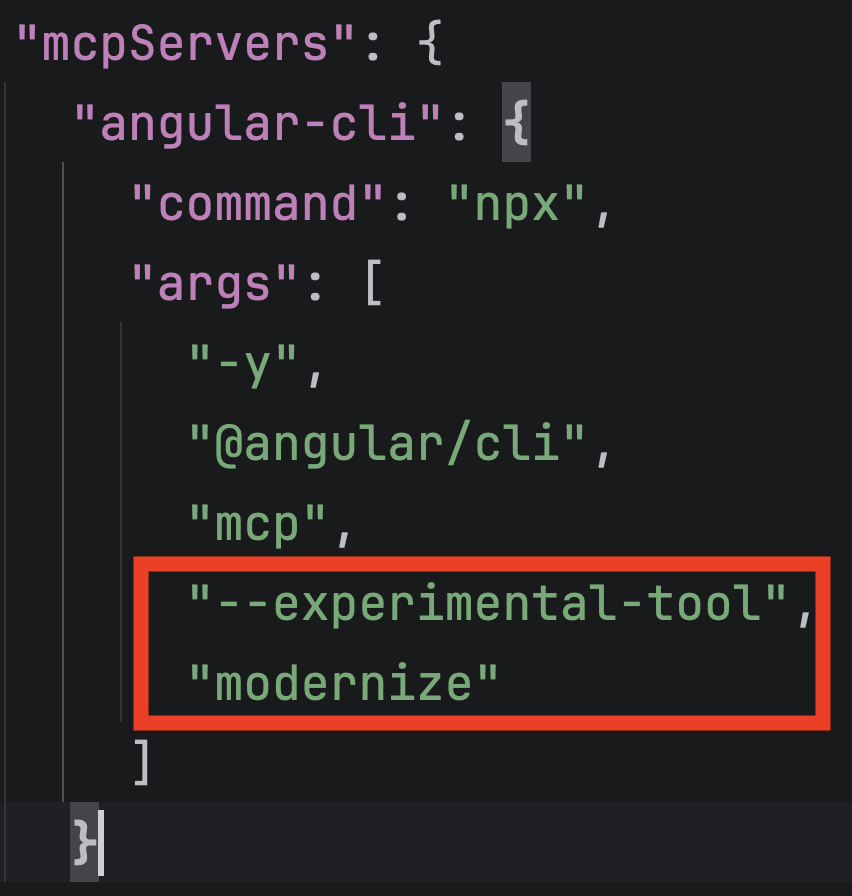
In short: your AI stops hallucinating Angular code and starts writing it the right way. Here is how you can configure your ~/.claude.json to start the MCP server in each Claude Code session.
Notice that experimental tools like modernize (to help with migration to Signals) are off by default: