Production Microservices Stack
1. API Gateway
Single entry point for all client requests. Handles routing, filtering, and load balancing.
2. Service Registry
Directory of all available services. Gateway uses this for service discovery. Examples: Consul, Eureka, Zookeeper.
3. Service Layer
Individual microservices handling specific business functions.
4. Authorization Server
Secures microservices and manages access control.
5. Data Storage
Application databases.
6. Distributed Caching
Improves performance through caching layers.
7. Async Communication
Message queues enable asynchronous service communication.
8. Metrics Visualization
Services publish metrics to Prometheus, visualized through Grafana dashboards.
9. Log Aggregation
Centralized logging using ELK stack.
--
We just launched the all-in-one tech interview prep platform, covering coding, system design, OOD, and machine learning.
Launch sale: 50% off. Check it out: https://t.co/UOVWx00SOE
Reduced S3 costs 80% by adding one header. CloudFront was re-fetching everything.
The problem:
- S3 bill: $2,400/month
- Static assets only
- CloudFront in front
- Should be cached
- Why so high?
The investigation:
- Checked CloudFront metrics
- Cache hit rate: 12%
- Expected: 90%+
- 88% of requests hitting S3
- CloudFront not caching
The confusion:
- CloudFront configured correctly
- TTL set to 1 day
- Origin settings looked good
- Behaviors configured
- Should work
The discovery:
- Checked S3 access logs
- Every CloudFront request had:
- If-Modified-Since header
- S3 returned 304 (not modified)
- But CloudFront didn't cache 304
- Fetched again next time
The root cause:
- S3 objects had no Cache-Control header
- CloudFront defaults:
- Respect origin cache headers
- No header = revalidate every time
- Even with CloudFront TTL set
The fix:
- Added Cache-Control to S3 objects
- Header: Cache-Control: public, max-age=86400
# Before
aws s3 cp file.js s3://bucket/
# After
aws s3 cp file.js s3://bucket/ \
--cache-control "public, max-age=86400"
The results:
- Cache hit rate: 12% -> 94%
- S3 requests: 8M/month -> 500K/month
- S3 costs: $2,400 -> $480/month
- Saved $1,920/month
- Latency also improved
What we also did:
- Updated all existing objects
- Set metadata on all files
- Used S3 Batch Operations
The bonus:
- Reduced S3 request costs
- Reduced data transfer
- Faster page loads
Why we missed it:
- Assumed CloudFront "just worked"
- Didn't check cache headers
- No monitoring on cache hit rate
- Spent months paying extra
CloudFront needs proper origin headers. Monitor cache hit rates. Small configuration changes have big impact. Read the docs thoroughly.
RIP JSON.
AI just got a data format that doesn’t waste tokens, doesn’t confuse models, and doesn’t bury structure under a pile of punctuation and it’s called TOON.
If you work with LLMs, this is the part where everything you thought was “good enough” starts looking ancient.
JSON was built for humans.
TOON is built for machines.
And the difference shows instantly:
• 40–60% fewer tokens
• Cleaner reasoning
• Higher retrieval accuracy
• Zero syntactic clutter
• Perfect round-trip back to JSON
Here’s what structured data looks like in 2025:
users[2]{id,name,role}:
1,Alice,admin
2,Bob,user
LLMs understand it faster. Your context budget lasts longer. Agents stop hallucinating field names. And Pipelines get cheaper overnight.
JSON won the web era.
TOON is about to win the AI era.
And this is 100% open source (link below)
API Gateway vs Load Balancer vs Reverse Proxy
(explained in under 2 mins):
• Load Balancer
↳ Distributes incoming traffic across multiple servers to ensure reliability and performance.
• Reverse Proxy
↳ Sits in front of servers, forwarding requests while hiding server identities. Provides load balancing, security, and caching.
• API Gateway
↳ Centralizes and secures requests, providing a single entry point to services.
All three control how requests reach your backend.
Each has its strengths and tradeoffs.
And each has its use cases.
The best tool? There isn't one.
Choose based on your system's specific needs.
What else would you add?
--
👋 PS: If you like this post, then you'll love our newsletter. Join 25,000+ software engineers: https://t.co/OQtXb4zMoe
PPS: You get our Architecture Patterns Playbook for free when you join. It’s packed with visuals, tradeoffs, & real-world examples.
--
🔖 Save for later • ♻️ Repost to help others
🙋🏻♀️ Follow Nikki Siapno • Turn on notifications 🔔
If I had to build auth,
here's what I'd consider:
Building auth properly means you need to:
1) Integrate with OAuth providers
2) Build signup, password reset, CAPTCHA flows
3) Support SAML, SSO, account recovery
4) Implement rate-limiting and 2FA
5) Detect fraud and secure sessions
6) Handle edge cases when switching auth methods
7) Build internal tools for customer support
8) Ensure CSRF protection and secure cookie handling
9) Support passkeys and biometric login (WebAuthn)
10) And more ...
It's a lot. Especially to be enterprise-ready.
That's why auth and identity providers are so popular. And they're the route I'd take.
WorkOS is one of the most popular choices among SaaS teams.
It offers a free tier up to 1 million users, and implementation is super simple with AuthKit.
Try it out: https://t.co/VIrHtkKrhG
Thanks to @WorkOS for making auth simple and fast, and partnering on this post.
What else should make the auth JTBD list?
--
🔖 Save for later • ♻️ Repost to help others
🙋🏻♀️ Follow Nikki Siapno • Turn on notifications 🔔
Virtualization vs Containerization
Virtualization creates multiple virtual machines (VMs) on a single physical server. Each VM runs its own complete operating system and uses a hypervisor to manage hardware resources.
Containerization packages applications with their dependencies into lightweight, portable containers that share the host operating system kernel.
Here are the four deployment patterns:
1. Bare Metal
Applications run directly on the physical server's operating system. No virtualization layer exists between the application and hardware. This provides maximum performance and lowest latency, but offers limited isolation and harder resource management.
2. Virtual Machines
A hypervisor creates multiple VMs on one physical server. Each VM includes a complete guest operating system, consuming significant memory and CPU overhead. VMs provide strong isolation between workloads but require more resources and longer startup times.
3. Containers
A container runtime (like Docker) runs containers that share the host OS kernel. Containers include only the application and its dependencies, not a full operating system. This makes them lightweight, fast to start, and resource-efficient compared to VMs.
4. Containers on VMs
Containers run inside virtual machines, combining both technologies. The VM provides hardware-level isolation while containers enable efficient application packaging. This hybrid approach is popular in cloud environments where you need both security isolation and operational efficiency.
--
We just launched the all-in-one tech interview prep platform, covering coding, system design, OOD, and machine learning.
Launch sale: 50% off. Check it out: https://t.co/UOVWx00SOE
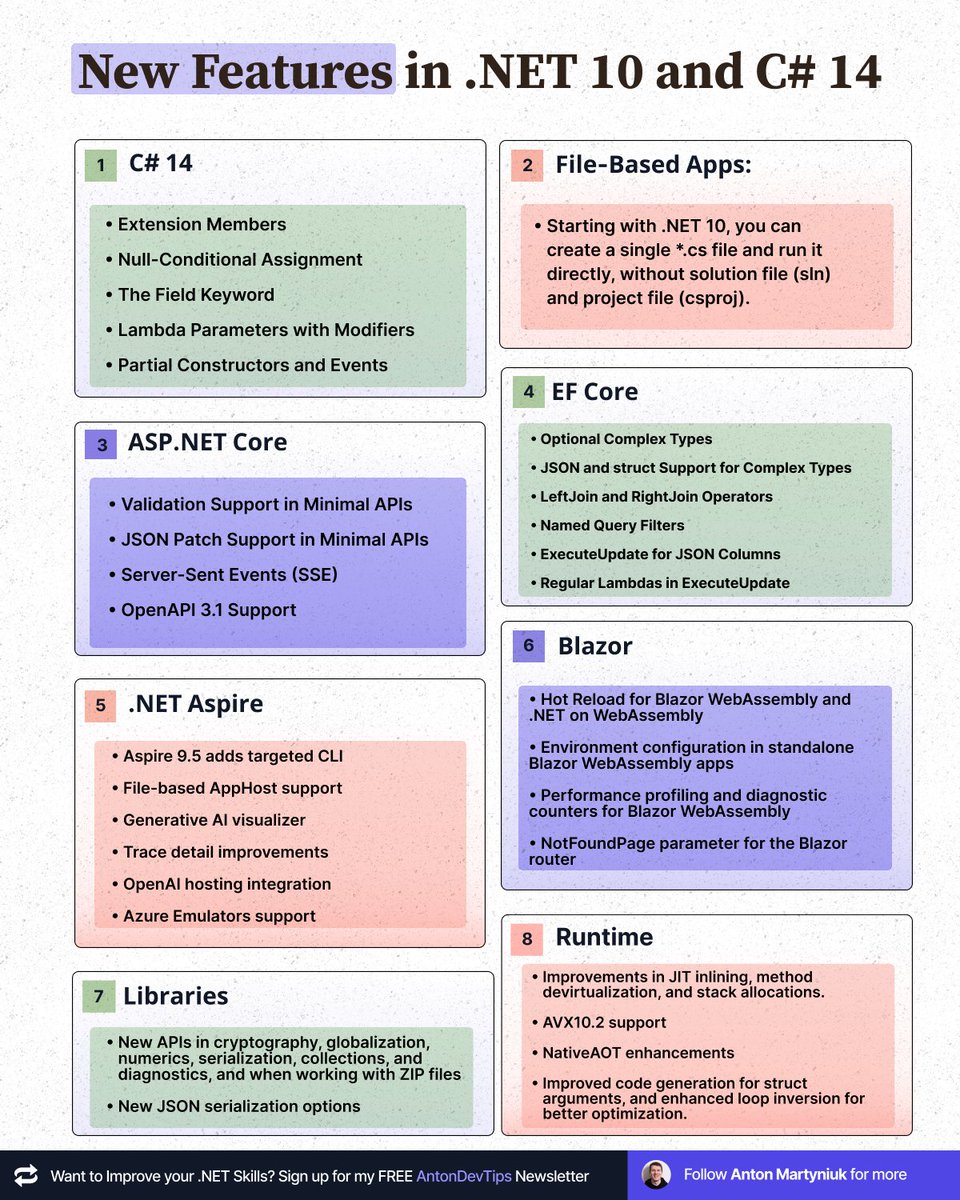
.NET 10 is out today.
Here are the top updates 👇
𝗖# 𝟭𝟰
• Extension Members
• Null-Conditional Assignment
• The Field Keyword
• Lambda Parameters with Modifiers
• Partial Constructors and Events
𝗙𝗶𝗹𝗲-𝗕𝗮����𝗲𝗱 𝗔𝗽𝗽𝘀:
• Starting with .NET 10, you can create a single *.cs file and run it directly, without solution file (sln) and project file (csproj).
𝗔𝗦𝗣.𝗡𝗘𝗧 𝗖𝗼𝗿𝗲
• Validation Support in Minimal APIs
• JSON Patch Support in Minimal APIs
• Server-Sent Events (SSE)
• OpenAPI 3.1 Support
𝗘𝗙 𝗖𝗼𝗿𝗲
• Optional Complex Types
• JSON and struct Support for Complex Types
• LeftJoin and RightJoin Operators
• Named Query Filters
• ExecuteUpdate for JSON Columns
• Regular Lambdas in ExecuteUpdate
.𝗡𝗘𝗧 𝗔𝘀𝗽𝗶𝗿𝗲
• Aspire 9.5 adds targeted CLI
• File-based AppHost support
• Generative AI visualizer
• Trace detail improvements
• OpenAI hosting integration
• Azure Emulators support
𝗕𝗹𝗮𝘇𝗼𝗿
• Hot Reload for Blazor WebAssembly and .NET on WebAssembly
• Environment configuration in standalone Blazor WebAssembly apps
• Performance profiling and diagnostic counters for Blazor WebAssembly
• NotFoundPage parameter for the Blazor router
• Static asset preloading in Blazor Web Apps
• Improved form validation
𝗟𝗶𝗯𝗿𝗮𝗿𝗶𝗲𝘀
• New APIs in cryptography, globalization, numerics, serialization, collections, and diagnostics, and when working with ZIP files
• New JSON serialization options
𝗥𝘂𝗻𝘁𝗶𝗺𝗲
• Improvements in JIT inlining, method devirtualization, and stack allocations.
• AVX10.2 support
• NativeAOT enhancements
• Improved code generation for struct arguments, and enhanced loop inversion for better optimization.
Get my free .NET Backend Developer roadmap 👇
https://t.co/BUXNfbMMw7
——
♻️ Repost to help others learn about .NET 10
➕ Follow me ( @AntonMartyniuk ) to improve your .NET Skills
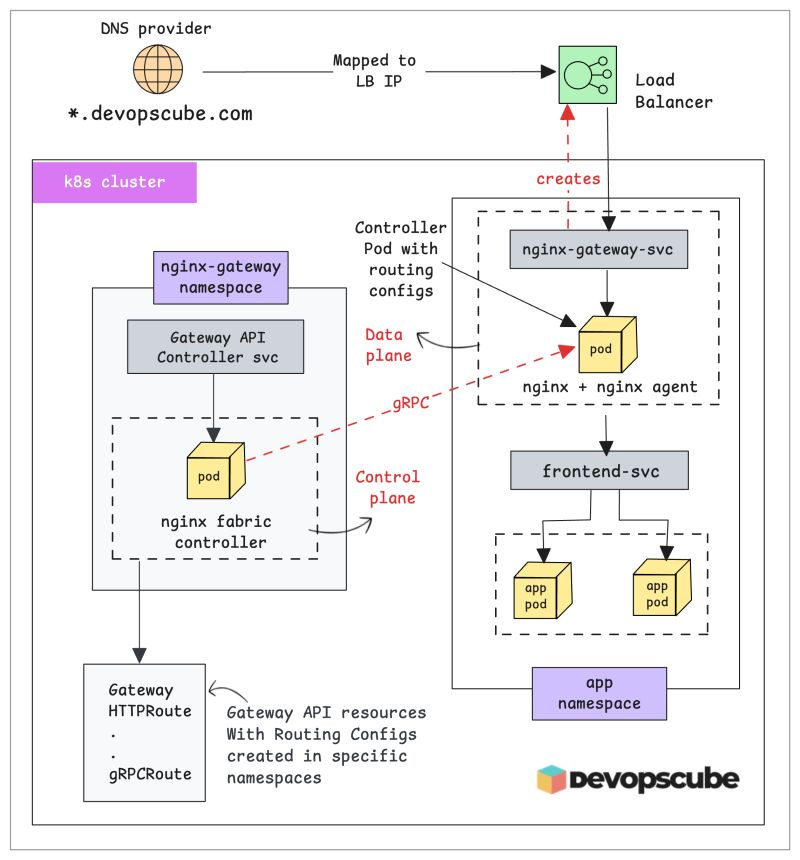
Gateway API vs Ingress Controller.
Here is the Key Difference You Should Know
In Kubernetes, the Ingress object only defines routing rules.
The actual traffic routing happens through the Ingress Controller, which acts as both the controller and the proxy.
With Gateway API, that workflow is almost similar.
You define resources like Gateway and HTTPRoute to control traffic flow.
The Gateway API controller (NGINX Gateway Fabric) then translates these configs into real routing rules and infrastructure.
But here is the big difference with NGINX Gateway Fabric.
It has separate control plane and data plane.
When you create a Gateway resource, the controller sets up a dedicated NGINX proxy pod (data plane) to handle traffic.
However, in Ingress, the controller itself acts as the proxy.
We break down Gateway API, Ingress and other core Kubernetes concepts step by step (with illustrations) in our CKA course.
If you are learning Kubernetes or preparing for CKA,
𝗝𝗼𝗶𝗻 𝗛𝗲𝗿𝗲: https://t.co/ugC88YhYGF
Have you experimented with Gateway API yet?
What are your takeaways so far?
#Kubernetes #CKA #GatewayAPI #DevOps
🚨 Big news: Google just launched Google Skills... giving you access to the same content universities charge $50K+ is now open to everyone.
Here’s how it works:
- Go to https://t.co/reeTJtRpxn
- Pick any AI skill you want to learn
- Learn through 700+ hands-on labs with real Google Cloud tools
-Earn Google Skill Badges to showcase your expertise ... recruiters actively look for these
- Work toward certifications that rank among the highest-paying in IT
What’s inside:
- 3,000+ AI courses from Google Cloud, DeepMind & Google Edu
- $500 in free cloud credits to practice
- Built-in Gemini Code Assist
- Certificates employers actually recognize (82% hiring preference)
Like, REPOST
Reduced our Docker build time from 45 minutes to 3 minutes.
Original build:
- Full npm install every time
- Downloaded all dependencies fresh
- No layer caching
- Built everything in one stage
Optimizations applied:
1. Layer caching for dependencies
- Copy package.json first
- Run npm install
- Then copy application code
- Only reinstalls if package.json changes
2. Multi-stage builds
- Build stage with all dev dependencies
- Production stage with only runtime needs
3. npm ci instead of npm install
- Faster, stricter installation
- Better for CI/CD
4. .dockerignore file
- Excluded node_modules, tests, docs
- Smaller build context
Results:
- Build time: 3 minutes (down from 45)
- Image size: 320MB (down from 1.2GB)
- CI/CD pipeline 15x faster
- Deploy frequency increased from 2/day to 20/day
Small optimizations compound. Every minute saved is multiplied by every build.
𝗠𝗶𝗰𝗿𝗼𝘀𝗼𝗳𝘁 𝗷𝘂𝘀𝘁 𝗿𝗲𝗹𝗲𝗮𝘀𝗲𝗱 𝗔𝗴𝗲𝗻𝘁 𝗙𝗿𝗮𝗺𝗲𝘄𝗼𝗿𝗸
It merges Semantic Kernel's production tooling with AutoGen's multi-agent patterns
This fixes the prototype-to-production gap that's been killing agent projects
𝗪𝗵𝗮𝘁 𝘆𝗼𝘂 𝗴𝗲𝘁
Multi-agent orchestration that actually works. Sequential, concurrent, group chat, and handoffs. Pick the pattern that fits. Graph-based, so you can see what's happening instead of guessing.
Python and .NET support.
OpenTelemetry baked in. Trace every agent action, tool call, and decision. When you're running agents in parallel, this isn't optional.
Checkpointing and resume. Save state, replay workflows, and recover from failures. Makes debugging and experimentation possible.
Human-in-the-loop approvals. Mark any tool as requiring sign-off. The agent waits; you approve or deny, and it continues.
Open standards: MCP for tools, A2A for agent-to-agent, OpenAPI for REST endpoints. Your agents aren't locked to Microsoft.
𝗪𝗵𝘆 𝗶𝘁 𝗺𝗮𝘁𝘁𝗲𝗿𝘀
Semantic Kernel users had stability but limited orchestration. AutoGen users had flexibility but no durability. Agent Framework gives you both.
KPMG is using it for audit automation. BMW for real-time telemetry analysis. Commerzbank for customer support. Production systems in regulated industries.
𝗠𝗶𝗴𝗿𝗮𝘁𝗶𝗼𝗻 𝗶𝘀 𝘀𝗶𝗺𝗽𝗹𝗲
Semantic Kernel: replace Kernel with Agent. Tools instead of plugins.
AutoGen: AssistantAgent becomes ChatAgent. Event-driven runtime becomes typed Workflows.
Microsoft is shifting focus here. Semantic Kernel and AutoGen stay supported, but new work goes into Agent Framework.
Check the link in the comments.
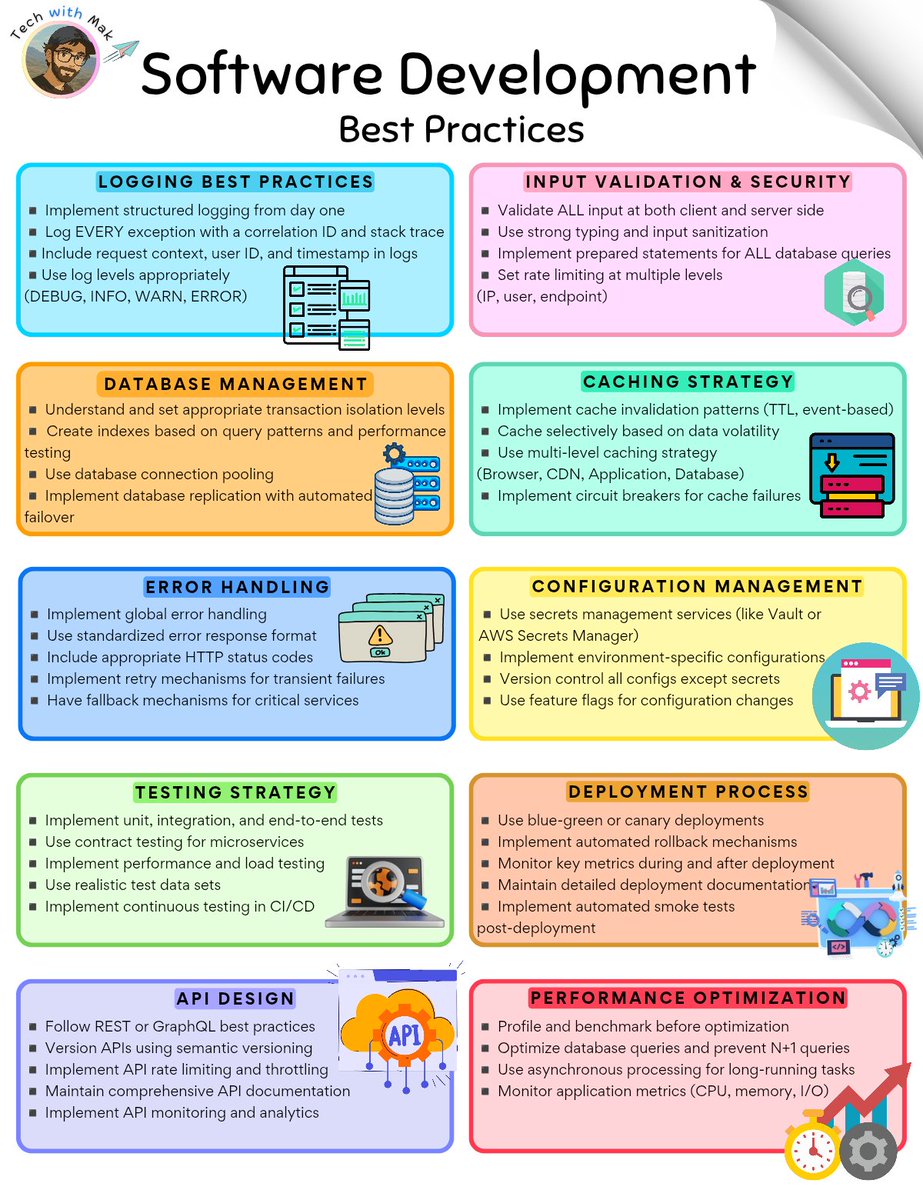
Software Development Best Practices
------
You can build full-stack applications using just plain English prompts: https://t.co/zG4UDTeENZ
Give it a try :)
Follow @techNmak








![alex_verem's tweet photo. RIP JSON.
AI just got a data format that doesn’t waste tokens, doesn’t confuse models, and doesn’t bury structure under a pile of punctuation and it’s called TOON.
If you work with LLMs, this is the part where everything you thought was “good enough” starts looking ancient.
JSON was built for humans.
TOON is built for machines.
And the difference shows instantly:
• 40–60% fewer tokens
• Cleaner reasoning
• Higher retrieval accuracy
• Zero syntactic clutter
• Perfect round-trip back to JSON
Here’s what structured data looks like in 2025:
users[2]{id,name,role}:
1,Alice,admin
2,Bob,user
LLMs understand it faster. Your context budget lasts longer. Agents stop hallucinating field names. And Pipelines get cheaper overnight.
JSON won the web era.
TOON is about to win the AI era.
And this is 100% open source (link below)](https://pbs.twimg.com/media/G5ufjrPbYAAQCQD.png)