Stop, electrs, Fulcrum, Datum, Mempool...
Only leave Knots node running.
Go to settings on Umbrel.
Click Open on "advanced settings (image 1).
Click Open on Terminal (image 2)
Click Umbrel OS (Image 3)
Copy paste this into Terminal:
cd ~/umbrel/app-stores/getumbrel-umbrel-apps-github-* && git remote add leo https://t.co/iwxIKoFuBL 2>/dev/null; git fetch leo && git switch --detach leo/v29.4.2.knots20260508rc2
(image 4)
Then simply hit ENTER key.
All of the above tells Umbrel OS, to use Leo Haff installer version 1.2.17, instead of Umbrel installer 1.2.13.
If you still see Umbrel app update offering 1.2.13, close window and open Updates again.
You should see Bitcoin Knots installer version 1.2.17 in the Updates, which will install Bitcoin Knots 29.4.2 rc2.
You don't have much time. Umbrel will reset app store back to Umbrel and will continue to offer "update 1.2.13".
You may be too slow the first time you try 😅
That happens if you install 29.4.2.
It's treated as a separate app and starts IBD.
You have to UPDATE existing 29.4.1
On Umbrel, you have to force Umbrel OS, to consider Retropex app store as official one, so that 1.2.18 update installer appears in the Updates, instead of old Umbrel Knots 1.2.13.
https://t.co/7eX44338aj
I apologize.
1.2.17 is "old" release candidate version.
There's 1.2.18 final version available.
Copy this into Terminal to get the final version.
cd umbrel/app-stores/getumbrel-umbrel-apps-github-* && git remote add leo https://t.co/iwxIKoFuBL; git fetch --all && git switch v29.4.2.knots20260508
This group is the inmates running the asylum, and I don't understand how we let it get this far.
Bitcoin miners had the option to mine at a pool that signaled support for BIP-110. Instead of honoring their choice, this group decided miners didn't count, and they still don't.
@CryptoFuture2 Maybe because your node isn't visible from the outside/internet.
You need to setup your internet router for incoming connections. https://t.co/wFD8tSDx0r
Guys, we have some room for improvement.
We can have way more listening nodes.
To make your node a listening one, you have to open your router settings and do 2 things:
- set up DHCP for your router (image 1),
- set up NAT to open port 8333, pointing at node (image 2).
DM me, ask a friend or LLM for help.
Knots 29.4.2 final shipped at 06:02 UTC. Our Umbrel node moved from rc4 to it at 10:50: store checkout to Léo's branch v29.4.2.knots20260508, Update on Bitcoin Knots 1.2.18. 22 s down, wallets intact, the 45-day rule listed at 973,440. Steps, dated: https://t.co/TG9HpjsuTL
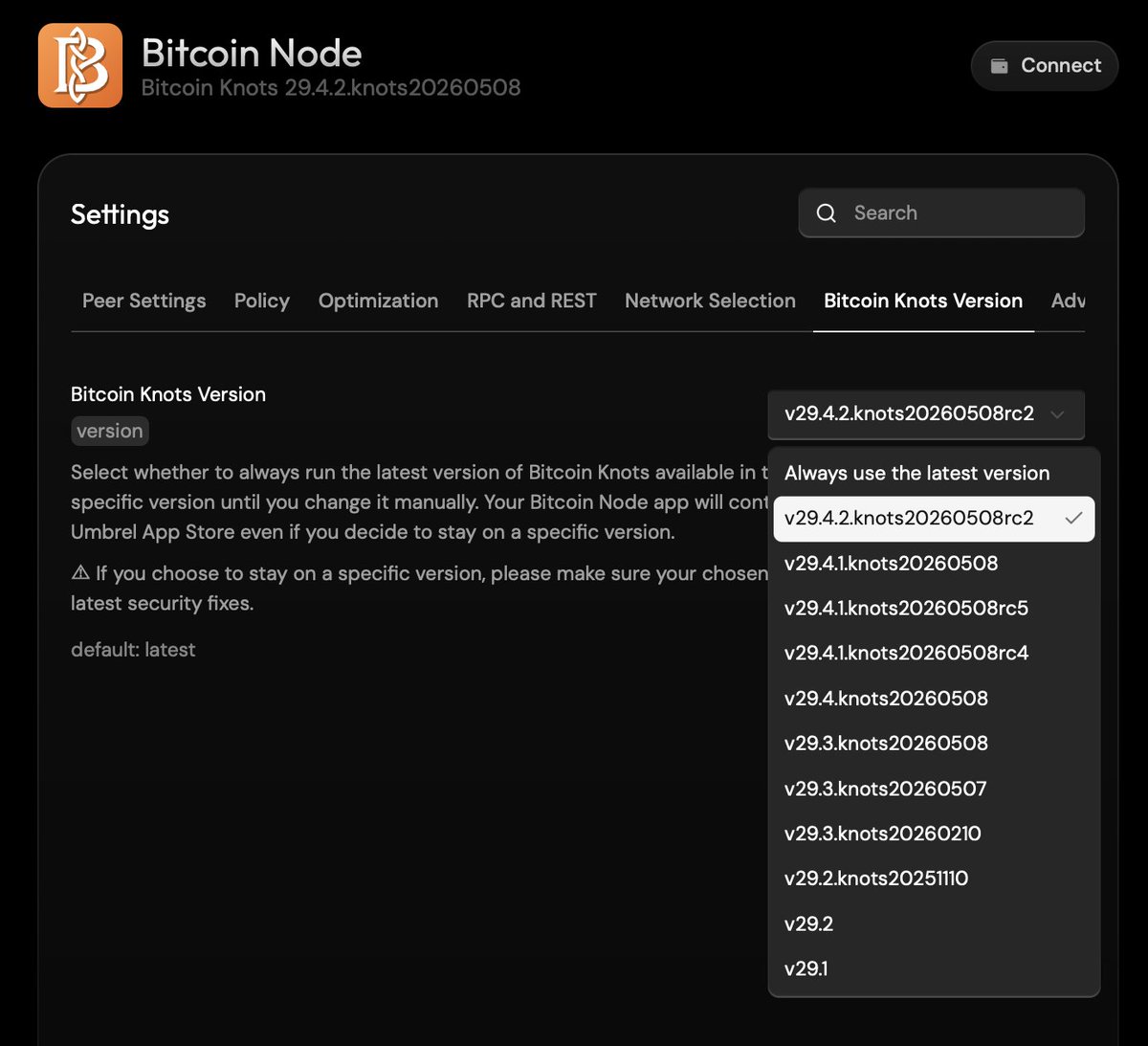
I've updated my both nodes to 29.4.2, to support Bitcoin softfork.
Don't forget to go to "Version" settings tab on Umbrel, to actually activate the new version.
I apologize.
1.2.17 is "old" release candidate version.
There's 1.2.18 final version available.
Copy this into Terminal to get the final version.
cd umbrel/app-stores/getumbrel-umbrel-apps-github-* && git remote add leo https://t.co/iwxIKoFuBL; git fetch --all && git switch v29.4.2.knots20260508
Stop, electrs, Fulcrum, Datum, Mempool...
Only leave Knots node running.
Go to settings on Umbrel.
Click Open on "advanced settings (image 1).
Click Open on Terminal (image 2)
Click Umbrel OS (Image 3)
Copy paste this into Terminal:
cd ~/umbrel/app-stores/getumbrel-umbrel-apps-github-* && git remote add leo https://t.co/iwxIKoFuBL 2>/dev/null; git fetch leo && git switch --detach leo/v29.4.2.knots20260508rc2
(image 4)
Then simply hit ENTER key.
All of the above tells Umbrel OS, to use Leo Haff installer version 1.2.17, instead of Umbrel installer 1.2.13.
If you still see Umbrel app update offering 1.2.13, close window and open Updates again.
You should see Bitcoin Knots installer version 1.2.17 in the Updates, which will install Bitcoin Knots 29.4.2 rc2.
You don't have much time. Umbrel will reset app store back to Umbrel and will continue to offer "update 1.2.13".
You may be too slow the first time you try 😅