If I restarted my career today, I'd read these 7 books first.
13+ years in .NET taught me one thing about books:
The order matters as much as the books themselves.
Here's my order 👇
1. 𝗧𝗵𝗲 𝗣𝗿𝗮𝗴𝗺𝗮𝘁𝗶𝗰 𝗣𝗿𝗼𝗴𝗿𝗮𝗺𝗺𝗲𝗿 (Andy Hunt, Dave Thomas)
↳ Read it in your first year.
↳ Small habits that make people trust your code.
2. 𝗥𝗲𝗳𝗮𝗰𝘁𝗼𝗿𝗶𝗻𝗴 (Martin Fowler)
↳ How to change code in small, safe steps.
↳ You'll use this skill every day, on every project.
3. 𝗛𝗲𝗮𝗱 𝗙𝗶𝗿𝘀𝘁 𝗗𝗲𝘀𝗶𝗴𝗻 𝗣𝗮𝘁𝘁𝗲𝗿𝗻𝘀 (Eric Freeman, Elisabeth Robson)
↳ Patterns explained with pictures and stories you remember.
↳ After Refactoring, you see why each pattern exists.
4. 𝗗𝗲𝘀𝗶𝗴𝗻𝗶𝗻𝗴 𝗗𝗮𝘁𝗮-𝗜𝗻𝘁𝗲𝗻𝘀𝗶𝘃𝗲 𝗔𝗽𝗽𝗹𝗶𝗰𝗮𝘁𝗶𝗼𝗻𝘀 (Martin Kleppmann)
↳ How databases, replication and queues really work.
↳ You stop guessing why a system is slow.
5. 𝗦𝘆𝘀𝘁𝗲𝗺 𝗗𝗲𝘀𝗶𝗴𝗻 𝗜𝗻𝘁𝗲𝗿𝘃𝗶𝗲𝘄, 𝗩𝗼𝗹. 𝟭 (Alex Xu)
↳ A 4-step way to design any system.
↳ Worth reading regardless if you plan to go to interviews.
6. 𝗕𝘂𝗶𝗹𝗱𝗶𝗻𝗴 𝗘𝘃𝗼𝗹𝘂𝘁𝗶𝗼𝗻𝗮𝗿𝘆 𝗔𝗿𝗰𝗵𝗶𝘁𝗲𝗰𝘁𝘂𝗿𝗲𝘀 (Neal Ford, Rebecca Parsons, Patrick Kua)
↳ Requirements change every month. This book shows how to design for it.
↳ Fitness functions: automated checks that protect your architecture.
7. 𝗛𝗲𝗮𝗱 𝗙𝗶𝗿𝘀𝘁 𝗦𝗼𝗳𝘁𝘄𝗮𝗿𝗲 𝗔𝗿𝗰𝗵𝗶𝘁𝗲𝗰𝘁𝘂𝗿𝗲 (Raju Gandhi, Mark Richards, Neal Ford)
↳ The friendliest step from senior developer to architect.
↳ Styles, trade-offs, and how to explain your decisions.
📌 𝗪𝗵𝘆 𝘁𝗵𝗶𝘀 𝗼𝗿𝗱𝗲𝗿 𝘄𝗼𝗿𝗸𝘀:
→ Books 1 to 3 make you a developer people want on their team.
→ Books 4 and 5 show you how real systems behave.
→ Books 6 and 7 teach you how to make decisions.
You can read all of them in a year. And it will change your career hugely.
Which book would you add as #8?
I'd learn them in the same order. In my projects, I combine the first two: Vertical Slices for organizing features, with Clean Architecture boundaries to keep the domain free from EF Core and other infrastructure.
For most new projects, I start with a Modular Monolith. It gives clear module boundaries from day one, and I only extract a module into a service when it needs to scale or deploy on its own.
I'd also add Domain-Driven Design basics next to step 3. Bounded contexts are what tell you where to draw the module boundaries in the first place.
Also, Native AOT starts much faster and uses less memory, since there is no JIT work at startup. This makes it great for serverless functions, CLI tools, and containers that scale often. Or just apps that don't require having the .NET runtime installed and don't want to be a self-contained app with hundreds of DLLs.
Despite Native AOT being compiled into machine code, the long-running APIs, JIT can reach higher peak speed. Dynamic PGO optimizes your hot methods based on how the app really runs, and Native AOT can't do that.
And of course, Native AOT apps have limitations, such as runtime code generation, reflection and others.
P.S.: great visual
Your developers should also possess the following skills:
1) Communication: explaining a technical problem to a manager or client in plain words
2) Ownership: taking a task from vague idea to production without someone pushing you
3) Business understanding: knowing why a feature matters and who pays for it
4) Estimation: giving realistic timelines and flagging risks early
5) Saying no: pushing back on scope or deadlines with clear reasons
6) Writing: clear docs, PR descriptions, and design proposals
For me, the biggest one is trade-off thinking. A senior developer can explain why they chose one option and what they gave up for it.
Most .NET developers I know still write code in Visual Studio.
And most of them run their AI agent in a separate terminal next to it.
I see this setup in almost every team I talk to.
Every task turns into a hand-off between 2-3 windows:
❌ The agent edits files on disk, and Visual Studio asks you to reload them
❌ It renames a type by editing 20 files one by one, while a refactoring would do it in one step
❌ You review the diff in another app, without your code inspections
❌ Each agent comes with its own app, so trying a different one means a new setup
The agent was working outside the IDE.
So all the tools in Visual Studio sat unused.
Here's the setup I tested last week:
𝗦𝘁𝗲𝗽 𝟭: 𝗞𝗲𝗲𝗽 𝗩𝗶𝘀𝘂𝗮𝗹 𝗦𝘁𝘂𝗱𝗶𝗼 𝗮𝘀 𝘁𝗵𝗲 𝗵𝗼𝗺𝗲 𝗯𝗮𝘀𝗲
Your solution, debugger and test runner are already there.
The agent should work in the same place.
𝗦𝘁𝗲𝗽 𝟮: 𝗣𝗶𝗰𝗸 𝘁𝗵𝗲 𝗮𝗴𝗲𝗻𝘁 𝗶𝗻 𝗥𝗲𝗦𝗵𝗮𝗿𝗽𝗲𝗿 𝟮𝟬𝟮𝟲.𝟯
ReSharper 2026.3 shipped on November 10.
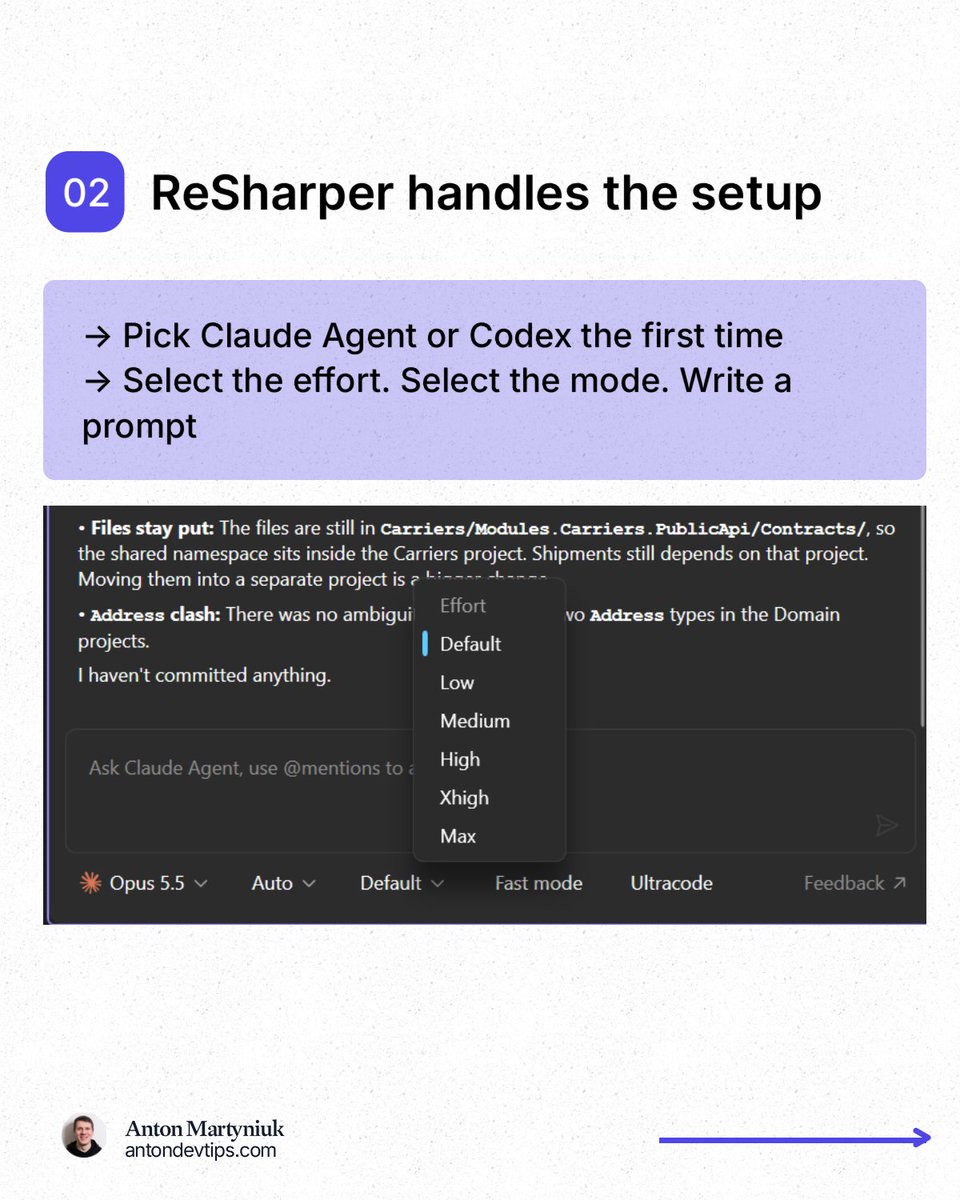
In the AI Assistant tool window, you choose Junie, Claude Agent or Codex.
ReSharper connects them through the Agent Client Protocol (ACP) and handles the setup.
The first time you pick Claude Agent or Codex, it asks for your consent and installs it.
You can pick a different agent for each task, so you're never locked into one vendor.
ACP support is still in the works, and the list of agents is going to grow.
𝗦𝘁𝗲𝗽 𝟯: 𝗟𝗲𝘁 𝘁𝗵𝗲 𝗮𝗴𝗲𝗻𝘁 𝘂𝘀𝗲 𝗥𝗲𝗦𝗵𝗮𝗿𝗽𝗲𝗿 𝗿𝗲𝗳𝗮𝗰𝘁𝗼𝗿𝗶𝗻𝗴𝘀
My project was a modular monolith that needed a new module.
↳ Claude Agent explained how the Orders module calls Billing
↳ Codex moved the shared contracts into a new namespace
↳ Then it ran dotnet test from the same window
This is the part I liked most.
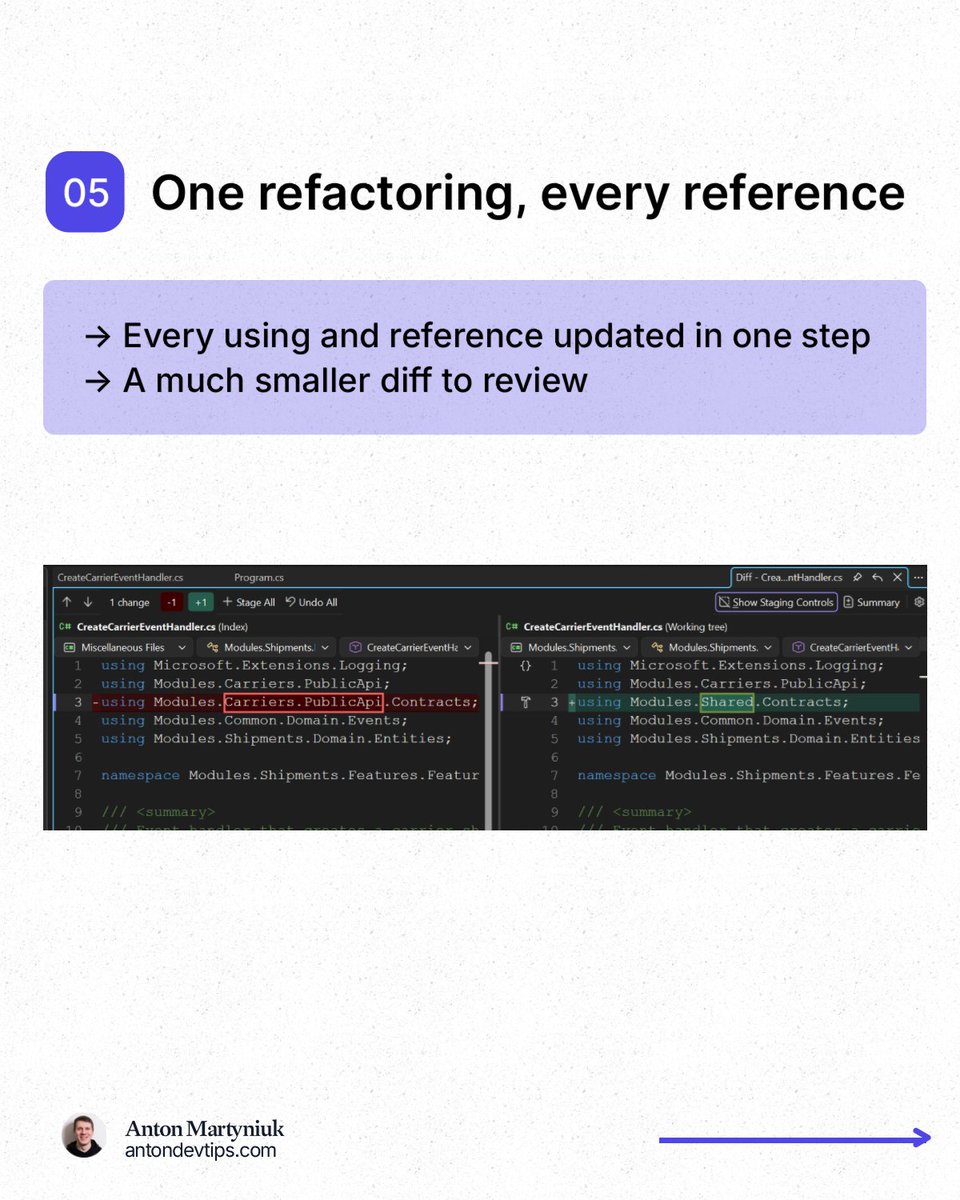
Codex used ReSharper's Move refactoring.
Every using and reference got updated in one step.
Agents can run Rename and other ReSharper refactorings the same way.
Fewer hand edits means a smaller diff to review.
𝗦𝘁𝗲𝗽 𝟰: 𝗥𝗲𝘃𝗶𝗲𝘄 𝘁𝗵𝗲 𝗿𝗲𝘀𝘂𝗹𝘁 𝘄𝗶𝘁𝗵 𝗥𝗲𝗦𝗵𝗮𝗿𝗽𝗲𝗿
The changes land in your solution with inspections on.
You check them, run the tests and decide what stays.
👉 Try the agents in ReSharper 2026.3 here: https://t.co/GaRqqyeNtz
Junie Lite is free and needs only your JetBrains account. Other agents only support JetBrains AI subscriptions for now.
——
Many thanks to @jetbrains for sponsoring this post #ad
10 reasons .NET is better than PHP
PHP still runs a huge part of the web.
But for a new backend in 2026, I'd pick .NET.
I've built .NET apps for 13+ years.
Here's an honest list from both sides:
10 reasons .NET is better than PHP
1. Your app stays in memory
↳ Classic PHP boots your app on every request. ASP .NET Core starts once and keeps running.
2. Faster web apps
↳ ASP .NET Core ranks near the top of the TechEmpower benchmarks, far above Laravel and Symfony.
3. Types checked at build time
↳ The C# compiler catches type errors before you run anything. PHP checks types at runtime, so you add PHPStan or Psalm.
4. Real generics
↳ List<Order> is a real type in C#. PHP has no generics, only docblock comments for static analyzers.
5. async/await built in
↳ No extra extensions. In PHP, you reach for Swoole, ReactPHP or Fibers with a library.
6. Background work in the same app
↳ A BackgroundService runs next to your API. In PHP, you run separate queue workers under Supervisor.
7. Real multi-threading
↳ Tasks, Parallel and Channels in the box. A PHP request runs on one thread.
8. Typed queries with LINQ
↳ EF Core checks your queries at compile time. Eloquent and Doctrine use strings for many column names.
9. Safe refactoring
↳ Rename a property and the IDE updates every usage. Magic methods and string keys in PHP make that risky.
10. One language for every app
↳ Web, desktop, mobile, cloud, AI and games with Unity. All in C#.
---
👉 5 reasons PHP is better than .NET
1. Cheap hosting everywhere
↳ Almost any shared host runs PHP for a few dollars a month.
2. The WordPress world
↳ WordPress, WooCommerce and Drupal power a big part of the web. Plugins and themes for everything.
3. Fastest start for simple sites
↳ Save a file, refresh the page. No build step.
4. Laravel's developer experience
↳ Auth, queues, mail and admin panels out of the box, with one CLI.
5. Many web developers know it
↳ Lots of freelancers and agencies, easy to find help for a small project.
📌 PHP started in 1995 as a set of tools for personal home pages.
.NET came in 2002 and went open-source and cross-platform with .NET Core in 2016.
PHP got scalar type hints in PHP 7 (2015) and a JIT in PHP 8 (2020).
→ PHP owns content sites and cheap hosting
→ .NET has the stronger type system and runtime for complex backends
Pick PHP when you build a WordPress site, a simple CRUD app, or your team already lives in Laravel.
Pick .NET when your backend has complex business logic, heavy traffic or long-running work.
Which would you pick for your next backend: .NET or PHP?
——
➕ Follow me to improve your .NET and Architecture Skills
@milan_milanovic Also, another point: backend technologies live much longer than frontend ones; it's always been this way. Frontend languages actually live for long too: JavaScript, TypeScript. But frontend frameworks die faster.
That's because it's easier to change frontend to something else.
@mjovanovictech What if you keep your own machine safe and without production keys (all that stuff?) So you can reach production only from a limited environment that the agents don't have access to?
📌 You don't read my newsletter.
But 28,000+ developers at Microsoft, Google, Amazon, Datadog, Redis and MongoDB - read it once per week.
👉 Go from .NET developer to architect, in 10 minutes a week. Join for free: https://t.co/1UhIcE90Ba
10 reasons .NET is better than PHP
PHP still runs a huge part of the web.
But for a new backend in 2026, I'd pick .NET.
I've built .NET apps for 13+ years.
Here's an honest list from both sides:
10 reasons .NET is better than PHP
1. Your app stays in memory
↳ Classic PHP boots your app on every request. ASP .NET Core starts once and keeps running.
2. Faster web apps
↳ ASP .NET Core ranks near the top of the TechEmpower benchmarks, far above Laravel and Symfony.
3. Types checked at build time
↳ The C# compiler catches type errors before you run anything. PHP checks types at runtime, so you add PHPStan or Psalm.
4. Real generics
↳ List<Order> is a real type in C#. PHP has no generics, only docblock comments for static analyzers.
5. async/await built in
↳ No extra extensions. In PHP, you reach for Swoole, ReactPHP or Fibers with a library.
6. Background work in the same app
↳ A BackgroundService runs next to your API. In PHP, you run separate queue workers under Supervisor.
7. Real multi-threading
↳ Tasks, Parallel and Channels in the box. A PHP request runs on one thread.
8. Typed queries with LINQ
↳ EF Core checks your queries at compile time. Eloquent and Doctrine use strings for many column names.
9. Safe refactoring
↳ Rename a property and the IDE updates every usage. Magic methods and string keys in PHP make that risky.
10. One language for every app
↳ Web, desktop, mobile, cloud, AI and games with Unity. All in C#.
---
👉 5 reasons PHP is better than .NET
1. Cheap hosting everywhere
↳ Almost any shared host runs PHP for a few dollars a month.
2. The WordPress world
↳ WordPress, WooCommerce and Drupal power a big part of the web. Plugins and themes for everything.
3. Fastest start for simple sites
↳ Save a file, refresh the page. No build step.
4. Laravel's developer experience
↳ Auth, queues, mail and admin panels out of the box, with one CLI.
5. Many web developers know it
↳ Lots of freelancers and agencies, easy to find help for a small project.
📌 PHP started in 1995 as a set of tools for personal home pages.
.NET came in 2002 and went open-source and cross-platform with .NET Core in 2016.
PHP got scalar type hints in PHP 7 (2015) and a JIT in PHP 8 (2020).
→ PHP owns content sites and cheap hosting
→ .NET has the stronger type system and runtime for complex backends
Pick PHP when you build a WordPress site, a simple CRUD app, or your team already lives in Laravel.
Pick .NET when your backend has complex business logic, heavy traffic or long-running work.
Which would you pick for your next backend: .NET or PHP?
——
➕ Follow me to improve your .NET and Architecture Skills
Your 10-day plan to pass a senior .NET interview in 2027.
Skip any of these 5 stages, and the offer goes to someone else.
Here is what each stage really tests 👇
𝟭. 𝗙𝗶𝗻𝗱 𝘆𝗼𝘂𝗿 𝗴𝗮𝗽𝘀 (Day 1)
↳ Mid-level, senior and lead interviews measure different things
↳ A 5-minute self-audit shows where to spend your time
↳ Skip it, and you re-read docs hoping the right topics come up
𝟮. 𝗔𝗻𝘀𝘄𝗲𝗿 𝘁𝗵𝗲 𝘁𝗲𝗰𝗵𝗻𝗶𝗰𝗮𝗹 𝗿𝗼𝘂𝗻𝗱𝘀 (Days 2-6)
↳ C#, async and memory, ASP .NET Core, EF Core, security
↳ You must explain how the runtime, pipeline and ORM work inside
↳ Async, threading and memory are where seniors get separated
𝟯. 𝗣𝗮𝘀𝘀 𝘀𝘆𝘀𝘁𝗲𝗺 𝗱𝗲𝘀𝗶𝗴𝗻 (Day 7)
↳ This is where many strong coders freeze
↳ A 5-step framework takes you from the first question to the final design
↳ Interviewers care about your trade-offs more than a "perfect" answer
𝟰. 𝗚𝗲𝘁 𝗶𝗻𝘃𝗶𝘁𝗲𝗱 (Days 8-9)
↳ No invite, no interview
↳ A portfolio project and an active GitHub show real work
↳ A clear LinkedIn profile brings recruiters to you
𝟱. 𝗪𝗶𝗻 𝘁𝗵𝗲 𝗿𝗼𝗼𝗺 (Day 10)
↳ Practice your answers out loud before the real call
↳ Prepare 4 stories in STAR form (Situation, Task, Action, Result)
↳ Ask good questions back and have your salary number ready
📌 Many developers prepare only for stage 2.
The offer depends on all 5.
I turned this plan into a free 10-day email course: 𝗣𝗮𝘀𝘀 .𝗡𝗘𝗧 𝗜𝗻𝘁𝗲𝗿𝘃𝗶𝗲𝘄𝘀.
1 short lesson a day (5-10 minutes) + a task to finish the same day.
👉 Start it here for free:
↳ https://t.co/RCAufgZWP7
Which interview stage is the hardest for you?
📌 One thing I learned from interviewing .NET developers myself:
I keep seeing strong engineers fail for the same reason. They never saw the full list of what they are measured on.
You learn what your current job needs. Then a senior interview asks about deadlocks, query performance or system design, things you never had a reason to touch.
The list of topics isn't endless. It's a known map, and this 10-day plan walks you through it one day at a time.
👉 Get one lesson a day in your inbox, for free: https://t.co/sGboxvat6J
Your 10-day plan to pass a senior .NET interview in 2027.
Skip any of these 5 stages, and the offer goes to someone else.
Here is what each stage really tests 👇
𝟭. 𝗙𝗶𝗻𝗱 𝘆𝗼𝘂𝗿 𝗴𝗮𝗽𝘀 (Day 1)
↳ Mid-level, senior and lead interviews measure different things
↳ A 5-minute self-audit shows where to spend your time
↳ Skip it, and you re-read docs hoping the right topics come up
𝟮. 𝗔𝗻𝘀𝘄𝗲𝗿 𝘁𝗵𝗲 𝘁𝗲𝗰𝗵𝗻𝗶𝗰𝗮𝗹 𝗿𝗼𝘂𝗻𝗱𝘀 (Days 2-6)
↳ C#, async and memory, ASP .NET Core, EF Core, security
↳ You must explain how the runtime, pipeline and ORM work inside
↳ Async, threading and memory are where seniors get separated
𝟯. 𝗣𝗮𝘀𝘀 𝘀𝘆𝘀𝘁𝗲𝗺 𝗱𝗲𝘀𝗶𝗴𝗻 (Day 7)
↳ This is where many strong coders freeze
↳ A 5-step framework takes you from the first question to the final design
↳ Interviewers care about your trade-offs more than a "perfect" answer
𝟰. 𝗚𝗲𝘁 𝗶𝗻𝘃𝗶𝘁𝗲𝗱 (Days 8-9)
↳ No invite, no interview
↳ A portfolio project and an active GitHub show real work
↳ A clear LinkedIn profile brings recruiters to you
𝟱. 𝗪𝗶𝗻 𝘁𝗵𝗲 𝗿𝗼𝗼𝗺 (Day 10)
↳ Practice your answers out loud before the real call
↳ Prepare 4 stories in STAR form (Situation, Task, Action, Result)
↳ Ask good questions back and have your salary number ready
📌 Many developers prepare only for stage 2.
The offer depends on all 5.
I turned this plan into a free 10-day email course: 𝗣𝗮𝘀𝘀 .𝗡𝗘𝗧 𝗜𝗻𝘁𝗲𝗿𝘃𝗶𝗲𝘄𝘀.
1 short lesson a day (5-10 minutes) + a task to finish the same day.
👉 Start it here for free:
↳ https://t.co/RCAufgZWP7
Which interview stage is the hardest for you?
Important note: disable TRACE on your production servers. It echoes the full request back, including cookies and auth headers, which opens the door to cross-site tracing attacks.
Check support before you use QUERY. Many proxies, CDNs, firewalls, and client libraries still don't recognize it. Some will block the request or fail to cache it.
Database query planner is pretty smart, and it removes unneeded joins. In this case, in the previous EF Core version, the split query used an inner join, and its variable was used in the `ORDER BY` statement. That's why the query planner was not able to remove it, but it was pretty unnecessary.
Practical use case of using union types:
1) Returning different outcomes from your application layer handlers and services, which would translate to success and error HTTP codes in the API layer.
2) Using it for a result pattern (instead of throwing exceptions at the application level for business errors).
Closed hierarchies made a good addition to union types.
I hope closed enum types will make a fit in .NET 12 and C# 16. Now it's a champion proposal.
Note: how to inject a scoped dependency into a singleton.
Inject IServiceScopeFactory into the singleton and create a new scope for each unit of work. Use "await using var scope = scopeFactory.CreateAsyncScope();" and resolve the DbContext from scope.ServiceProvider.
Don't resolve scoped services from an injected IServiceProvider. In a singleton, it's the root provider, so your DbContext lives until the app stops and gets shared across threads. IServiceScopeFactory makes the scope explicit and disposes everything when the work is done.
@kristijan_kralj P.S.: Don't use the Autofac library, it's outdated. Use Microsoft DI. Every package that you can find on NuGet gives you Microsoft DI extension methods, not for Autofac.
MassTransit v9 is paid, you can use V8 for free (or switch to Wolverine).