Certifications you can take { for free }:
Software Engineering:
~ https://t.co/4Npq4GVa0h
Python, ML, AI:
~ https://t.co/tx15laH64a
Project Management:
~ https://t.co/e1NS1NFLCn
Digital Marketing:
~ https://t.co/PotTBsQbVf
More certifications:
~ https://t.co/GDmqZmgbep
Classes & Objects in Javascript:
1. Class: The Blueprint or Template
A class in JavaScript is like a template or a mold for creating multiple objects that share the same structure and behavior.
It defines:
- Properties (attributes):
which describe the object’s characteristics.
- Methods (functions):
which describe the object’s behaviors or actions.
However, a class by itself doesn't represent a specific thing, it’s just a blueprint.
It only defines what an object should have or be able to do but doesn’t have any real values attached to it.
2. Object: The Instance
An object is the real-world representation of a class.
It’s a specific instance of a class with real data and can use the methods defined by the class.
In simpler terms, objects are created using the class as a blueprint, but each object can have its own unique data.
When you create an object, you assign it specific values for the properties defined in the class.
These values can differ between objects even though they’re created from the same class.
- Why Use Classes and Objects?
1. Without Classes: Repetitive Code
Without classes, we’d have to manually define the same structure again and again for each object,
which can lead to repetitive and error-prone code.
2. With Classes: Code Reusability and Clarity
With classes, you define the structure once and can reuse it to create as many objects as you want.
This makes your code more maintainable and scalable.
Summary:
1. Class:
Defines the structure (properties like color, brand) and behavior (methods like drive()) of the objects.
Does not hold actual data itself, just the instructions for what objects should look like and how they should behave.
2. Object:
An instance of the class, with real values.
Each object has its own unique data
(e.g., myCar is a red Toyota, yourCar is a blue Honda) but shares the structure and methods of the class.
𝐒𝐐𝐋 𝐯𝐬 𝐍𝐨𝐒𝐐𝐋 - 7 𝐊𝐞𝐲 𝐃𝐢𝐟𝐟𝐞𝐫𝐞𝐧𝐜𝐞𝐬 You Must Know
1. 𝐃𝐚𝐭𝐚 𝐌𝐨𝐝𝐞𝐥
SQL: Uses a relational data model where data is stored in tables with rows and columns.
NoSQL: Offers a variety of data models including key-value, document, column-family, and graph models.
2. 𝐒𝐜𝐚𝐥𝐚𝐛𝐢𝐥𝐢𝐭𝐲
SQL: Primarily scales vertically by increasing the hardware resources (CPU, RAM, SSD) of a single server.
NoSQL: Designed for horizontal scalability, allowing distribution of load across multiple servers.
3. 𝐒𝐜𝐡𝐞𝐦𝐚
SQL: Enforces a strict schema with predefined tables, columns, and data types, making it more suitable for structured data.
NoSQL: Typically use a dynamic schema, perfect for unstructured or evolving data.
4. 𝐓𝐫𝐚𝐧𝐬𝐚𝐜𝐭𝐢𝐨𝐧 𝐒𝐮𝐩𝐩𝐨𝐫𝐭
SQL: Provides strong support for ACID transactions (Atomicity, Consistency, Isolation, Durability), ensuring data validity even in the event of errors, power failures, etc.
NoSQL: Many NoSQL databases sacrifice ACID compliance for scalability and availability. However, some NoSQL databases offer tunable consistency models.
5. 𝐐𝐮𝐞𝐫𝐲 𝐋𝐚𝐧𝐠𝐮𝐚𝐠𝐞
SQL: Uses Structured Query Language (SQL) to perform operations such as data retrieval, insertion, update, and deletion. SQL databases excel at performing complex queries across multiple tables.
NoSQL: NoSQL databases do not have a standard query language. Each NoSQL database may have its query syntax or API, depending on its data model.
6. 𝐏𝐞𝐫𝐟𝐨𝐫𝐦𝐚𝐧𝐜𝐞
SQL: Optimized for complex queries and joins across multiple tables. This can lead to slower performance for certain types of queries, especially as data volume grows.
NoSQL: Designed for high-performance, simple read/write operations. By denormalizing data and optimizing for specific access patterns, NoSQL databases can achieve extremely low latency for certain operations.
7. 𝐔𝐬𝐞 𝐂𝐚𝐬𝐞𝐬
SQL: Well-suited for applications requiring complex queries and transactions, such as financial systems, e-commerce platforms, and applications with strong data consistency requirements.
NoSQL: Used in scenarios involving large volumes of rapidly changing, unstructured data, such as real-time web applications, IoT data processing, and big data analytics.
♻️ Repost to help others in your network.
👉 Get a FREE System Design Interview Handbook in your inbox by joining our free newsletter: https://t.co/kPG9KUwHIy
DOM in a nutshell:
1. What is the DOM?
DOM stands for The Document Object Model (DOM).
The DOM is like a map of a webpage that computers use to understand and change web pages.
It's a way for computer programs, like JavaScript, to talk to and change what you see on a website.
The DOM is not a part of JavaScript itself but is provided by web browsers as an API (Application Programming Interface) that JavaScript can use to interact with web pages.
2. DOM Elements and Tree Structure:
Think of a web page like a tree with branches.
Each part of the page, like text, pictures, and buttons, is a branch (or node) on the tree.
The top of the tree is the "Document," representing the whole page.
3. Node Types:
Nodes in the DOM tree can be of various types, including elements, text nodes, attribute nodes, etc.
The most commonly used node types include:
- Element nodes: Represent HTML elements, like <div>, <p>, etc.
- Text nodes: Represent the text within elements.
- Attribute nodes: Represent attributes of elements.
4. Accessing DOM Elements:
You can access DOM elements in JavaScript using various methods like "getElementById", "getElementsByClassName", "getElementsByTagName", or "querySelector".
5. Modifying DOM Elements:
You can change the content, attributes, or structure of DOM elements using JavaScript.
Common methods for modifying the DOM include:
- innerHTML: Changes the HTML content of an element.
- textContent: Changes the text content of an element.
- setAttribute: Sets or changes attributes of an element
6. Creating and Appending Elements:
You can create new elements and append them to the DOM using functions like "createElement'' and "appendChild".
7. Event Handling:
You can use the DOM to set up event listeners to respond to user actions, like clicks, mouse movements, and keyboard inputs.
Event listeners can be attached to DOM elements to trigger JavaScript functions when specific events occur.
8. Traversal and Selecting Elements:
You can navigate and select elements within the DOM tree using properties like ''parentNode'', ''childNodes'', ''nextSibling'', ''previousSibling'', etc.
The ''querySelector'' and ''querySelectorAll'' methods allow you to select elements using CSS-like selectors.
9. CSS Manipulation:
You can change the styles of DOM elements by modifying their CSS properties.
This can be done through the ''style'' property or by adding/removing CSS classes.
10. DOM Performance:
- When manipulating the DOM, it's important to be mindful of performance, as excessive DOM manipulation can slow down web applications.
- Techniques like batch updates and minimizing reflows and repaints are important for optimizing performance.
11. Cross-Browser Compatibility:
Different web browsers may have slight differences in how they implement the DOM.
Libraries like jQuery and modern frameworks often provide a layer of abstraction to handle cross-browser compatibility.
In summary, the DOM is a crucial part of web development, allowing you to interact with web page content and make it dynamic and interactive.
It is a core concept for client-side scripting with JavaScript and is essential for building modern web applications.
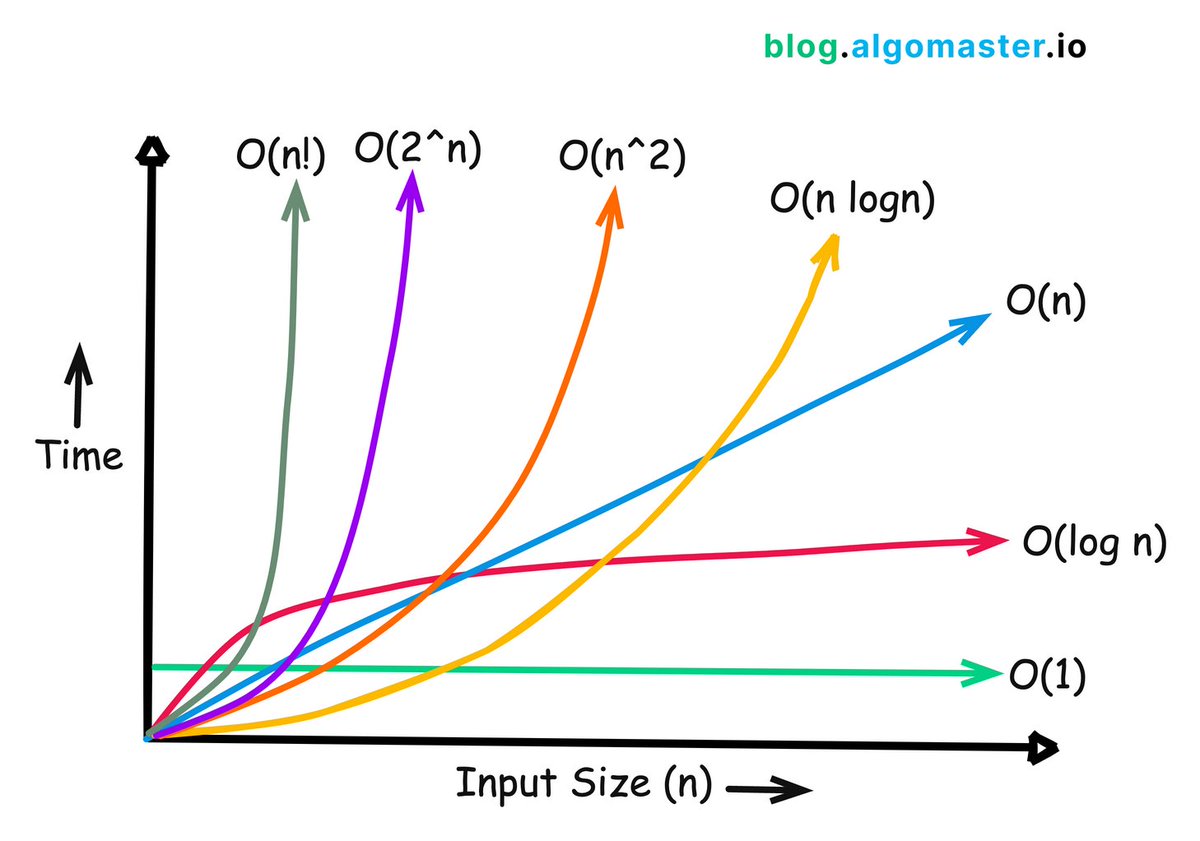
7 must-know runtime complexities for coding interviews:
1. 𝐎(1) - 𝐂𝐨𝐧𝐬𝐭𝐚𝐧𝐭 𝐭𝐢𝐦𝐞
- The runtime doesn't change regardless of the input size.
- Example: Accessing an element in an array by its index.
2. 𝐎(𝐥𝐨𝐠 𝐧) - 𝐋𝐨𝐠𝐚𝐫𝐢𝐭𝐡𝐦𝐢𝐜 𝐭𝐢𝐦𝐞
- The runtime grows slowly as the input size increases. Typically seen in algorithms that divide the problem in half with each step.
- Example: Binary search in a sorted array.
3. 𝐎(𝐧) - 𝐋𝐢𝐧𝐞𝐚𝐫 𝐭𝐢𝐦𝐞
- The runtime grows linearly with the input size.
- Example: Finding an element in an array by iterating through each element.
4. 𝐎(𝐧 𝐥𝐨𝐠 𝐧) - 𝐋𝐢𝐧𝐞𝐚𝐫𝐢𝐭𝐡𝐦𝐢𝐜 𝐭𝐢𝐦𝐞
- The runtime grows slightly faster than linear time. It involves a logarithmic number of operations for each element in the input.
- Example: Sorting an array using quick sort or merge sort.
5. 𝐎(𝐧^2) - 𝐐𝐮𝐚𝐝𝐫𝐚𝐭𝐢𝐜 𝐭𝐢𝐦𝐞
- The runtime grows proportionally to the square of the input size.
- Example: Bubble sort algorithm which compares and potentially swaps every pair of elements.
6. 𝐎(2^𝐧) - 𝐄𝐱𝐩𝐨𝐧𝐞𝐧𝐭𝐢𝐚𝐥 𝐭𝐢𝐦𝐞
- The runtime doubles with each addition to the input. These algorithms become impractical for larger input sizes.
- Example: Generating all subsets of a set.
7. 𝐎(𝐧!) - 𝐅𝐚𝐜𝐭𝐨𝐫𝐢𝐚𝐥 𝐭𝐢𝐦𝐞
- Runtime is proportional to the factorial of the input size.
- Example: Generating all permutations of a set.
♻️ Repost to help others in your network.
Join 28,501+ readers of our free newsletter: https://t.co/kPG9KUxfy6
Day 1 of SQL
- Introduction to Databases and SQL
- Basic Sql syntax
- Connecting to a sample database
What are Databases?
- Databases are structured collections of data that are organized for efficient storage, retrieval, and manipulation.
- They serve as a central repository for information, allowing users to store and access data in a structured manner.
- Common types of databases include relational databases (e.g., MySQL, PostgreSQL), NoSQL databases (e.g., MongoDB, Cassandra), and object-oriented databases (e.g., MongoDB).
Types of Databases:
- Relational databases: Organize data into tables consisting of rows and columns, with relationships established between tables.
- NoSQL databases: Designed for storing and retrieving unstructured or semi-structured data, offering flexibility and scalability for modern applications.
- Object-oriented databases: Store data as objects, enabling complex data structures and relationships to be represented.
Just wrapped up diving into Recoil for state management in React! 🚀 Impressed by its efficiency in managing complex states. Excited to use Recoil for more organized and manageable applications! 💡#React#Recoil#StateManagement#webdevelopment
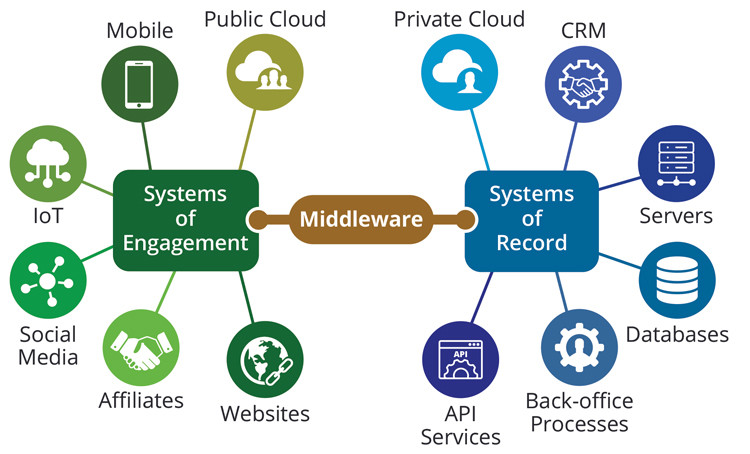
How does middleware actually work?
Middleware can be thought of as a "software glue" that enables seamless interaction between various software components, often abstracting the complexities of underlying infrastructure and allowing for interoperability.
Here's a general overview of how middleware works:
1. Communication Facilitation:
- Middleware facilitates communication between different applications or components that may be running on separate systems, platforms, or devices.
- It provides a set of standardized communication protocols, such as messaging formats or API specifications, to ensure that systems can understand and interact with each other.
2. Abstraction of Complexity:
- Middleware abstracts the underlying complexities of the hardware and software infrastructure, providing a consistent interface for applications to interact.
- This abstraction allows developers to focus on the functionality of their applications without having to worry about the specifics of the communication protocols or the intricacies of the underlying network.
3. Integration Support:
- Middleware often supports integration by providing tools and services for connecting diverse systems.
This integration may involve different programming languages, operating systems, or data formats.
- It helps in creating a unified environment where applications can work together seamlessly.
4. Data Transformation and Routing:
- Middleware can handle data transformation between different formats to ensure that information is properly interpreted by the receiving system.
- It may also provide routing capabilities, determining the most efficient path for data to travel between applications.
5. Transaction Management:
Middleware often includes transaction management capabilities to ensure the consistency and reliability of data exchanges between systems.
This is crucial in scenarios where multiple operations need to be executed as part of a single transaction.
6. Security and Access Control:
Middleware may include security features such as encryption, authentication, and authorization to safeguard communication between applications.
Access control mechanisms help in managing permissions and ensuring that only authorized entities can access specific resources.
7. Scalability and Load Balancing:
Middleware can contribute to the scalability of a distributed system by providing mechanisms for load balancing and resource allocation.
It helps in distributing workloads efficiently across multiple servers or components.
8. Monitoring and Management:
Middleware often includes tools for monitoring the performance and health of distributed systems.
It may provide management interfaces for configuring and maintaining the middleware infrastructure.
Examples of middleware include
message-oriented middleware (MOM), remote procedure call (RPC) frameworks, application servers, and integration platforms.
These tools play a crucial role in building robust, scalable, and interoperable distributed systems.
React Interview Question's Answer:
What are class components in React, and how do they differ from functional components?
Class components and functional components are two fundamental ways to create components in React, each with its own characteristics.
- What are Class components:
Class components are JavaScript ES6 classes that extend the
React.Component class from the React library. They are also known as "stateful" components because they can manage component state.
Class components can have state, which is data that can change over time. State changes trigger re-renders of the component. You update state using this.setState().
Class components have access to lifecycle methods like componentDidMount, componentDidUpdate, and componentWillUnmount.
These methods allow you to perform tasks at different stages in a component's lifecycle.
- What are Functional components:
Functional components are JavaScript functions that return JSX elements.
They are also known as "stateless" or "dumb" components because they don't manage their own state or have access to lifecycle methods by default (before Hooks).
Initially, functional components couldn't manage state.
However, with the introduction of Hooks, you can use the useState Hook to add state management to functional components.
Functional components didn't have access to lifecycle methods until React 16.8 when Hooks were introduced.
Now, Hooks like useEffect can be used to replicate some lifecycle behavior.
Difference: