ATV is a system designed to shape, build, and develop the value of $ITL ( Interlink Chain L1 ) within the real-world economy--operated by and for the community.
🔥DETAILED GUIDE ON REGISTERING FOR ATV QR PAYMENT AND COMPLETING THE CHECK-IN TASK
🟢HOW TO REGISTER FOR ATV QR PAYMENT:
- Step 1: Access the ATV app within the ITLX dApps section.
- Step 2: Go to the "Payment Point" section and log in to your ITLX wallet.
- Step 3: Set up your Payment Point by filling in all required information, including the store name, address, and a description of your store's services.
➡️Note: The "Country" field cannot be edited manually, enter the address in the "Address" field first, and the "Country" field will update automatically.
- Step 4: Complete the process and receive your ATV QR code.
🟢HOW TO COMPLETE THE QR CHECK-IN TASK:
- Step 1: On the "Payment Point Detail" screen, click "Earn now" within the QR Check-In Task section.
- Step 2: Click "Submit Now".
- Step 3: Submit the following three pieces of information:
✅QR Check-In Photo:
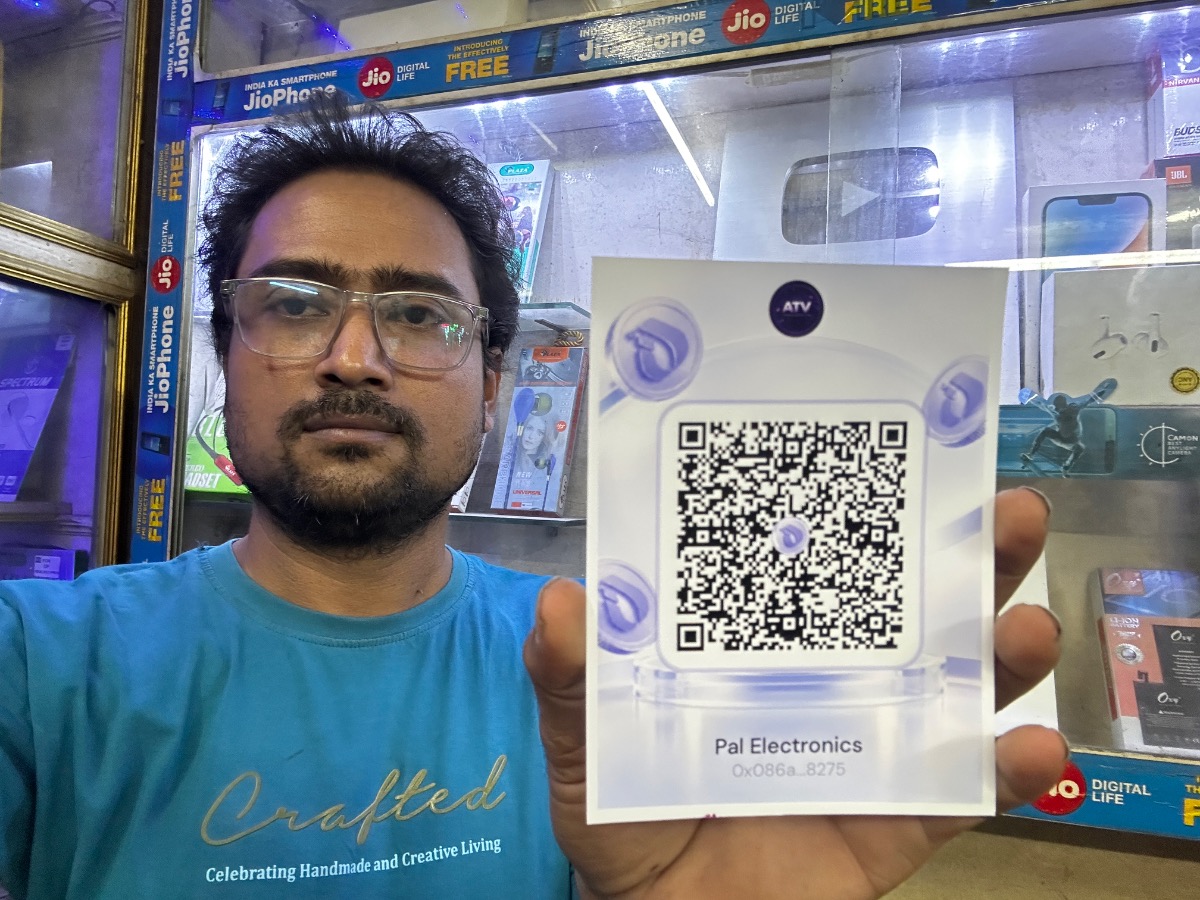
A photo of yourself holding the ATV QR payment code, with the physical store you own or your business premises visible in the background. If you operate an online business, please take a photo of yourself holding the ATV QR code alongside the products/services you sell or proof of your online store's existence.
➡️In summary: the photo you submit must include three elements: you, your ATV QR code, and your business/store.
✅Business Registration photo:
Provide an image of your business license or operating permit.
✅Check-in post URL:
Provide the link to the social media post where you shared your ATV QR image (please ensure the post is set to public).
🔔Notes regarding the QR CHECK-IN TASK program:
- Each store may register for the check-in task only once; incomplete submissions or entries suspected of using AI-generated images will be rejected.
- Confirmed stores will receive 3 ITL (for stores providing a business license) or 1 ITL (for stores not providing a business license).
- ITL rewards are currently being prepared by ATV; we will notify you as soon as the distribution process begins for stores that have completed the task. Rewards will be transferred directly to the ITLX wallet address used during your initial Payment Point registration.
🤝Thank you for your interest.
#Interlink #ITL #ATVInterlink #ATVQRPayment
🎉Congratulations to the Interlink community on entering the $ITLG Mainnet Era!
Moving forward, ATV will roll out additional features designed to directly support $ITLG as soon as it becomes transferable.
This initiative aims to foster and drive the adoption of $ITLG within the real-world economy, alongside $ITL.
🔥Stay tuned.
#Interlink #ITL #ITLG #ATVInterlink
🔥Would you like to see ATV implement support for $ITLG as an additional payment method once $ITLG becomes transferable?
A. YES
B. NO
#Interlink#ITL#ATVInterlink#ATVQRPayment
🔥Clarification on the ATV System’s Scoring Mechanism
As previously announced, the ATV platform has begun evaluating user trading performance to determine rankings and eligibility for receiving Business Tokens.
It is important to clarify that ATV encourages all users to engage in $ITL transactions, regardless of whether they utilize an ATV QR code. Users may either generate an ATV QR code or simply use their ITLX wallet to conduct $ITL transactions; in both cases, their trading volume will be accounted for, provided that the transaction data is submitted to ATV.
🏛️The submission process is as follows:
✅For transactions conducted via an ATV QR code:
Immediately upon completing a transaction, a dashboard will appear, offering the option to "Submit ATV now."
To submit data this way, users simply need to provide the required information along with a photograph of the actual product involved in the transaction.
✅For transactions conducted without an ATV QR code:
If a user carries out an $ITL transaction directly through an ITLX wallet—bypassing the ATV QR code—they may still submit the transaction data to ATV via the "Submit" section located within the ATV-ITLX DApps interface.
For this submission method, users must provide the necessary details along with three pieces of supporting evidence: a photograph of the actual product, a record of the conversation between the buyer and seller confirming the transaction, and a screenshot showing the successful transfer/receipt of $ITL on the blockchain.
🎯Summary: Whether you conduct $ITL transactions via an ATV QR code or through standard $ITL transactions within the ITLX wallet, you remain eligible to participate in the upcoming distribution of ACE rewards and ATV Business Tokens.
👉Please note that the system scoring merchansim only records transactions that are successfully submitted to ATV via the two methods mentioned above.
Don’t just stop at conducting $ITL transactions—ensure that you also submit your transaction details to ATV to maximize your benefits by securing ACE rewards and ATV Business Tokens.
🔔New users are welcome to join our Council-Country group for further assistance.
📍ATV Official Group: https://t.co/nMQ1uJraog
🤝Thank you for your interest.
#Interlink #ITL #ATVInterlink #ATVQRPayment
HAVE YOU CREATED YOUR ATV QR YET? 👀
Don’t wait! Create your @ATV_Interlink QR, start using it for payments, and check in with your QR code to complete the QR Check-In Task. 🔥
Create your ATV QR, start using it, and check in today. Every step helps bring $ITL closer to real-world payments! 💜
#InterLink #ITLG #ITL
🔥Clarification on the ATV System’s Scoring Mechanism
As previously announced, the ATV platform has begun evaluating user trading performance to determine rankings and eligibility for receiving Business Tokens.
It is important to clarify that ATV encourages all users to engage in $ITL transactions, regardless of whether they utilize an ATV QR code. Users may either generate an ATV QR code or simply use their ITLX wallet to conduct $ITL transactions; in both cases, their trading volume will be accounted for, provided that the transaction data is submitted to ATV.
🏛️The submission process is as follows:
✅For transactions conducted via an ATV QR code:
Immediately upon completing a transaction, a dashboard will appear, offering the option to "Submit ATV now."
To submit data this way, users simply need to provide the required information along with a photograph of the actual product involved in the transaction.
✅For transactions conducted without an ATV QR code:
If a user carries out an $ITL transaction directly through an ITLX wallet—bypassing the ATV QR code—they may still submit the transaction data to ATV via the "Submit" section located within the ATV-ITLX DApps interface.
For this submission method, users must provide the necessary details along with three pieces of supporting evidence: a photograph of the actual product, a record of the conversation between the buyer and seller confirming the transaction, and a screenshot showing the successful transfer/receipt of $ITL on the blockchain.
🎯Summary: Whether you conduct $ITL transactions via an ATV QR code or through standard $ITL transactions within the ITLX wallet, you remain eligible to participate in the upcoming distribution of ACE rewards and ATV Business Tokens.
👉Please note that the system scoring merchansim only records transactions that are successfully submitted to ATV via the two methods mentioned above.
Don’t just stop at conducting $ITL transactions—ensure that you also submit your transaction details to ATV to maximize your benefits by securing ACE rewards and ATV Business Tokens.
🔔New users are welcome to join our Council-Country group for further assistance.
📍ATV Official Group: https://t.co/nMQ1uJraog
🤝Thank you for your interest.
#Interlink #ITL #ATVInterlink #ATVQRPayment
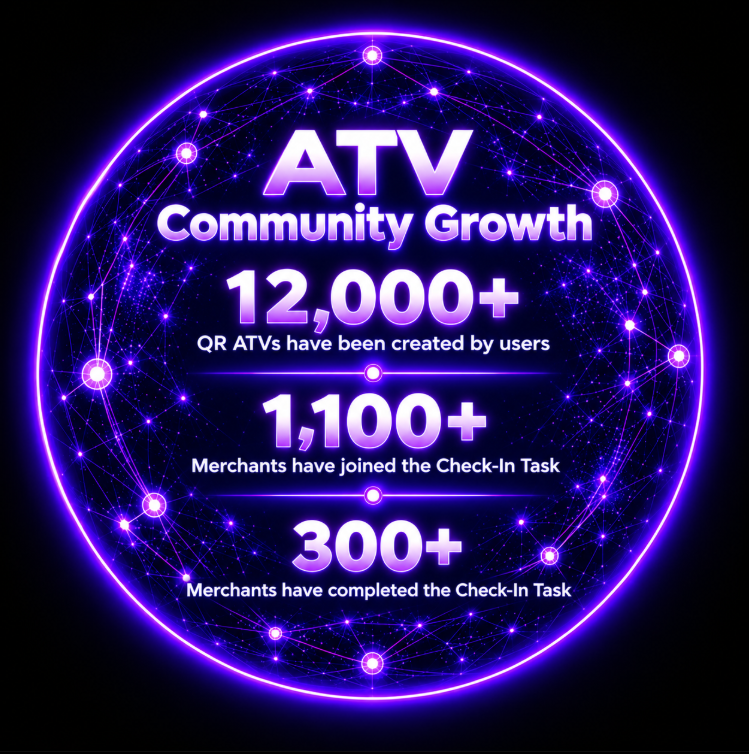
🔥Within the first 72 hours of the launch of the ATV QR Payment BETA 1.0 feature, we have recorded:
✅Over 12,000 ATV QR codes generated by users.
✅Over 1,100 merchants globally have applied for the QR Check-In Task.
✅Over 300 merchants have already been approved for completing the QR Check-In Task.
This marks the very first step in the ATV QR Payment journey—a move toward broader adoption of $ITL for the exchange of goods and services within the real-world economy.
Our system has now begun evaluating transaction performance for each ATV QR code; these metrics will be used to calculate ACE rankings and determine the allocation of ATV Business Tokens in the near future.
🏎️Start using your ATV QR code and embark on this exciting journey.
🎊Once again, congratulations to the entire ATV community on this initial milestone achieved over the past 72 hours.
#Interlink #ATVQRPayment
🔥DETAILED GUIDE ON REGISTERING FOR ATV QR PAYMENT AND COMPLETING THE CHECK-IN TASK
🟢HOW TO REGISTER FOR ATV QR PAYMENT:
- Step 1: Access the ATV app within the ITLX dApps section.
- Step 2: Go to the "Payment Point" section and log in to your ITLX wallet.
- Step 3: Set up your Payment Point by filling in all required information, including the store name, address, and a description of your store's services.
➡️Note: The "Country" field cannot be edited manually, enter the address in the "Address" field first, and the "Country" field will update automatically.
- Step 4: Complete the process and receive your ATV QR code.
🟢HOW TO COMPLETE THE QR CHECK-IN TASK:
- Step 1: On the "Payment Point Detail" screen, click "Earn now" within the QR Check-In Task section.
- Step 2: Click "Submit Now".
- Step 3: Submit the following three pieces of information:
✅QR Check-In Photo:
A photo of yourself holding the ATV QR payment code, with the physical store you own or your business premises visible in the background. If you operate an online business, please take a photo of yourself holding the ATV QR code alongside the products/services you sell or proof of your online store's existence.
➡️In summary: the photo you submit must include three elements: you, your ATV QR code, and your business/store.
✅Business Registration photo:
Provide an image of your business license or operating permit.
✅Check-in post URL:
Provide the link to the social media post where you shared your ATV QR image (please ensure the post is set to public).
🔔Notes regarding the QR CHECK-IN TASK program:
- Each store may register for the check-in task only once; incomplete submissions or entries suspected of using AI-generated images will be rejected.
- Confirmed stores will receive 3 ITL (for stores providing a business license) or 1 ITL (for stores not providing a business license).
- ITL rewards are currently being prepared by ATV; we will notify you as soon as the distribution process begins for stores that have completed the task. Rewards will be transferred directly to the ITLX wallet address used during your initial Payment Point registration.
🤝Thank you for your interest.
#Interlink #ITL #ATVInterlink #ATVQRPayment
🔥Within the first 72 hours of the launch of the ATV QR Payment BETA 1.0 feature, we have recorded:
✅Over 12,000 ATV QR codes generated by users.
✅Over 1,100 merchants globally have applied for the QR Check-In Task.
✅Over 300 merchants have already been approved for completing the QR Check-In Task.
This marks the very first step in the ATV QR Payment journey—a move toward broader adoption of $ITL for the exchange of goods and services within the real-world economy.
Our system has now begun evaluating transaction performance for each ATV QR code; these metrics will be used to calculate ACE rankings and determine the allocation of ATV Business Tokens in the near future.
🏎️Start using your ATV QR code and embark on this exciting journey.
🎊Once again, congratulations to the entire ATV community on this initial milestone achieved over the past 72 hours.
#Interlink #ATVQRPayment
🔥ANNOUNCEMENT REGARDING THE ACE (ATV CLUB ELITE) MECHANISM
ACE is an advanced system that allows any merchant to optimize their benefits on the ATV QR Payment platform through $ITL transactions conducted via their ATV QR codes.
The volume of $ITL transactions serves as the primary factor for merchants to improve their standing on the Elite leaderboard, thereby unlocking exclusive perks within the ATV ecosystem. These include eligibility for platform revenue sharing, priority access to $ITL OTC trades at the average ATV price, receipt of exclusive ATV NFTs, access to advanced ATV financial opportunities, enhanced visibility for your store on the ATV Map, and more.
Following the successful launch of the ATV QR Payment BETA 1.0 a few days ago, the ACE mechanism is scheduled to be introduced in the upcoming BETA 1.1 version.
Please note that our system has already begun tracking user transaction performance linked to the ATV QR codes they have generated. This data will be used to establish user rankings the moment the ACE mechanism goes live.
Participation in the ranking system and eligibility for ACE benefits are open to everyone—regardless of whether or not a user has completed the "QR Check-In Task."
Start generating your ATV QR codes and conducting $ITL transactions through the exchange of goods and services; every transaction is currently being aggregated and factored into your ranking position.
We also have a Telegram group established and managed by our Leader Council and Country Leaders. If you are new, you are welcome to join to connect with other merchants in your local area—a great way to increase your transaction volume and grow your business using $ITL and ATV QR Payment.
📍ATV Official Group: https://t.co/nMQ1uJraog
🤝Thank you for your interest.
#Interlink #ITL #ATVInterlink #ATVQRPayment
🔥DETAILED GUIDE ON REGISTERING FOR ATV QR PAYMENT AND COMPLETING THE CHECK-IN TASK
🟢HOW TO REGISTER FOR ATV QR PAYMENT:
- Step 1: Access the ATV app within the ITLX dApps section.
- Step 2: Go to the "Payment Point" section and log in to your ITLX wallet.
- Step 3: Set up your Payment Point by filling in all required information, including the store name, address, and a description of your store's services.
➡️Note: The "Country" field cannot be edited manually, enter the address in the "Address" field first, and the "Country" field will update automatically.
- Step 4: Complete the process and receive your ATV QR code.
🟢HOW TO COMPLETE THE QR CHECK-IN TASK:
- Step 1: On the "Payment Point Detail" screen, click "Earn now" within the QR Check-In Task section.
- Step 2: Click "Submit Now".
- Step 3: Submit the following three pieces of information:
✅QR Check-In Photo:
A photo of yourself holding the ATV QR payment code, with the physical store you own or your business premises visible in the background. If you operate an online business, please take a photo of yourself holding the ATV QR code alongside the products/services you sell or proof of your online store's existence.
➡️In summary: the photo you submit must include three elements: you, your ATV QR code, and your business/store.
✅Business Registration photo:
Provide an image of your business license or operating permit.
✅Check-in post URL:
Provide the link to the social media post where you shared your ATV QR image (please ensure the post is set to public).
🔔Notes regarding the QR CHECK-IN TASK program:
- Each store may register for the check-in task only once; incomplete submissions or entries suspected of using AI-generated images will be rejected.
- Confirmed stores will receive 3 ITL (for stores providing a business license) or 1 ITL (for stores not providing a business license).
- ITL rewards are currently being prepared by ATV; we will notify you as soon as the distribution process begins for stores that have completed the task. Rewards will be transferred directly to the ITLX wallet address used during your initial Payment Point registration.
🤝Thank you for your interest.
#Interlink #ITL #ATVInterlink #ATVQRPayment
Thank you for your question; here are the answers to your inquiries:
1. The printed ATV QR code can be in color or black and white, provided the code is clearly and fully visible.
2. The photo you post on social media must show you holding the ATV QR code in front of your actual store (this is also the photo you will submit to us to complete the ATV QR Code Check-in Task).
Thank you.
🔥DETAILED GUIDE ON REGISTERING FOR ATV QR PAYMENT AND COMPLETING THE CHECK-IN TASK
🟢HOW TO REGISTER FOR ATV QR PAYMENT:
- Step 1: Access the ATV app within the ITLX dApps section.
- Step 2: Go to the "Payment Point" section and log in to your ITLX wallet.
- Step 3: Set up your Payment Point by filling in all required information, including the store name, address, and a description of your store's services.
➡️Note: The "Country" field cannot be edited manually, enter the address in the "Address" field first, and the "Country" field will update automatically.
- Step 4: Complete the process and receive your ATV QR code.
🟢HOW TO COMPLETE THE QR CHECK-IN TASK:
- Step 1: On the "Payment Point Detail" screen, click "Earn now" within the QR Check-In Task section.
- Step 2: Click "Submit Now".
- Step 3: Submit the following three pieces of information:
✅QR Check-In Photo:
A photo of yourself holding the ATV QR payment code, with the physical store you own or your business premises visible in the background. If you operate an online business, please take a photo of yourself holding the ATV QR code alongside the products/services you sell or proof of your online store's existence.
➡️In summary: the photo you submit must include three elements: you, your ATV QR code, and your business/store.
✅Business Registration photo:
Provide an image of your business license or operating permit.
✅Check-in post URL:
Provide the link to the social media post where you shared your ATV QR image (please ensure the post is set to public).
🔔Notes regarding the QR CHECK-IN TASK program:
- Each store may register for the check-in task only once; incomplete submissions or entries suspected of using AI-generated images will be rejected.
- Confirmed stores will receive 3 ITL (for stores providing a business license) or 1 ITL (for stores not providing a business license).
- ITL rewards are currently being prepared by ATV; we will notify you as soon as the distribution process begins for stores that have completed the task. Rewards will be transferred directly to the ITLX wallet address used during your initial Payment Point registration.
🤝Thank you for your interest.
#Interlink #ITL #ATVInterlink #ATVQRPayment
📢 NOTE REGARDING THE ATV QR CHECK-IN TASK
We have received a significant number of check-in task registration requests from users. However, some have been rejected, primarily because the submitted photographic evidence was incorrect.
Please ensure your photo submission includes an image of you holding the ATV QR code with your business premises visible in the background.
If you operate an online business without a physical storefront, you may submit an image showing your online store details instead.
✅Note: Any submissions that do not meet these requirements, or those containing AI-generated images, will be rejected.
👇Below is an example of a photo from a merchant who successfully passed our verification process.
Thank you for your attention.
#Interlink #ITL #ATVInterlink #ATVQRPayment
📢NOTE REGARDING THE ATV QR CHECK-IN TASK
In the second step of the task, you need to take a photo of yourself holding the ATV QR code. The photo must be taken with your physical store visible in the background.
This helps ensure a more authentic review of your physical store registration and guarantees uninterrupted reward distribution.
Thank you for your attention.
#Interlink #ITL #ATVInterlink #ATVQRPayment
🔥 We are witnessing the first pioneering steps taken by Linkers—visionaries committed to connecting, building, and growing alongside ATV QR Payment.
🚀Have you started your journey with ATV QR Payment yet?
#Interlink#ITL#ATVInterlink#ATVQRPayment
📢 NOTE REGARDING THE ATV QR CHECK-IN TASK
We have received a significant number of check-in task registration requests from users. However, some have been rejected, primarily because the submitted photographic evidence was incorrect.
Please ensure your photo submission includes an image of you holding the ATV QR code with your business premises visible in the background.
If you operate an online business without a physical storefront, you may submit an image showing your online store details instead.
✅Note: Any submissions that do not meet these requirements, or those containing AI-generated images, will be rejected.
👇Below is an example of a photo from a merchant who successfully passed our verification process.
Thank you for your attention.
#Interlink #ITL #ATVInterlink #ATVQRPayment
📢 Ambassadors, Have You Registered Your Payment Point and claimed your 3 ITL reward yet?
Don't miss out on this opportunity to become part of the growing InterLink Payment Network!
Let me know in the comments! 👇
@Ibmaremu We are announcing the Check-In task. As for ATV QR Payment, you can fully participate and use all features regardless of whether you are currently running a business.