It’s here!🔥The MythForce 1.2 Update has landed and it’s available across (almost) all platforms—Xbox, PlayStation, Steam, and EGS! The Switch patch is still in testing with Nintendo.
👑 Free Update
🎯 Hero Classes, Skill Trees & Elemental Combos
⚔️ Smoother Gameplay, Fresh Encounters & more!
💥 Game now 66% off for a limited time!
⚡️Unleash the magic, master the mayhem—Play On▶️
LET’S GO!!! MYTHFOOOORCE!!!🎶
Dive into epic upgrades of MythForce 1.2:
✨(almost) All Platforms Updated
⏳Switch is still in testing w/Nintendo
✨New Hero Classes & Skill Trees
✨Revamped Progression System
✨All-New Encounter Objectives
✨Elemental Combos
✨Smoother, Enhanced Gameplay
🎮Plus, MythForce is now 66% off!
I never knew that you could sell used wands and rods to merchants and then buy them back fully charged. Question is, is that an exploit that ruins the game? I can rationalize it roleplay wise (it makes sense the merchants would have the means to recharge them).
You asked, we delivered, and the 2.7 Beta for Baldur’s Gate I & II and Icewind Dale: Enhanced Editions is now playable through @GOGcom Galaxy!
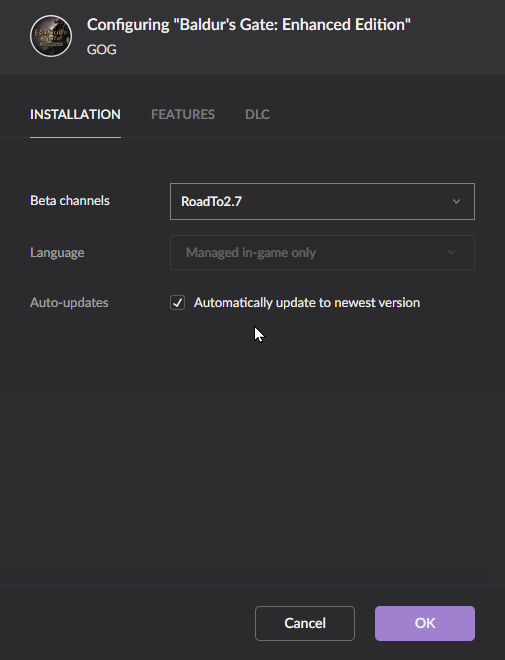
For Baldur’s Gate specifically, follow these steps to opt in:
1⃣Open the GOG Galaxy client and select Baldur’s Gate: Enhanced Edition
2⃣In the top‑right corner, open the Options menu.
Choose Manage Installation → Configure…
3⃣Under Beta channels, switch from Disabled to RoadTo2.7
4⃣Click OK and let the client update the game to version 2.7.3 for public testing
We also support the GOG Galaxy Cloud saves! Enjoy!
You asked, we delivered, and the 2.7 Beta for Baldur’s Gate I & II and Icewind Dale: Enhanced Editions is now playable through @GOGcom Galaxy!
For Baldur’s Gate specifically, follow these steps to opt in:
1⃣Open the GOG Galaxy client and select Baldur’s Gate: Enhanced Edition
2⃣In the top‑right corner, open the Options menu.
Choose Manage Installation → Configure…
3⃣Under Beta channels, switch from Disabled to RoadTo2.7
4⃣Click OK and let the client update the game to version 2.7.3 for public testing
We also support the GOG Galaxy Cloud saves! Enjoy!
Infinity Engine 2.7.3.0 Beta is here! Now live on Steam, Android, and iOS.
This release candidate brings smoother mobile UI, restored iOS purchase syncing, better support for foldable Android devices, improved SoD language handling, DLC display fixes, and faster boot times.
If all goes well, the full patch for #BaldursGate I & II and #IcewindDale: Enhanced Editions drops later in June. Jump in, test it out, and tell us what you think!⚔️
Details: https://t.co/QiP02GeUtS
@realArgonaut The live patch will be releasing on GOG the same day as on Steam. As for the beta, we're actually looking at bringing this to the GOG Galaxy as a branch, we'll see how it goes.
Infinity Engine 2.7.3.0 Beta is here! Now live on Steam, Android, and iOS.
This release candidate brings smoother mobile UI, restored iOS purchase syncing, better support for foldable Android devices, improved SoD language handling, DLC display fixes, and faster boot times.
If all goes well, the full patch for #BaldursGate I & II and #IcewindDale: Enhanced Editions drops later in June. Jump in, test it out, and tell us what you think!⚔️
Details: https://t.co/QiP02GeUtS
iPhone and iPad adventurers everywhere, rejoice: it’s finally happening!🐹 #BaldursGate I & II and #IcewindDale: Enhanced Editions are receiving their first major iOS update since 2018. Yes… we know. It’s been a while.
You can jump into the updated builds right now by joining the Public #TestFlight versions linked on our forum. The new #iOS updates include:
✨All 2.6 features & fixes previously exclusive to PC and Android, including new character voice sets from the legendary Mark Meer, and 11 new character portraits
📚A wide range of new translations
📲 Full user access to game data—including native access to save files, and more
The games now store and read data from a location visible to standard file browsers. You can manage saves and other files directly on your device or by connecting it to a computer.
On macOS: Use Finder → select your device → open the Files tab to view new saves
On Windows: Install Apple Devices from the Microsoft Store → open your device → check the Files tab
On iOS: Open the Files app → navigate to On My <device> → find the game’s folder
Custom content is now as simple as copying the appropriate folders into the game’s directory on your iOS device. Drop in overrides, portraits, or other assets just like you would on desktop!