Just tested Canva’s AI Upscaling and it’s surprisingly good! Take blurry or pixelated images and improve them directly inside @CanvaEdu using AI. Very useful for teachers working with older resources or screenshots of content.
Watch the full video here:
https://t.co/25SSlfQ0Ht
Ready to level up your Key Stage 1 coding lessons? My new video covers everything you need to know about ScratchJr plus a special look at my custom asset tool, AmberJr!
Stop being limited by the default library!
Watch now: https://t.co/bdFpTLjiDt
#Scratch#Coding@ScratchJr
Be one of the first few to follow AmberPuppets on LinkedIn! https://t.co/bIemhwxzGb
See the latest on whats happening with #DigitalStorytelling in #Primary#Education!
It’s my birthday! To celebrate, I’m giving away 3 Lifetime Creator Licenses to https://t.co/oopA3RecGu & https://t.co/AuwfcbdU4g 🎁
Full access, forever!
To enter:
1️⃣ Comment what you'll create
2️⃣ Share this post
Picking 3 winners across LinkedIn, YouTube, and X in 48 hrs!
What if video creation was as easy as typing in Docs?
That’s the promise of Google Vids.
And now, every teacher (even on the FREE plan) has access.
Here’s what it means 👉 https://t.co/aQXSLZVLYd
#EdTech#GoogleVids#GoogleForEducation
🚀 New from Google’s Notebook LM! You can now join and steer podcast discussions with their new interactive mode. Ask questions, get clarification, and dive deeper into any topic! 🤖🎧 #AI#EdTech#Google#InteractiveLearning#NotebookLM
Video: https://t.co/NI9CTrbCtL
To celebrate my birthday I'm giving away 5, 2 long month free memberships to my Patreon where you get to connect and enjoy my videos ad-free! #ThankYou#FlippedCommunity
https://t.co/qjpJYgNkPc
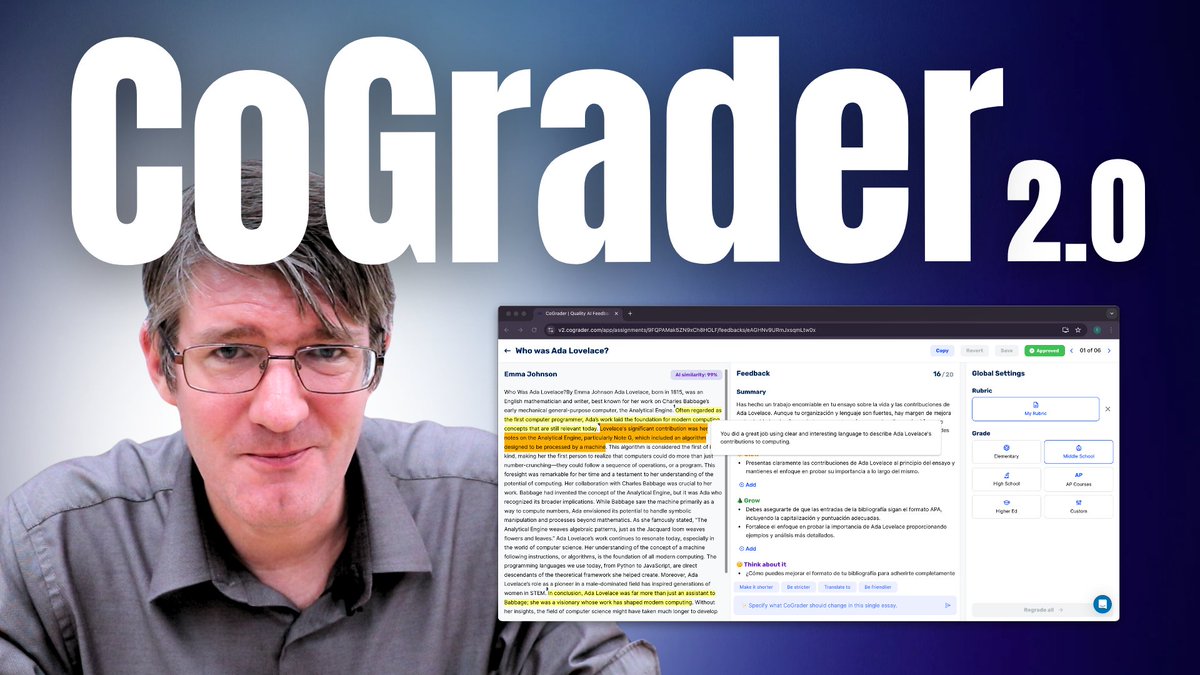
I’ve been testing @cograder Version 2, and it’s a powerful tool for speeding up the grading process. It doesn’t replace your judgment but makes grading far more efficient.
Here’s my walkthrough and thoughts:
https://t.co/kXHfFDmA4L
I'm curious to hear how it works for you!
As a teacher and parent, I use this deepfake tool(https://t.co/0rJ41aFyV1) to show students and parents how media can be manipulated. It’s a simple way to teach critical thinking and start real conversations about online safety. #DigitalLiteracy#Deepfakes
I'm re-launching our Facebook Flipped Community to share ideas, ask questions, and interact with each other! Come join us and share some #EdTech tips trick or lessins that worked well. https://t.co/EBMkqOOs0Q
With a little bit of #AppsScript you can add a cell to your spreadsheets that shows you when another cell was last changed! Perfect for those tracking documents and #assessment overviews! Video: https://t.co/fMN3ct85ki
Have a great #BackToSchool everyone!
@GoogleForEdu#GoogleEI
Newest video is up: https://t.co/EZl6GQph1u Share videos via #GoogleClassroom and add questions, promoting engagement and asking follow up open ended questions. Another great feature of @GoogleForEdu Workspace Plus!
🧑🏫 Need to automate your reports? Learn how to create Word reports from Excel using #MailMerge in my latest tutorial! Say goodbye to manual work & hello to streamlined processes 💡 Watch now 👉 https://t.co/LEkfvnu0Jx #TeacherTools#EdTech#ExcelTips
My youngest has been absolutely in love with the A3 set by @WhalesBot
This set is definitely a recommended for #eyfs and #keystage1 classes (Early Elementary)
Solid build quality and fun projects included right out of the box!
https://t.co/VZq84822dS
#robotics#coding#edu
Very useful update! Google Workspace Updates: Providing student engagement signals for Google Drive file attachments in Google Classroom: https://t.co/ckr8kAOOse
Time for another #GoogleSheets video. After collating all your data and report comments. Have them automatically turned into Reports in no time. All you need to do is design the report once.
Link: https://t.co/euHRWMEjC5
#edu#teachers#education#GoogleEI@GoogleWorkspace