❓Why does my model return different data than my tool?
💡The model processes tool output and forms its own response with that data. The model's output is a String, not the raw tool data structure.
👉Free #SwiftUI picture book at https://t.co/fC3W05RAZO
❓How can I tell AI Transcript Entry objects apart?
💡The LanguageModelSession (AI model) keeps a transcript of prompts and responses. You can loop though it and do a switch on the entry type.
👉Free #SwiftUI picture book at https://t.co/fC3W05RAZO
❓Can I use Limited Availability Checks in the Instructions?
💡Yes! You can use limited availability checks right in your Instructions builder. The Prompt builder has a special buildLimitedAvailability function that knows how to handle availability checks.
👉Free #SwiftUI picture book: https://t.co/E14RMGp2fW
❓How do I check if Apple Intelligence is available?
💡Use SystemLanguageModel.default.isAvailable to check availability. If it returns false, display a ContentUnavailableView to let users know Apple Intelligence isn't available on their device.
👉Free #SwiftUI picture book at https://t.co/E14RMGp2fW
❓How can I control the length of AI responses in SwiftUI?
💡Use the maximumResponseTokens parameter in GenerationOptions to limit response length. This lets you show users a preview before generating longer content.
👉Free #SwiftUI picture book at https://t.co/fC3W05RAZO
❓How do I show when a session is processing in SwiftUI?
💡Use the session's isResponding boolean property to track when a prompt is being processed, then disable your button and show a loading indicator while it's true.
👉Free #SwiftUI picture book at https://t.co/W2hNgW2QY3
@seanallen_dev This is great info to share with your audience, because this is the kind of knowledge that I think a lot of developers (or entrepreneurs in general) struggle with.
❓When should you prewarm the prompt prefix in SwiftUI?
💡Prewarm it right when the view appears using .onAppear, or when picker values change since they're used in the prompt prefix. This prepares your AI prompt ahead of time.
👉Free #SwiftUI picture book at https://t.co/E14RMGp2fW
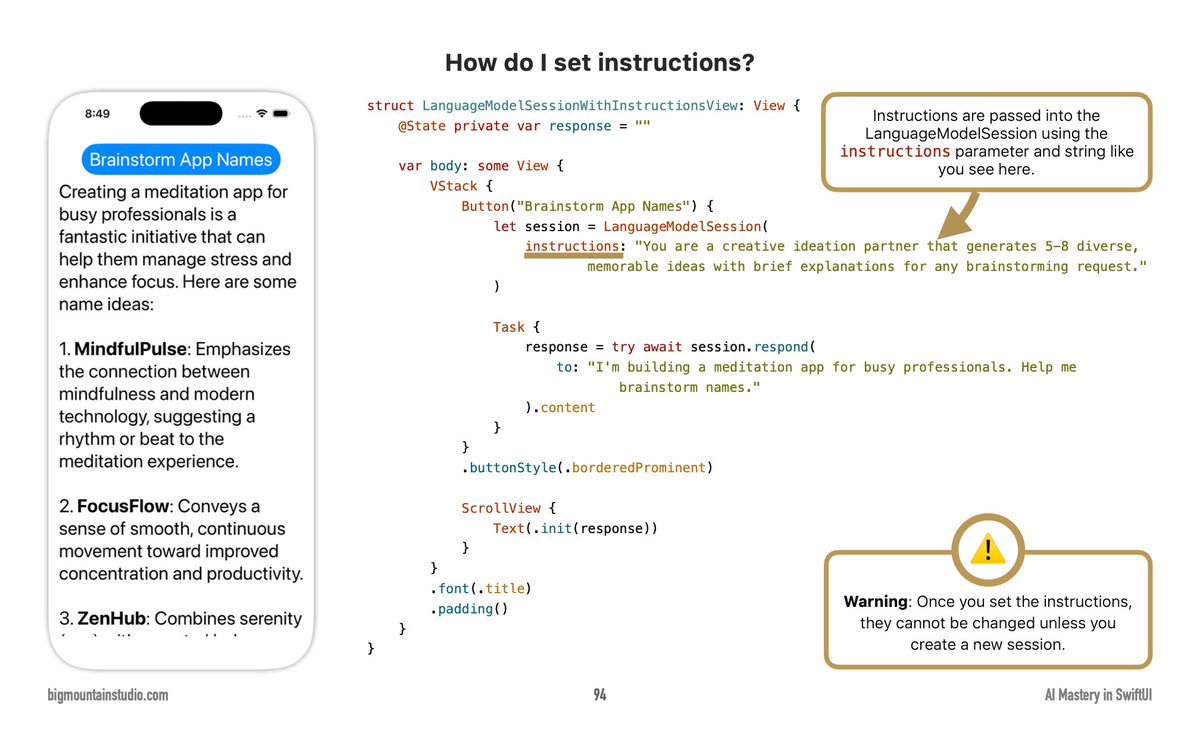
❓How do I set instructions for a language model session in SwiftUI?
💡Pass instructions into the LanguageModelSession using the instructions parameter with a string describing the AI's behavior and role.
👉Free #SwiftUI picture book at https://t.co/fC3W05RAZO
❓How do I control spacing between rows in LazyHGrid?
💡Use the spacing parameter in GridItem to set the gap. You can specify different spacing values (40, 20, etc.) or omit it for a default value.
👉Free #SwiftUI picture book: https://t.co/fC3W05RAZO
I’ve definitely been thinking a lot about making content on my learnings and experiences.
I’ve had the fortunate opportunity at work to learn a variety of tools and methods and automations. Our company has embraced AI and gave us quite the budget to experiment with a lot of the tools out there.
At work, I’ve given many presentations but I’ve never shared anything publicly because I’m thinking it’s always changing.
But I don’t know, maybe I should reconsider.
🏳️Time to face obvious facts. iOS Dev courses are no longer viable income for me. I've been disrupted.
I'm looking to join a team working on a cool iOS project (full-time or part-time contract). Remote.
RT's are appreciated! DMs open.
That’s exactly what I think too.
I’m in many groups and the favored AI tools and tech changes almost weekly.
“This is the best. Now this. Now that is too slow. Now this one is too expensive. This one has this new feature. Now they all have that new feature.”
Around and around it goes.
❓What is one way to format currency values in SwiftUI?
💡Use Text with .currency format parameter and specify currency codes like "USD", "EUR", "GBP", or get the locale's current currency with locale.currency?.identifier.
👉Free #SwiftUI picture book at https://t.co/fC3W05RAZO
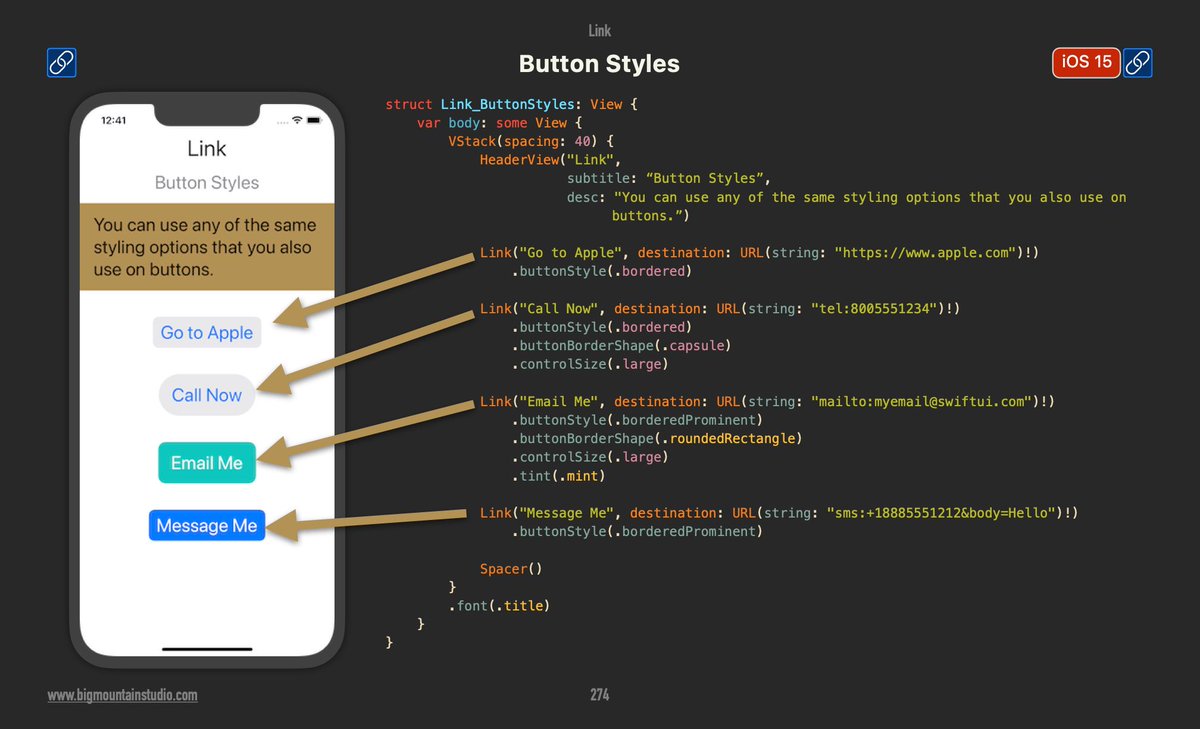
❓How do I create links with different button styles in SwiftUI?
💡Use the Link component with buttonStyle modifiers like .bordered and .borderedProminent, plus shape modifiers like .capsule or .roundedRectangle for beautiful, tappable links.
👉Free #SwiftUI picture book at https://t.co/E14RMGp2fW
❓What is a quick and easy way to create color gradients in SwiftUI?
💡Every color has a gradient property that transitions from a lighter version to itself. Simply use .fill(color.gradient) on shapes like RoundedRectangle to create gradients.
👉Free #SwiftUI picture book at https://t.co/E14RMGp2fW