In the ethereal realm of Solana's blockchain, where the whispers of digital spirits echo through the void, Fiji Coin emerges as a cryptic enigma, Be like water
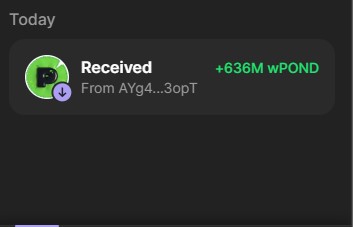
After two days of grinding, I finally got my first taste of $Wpond ! It's real, it's happening! Stay savage, stay hungry, and you'll get what's yours! Keep mining like a real OG!
$PORK $PNDC LET'S GO!🚀⛏️🐷🐸
Pond0x Mining Guide: My Step-by-Step Process
This is my personal approach to mining on the Pond0x website. Here’s how I manage the process:
Step 1: Logging In
Connect MetaMask and Phantom Wallets: I log into both MetaMask and Phantom wallets since my Ethereum wallet is on MetaMask, and my Solana wallet is on Phantom.
Once logged in, I connect to the Pond ecosystem using MetaMask (Ethereum) and Phantom (Solana) via the profile section.
Step 2: Start Mining
Initiating Mining: I navigate to the "Mine" tab.
If the xMiner v1.7 icon is green, I wait for the system to allow me to start mining.
If the xMiner turns yellow, I immediately refresh the page and reconnect my Ethereum wallet through the profile section.
Then, I return to the "Mine" section and check the status again. If the icon is green, I wait for the system to allow me to start mining.
Handling Yellow xMiner: If the xMiner stays yellow after two reconnection attempts, I continue refreshing the page until the xMiner turns green. Once it’s green, I wait for the system to allow me to start mining.
Step 3: Mining Process
Mining and Monitoring: Once connected, I mine and monitor the hash rate until the "Stop & Claim" button appears.
I always start mining with 1.1M, and below 100M, I only see the "Stop" button.
When the "Stop & Claim" button appears, I verify that I have mined enough to claim.
Claiming: If the Mine button turns yellow, I immediately click "Claim" and the system directs me to the "Queue" window.
There, I refresh the page and restart the process from the beginning.
Handling Frequent Yellow xMiner: If the xMiner turns yellow 2-3 times in a row, I clear my browser cache, log in again, and repeat the process from scratch.
Step 4: Special Situations
If the Mine Button is Grey: If the Mine button becomes grey and unclickable, I immediately refresh the page and try again.
If Hash Rate Drops to 0: If my hash rate drops to 0, and I’ve only mined the initial 1.1M, I immediately refresh and start over.
However, if my hash rate drops to 0 after mining more than 100M, I click Claim and then repeat the entire process from the beginning.
if you exceed network medium hash rate (typically 700-800) you are 99.9% likely to get slashed. ( H wonder)
$PORK $PNDC ⛏️🐷🐸