Here's our official OBBY benchmarks for https://t.co/bvcLHh0BuB
Here our agentic tool was able to create in 3 prompts:
- A simple Player Obby with spawn points
- 3 Levels to it with clean UI
- Simple graphics with visual appeal
We will be improving the Blox terminal and updating our maps to analyze retention and to train the terminal agent to update the map based on map data/analytics.
Good afternoon Blox Terminal users.
Today we announce the release of our most awaited experiment yet.
In under 11 hours of preparation, we were able to construct a fully automated Monster catching simulator/ gacha game.
Check it out:
https://t.co/ZkF0GrheWz
Today on 10/30, we pushed major updates to our MCP.
- Build accuracy increased by using more in depth models
- Blox models are now able to access galleries and resource packs of your choosing
We are implementing build in galleries into our models, stay tuned!
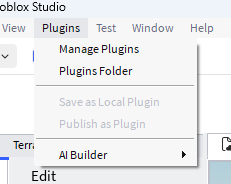
4- in the top bar, click Plugins folder and drag and drop the builder into the Roblox plugins section
5- Start the bat and select the AI Builder from the plugins section
6- Restart Roblox Studio and select your plugin, after that you're all set up!
How to set up Blox Terminal:
1- Wallets holding the $Blox token will be eligible for free usage
2- once your wallet is connect install the Blox terminal ZIP from https://t.co/j6iYoajwA4
3- Once extracted, enter your Claude API key into apikey.txt