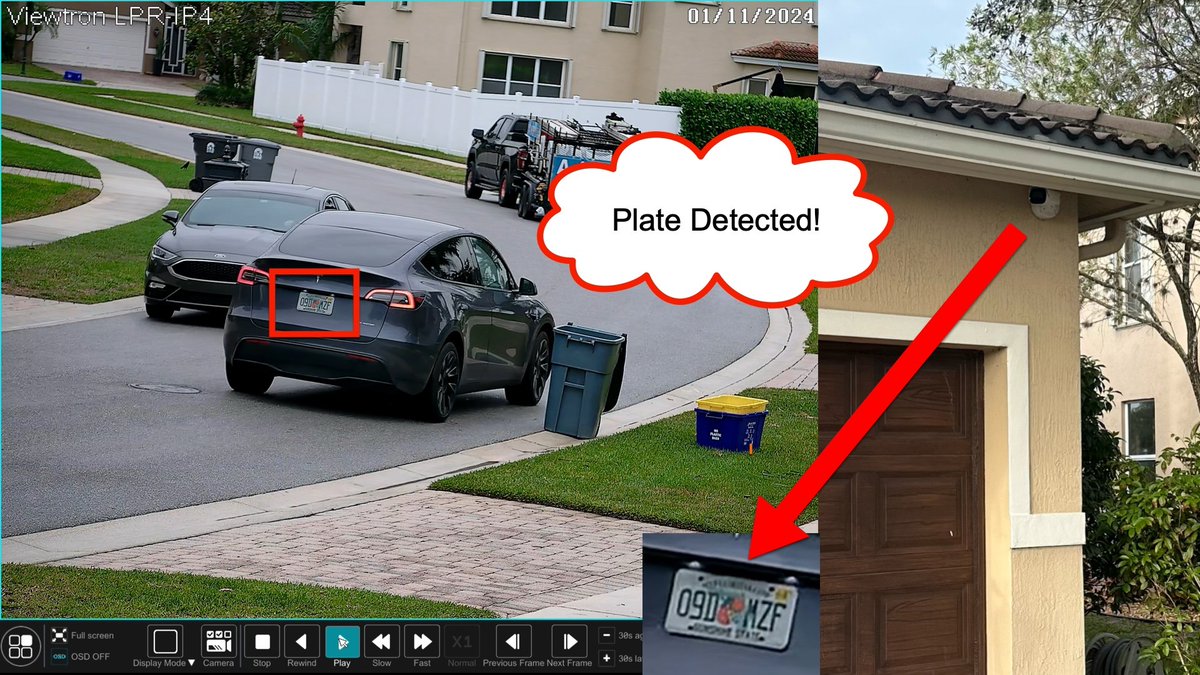
Search and play back recorded license plate recognition events in the Viewtron mobile app for iPhone and Android. https://t.co/IpYwwAA5no
CCTV Camera Pros put together a video demo from the Viewtron IP camera NVR at our warehouse. That 16 channel NVR has a Viewtron LPR-IP4 license plate camera and 14 other Viewtron IP cameras connected to it. The LPR-IP4 has automatic license plate recognition software built into it. When a license plate is detected, the event is bookmarked on the NVR so it is easy to find.
The mobile app's intelligent search finds those events, including plate detection, successful plate recognition, and strange plate. Search results show license plate thumbnails, and the events are annotated in green on the playback timeline. The video also covers landscape view, HD main stream playback, digital zoom, snapshot images, and video backup. The step-by-step instructions are in the video and on the page.
If you have questions about setting up an LPR camera system for home, business, or government, email us at [email protected] or call or text us at 1-561-433-8488.
https://t.co/IpYwwAA5no
CCTV Camera Pros put together a video demo of the Viewtron security camera app playing back recorded video from a Viewtron DVR or NVR. The app is available for iPhone and Android. https://t.co/DBBXi5B92u
The playback timeline is color coded, so you can find the type of recording you need:
🔵 Blue: Continuous Recording
🟠 Orange: Motion Detection Recording
⚪ Clear: No Recording
🟡 Yellow: AI Software Human Detection Recording
By default the player uses the secondary stream. You can switch to Main Stream for the highest video resolution. On the playback screen you can also jump back to live view, select a different camera, turn audio on or off, use multi-camera layouts, pick another date, and save a clip or snapshot on your phone.
The step-by-step instructions are in the video and on the page. If you have questions, email us at [email protected] or call or text us at 1-561-433-8488.
https://t.co/DBBXi5B92u
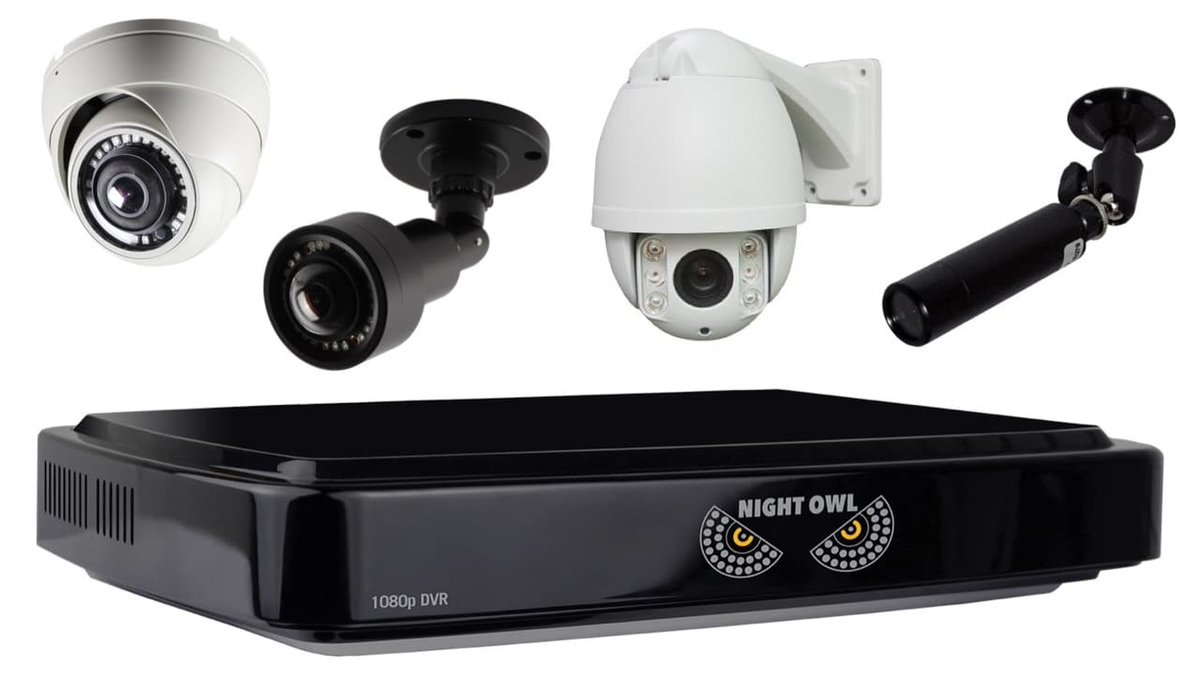
Looking for a Night Owl camera compatibility for replacement cameras or a replacement DVR? https://t.co/wsJCOXMSaP
CCTV Camera Pros put together a Night Owl camera compatibility chart that lists the Night Owl DVR and camera models we know about, organized by video format and resolution, and shows which Viewtron hybrid DVR works with each one:
🔹 Video formats: analog CCTV, AHD, HDA and HD-TVI
🔹 Resolutions: 960H, 720p, 1080p, 3MP, 4MP, 5MP and 4K
🔹 Every BNC input on a Viewtron hybrid DVR auto-detects AHD, HD-TVI, HD-CVI and analog CCTV
🔹 Keep your existing cameras and coax cables and only swap the recorder
The VT-DVR-4, VT-DVR-8 and VT-DVR-16 support up to 4K, and Viewtron DVRs include free iPhone and Android apps plus Mac and Windows software.
Night Owl ended support for the Night Owl HD, Night Owl Pro and Night Owl Lite apps on June 1, 2026, but your wired BNC CCTV cameras still work. You just need a new DVR.
How to find your model number, which DVR size to pick, and the replacement steps are on the page. If your model is not listed, email us at [email protected] or call or text us at 1-561-433-8488. We will confirm compatibility for you.
https://t.co/wsJCOXMSaP
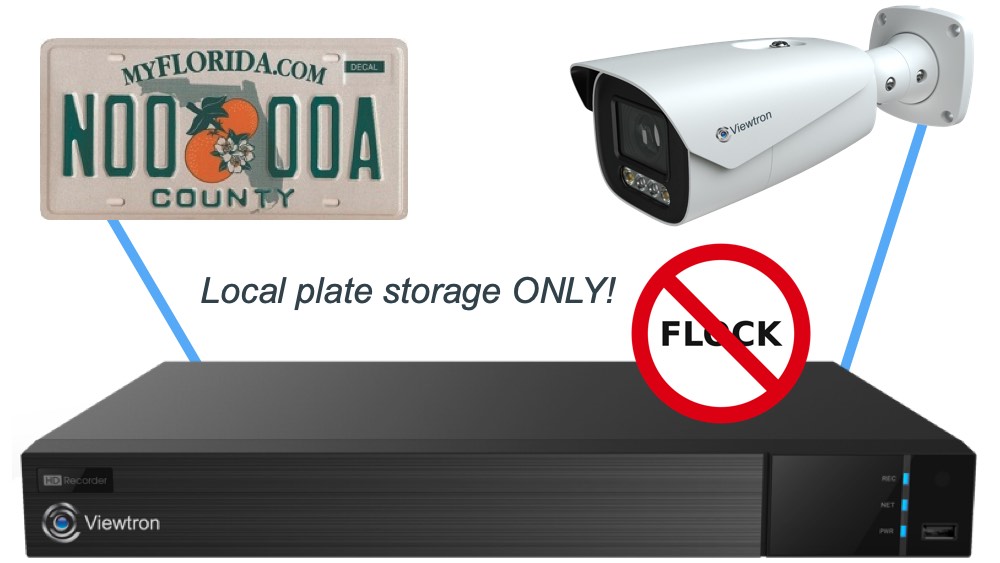
Do all LPR cameras send license plate data to the government like Flock cameras do? A customer asked us that after watching one of our license plate capture videos. The short answer is no, not Viewtron LPRs. https://t.co/oUEiIiEMhQ
Viewtron LPR cameras record plate video and plate data to the local hard drive of the owner's Viewtron NVR. Nothing is sent to a centralized government database or cloud service. It is a closed loop system.
~ Plate video and data stay on the owner's NVR only
~ No cloud service is used for plate recognition or video storage
~ The mobile app and the Mac and Windows VMS software connect straight to the owner's own NVR
~ When the drive fills up, the NVR overwrites the oldest recordings automatically
Homeowners and businesses use LPR so they can identify the vehicles involved if a crime happens on or near their property. They are not tracking traffic down the street.
The full answer, plus links to our license plate capture vs ALPR article and LPR video demos, is on this page.
https://t.co/oUEiIiEMhQ
Questions? Email us at [email protected] or call or text us at 561-433-8488. We are happy to help you design an LPR system that keeps your data local.
Viewtron security camera DVRs and NVRs have alarm inputs on the back, so you can hardwire a magnetic door sensor and trigger video recording every time the door opens. https://t.co/Kk6cQVW7nS
CCTV Camera Pros put together a demo using a magnetic door sensor wired with 18/2 cable to the alarm input on a Viewtron NVR. Our 8 channel Viewtron DVR, for example, has 8 alarm inputs and 2 relay outputs. The recorder runs 24/7 continuous recording and bookmarks every motion and sensor event, color coded on the playback timeline, so door openings are easy to find.
You can also search by Sensor event on the Search and Backup screen, back up the clips to a USB drive, and see the same color-coded timeline in the free Viewtron iPhone and Android apps and the free Viewtron VMS software for Mac and Windows.
The video, the full how-to, and links to the Viewtron DVR and NVR manuals are on the page. For questions about Viewtron alarm integration, email us at [email protected] or call or text us at 1-561-433-8488.
https://t.co/Kk6cQVW7nS
Viewtron VMS is free VMS software for Viewtron CCTV DVRs, NVRs and IP cameras, with a Windows version and a Mac version. Watch live video, search and play back recordings, and get alarm alerts from one screen. https://t.co/Ei7fr4Mwjv
CCTV Camera Pros put together a set of video demos of the software. They cover live camera view layouts, viewing cameras at multiple locations, recorded video search and playback, search by alarm event, remote video backup over the network, remotely triggering alarm relay outputs, and pop-up alerts from security alarms. Viewtron VMS supports up to 16 DVRs and NVRs and up to 256 security cameras (CCTV and IP). The software is free for all Viewtron customers and only works with Viewtron security camera systems.
If you have questions about Viewtron VMS or your system, email us at [email protected] or call or text us at 1-561-433-8488.
https://t.co/Ei7fr4Mwjv
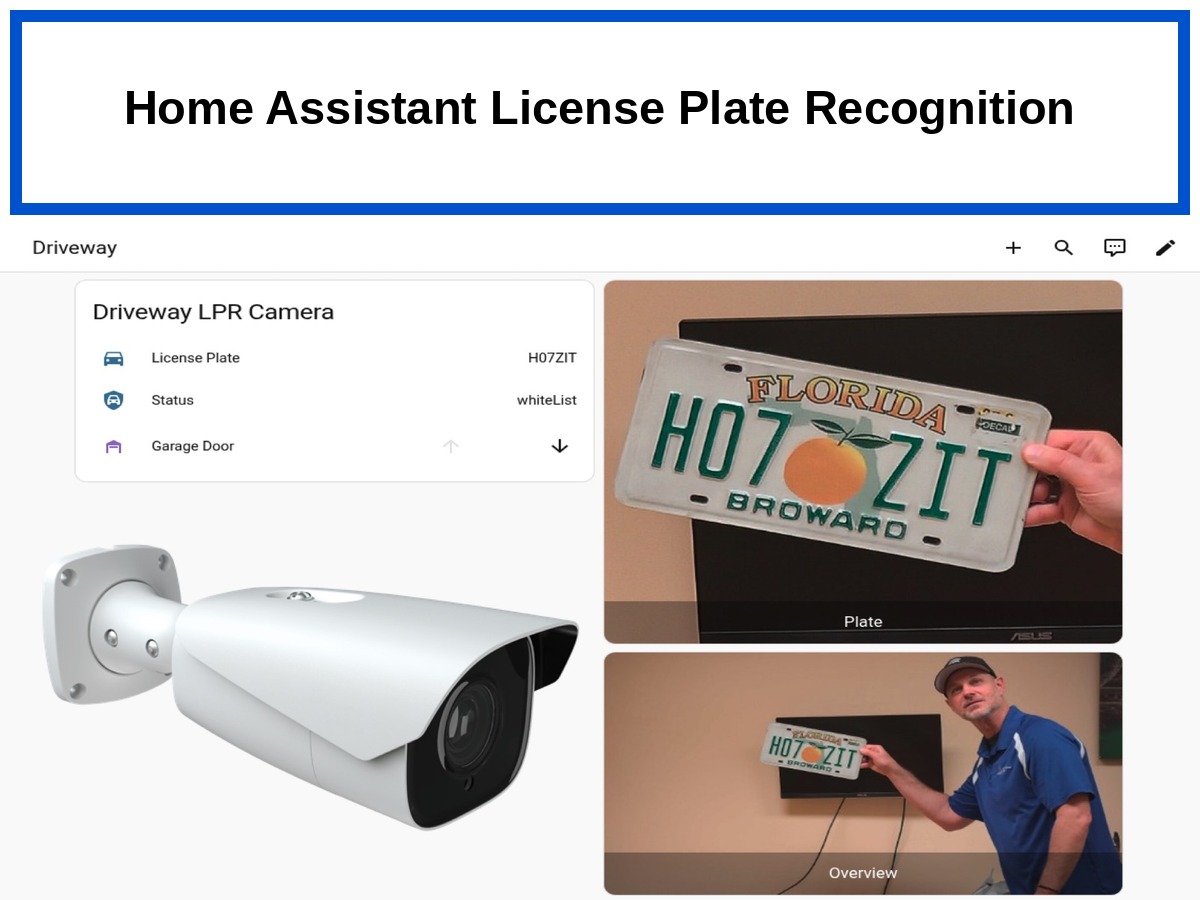
Home Assistant License Plate Recognition with LPR Camera API: CCTV Camera Pros put together a how-to that shows a Viewtron LPR camera sending the plate number, a plate image and an overview image straight into Home Assistant over MQTT. https://t.co/tS9CTbCaCC
The AI runs on the camera. Our Viewtron LPR-IP4 reads the plate itself and sends each read with its HTTP POST API to the Viewtron Bridge, a free, open-source Home Assistant app we published on GitHub. The bridge publishes the read to MQTT, and Home Assistant discovers the entities on its own: the plate number, the plate's list status, a cropped plate image and a full scene image. An NVR is optional, and there is no cloud plate reading, no GPU or Coral, and no subscription.
The allow list lives on the camera. You add your plates as Allow, Block or Temporary, and you can give a plate a start and end time for guests, contractors and deliveries. Then Home Assistant automations can open your garage door or gate when an allowed plate is read, and send a phone alert with the plate picture when an unknown plate shows up. The plate reads stay on your camera and your Home Assistant server.
Already running Frigate or Blue Iris? You can use both. Keep them for recording video, and use the LPR camera's plate events for your automations. The 4MP LPR-IP4 has an 8-32mm motorized zoom lens and built-in IR, and it reads plates from about 21 to 90 feet away when it is installed well.
The install steps, camera settings, entity list, both automations, and tips for using plate reads safely on a gate or garage are on the page.
Need help confirming our Viewtron LPR camera will work for your application? Email us at [email protected] or call or text us at 1-561-433-8488.
We will confirm the right LPR camera setup for your property.
https://t.co/tS9CTbCaCC
LPR Camera Night Time License Plate Recognition: can a license plate camera read a front plate at night with the headlights shining right at it? CCTV Camera Pros tested it, and we added new night captures from our 4MP Viewtron LPR-IP4. https://t.co/UIlUUw44aU
Headlight glare trips up most security cameras at night. Add vehicle motion and reflective plate sheeting, and a regular dome aimed at the driveway usually cannot read the plate. Night plate reading takes a dedicated LPR / ANPR camera with the right IR and shutter setup.
In the first video, our 1080p Viewtron LPR-IP7 captures a car's front plate at night with the headlights on. The camera handles the glare, and the characters are clear in full screen playback. It was recorded on a hybrid DVR, so it is capture only. A second video shows a Viewtron NVR's ANPR software detecting a rear plate in real time.
The new 4MP section shows the LPR-IP4, the model we recommend now, capturing the rear plate of a pickup truck and a front plate at night. At 130 to 140 feet, the front plate is not crystal clear, but you can still identify every letter and number.
Both videos, close-ups of the 4MP captures, and the night settings we use for glare and overexposed plates are on the page. ANPR software is built into every Viewtron NVR with no ongoing license fees.
To plan a night LPR setup, email us at [email protected] or call or text us at 1-561-433-8488.
We will confirm the right LPR camera setup for your property.
https://t.co/UIlUUw44aU
Night Owl ended mobile app support on June 1, 2026. The Night Owl HD, Night Owl Pro and Night Owl Lite apps are no longer supported. If you have a Night Owl system with wired BNC CCTV cameras, your cameras still work. You just need a new DVR. https://t.co/CogZ8F011L
CCTV Camera Pros put together a Night Owl camera compatibility chart. It lists the Night Owl DVR and camera models that we know about, organized by video format (analog CCTV, AHD, HDA and HD-TVI) and resolution (960H, 720p, 1080p, 3MP, 4MP, 5MP and 4K), and shows which Viewtron hybrid DVR works with each one.
Viewtron hybrid DVRs work with almost every Night Owl BNC camera ever made. Every BNC input auto-detects AHD, HD-TVI, HD-CVI and analog CCTV, so you keep your existing cameras and coax cables and only swap the recorder. The VT-DVR-4, VT-DVR-8 and VT-DVR-16 support up to 4K, and you get free iPhone and Android apps plus Mac and Windows software.
How to find your model number, which DVR size to pick, and the replacement steps are on the page. If your model is not listed, email us at [email protected] or call or text us at 1-561-433-8488. We will confirm compatibility for you.
https://t.co/CogZ8F011L
LPR camera for home use: does it actually work? This video shows the license plate recognition testing we did with a Viewtron LPR camera installed at my house. https://t.co/U4vPpJx6M7
Putting an LPR camera on a home to monitor the street out front is a tough install. I mounted the Viewtron LPR-IP4 above my garage door, 9 feet 4 inches off the ground, and my house sits 35 feet back from the road. I angled the camera down the street and zoomed the 8-32mm motorized lens in on a plate detection zone about 110 feet away.
The results surprised me. Daytime and night time license plate capture was clear, and since that test we have helped many homeowners with license plate camera designs for their own homes.
These Viewtron LPR systems also work great for gated communities, commercial parking lot entrances, and government facilities.
The full test results and the NVR playback demo are on the page and in the video. Every property is different, so for a free phone consultation on your setup, email [email protected] or call or text 1-561-433-8488.
https://t.co/U4vPpJx6M7
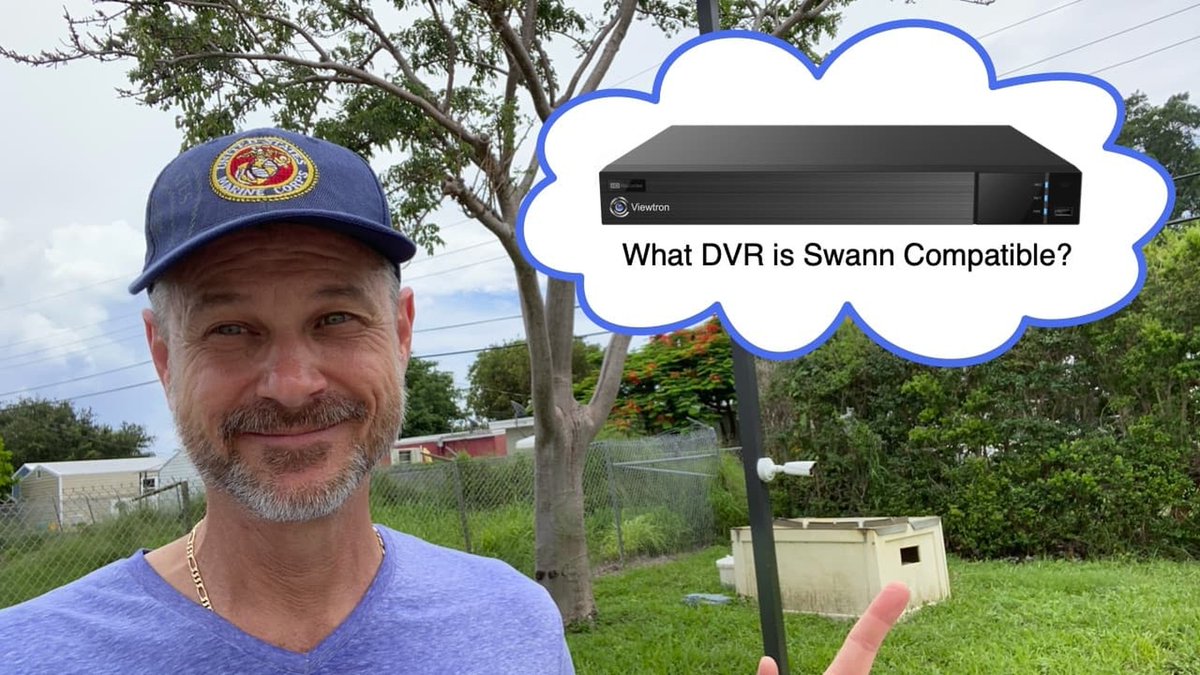
Will a new DVR work with the Swann BNC CCTV cameras you already have? A customer that has Swann 1080p BNC cameras wired with coax and wanted to know if they would plug and play with a Viewtron Hybrid DVR. https://t.co/1xEGoe4Gtc
In almost every case, yes. CCTV Camera Pros does not sell Swann cameras or Swann DVRs, but we replace Swann DVRs with Viewtron hybrid DVRs all the time. They are plug and play with 99% of BNC CCTV cameras. Every BNC input on the VT-DVR-4, VT-DVR-8, and VT-DVR-16 supports analog CCTV (CVBS), AHD, HD-TVI, and HD-CVI, from 720p and 1080p up to 4MP, 5MP, and 4K. You keep your cameras and coax cable and only swap the recorder.
The one BNC format that does not work is HD-SDI / SDI, and it is very rare.
How to find your Swann camera and DVR model numbers, which size Viewtron DVR to pick, and tips for the swap are in the forum post.
Want to be 100% sure first? Email me your camera make and model: [email protected]
https://t.co/1xEGoe4Gtc
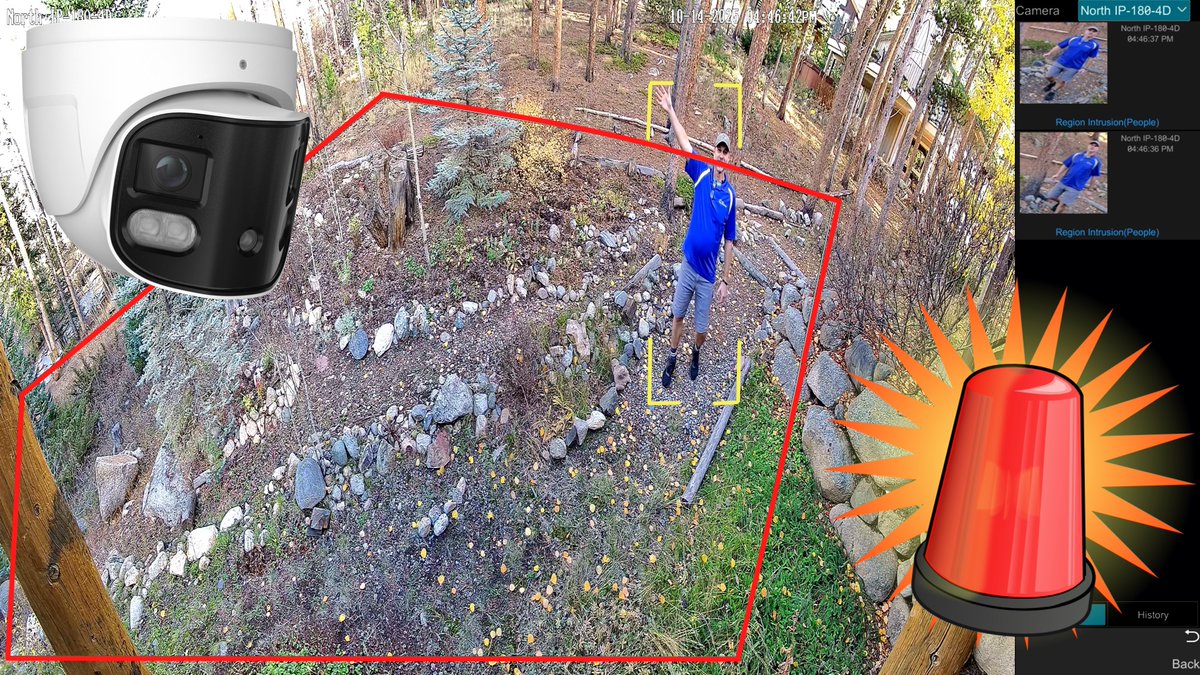
You can set up a perimeter alarm around your home or business with Viewtron AI security cameras. This video demo shows how it works. https://t.co/XxFLTHhOAJ
A customer wanted an intrusion zone around the outside of his house, and he wanted an audible alarm loud enough to wake him up at night if a person walked into that zone. He was not sure a mobile app push notification would do it.
Viewtron IP camera NVRs have a built-in alarm buzzer that the AI human detection can trigger. If that is not loud enough, you can connect a higher decibel external siren (110 to 120 dB) and alarm light to one of the alarm relay outputs on the back of the NVR.
For the demo I used our Viewtron IP-180-4D 180 degree camera at my house. It is one of our alarm cameras with its own built-in alarm light and speaker, so those can go off on a perimeter intrusion too.
The step-by-step NVR setup is on the page and in the video.
https://t.co/XxFLTHhOAJ
Lorex IP Camera to TV Live Display Solution
https://t.co/jIWpddXcwR
Viewtron IP to HDMI decoders pull live RTSP from your IP cameras and output HDMI to a TV or spot monitor — and they work with any IP camera brand that supports RTSP, not just Viewtron.
Keep recording on an existing Lorex (or other) NVR while adding a separate HDMI live view. IP-HDMI-D4 covers hard-wired 1080p; IP-HDMI-D4K adds 4K HDMI and WiFi, plus multi-camera layouts. You can find all of our HDMI over Ethernet decoders here:
https://t.co/Zh57MIdqsJ
Full setup, RTSP URL tips, and channel layout notes:
https://t.co/jIWpddXcwR
Tired of trees, shadows, and rain setting off your outdoor security camera motion detection?
Viewtron Smart Motion Detection on our BNC CCTV camera DVRs uses AI to target people and vehicles. That cuts the false alarms that make a lot of customers turn motion recording off.
It runs on the DVR, so you can keep your existing BNC CCTV cameras (Lorex, Swann, Hikvision, Dahua, Night Owl, and others) and still get smarter alerts. Works with analog and HD-over-Coax up through 4K. Setup and mobile push demo are in the video.
https://t.co/hzx2iGPLU4
Viewtron Security Camera App: DVR Recorded Video Playback
https://t.co/J6DAVvZ79y
Here is a video demo of the Viewtron security camera app playing back recorded surveillance footage from a Viewtron DVR or NVR. The same free app works on iPhone and Android.
I use this when I need to check what happened on site without sitting in front of the recorder. From live view in the app, you open recorded playback and start reviewing footage for the current day. The player defaults to the secondary stream for smoother remote viewing. When you want the high definition recording, you switch over to the main stream.
The playback timeline is color coded so you can find the type of recording you care about quickly:
• Blue: continuous recording
• Orange: motion detection recording
• Clear: no recording for that stretch
• Yellow: AI human detection recording
On the playback screen you can jump back to live view, select a different camera, turn audio on or off if that camera has a microphone, switch between single and multi-camera layouts, toggle the timeline annotations, pick another date, use fast forward / reverse / pause, choose main stream or substream, save a local clip on the phone, or take a snapshot of the current frame.
This remote playback works with Viewtron hybrid DVRs for BNC / HD-over-coax cameras and with Viewtron IP camera NVRs. If you want more mobile app demos, the related videos are linked from the page.
Questions: [email protected]
https://t.co/J6DAVvZ79y
Need to monitor security cameras at more than one site from one PC?
https://t.co/HmFDXnUV48
Viewtron VMS (video management software) is included with Viewtron DVRs, NVRs, and IP cameras. Run it on Mac or Windows at your main office and pull live video from multiple locations onto one screen. Build custom layouts that mix cameras from different sites in the same view.
Supported on the included VMS:
• Up to 16 DVRs / NVRs
• Up to 256 cameras
• Up to 100 cameras per screen
• Up to 32 concurrent remote users
• Same software for Mac and Windows
You can also remotely back up video from your recorders, use CMS tools across multiple DVRs, and handle remote monitoring from that same central PC. A full VMS version is available for larger installs if you need higher capacity.
Step-by-step setup is in the video and on the page.
https://t.co/HmFDXnUV48
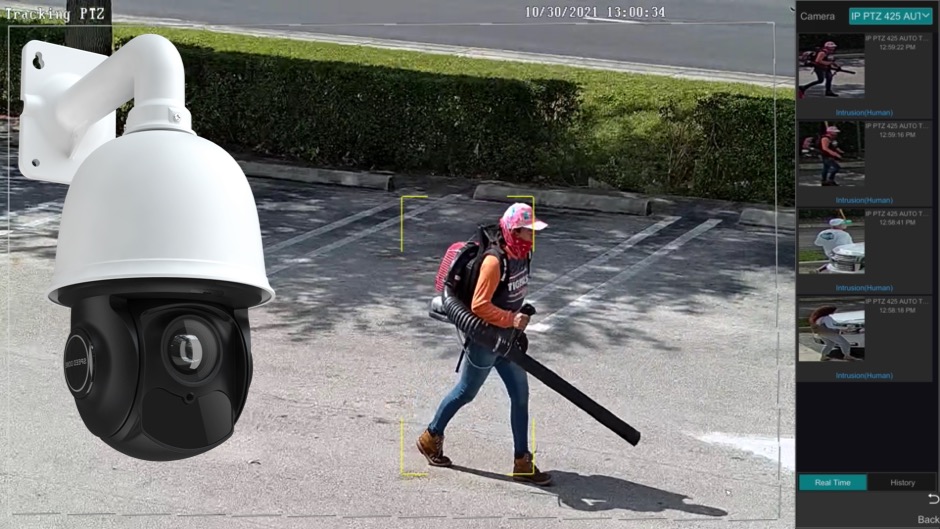
This is a demo of our Viewtron auto-tracking PTZ with human object detection. We draw an intrusion zone on the Viewtron NVR, and when someone walks into that zone the PTZ pans, tilts, and zooms to follow them across the view.
The video was recorded with the IP-PTZ-425 (4 megapixel, 25x optical zoom). The same auto-tracking / intrusion-zone setup is on our newer models too: the IP-PTZ-440 (4MP, 40x zoom) and the IP-PTZ-832 (4K / 8MP, 32x zoom).
Step-by-step setup and the full zoom examples are on the page and in the video.
https://t.co/B8WSb7dnks
People Counting Camera Demo for Viewtron IP Cameras
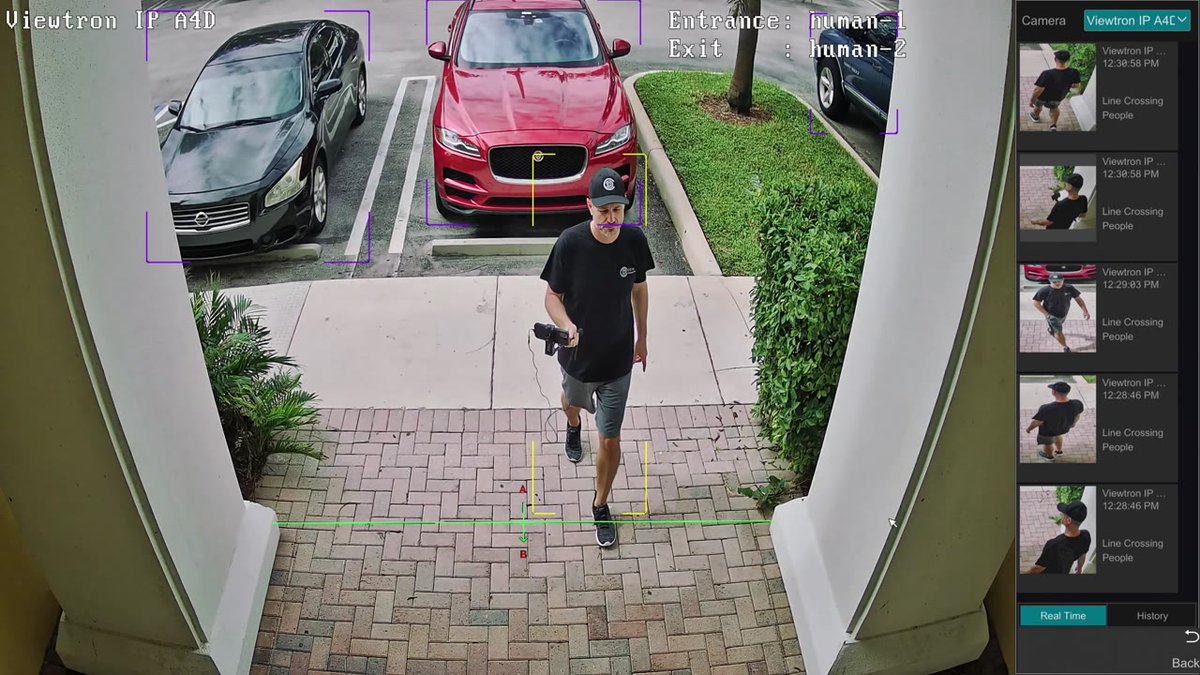
This video shows a Viewtron IP camera counting people in real time as they enter and exit the entrance at our West Palm Beach building — useful for many business and government sites:
https://t.co/hC3fC6aHbP
The demo uses a Viewtron IP-A4D dome with AI, plus line crossing counting on the Viewtron NVR. The camera and NVR work together for live Entrance / Exit people totals over the video.
Step-by-step setup (AI / Event, draw the line, Statistical OSD, Detection Target for People) is in the video and on that page — including how to search Intelligent Analytics later and play back the count with the recording.
We also have a traffic counting demo for cars and trucks:
https://t.co/uH9RdBH54x
Questions: [email protected]
Traffic Counting Camera Setup for Viewtron IP Cameras
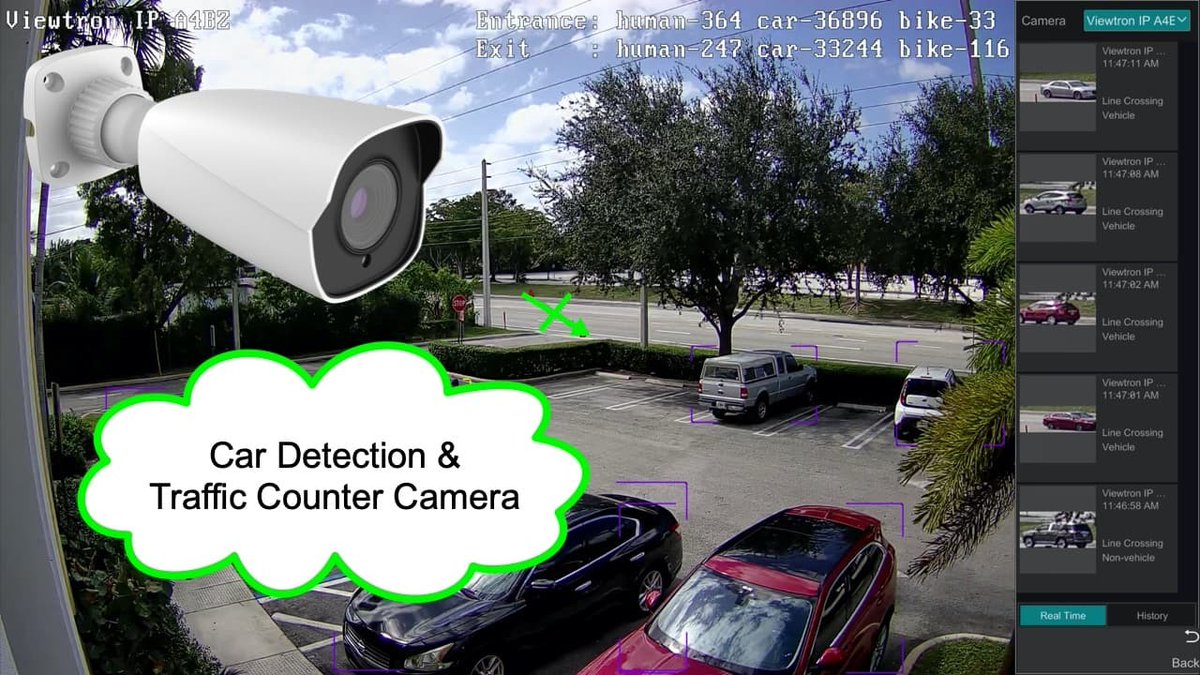
Watch this video to see how to set up a 4 megapixel Viewtron network IP camera as a traffic counting camera. This demo shows vehicles being counted in real time when they cross a section of the road in front of the CCTV Camera Pros warehouse:
https://t.co/gUGxKCfS3G
This works because of the artificial intelligence software built into the IP camera and the Viewtron NVR it is connected to. The same camera can also act as a vehicle detection camera.
The camera detects cars and trucks, then the line crossing counting function on the network video recorder keeps a running total of vehicles that crossed the line in both directions. This is done in real time.
Real Time Vehicle Detection & Traffic Counting
On the Viewtron NVR live view, you can enable Target Detection by right-clicking on the screen. That opens a window with snapshot images taken in real time when a vehicle crosses the line drawn across the road. Please note the vehicle counter in white text at the top of the screen. Entrance is vehicles that crossed the line from the A -> B direction. Exit is the opposite, B -> A.
AI Security Camera
This is the AI security camera used in this system. It is a 4 megapixel IP camera, Viewtron model IP-A4BZ.
Viewtron NVR (Network Video Recorder)
IP cameras may be connected to these NVRs via the PoE network ports on the back of the NVR. They can also be connected by being on the same network via a network switch or router.
In addition to the vehicle counting function, these NVRs also support face detection, people detection, intrusion detection, face recognition / face match, license plate recognition, and other AI functions.
Traffic Counting Setup
This is how the traffic counting application is set up on the Viewtron NVR.
To set up the traffic counting function, select AI / Event from the NVR main menu.
On the AI / Event screen, follow these instructions.
1. Choose the camera that you want to configure at the top of the screen, where it says Camera Name.
2. Select Line Crossing Counting.
3. On the line cross counting setup screen, check the Enable checkbox.
4. Check the Draw line checkbox, then click and drag with the mouse to draw the crossing line where you want it placed.
5. Check the Statistical OSD checkbox if you want the real time object count text displayed over the live view of the camera.
6. If you want to reverse the direction of traffic flow, you can change the A->B direction to B->A with the Direction drop down.
7. If you want the object counter to automatically reset each day, week, or month, check the Auto Reset checkbox. Then, select the frequency and time that you want the counter reset to occur.
8. Click on the Detection Target tab.
On the Detection Target screen, you can place check boxes next to the different types of objects that you want to count. Viewtron AI cameras can detect and count People, Vehicle, and Non-vehicle (which is bicycles). When you are done, click on the Apply button.
Note: People detection and counting is another useful feature for business and government installations. For example, businesses can use these object detection surveillance systems to keep track of traffic flows at specific entrances and exits of buildings, or even track how many customers enter a certain area of their business.
Recorded Video Playback
Please note that the traffic counting is kept in sync with the video recording. This allows you to play back video and see what the traffic count was at any point in time.
Complete AI Surveillance Systems
CCTV Camera Pros designs and supplies complete AI security camera systems for home, business, and government. We have some pre-packaged systems available and we also provide custom quotes based on customer requirements.
Questions?
Thank you for checking out this video and article! If you have any questions, you can email me here ([email protected]).