Discord is causing MAJOR Input Delay and FPS Drops while Gaming
Do these Settings to Optimize Discord for Maximum Performance on Windows 10/11
(Increased FPS + Reduced Latency) More Info Below!
A first look at TinyBoost's (beta) USB Viewer: see where your devices are connected and load-balance them across controllers.
Sign up for the waitlist: https://t.co/LlxyLcbpDb
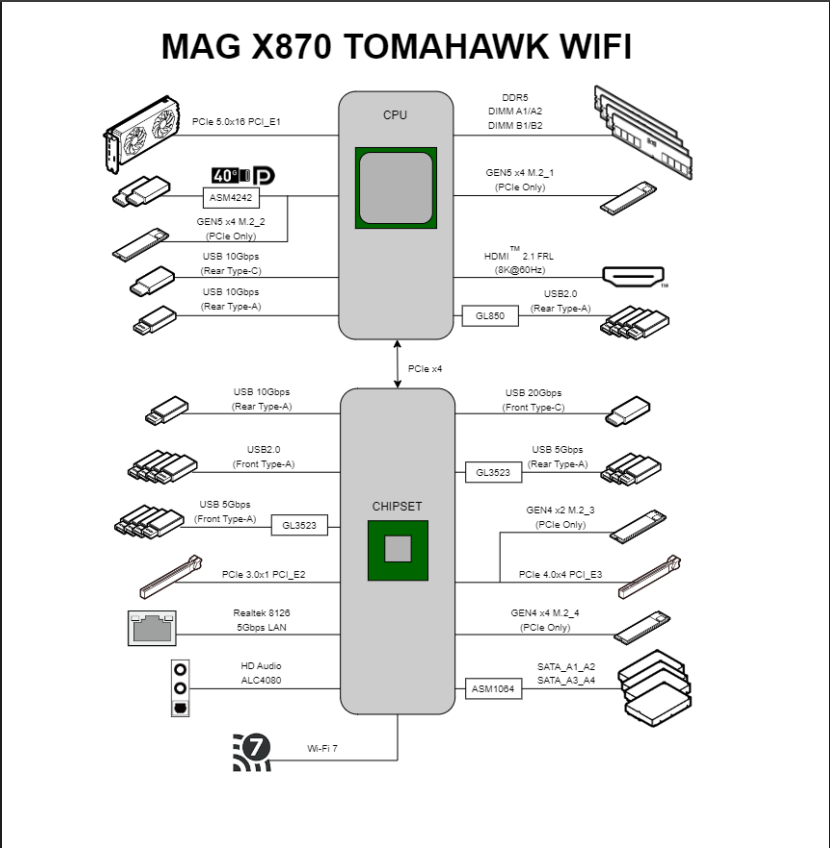
Not all USB ports on your motherboard are equal. Some are connected directly to the CPU, while others are routed through the chipset. Understanding the difference can help you make better use of your USB devices.
Reduce USB contention by distributing your devices across different USB controllers whenever possible.
On systems used for both work and gaming, avoid connecting all USB devices to the same xHCI controller. Using your motherboard's block diagram as a reference, connect latency-sensitive devices such as your mouse and keyboard to USB ports that are connected directly to the CPU's xHCI controller. Place higher-bandwidth or less latency-sensitive devices such as USB speakers, webcams, Stream Decks, audio interfaces, capture cards, and external storage across the remaining controllers as evenly as possible.
By balancing devices across available controllers, you can reduce controller congestion, avoid unnecessary bandwidth contention, improve USB stability, and ensure each device has access to the resources it needs.
TL;DR: Connect your mouse and keyboard to USB ports that bypass the chipset and connect directly to the CPU's USB controller. Distribute your remaining USB devices as evenly as possible across the other controllers managed by the motherboard chipset.