#Interview#DataEngineer#datascience Resources that are used for preparing for 𝐌𝐋 𝐫𝐨𝐥𝐞𝐬 𝐚𝐭 𝐌𝐞𝐭𝐚 𝐚𝐧𝐝 𝐆𝐨𝐨𝐠𝐥𝐞.
The below resources might seem like 𝐨𝐯𝐞𝐫𝐤𝐢𝐥𝐥, but they gave me the confidence to ace any 𝐌𝐋 𝐢𝐧𝐭𝐞𝐫𝐯𝐢𝐞𝐰. The investment in understanding 𝐟𝐮𝐧𝐝𝐚𝐦𝐞𝐧𝐭𝐬 paid off not just in interviews, but in becoming a better ML engineer overall.
Listing down the 𝗯𝗲𝘀𝘁 𝗿𝗲𝘀𝗼𝘂𝗿𝗰𝗲𝘀 for 𝗠𝗟 𝗶𝗻𝘁𝗲𝗿𝘃𝗶𝗲𝘄 𝗽𝗿𝗲𝗽:
𝟭. 𝗠𝗟 𝗦𝘆𝘀𝘁𝗲𝗺 𝗗𝗲𝘀𝗶𝗴𝗻 - 𝗕𝘆𝘁𝗲𝗕𝘆𝘁𝗲𝗚𝗼
Link: https://t.co/m3rMI1bBjn
They have focused problems that teach you how to solve system design interviews with proper structure. Each problem breaks down real-world ML systems (visual search, recommendation engines, etc.) into digestible components. You'll learn how to think about scale, trade-offs, and architecture decisions that Big Tech companies expect you to discuss.
𝟮. 𝗖𝗼𝗱𝗶𝗻𝗴 𝗟𝗟𝗠 𝗳𝗿𝗼𝗺 𝗦𝗰𝗿𝗮𝘁𝗰𝗵 - 𝗔𝗻𝗱𝗿𝗲𝗷 𝗞𝗮𝗿𝗽𝗮𝘁𝗵𝘆
Link: https://t.co/LIQN8r09Lg
This isn't just another tutorial - it's a masterclass in understanding how LLMs actually work. Andrej breaks down transformers, attention mechanisms, and training from first principles. After this, you won't just use LLMs, you'll understand them deeply enough to architect solutions around them.
𝟯. 𝗖𝗼𝗱𝗶𝗻𝗴 𝗠𝘂𝗹𝘁𝗶𝗺𝗼𝗱𝗮𝗹 𝗟𝗮𝗻𝗴𝘂𝗮𝗴𝗲 𝗠𝗼𝗱𝗲𝗹 𝗳𝗿𝗼𝗺 𝗦𝗰𝗿𝗮𝘁𝗰𝗵 - 𝗨𝗺𝗮𝗿 𝗝𝗮𝗺𝗶𝗹
Link: https://t.co/5Wbb1BWOlo
Duration: 6 hours
Yes, it's long. But it's worth every minute. This acts as an excellent revision of the LLM course above and extends your understanding to multimodal models. Everyone is fascinated by just using model APIs, but having this fundamental knowledge helps you think critically when solving any problem with LLMs in interviews.
𝟰. 𝗗𝗮𝘁𝗮 𝗦𝘁𝗿𝘂𝗰𝘁𝘂𝗿𝗲𝘀 & 𝗔𝗹𝗴𝗼𝗿𝗶𝘁𝗵𝗺𝘀 - 𝗡𝗲𝗲𝘁𝗖𝗼𝗱𝗲
Link: https://t.co/G43CcNWwSs
Most Big Tech companies still ask DSA questions for ML roles. NeetCode provides video solutions for LeetCode's top 150 problems. What makes this special is that each solution teaches you the pattern, not just the answer. You'll learn to recognize problem types instantly during interviews.
𝟱. 𝗗𝗦𝗔 𝗣𝗮𝘁𝘁𝗲𝗿𝗻𝘀 𝗕𝘆 𝗖𝗮𝘁𝗲𝗴𝗼𝗿𝘆 - 𝗔𝗱𝗶𝘁𝘆𝗮 𝗩𝗲𝗿𝗺𝗮
Link: https://t.co/7hGV7vIDl8
This is hands down the best resource for learning DSA patterns. Instead of memorizing solutions, you'll learn the thinking framework behind each category (DP, recursion, sliding window, etc.). Once you understand these patterns, you can tackle any variation that interviewers throw at you.
Slow Spark join? If one side is small, broadcast it so the big table isn't shuffled:
from pyspark.sql.functions import broadcast
big.join(broadcast(small), "id")
Then check the plan with .explain()
#PySpark#DataEngineering#code#python
Latest row per user in SQL, no subquery:
SELECT *
FROM events
QUALIFY ROW_NUMBER() OVER (
PARTITION BY user_id ORDER BY ts DESC
) = 1
Works in Snowflake, BigQuery and DuckDB.
#SQL#DataEngineering
Your pandas script is slow because it loads data it doesn't need.
df = https://t.co/SpoRqTP6Ay_csv(
"big.csv",
usecols=["id", "price", "city"],
dtype={"city": "category"},
)
Fewer columns + smaller dtypes = much lower memory.
#Python#DataScience
🚨𝗕𝗥𝗘𝗔𝗞𝗜𝗡𝗚: GOODBYE CHATGPT forever.
Claude just collapsed every tool you were using into one single 120-second system completely free.
7 prompts go from completely across 10 tools to completely unstoppable with just one: 👇
🚀 The tech industry has a funny habit of reinventing old ideas and giving them shiny new names.
The latest example?
“Forward Deployed Engineer.”
A fancy title for what is essentially a customer-facing software engineer.
And honestly, this hits a nerve.
Because software engineers were always supposed to be customer-facing.
Years ago, Kent Beck talked about the concept of the “Whole Team” in Extreme Programming (XP). The idea was simple:
👉 Developers work directly with the business.
👉 Developers understand customer problems firsthand.
👉 Everyone shares responsibility for outcomes.
No endless handoffs.
No communication chains.
No “I’ll get back to you after speaking with engineering.”
Just builders working closely with the people they serve.
Somewhere along the way, we decided engineers shouldn’t talk to users.
We inserted layers:
Business Analysts.
Product Owners.
Project Managers.
Scrum Masters.
Program Managers.
Each role was created with good intentions.
But every layer added distance between the people building the software and the people using it.
And something important got lost.
Engineers stopped hearing customer pain directly.
They became ticket processors instead of problem solvers.
Requirements moved through five meetings before reaching the people writing the code.
Context disappeared.
Speed disappeared.
Ownership disappeared.
Now fast forward to the AI era.
The most valuable engineers aren’t just writing code.
They’re:
⚡ Talking to customers
⚡ Understanding business problems
⚡ Building prototypes in days, not months
⚡ Deploying solutions directly into production
⚡ Iterating based on real feedback
In other words…
We’re returning to the original idea.
The engineer is once again becoming part builder, part consultant, part product thinker.
The irony?
We needed a brand-new title to describe something that software engineering was always meant to be.
“Forward Deployed Engineer.”
And if you really want Silicon Valley bonus points…
Just add AI in front of it. 🤖
Because nothing says innovation quite like rediscovering a 25-year-old idea and giving it a cooler name.
The best engineers I’ve worked with didn’t hide behind tickets.
They talked to customers.
They understood the business.
They owned outcomes.
And that’s becoming valuable again.
Maybe the future of software engineering looks a lot like its past.
#CyberSecurity
#FutureOfWork
#Engineer
🚨 The Tech Industry is witnessing the birth of a NEW engineering era.
First came Software Engineering.
Then Data Engineering exploded.
Now… Gen AI Engineering is changing everything.
We are moving from:
➡ Writing logic → Designing intelligence
➡ Building apps → Building autonomous systems
➡ Dashboards → Decision-making AI
➡ Static pipelines → Self-learning workflows
A few years ago:
• Data Scientists predicted outcomes
• Data Engineers moved data at scale
But today?
🔥 Gen AI Engineers are building systems that can:
✔ Understand human language
✔ Generate code
✔ Automate workflows
✔ Analyze massive datasets
✔ Create content
✔ Act like intelligent copilots
The shift is MASSIVE.
The future tech stack is no longer just:
Python + SQL + Spark
It’s becoming:
LLMs + Vector DBs + Agents + RAG + Real-time Data + AI Orchestration
And the biggest opportunity?
💡 Engineers who combine:
Data + AI + Systems Thinking
will dominate the next decade.
Because the real winners won’t be the people who simply use AI…
They’ll be the people who BUILD with AI.
The next generation of engineers will not just create software.
They’ll create digital intelligence. 🤯
We are still early.
Very early.
And this may become the biggest technology shift of our lifetime. 🚀
#AI #GenAI #DataScience #DataEngineering #MachineLearning #LLM #ArtificialIntelligence #BigData #Tech #Innovation #FutureOfWork
Gemini Omni doesn't just build scenes that look real, it reasons about what should happen next. It combines an intuitive understanding of physics with Gemini's knowledge of history, science, and cultural context.
Rolling out today starting with video outputs to Google AI Plus, Pro and Ultra subscribers globally through the @Geminiapp + Google Flow, and @YouTube Shorts this week. Incredible #Gemini
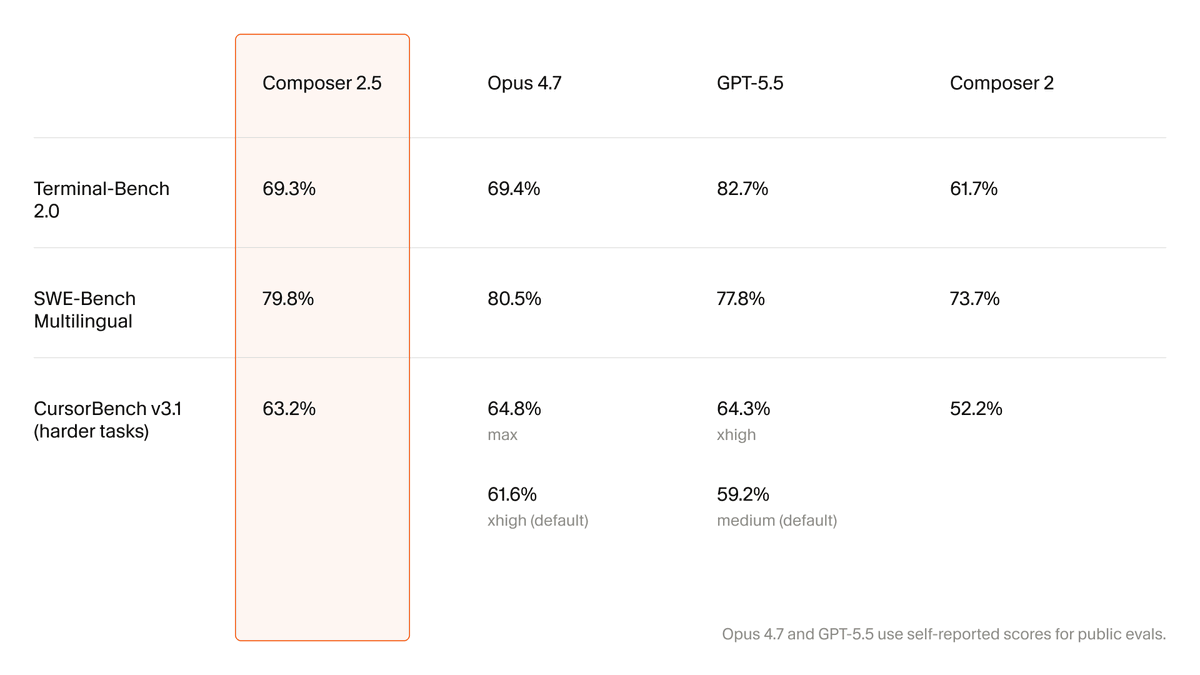
Introducing Composer 2.5, our most powerful model yet.
It's more intelligent, better at sustained work on long-running tasks, and more reliable at following complex instructions.
For the next week, we’re doubling the included usage of the model.
AI is creating a new kind of engineer. 🤯
Not the one who memorizes syntax.
The one who builds systems with AI at the center.
The smartest engineers today are using AI to:
⚡ Write code
⚡ Debug faster
⚡ Automate workflows
⚡ Generate architectures
⚡ Learn 10x faster
⚡ Build entire products solo
This is the biggest shift in tech since the internet. 🚀
The gap is no longer:
“Who can code?”
It’s:
“Who can leverage AI better than everyone else?”
Average developers use AI like autocomplete.
Top engineers use AI like a team. 🔥
The future belongs to:
🧠 AI-native builders
⚙️ System thinkers
🚀 Fast executors
Adapt fast… or get outpaced.
Reference https://t.co/uIMXxNbIay
OpenAI just sent shockwaves through fintech. 💀📉
Today, ChatGPT became a personal finance assistant.
Connect your bank accounts via Plaid → and GPT-5.5 can now:
💰 Analyze spending
📊 Track subscriptions
📈 Understand investments
🧠 Remember savings goals
💳 Answer questions using your real transaction data
And this is only the beginning.
Next:
⚡ Tax estimates
⚡ Credit card recommendations
⚡ Financial planning
⚡ AI-native banking experiences
Most fintech startups built dashboards.
OpenAI built:
👉 An intelligent financial operating system.
That changes everything.
The scary part?
People don’t want 10 finance apps anymore.
They want ONE AI that understands their entire financial life.
AI is no longer replacing features.
It’s replacing products. 🔥
Claude vs. Claude Code vs. Cowork.
Anthropic offers three distinct ways to interact with Claude, and each one targets a fundamentally different workflow. Think of it as: Chat for thinking, Code for building, and Cowork for doing.
Here's a quick breakdown:
1️⃣ Claude Chat
This is the conversational AI assistant most people already know. You type a prompt, Claude responds, and you iterate together.
- Turn rough ideas into structured plans through conversation
- Write emails, reports, essays, and long-form content
- Research and summarize complex topics in minutes
- Analyze documents, PDFs, and images
- Build interactive prototypes through Artifacts
The key here is that everything happens through conversation. You're thinking with Claude, not delegating work to it.
It's available on every device, has a free tier, and supports persistent memory across sessions.
The tradeoff is that it has no direct access to your local files (upload only), and it can't generate raster images natively.
2️⃣ Claude Code
This is a terminal-native coding agent. You describe what you want in plain English, and Claude reads your codebase, writes code, runs tests, fixes errors, and ships the result.
- Build and debug entire features across the full codebase
- Write, run, and fix tests automatically
- Manage git workflows and create pull requests
- Spawn multiple parallel agents working on different parts of a task simultaneously
It handles the full development cycle end to end, from planning to execution to testing. With the CLAUDE(.)md configuration file, you can teach it your project's conventions, patterns, and constraints so it writes code the way your team expects.
The tradeoff is a steeper learning curve compared to Chat, and token costs can add up during heavy sessions.
3️⃣ Claude Cowork
This is the newest addition. Anthropic describes it as Claude Code for the rest of your work.
It's an agentic desktop assistant that automates file management and repetitive tasks through a GUI. You describe an outcome, and Claude plans, executes, and delivers finished work: formatted documents, organized file systems, spreadsheets with working formulas, and synthesized research.
- Direct local file access and editing (no upload/download cycle)
- Schedule recurring tasks automatically
- Assign tasks remotely via Dispatch from your phone
- Computer Use lets Claude control your screen directly
It runs inside a sandboxed virtual machine on your computer, so Claude can only access folders you explicitly grant. You don't need to know how to code to use it.
The tradeoff is that your computer must stay awake for tasks to run, and it's still in research preview.
Here's how to think about choosing between them:
→ If you need to think through a problem or get writing/research help, use Chat
→ If you're building software and want an autonomous coding partner, use Code
→ If you have a clearly defined deliverable that involves local files and desktop workflows, use Cowork
All three are included in the same subscription starting at $20/month, which makes it one of the highest-leverage subscriptions in productivity software right now.
I've put together a visual below that maps the workflow of each product side by side.
Also, if you want to go deeper into Claude Code specifically, my co-founder wrote a detailed article covering the anatomy of the .claude/ folder, a complete guide to CLAUDE(.)md, custom commands, skills, agents, and permissions, and how to set them all up properly.