🔥Ask Me Anything: DeFunds & @xdaoapp Collaboration (and $500 draw) 🔥
Great news, everyone! We're organizing an AMA session on the 3rd of July at 15:00 (UTC+3). The main participants of the AMA are DeFunds CEO Igor Shepelev and XDAO co-founder Zurab Shavlidze.
Participants of the AMA will have a chance to win $500, which will be distributed among the contestants. To take part in the draw, you need to participate in our Zealy campaign and complete some simple quests. Here's the link to our Zealy community: https://t.co/6YzvXzrUuy
From this AMA, you will learn:
🤝Which cooperative features DeFunds and XDAO will announce.
🤔How to use DeFunds and XDAO together and how to create a fund for your DAO.
✍️What else is awaiting DeFunds users in the future.
Important: The AMA will be held in Russian, but we will provide a translated recording later.
🗓️See you at the AMA session on the 3rd of July!
‼️ Important Reminder: The XDAO & DeFunds AMA session is today at 7:00 p.m. UTC+3! ‼️
Co-founder of XDAO, Zurab Shavlidze, and DeFunds CEO, Igor Shepelev, will answer many questions about the projects' collaboration.
💰Participants of the AMA will have a chance to win $500, which will be distributed among the contestants. To take part in the draw, you need to participate in our Zealy campaign and complete some simple quests.
🔎We will then contact you on Discord to get your Telegram nickname to verify your presence at the AMA. We will draw $500, divided into $50 prizes. Here's the link to our Zealy community: https://t.co/6YzvXzrUuy.
‼️ The AMA is coming! Stay tuned!
Giveaway on AMA! 🔥
Just a reminder that our AMA session is coming up soon, featuring DeFunds CEO Igor Shepelev and XDAO co-founder Zurab Shavlidze.
The AMA time has changed, so join us here: https://t.co/SOBplpbVDM on July 3rd at 19:00 (UTC+3)!!!
During this AMA, you will learn:
🤝 What collaborative features have been developed for DeFunds and XDAO?
🤔 How to create a fund for your DAO?
✍️ What else awaits DeFunds users in the future?
But that’s not all!
AMA participants will have the chance to share in a $500 reward pool.
To participate in the giveaway, you need to join the Zealy campaign and complete a few simple tasks.
Zealy link for contest participation https://t.co/63UMH5mLYq
New tasks are also available in XDAO Zealy https://t.co/j89VU37oHh !
Important: The AMA will be held in Russian, but we will provide a translated recording later.
Join now to avoid FOMO, it's going to be exciting!
🔥Ask Me Anything: DeFunds & @xdaoapp Collaboration (and $500 draw) 🔥
Great news, everyone! We're organizing an AMA session on the 3rd of July at 15:00 (UTC+3). The main participants of the AMA are DeFunds CEO Igor Shepelev and XDAO co-founder Zurab Shavlidze.
Participants of the AMA will have a chance to win $500, which will be distributed among the contestants. To take part in the draw, you need to participate in our Zealy campaign and complete some simple quests. Here's the link to our Zealy community: https://t.co/6YzvXzrUuy
From this AMA, you will learn:
🤝Which cooperative features DeFunds and XDAO will announce.
🤔How to use DeFunds and XDAO together and how to create a fund for your DAO.
✍️What else is awaiting DeFunds users in the future.
Important: The AMA will be held in Russian, but we will provide a translated recording later.
🗓️See you at the AMA session on the 3rd of July!
Here comes the brand new DeFunds explainer video! Send it to anyone to whom you want to explain the essence of the DeFunds platform 🤝
What is DeFunds?
How to create your own fund?
How to invest?
All of these questions are answered in the video below 👇
While trading on the DeFunds platform, traders earn commissions, which are their main source of income. How do you claim those commissions? Follow these steps:
✏️Wait until the next report.
👇Go to the 'My DeFunds' tab.
🤑Click the 'Claim' button in the 'Commissions' block, located in the upper part of this page.
Confirm the transaction.
That's it! All fees are calculated automatically, so no further steps or preparations are required.
How to transfer the ownership of the fund?
✏️The last but not least thing you can do in the 'Settings' block is to transfer the ownership of the fund.
To do so, click on the pencil symbol next to the 'Fund owner' line.
👇The following steps are pretty straightforward:
1) Paste the MetaMask wallet address of the new owner into the provided field.
2) Confirm this operation and sign the MetaMask popup.
Be careful! You will lose access to fund management; this action cannot be undone. All commissions you earn in this fund will be withdrawn to your address when ownership is transferred.
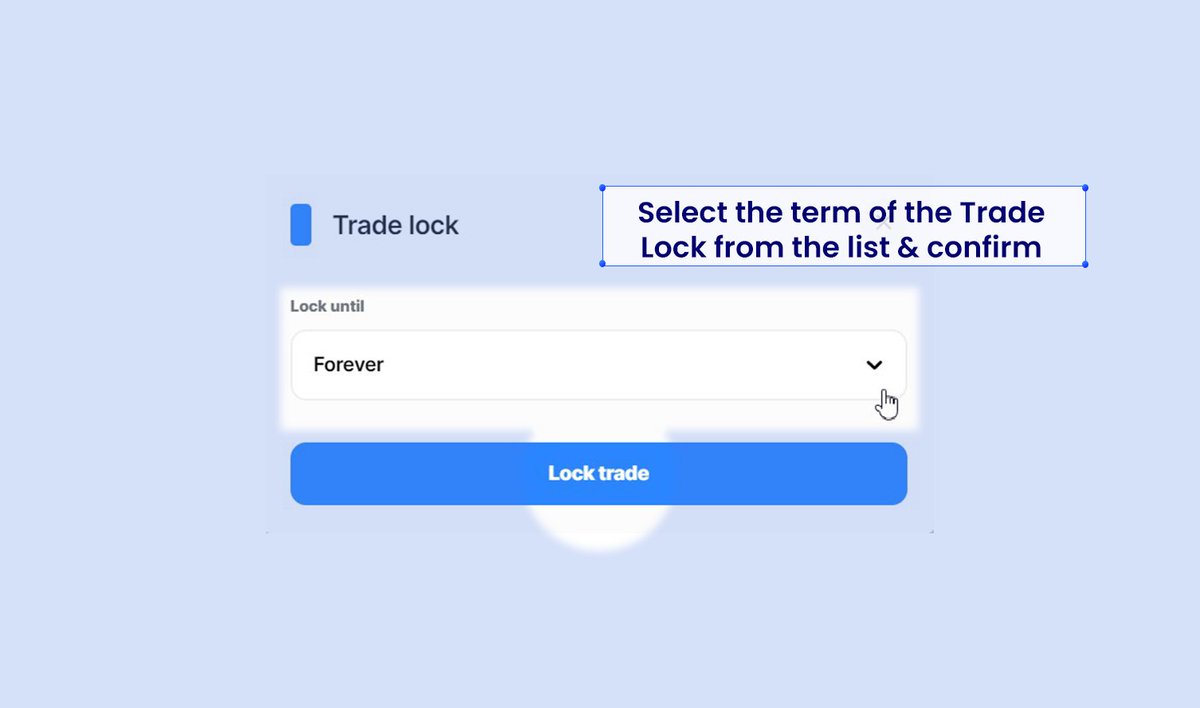
HOW TO LOCK THE TRADE FOR THE MANAGER🤔
To manage your fund effectively, you might need to lock trade for you manager for a specific period. Here's how to do it:
🔄In the 'Settings' block, find the 'Fund Manager' line.
🔒Click the small lock icon next… https://t.co/Je9ecKjHaw
How to appoint and/or change the fund manager? 🤔
Appointment of the Fund manager is one of the new DeFunds features. Let's take a look at how you can do this:
During the Fund creation:
1⃣Disable the 'I trade by myself' setting under the Commissions block & paste the manager's MetaMask wallet address in the 'Manager address' field.
2⃣Set the 'Manager share' percentage for subscription and performance fees.
❗️Note: Only the fund manager can trade within the fund.
Changing the Manager:
↗️Click 'Edit DeFund' in the upper right corner and scroll to 'Settings'.
✏️Click the pencil symbol next to the manager's address. The following steps are the same as those during the fund creation.
🛑Optionally, block trading for the current manager until the change is complete.
Request an update and sign the transaction in the MetaMask popup.
Important Details:
⏰Changes take effect at the next reporting period to prevent fund owner manipulation.
🏅You can appoint yourself as the manager of your own fund.
That's it! Remember - delegating authority is important.
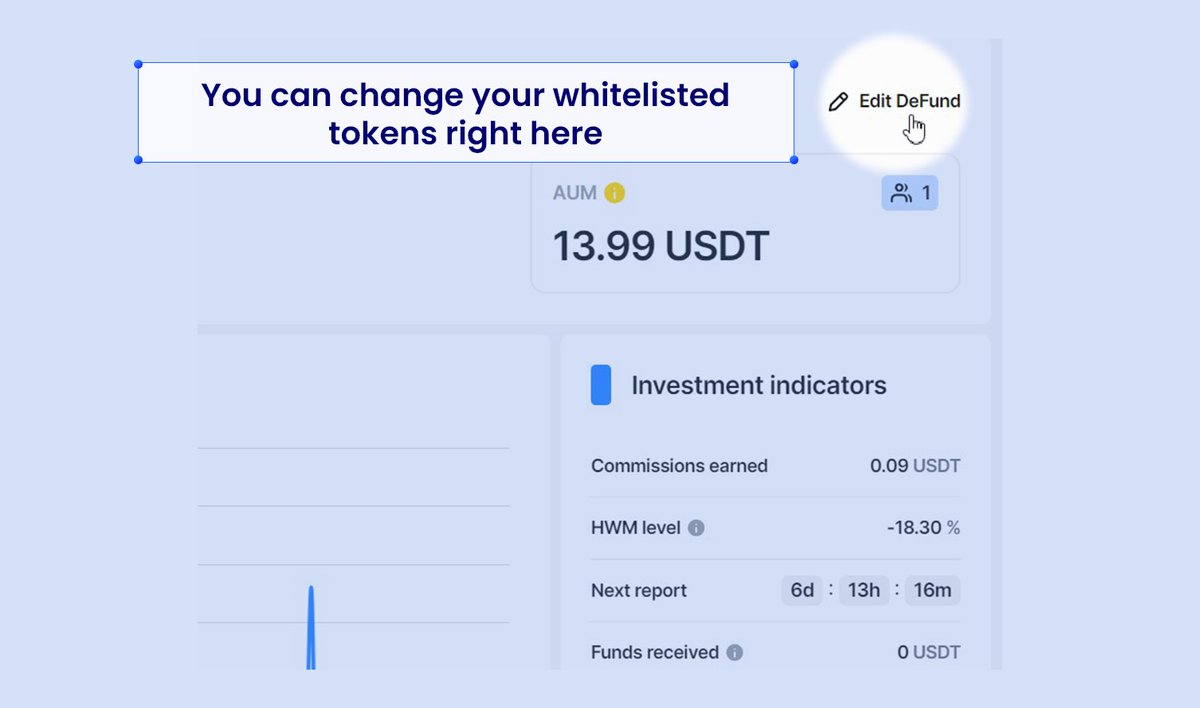
We announced earlier that there are new whitelisted tokens available for trading on the DeFunds platform. But how can you add them to your fund? It's as simple as pie! (❗Check the screenshots below)
👨💻 Click on the 'edit' button in your fund window.
👇Scroll down to the bottom of the page and add any tokens you want from the list by clicking on the 'Available tokens' field.
🤝Request an update by pushing the Big Blue Button. Your update will be processed in 14 days. After that, you will be able to sign the confirming transaction.
That's it! Now you're ready to trade even more tokens than before!
🔥One-Click Trading will save you from constant popups! 🔥
The new feature is out now! Get your own subaccount for One-Click Trading and eliminate constant signing popups with MetaMask commissions to make trading even faster. How to use One Click Trading:
1. Click the 'One Click Trading' button near the services list.
2. Put the desired amount of money into the Subaccount. This money will be used to pay trading commissions only. If the subaccount runs out of this money, you will see the signing popups again.
✍️Hint: You can see how many actions will cover the current amount of money in the subaccount by clicking on the subaccount balance.
3. Sign the confirming transaction.
4. Great! Your subaccount is ready. Now you can use One Click Trading for all trading operations (swap, AAVE, GMX, etc.).
📈You can add some money to it or withdraw your funds to the main account anytime. Deactivation of the subaccount is also an option.
❗️Notice that it's better not to keep large amounts of money in the subaccount because its private key is stored in the browser
#Web3 #BTC #DeFi #DEX #Crypto #ETH
New tokens are now available for trading on Arbitrum's whitelists on the DeFunds platform. Use all the power of ATOM, NEAR, AAVE, AVAX, and OP. Good luck with these freshly discovered trading possibilities!