Hello, we previously left a comment on your post requesting your device SN, service center, and repair case number to help verify the issues you encountered after the repair, but we have not received a reply from you.
If you need any assistance in the future, please feel free to contact us. Thank you for your understanding and support!
Hello Peter, we apologize for the unpleasant experience you have had. We take your issue very seriously. Please rest assured that we will follow up on your case until the problem is fully resolved.
We have been unable to reach you due to your account settings. You may contact us via DM and provide your case number, so we can assist you accordingly.
Thank you for your understanding and support.
Hi, we're sorry to hear about the issue you're experiencing with your Osmo Pocket 3.
Due to your current privacy settings, we're unable to send you a private message. Please send us a direct message at your earliest convenience so that we can gather more details and provide further assistance.
We look forward to hearing from you.
@_JazminZst Hi there! Thank you for your feedback, and we apologize for any inconvenience caused. To assist you effectively, we have dropped you a private message to follow up, we look forward to hearing from you, thank you!
Turn Night Portraits into Cinematic Shots with Osmo Pocket 4
Night scenes don't have to look dull. With Osmo Pocket 4's Low-Light Video mode, soft light, clean skin tones, and neon-lit atmosphere all stay beautifully in frame.
Shot on: Osmo Pocket 4
Video Creators: Xiao Lu Lawrence (小鹿lawrence), Jack Loves
Photography (爱摄影的杰克), Monster Mangshitou (Monster-莽石头)
@happytakkun3106 Hi there, this is DJI Support. We apologize for any inconvenience caused, we have dropped you a private message to follow up with you. We look forward to your reply, thank you.
Hello there,
Thank you for reaching out to DJI.
We are sorry to hear about the experience with your RC231 controller, and we would like to suggest the following steps:
1. Verify the Power-On Method
Please ensure you are using the correct method: press the power button once briefly, then press and hold for 2 seconds to power it on.
2. Check the Operating Temperature
Please confirm that the surrounding environment temperature is within the normal operating range of -10°C to 40°C. You may refer to the official DJI website for further details regarding the recommended operating temperature for your device.
3. Check the Power Indicator Light
Please briefly press the power button to check whether the power indicator light illuminates. If it does not, please attempt to charge the device. If it charges successfully, please allow it to charge fully before attempting to power it on again.
Should charging also not be possible despite trying multiple cables and chargers, as you mentioned, we would recommend contacting the DJI Service Centre for further assistance.
4. Attempt to Power On While Charging
If the power indicator light does illuminate, please try powering on the controller whilst connected to the charger. Should it still not power on, we would recommend contacting the DJI Service Centre for further assessment.
5. Provide an Operation Video
To help us better understand the situation, we would kindly suggest providing a short video demonstrating the steps you have taken.
Thank you sincerely for your understanding and continued support.
Hello, thank you very much for your feedback. We're truly sorry that your Action 5 Pro is experiencing frequent data loss. We fully understand how concerning and frustrating this must be for you.
We understand that you may not be able to provide detailed information at this time. However, the issue you're encountering may be related to the microSD card not being on the official recommended list. Such cards may suffer from insufficient capacity, slow read/write speeds, or even data loss. Even if the card's specifications meet the requirements, its stability may degrade under extreme conditions, leading to slower write speeds.
Below are the microSD card models that have passed official compatibility testing and are recommended for use with the DJI Action 5 Pro (please purchase genuine products from authorized sources):
SanDisk Extreme PRO 32GB U3 A1 V30 microSDHC
Kingston CANVAS Go! Plus 64GB U3 A2 V30 microSDXC
Kingston CANVAS Go! Plus 128GB U3 A2 V30 microSDXC
Kingston CANVAS Go! Plus 256GB U3 A2 V30 microSDXC
Kingston CANVAS Go! Plus 512GB U3 A2 V30 microSDXC
Lexar Professional 1066x 64GB U3 A2 V30 microSDXC
Lexar Professional 1066x 512GB U3 A2 V30 microSDXC
Kingston CANVAS Go! Plus 1TB U3 A2 V30 microSDXC
We recommend switching to one of the above recommended card models and ensuring you purchase genuine products from legitimate sources. We hope this information is helpful. Thank you for your understanding and support!
Hello there,
Sorry to bother you again.
We have been closely following your feedback and want you to know that your concerns are being taken very seriously. Should you require any further assistance, please feel free to refer to our previous message and provide the relevant information accordingly — we will do our utmost to assist you.
Thank you sincerely for your understanding and continued support.
Hi there,
We are very sorry to hear about your experience and understand how frustrating this situation must be.
We noticed that your aircraft has crashed during operation. If your aircraft has been involved in a collision or crash, it may have sustained structural or internal electronic damage, which could affect its flight safety and performance. We suggest sending it back to our official repair center for maintenance if the drone needs to be repaired.
Before we proceed, could you please share your current country/region and send us a PM with your device's SN? This information will help us provide you with the most accurate assistance.
Regarding the “Propulsion System Error” message you mentioned, if you encounter this issue again in the future, please kindly try the following troubleshooting steps:
1. Check if the drone's propellers are installed correctly and if there is any visible damage.
2. With the aircraft powered off, use your fingers to rotate the motors and check if there is any noticeable blockage or foreign objects.
Confirm if the user's takeoff altitude meets the recommended parameters. If an error message appears during flight, check if the wind speed in the environment is too high.
3. Verify if the error occurred due to an impact or other external forces, and check if the error persists after powering off and restarting the aircraft.
If the above troubleshooting steps do not resolve the issue, it is also recommended that the aircraft be sent back for further inspection.
We appreciate your cooperation and look forward to your reply.
Hello, we're very sorry to hear about the issues you've encountered with your returned device. We fully understand how concerning and disappointing this must be.
To accurately verify the situation and follow up for you, could you please provide the following information:
The device SN;
Which service center or address was used for the repair?
The related repair case number (if available).
Once we receive the information, we will confirm and address the matter promptly. Thank you for your cooperation!
Hi there,
Thank you for your interest. Regarding your inquiry, we currently do not have any new updates to share.
Please stay tuned to the DJI official website, as any latest information or announcements will be posted there in due course.
Thank you for your understanding and support.
Hi there,
We are very sorry to hear about your experience and the inconvenience caused.
Regarding the storage and usage method of the Pocket 3, we would like to kindly clarify the correct handling process to avoid any misunderstanding:
With the wide-angle lens installed, the device can be powered off normally. In this scenario, the Tilt axis is not fully retracted. If the device is placed into its protective cover in this state, the gimbal is not affected.
After power-off, Osmo Pocket 3 enters storage mode with the lens initially rotating inward. When the wide-angle lens lightly touches the axis arm, it rotates back towards the screen, allowing for storage in the protective cover. In the absence of a protective cover, it is recommended to remove the wide-angle lens before powering off.
Note: This is the same for both the Black Mist Filter and ND filter.
We truly appreciate your understanding and support.
Hi there, this is the DJI Support Team.
We’re sorry to hear about the issue with your Osmo Pocket 3. To better confirm whether this is related to focusing or gimbal movement, could you please send us a short video showing the issue, along with your device SN and current country/region via DM?
Please also try restarting the device, checking whether the firmware is up to date, cleaning the lens, and testing in a well-lit environment with a clear subject.
Once we receive the details, we’ll help check the next steps for you.
Hi there, this is the DJI Support Team.
Thank you for sharing the detailed test results. We’re sorry to hear that the same export error still occurs even after trying the basic troubleshooting steps.
Since the issue persists, please try the following options first:
1. If possible, please try downloading/editing/exporting the same footage with another phone.
2. If the footage is 4K 30fps or above, or if it includes post-processing effects such as Beauty, Color Recovery, Filters, or Dashboard, please try exporting it at a lower resolution, such as 1080p.
If the issue still cannot be resolved after trying the above, please send us the following information via private message so we can further check with the relevant team:
1. A screenshot of your phone’s “Settings > About phone” page. If you test with another phone, please also provide the model information of both phones.
2. DJI Mimo App logs and the exact time when the issue occurred. The more accurate the time is, the easier it will be for us to locate the issue in the logs.
3. A screen recording showing the full export process and the error message.
4. The original video file that has the issue, together with the proxy files if available. You can connect the camera to a computer and export the related files, such as files ending in .LRF or .OSV.
5. The original footage specifications, including resolution and frame rate.
6. How often the issue occurs, such as every time, only with specific footage, or occasionally.
Once we receive the information, we will further check and assist you. Thank you for your understanding and cooperation.
Hello, thank you for your feedback. Regarding the two points you mentioned:
The theoretical transfer speed of the Pocket 3 is USB 2.0;
Zooming is supported — you can adjust the zoom ratio by pushing the joystick down.
We hope this information is helpful. Thank you for your support!
@ScottDotDot@DJIGlobal Hi There. As we have not received your reply so far. Please feel free to contact us anytime if you need further assistance.
Thank you.
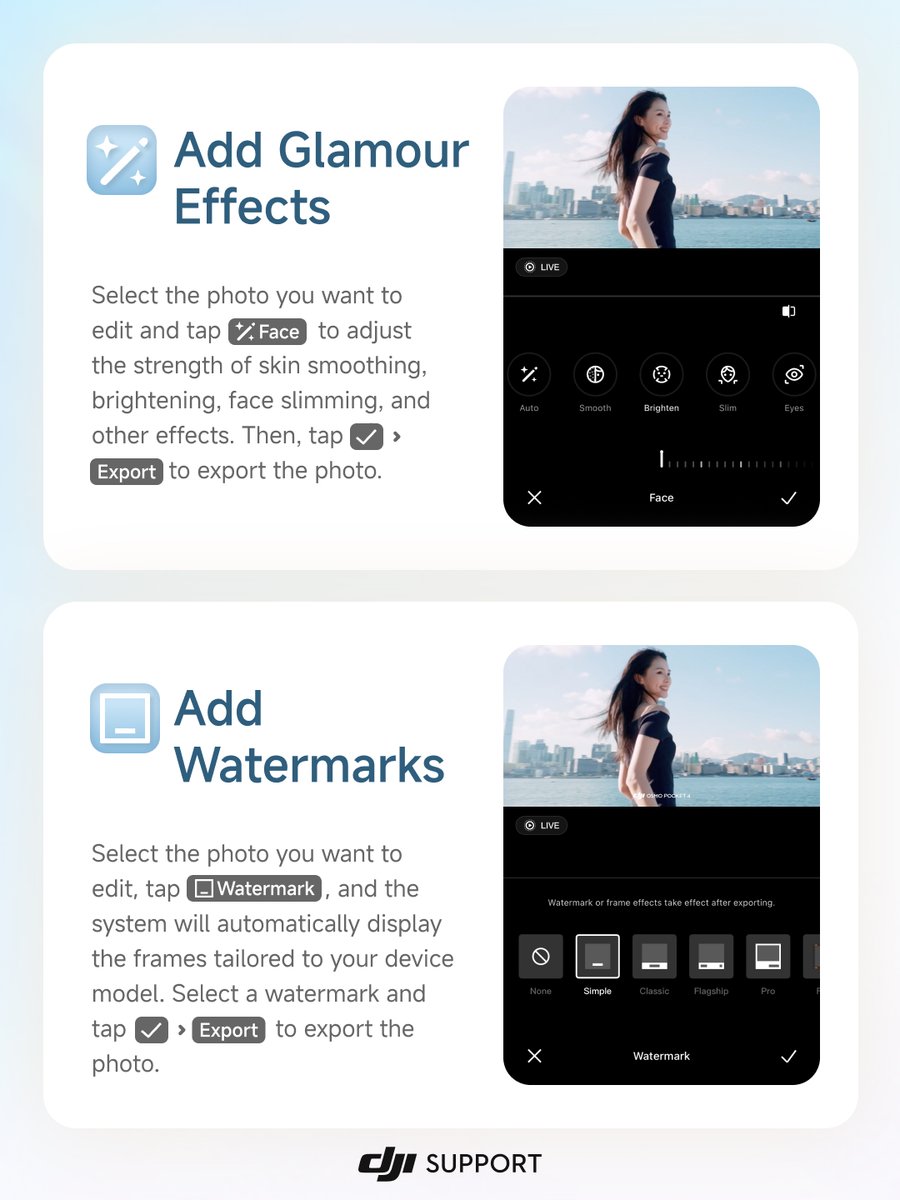
Level Up Your DJI Handheld Photos❗
DJI Mimo now supports photo editing! Shoot with your DJI handheld device, edit in DJI Mimo, and skip switching apps.