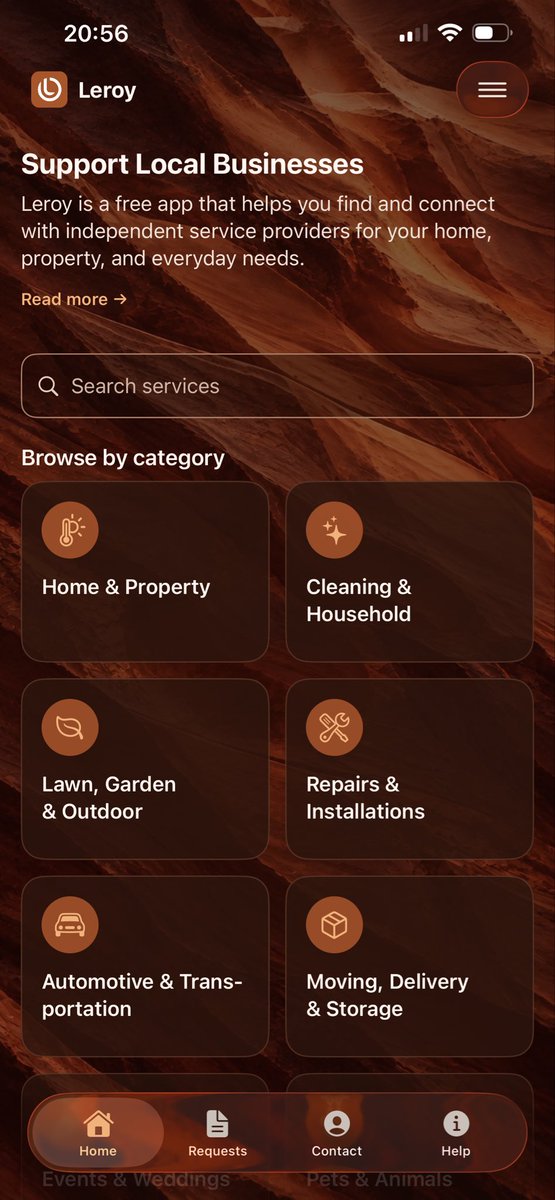
@teaqlio Thanks, Philip! I’m starting with home services and matching requests based on location and service type. TeaQL sounds interesting! Followed back.
Hey everyone! I’m a developer based in Oregon, currently building a platform that connects people who need services with local businesses.
Not launched yet, but I’m getting closer. I’ll be sharing my progress, challenges, and lessons learned as I go.
Looking forward to connecting with other builders here!
#BuildInPublic
Hi Alex! You should definitely try @firefox with the Multi-Account Containers extension. It lets you separate work, personal projects, and freelancing into isolated containers with independent login sessions, all within one browser.
You might not need to build a separate tool after all.
https://t.co/QhCDPhUQEU
Let’s connect!
@shamsbd71 Great question! If multiple agents need to run and test the application simultaneously, I’d use a separate dev server port for each worktree. Otherwise, a single port is enough.
I’ve been a software developer for 10+ years, and I never really needed Git Worktrees. Until I started working with multiple AI coding agents.
Here’s the problem:
Normally, you clone a Git repository and work on one branch at a time. But when multiple AI agents work in parallel, they can’t use different Git branches in the same working copy of a repository.
That’s where Git Worktrees come in.
Git Worktrees let you create separate working copies of a single repository, each with its own branch. This means multiple agents can work on different features simultaneously without interfering with each other’s files.
And it’s surprisingly simple:
Create a worktree for each agent:
git worktree add -b agent-1 ../agent-1 main
git worktree add -b agent-2 ../agent-2 main
List your worktrees:
git worktree list
Remove a worktree when finished:
git worktree remove ../agent-1
Each agent now has its own branch and working files, while all worktrees share the same Git history.
You can still run into merge conflicts when combining changes, but agents no longer interfere with each other’s working files.
Are you using Git Worktrees with your AI coding agents? Was this useful?
#BuildInPublic #Git #AIAgents
People spend money on three things:
1. Solving problems.
Pain, stress, debt, loneliness. People are willing to pay almost anything to make a serious problem disappear.
2. Convenience.
Some of the world's most successful companies simply made things faster, easier, or more accessible. People gladly pay extra to avoid unnecessary effort.
3. Experiences.
People are willing to spend extraordinary amounts of money to feel something they can't get anywhere else. Sometimes, the feeling is worth far more than the product itself.
That's it.
Solve a problem. Make life easier. Create an experience.
If you're building a business, start there.
#Entrepreneurship #Business #Startups #BuildInPublic
@clare_liguori Hey @grok, can you confirm whether existing paid Kiro CLI subscribers automatically qualify for the 10K bonus credits, or if we need to do anything to claim them?
Here’s my current tech stack for building Leroy Software.
I’m building a platform with multiple iOS apps, a web portal, and a serverless backend.
My daily tools:
Ghostty — terminal
tmux — terminal sessions
Neovim — code editing
AWS Kiro CLI — AI-powered development
Tailscale — VPN
Termius — managing agents from my phone
AI Agents:
Manager (Claude Sonnet 5.5) — delegates tasks and reviews completed work
Senior Developer (Claude Opus 5.5) — handles complex tasks
Junior Developer (Claude Haiku 5.5) — handles simpler tasks
Infrastructure & deployment:
GitHub Actions — CI/CD
Terraform — Infrastructure as Code
AWS — cloud infrastructure
Lambda + API Gateway — serverless APIs
Step Functions — workflow orchestration
AppConfig — application configuration
DynamoDB — database
Cognito — authentication
S3, SES, SNS — storage and messaging
Most of my Lambda functions are written in Go, while I use Rust for WebSocket connections.
#BuildInPublic #AIAgents #AWS #DevTools
@aitorapps Yes! Users can switch themes directly in the app, independently of their phone’s appearance settings. There are currently 8 themes, plus a System option that follows the phone’s settings. My app isn’t published yet. I’m actively testing it whenever I have some free time.