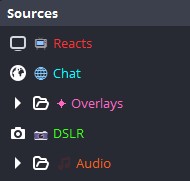
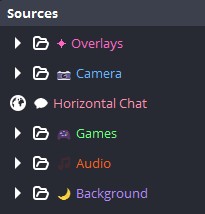
This is the cutest thing I've seen all week! Learn below how to use HTML to customize your sources
Here is how to do it in 3 steps:
1️⃣ Pick your color (hex code).
2️⃣ Use this tag:
<span style="color: # YOURHEX;">Text Here</span>
3️⃣ Right-click your Source in OBS > Rename > Paste the code.
Done!
Need some inspo? Copy/Paste these:
✨ Overlays: <span style="color:# FF00FF;">✦ Overlays</span>
📷 Camera: <span style="color:# 39FF14;">📷 DSLR</span>
🌐 Chat: <span style="color:# 00FFFF;">🌐 Chat</span>
🎵 Audio: <span style="color:# FF5F1F;">🎵 Audio</span>
Hope this tutorial helps! (All thanks to @CerisAbyss)
Do you have a dual streaming PC setup and want to have a great way of bringing audio from your Game PC to your Stream PC ? @Driggsy_ has got you covered with the brand new @elgato Wave XLR Pro ! Go check them out!
https://t.co/t3pbRUZRf8
There’s SO much to talk about when it comes to Wave XLR Pro.
I made a long-form video over on YouTube going into more depth if you want to learn more!
https://t.co/eUSLQQ8wzc