Gm ladies & gentlemen I will be doing a 30days learning challenge for nestjs i want to follow a youtube course with over a 100 videos i want to solidify my nextjs knowledge.
Wish me well guys 🥰
Decided to create a simple TODO mobile application using Rork AI. Although i wanted to use react native but the feature is no longer supported it built this app for me using Swift
Day 34/35 days of Nestjs Learning Challenge:
Today's tutorial lectures:
1. Creating a Sign Token Method
2. Creating Generate Token Method
3. Creating a refresh token API
Day 34/35 days of Nestjs Learning Challenge:
Today's tutorial lectures:
1. Creating a Sign Token Method
2. Creating Generate Token Method
3. Creating a refresh token API
Day 32/35 days of Nestjs Learning Challenge (June 21) (: Today's tutorial lectures:
1. Create Active user Decorator
2. Update Create Tweet Method
3. Introduction to Refresh Token
Day 32/35 days of Nestjs Learning Challenge (June 21) (: Today's tutorial lectures:
1. Create Active user Decorator
2. Update Create Tweet Method
3. Introduction to Refresh Token
Day 33/35 days of Nestjs Learning Challenge (June 20) (: Today's tutorial lectures:
1. Understanding Decorators
2. Allow anonymous Access to Routes
3. Read User from request
Day 33/35 days of Nestjs Learning Challenge (June 20) (: Today's tutorial lectures:
1. Understanding Decorators
2. Allow anonymous Access to Routes
3. Read User from request
In extracting the token from the header we use the CanActivate abstract class. from the canActivate method we use d executionContext to get the req. header and if the bearer token exist on the header we can extract it and return it, but if its not present it will return undefined
A guard in Nestjs is a class annotated with the @Injectable() decorator that implements the canActivate interface. Its primary purpose is to determine whether a given request should be handled by the route handler.
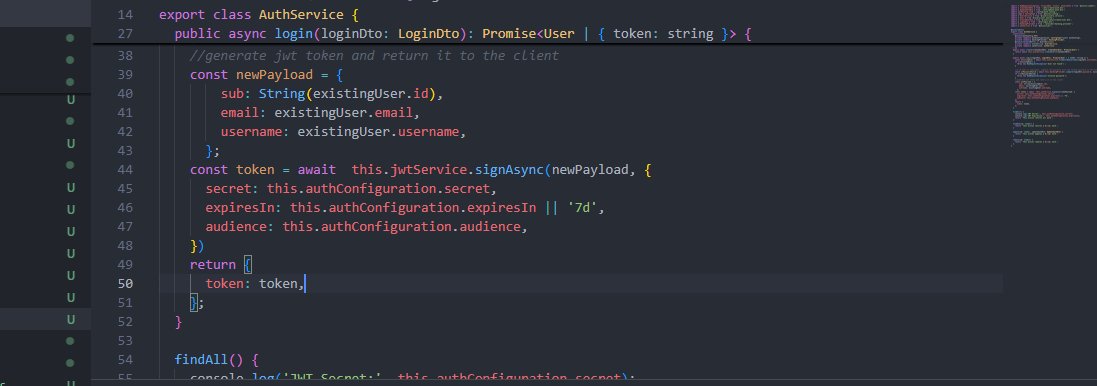
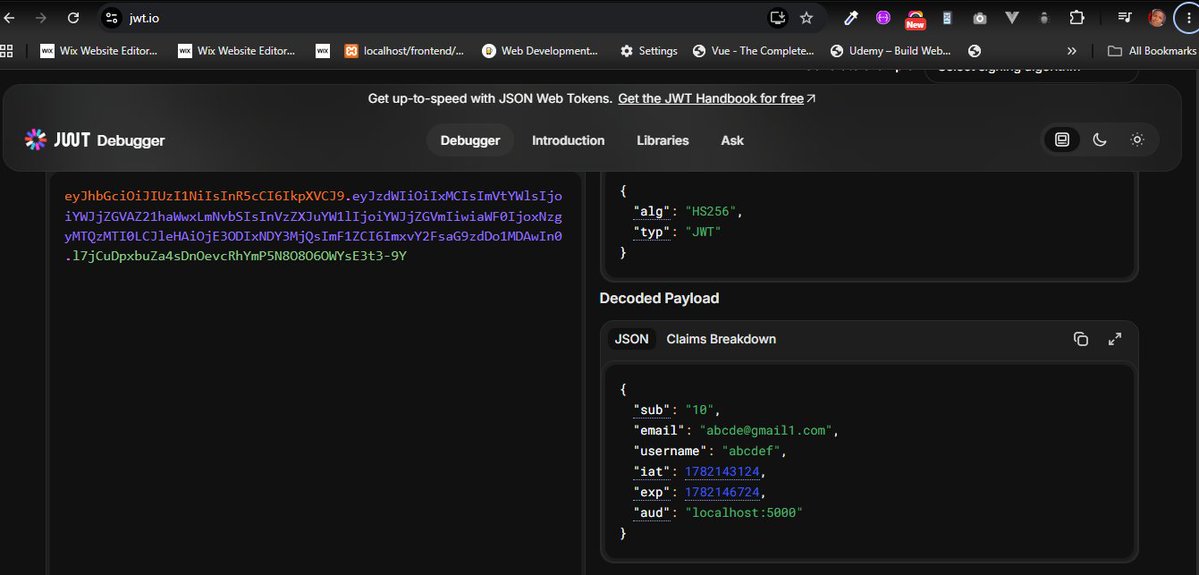
I've been able to create a json token using the jwtService from the installed jwt package, it just requires a payload and some optional config options. This was done and also i used the jwt website to decode my payloads it was fun.
The JWT config file was created using partial injection specific to the user config hence the config used in the forFeature import was used to assign the providers for the jwtmodule. see images below
P.S: The jwt package was installed using npm i @nestjs/jwt
Day 28/30 days of Nestjs Learning Challenge (June 16) (: Today's tutorial lectures:
1. Creating a hashing Provider
2. Storing Hashed Password in Database
3. Creating a User Login API
A JSON Web Token ( JWT in short) is an open standard (RFC 7519) that defines a compact and self-contained way for securely transmitting information between parties as a JSON object. In the video i learnt how a jwt is created, stored and verified
To create a login user api we use the controller to created the method that will handle the request and the response then use the auth service to handle the business logic for logging the user in. see image for more info: 👇👇
Day 28/30 days of Nestjs Learning Challenge (June 16) (: Today's tutorial lectures:
1. Creating a hashing Provider
2. Storing Hashed Password in Database
3. Creating a User Login API
Day 27/30 days of Nestjs Learning Challenge (June 15) (: Today's tutorial lectures:
1. Introduction to authentication
2. Creating User Signup Api
3. Password Hashing
To store HashPassword to database we need to do some importing and use the hashPassword class on the createuser method and hash the password before storing it on the database as seen in the images below:
We created a hashing provider which had a hashprovider abstract class that was implemented by the bcrypt class which will be used to hash our password using some salt rounds. Once we do this then there will be some issues on the authmodule which can be resolved as shown👇
Day 27/30 days of Nestjs Learning Challenge (June 15) (: Today's tutorial lectures:
1. Introduction to authentication
2. Creating User Signup Api
3. Password Hashing
Day 26/30 days of Nestjs Learning Challenge:
Today's tutorial lectures:
1. Creating the response Object
2. Creating the page links
3. Add pagination for Users
Hashing of a password is the process of transforming a user's password into a seemingly random string of characters of fixed length using a mathematical algorithm called a hash function. This resulting string is known as a hash or a message digest.
Authentication is a process of verifying the identity of a user, device or application. It answers the question who you are.
Usually in websites we use username and password which the web uses to check through the database to confirm, if the user is who he says he is.