🌌 Elysium is flourishing. More builders, more projects, more possibilities.
But there can only be one "first."
🪐 Elysium Orbit — The very first NFT on the chain.
10,000 worlds. Fully on-chain. A testament to the earliest history of Elysium.
https://t.co/qnndRIUObB
#ElysiumOrbit #Elysium #NFT
Elysium Orbit: The Earliest Art NFT Collection Identified in Our On-Chain Scan
A scan of Elysium (Chain ID 99901) from genesis through block 6,033 identified Elysium Orbit as the earliest art NFT collection with recorded mint activity.
✦ Contract deployed: Block 2,212
✦ First NFT minted: Block 2,533
The scan covered standard ERC-721, ERC-1155 and consecutive-transfer events. Earlier liquidity-position NFTs were excluded from the art-collection category.
🪐 10,000 worlds. Fully on-chain.
https://t.co/qnndRIUObB
🪐Elysium Orbit’s Live RPC upgrade is here!
Mint with one Elysium signature—no second HyperEVM signature or scheduled 3-hour batch wait.
Your NFT’s artwork appears after successful execution.
Refresh the site and mint your world 🌌
https://t.co/qnndRIUObB
#ElysiumOrbit #Elysium #NF
🪐 How to Mint Elysium Orbit
1. Connect your wallet
Visit https://t.co/qnndRIUObB and click Connect Wallet. Select your wallet extension.
2. Add Elysium
Click Add Elysium and approve the network request in your wallet.
3. Bridge HYPE
Open the Bridge tab, enter an amount, and confirm the transaction on HyperEVM. Keep some HYPE on HyperEVM for gas.
Once the deposit is confirmed and registered, refresh your balance to prepare your mint.
4. Mint your planets
Open Mint and choose your quantity:
• 0.01 HYPE per NFT, plus gas
• Up to 25 NFTs per transaction
• No cumulative mint limit per wallet
Click the mint button and confirm the Elysium transaction in your wallet.
5. Complete the HyperEVM submission
Click the pending transaction banner at the top of the page. Confirm the HyperEVM transaction in your wallet.
Both steps are required. Once HyperEVM confirms receipt, do not submit the same transaction again.
6. View your NFTs
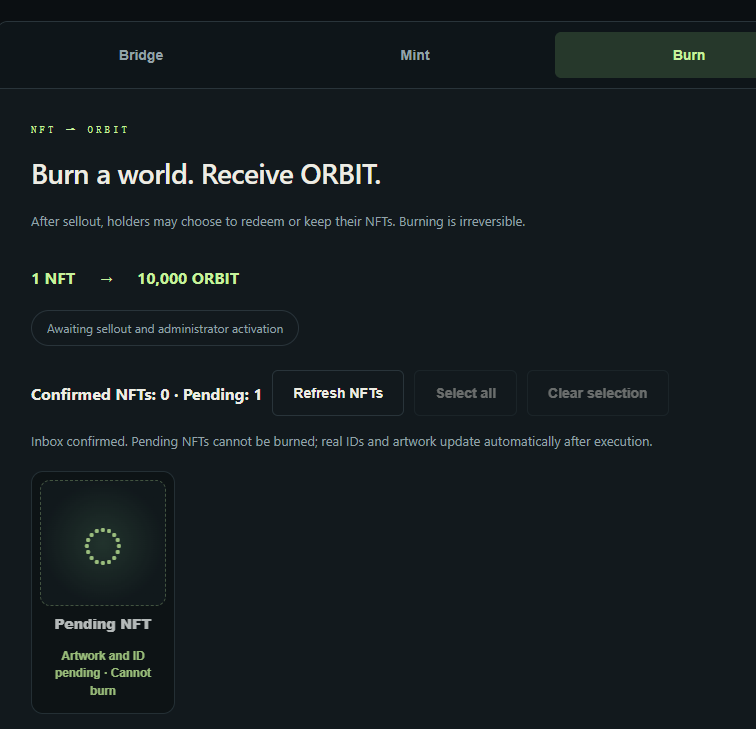
Open the Burn tab to view your collection. Pending NFTs appear as placeholders and cannot be burned. After batch execution, the page automatically updates with their actual IDs and artwork.
7. Keep or redeem
Once all 10,000 NFTs are minted and the administrator enables redemption, you can choose to keep your planets or burn them:
🔥 1 NFT = 10,000 ORBIT
Select individual NFTs or use Select All. Larger selections are split into transactions of up to 25 NFTs, each requiring signatures. Burning is irreversible.
🌐 https://t.co/qnndRIUObB
𝕏 https://t.co/x0M7CSFzP5
🪐 Finished minting?
Once your HyperEVM submission is confirmed, open the Burn tab to see your pending NFTs.
Your planet’s artwork and ID will appear automatically after batch execution—approximately every 3 hours, though timing may vary.
No extra reveal transaction needed. ✨
🪐 Mint a world. Unlock $ORBIT.
Once all 10,000 NFTs are minted:
🔥 Burn 1 NFT → Receive 10,000 $ORBIT
We plan to enable burning on November 9, alongside the expected mainnet launch, provided the collection has sold out.
Our commitment for collected HYPE:
💧 90% will fund liquidity, with the LP position permanently locked.
🏛️ 10% will go to the treasury.
Keep your planet or burn it for $ORBIT. Your choice.
https://t.co/qnndRIUObB
#ElysiumOrbit #Elysium #ORBIT
@Enter_Elysium 🪐 Elysium Orbit — the first NFT project on Elysium.
10,000 worlds. Fully on-chain.
Mint: 0.01 HYPE.
🔥 Each NFT can be burned for 10,000 ORBIT once the collection sells out and redemption is enabled.
https://t.co/zAGVGdbhTt
🪐 Elysium Orbit — the first NFT project on Elysium.
10,000 worlds. Fully on-chain.
Mint: 0.01 HYPE.
🔥 Each NFT can be burned for 10,000 $ORBIT once the collection sells out and redemption is enabled.
#Elysium#NFT#ElysiumOrbit