1. Open VLC and go to Browse.
2. Click on Open Network Stream.
3. Download m3u files of your choice from https://t.co/dswOoPgzDm and paste into the VLC Open Network Stream and it will load thousands of publicly available internet protocol television.
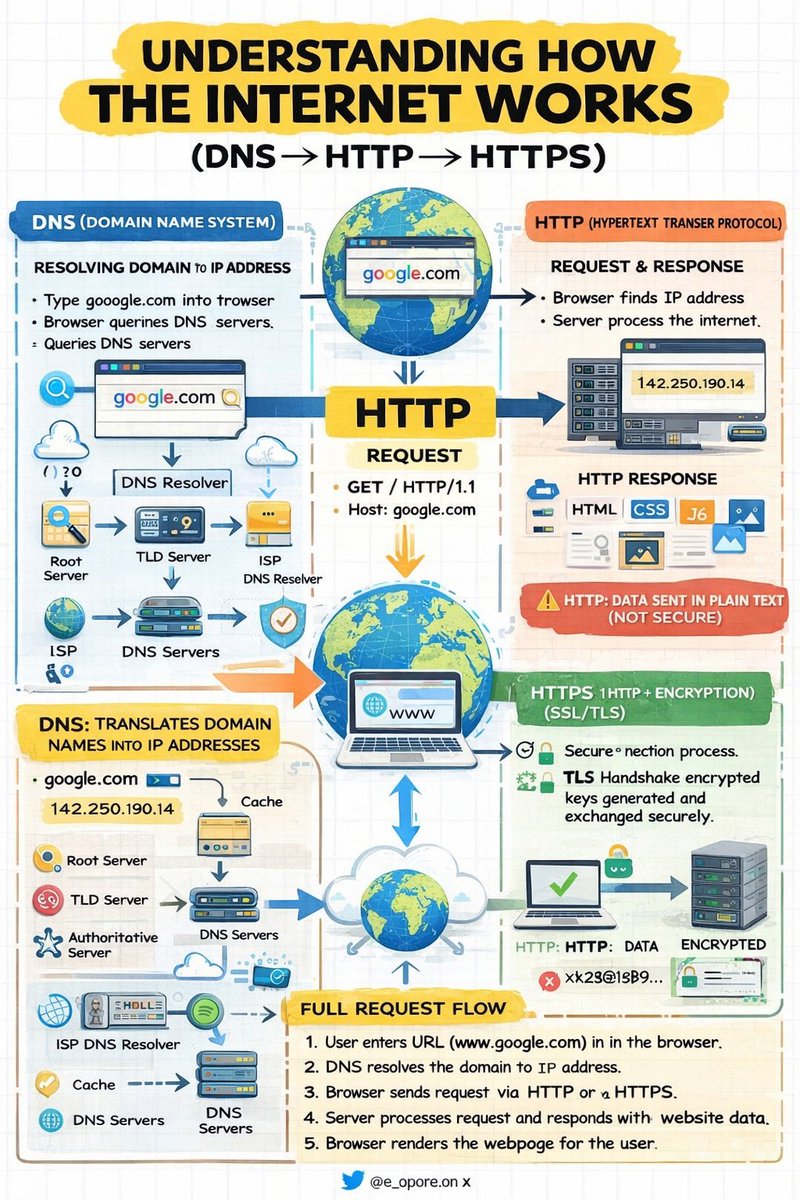
UNDERSTANDING HOW THE INTERNET WORKS (DNS → HTTP → HTTPS)
DNS (DOMAIN NAME SYSTEM) → RESOLVING DOMAIN TO IP ADDRESS
DNS is responsible for translating human-readable domain names into machine-readable IP addresses.
→ User enters a domain name (e.g., https://t.co/9TearboGxJ) into the browser
→ Browser sends a query to a DNS resolver
→ Resolver queries DNS servers (Root → TLD → Authoritative)
→ IP address is returned to the browser
→ Browser now knows the exact server location
Key Concept
→ DNS = Domain Name → IP Address Mapping
HTTP (HYPERTEXT TRANSFER PROTOCOL) → CLIENT-SERVER COMMUNICATION
HTTP defines how data is requested and transferred between a client (browser) and a server.
→ Browser establishes a connection to the server using the IP address
→ Client sends an HTTP request (e.g., GET /index.html)
→ Server processes the request
→ Server returns an HTTP response (HTML, CSS, JavaScript, assets)
→ Browser renders the received content
Key Concept
→ HTTP = Request → Response Communication Model
Limitation
→ Data is transmitted in plain text (not secure)
HTTPS (HYPERTEXT TRANSFER PROTOCOL SECURE) → ENCRYPTED COMMUNICATION
HTTPS enhances HTTP by adding a security layer using SSL/TLS encryption.
→ Browser initiates a secure connection request
→ TLS handshake begins between client and server
→ Server presents its SSL certificate
→ Encryption keys are generated and exchanged securely
→ All subsequent data is encrypted during transmission
Key Concept
→ HTTPS = HTTP + Encryption (Confidentiality + Integrity)
COMPLETE REQUEST FLOW → END-TO-END PROCESS
→ User enters a URL in the browser
→ DNS resolves the domain to an IP address
→ Browser sends a request via HTTP or HTTPS
→ Server processes the request and sends a response
→ Browser renders the webpage for the user
QUICK TIP:
→ DNS → Locates the server (Name Resolution)
→ HTTP → Transfers data (Communication Protocol)
→ HTTPS → Secures data (Encrypted Communication)
Grab the Backend Development Ebook:
https://t.co/t9mqUuRbjx
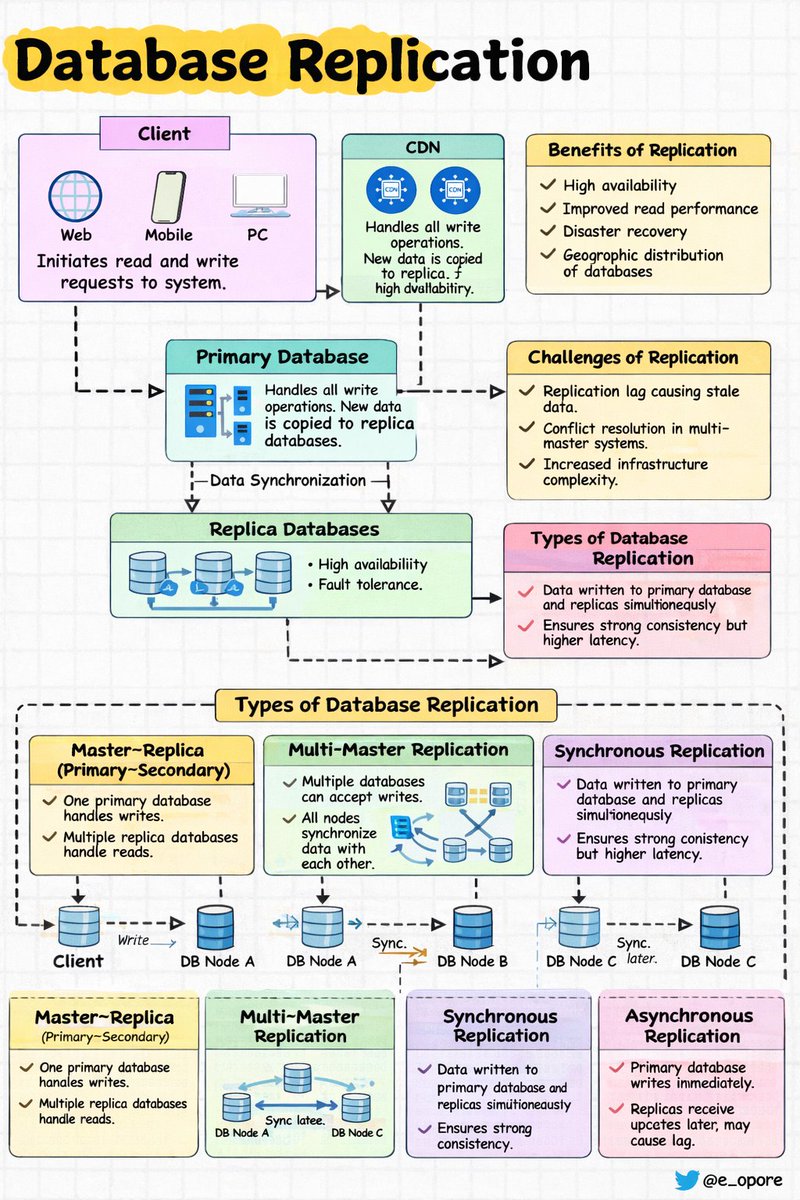
Database Replication in System Design
➤ Definition
→ Database replication is the process of copying and maintaining the same data across multiple database servers
→ Ensures data availability, reliability, and fault tolerance
→ Changes made on the primary database are propagated to replica databases
➤ How Replication Works
→ Client sends write request → Primary Database
→ Primary Database processes the write operation
→ Changes are copied → Replica Databases
→ Read requests can be served → Replica Databases
Flow Example
→ Client → Primary Database (Write)
→ Primary Database → Replicas (Data Synchronization)
→ Client → Replica Database (Read)
➤ Types of Database Replication
→ Master–Replica (Primary–Secondary)
→ One database server handles write operations
→ Multiple replica servers handle read operations
→ Replicas synchronize data from the primary server
→ Improves read scalability
Example Flow
→ Client → Primary DB (Write)
→ Primary DB → Replica 1
→ Primary DB → Replica 2
→ Users → Replicas (Read Requests)
→ Multi-Master Replication
→ Multiple database servers can accept write operations
→ Data changes are synchronized across all servers
→ Used in geographically distributed systems
Example Flow
→ Client → DB Node A (Write)
→ DB Node A → DB Node B (Sync)
→ DB Node B → DB Node C (Sync)
→ Synchronous Replication
→ Data is written to primary and replicas at the same time
→ Ensures strong consistency
→ Higher latency due to waiting for replica confirmation
Flow
→ Client → Primary DB
→ Primary DB → Replica DB (Confirm write)
→ Response returned to client
→ Asynchronous Replication
→ Primary database processes writes immediately
→ Replicas receive updates later
→ Improves performance but may cause replication lag
Flow
→ Client → Primary DB (Write success)
→ Primary DB → Replicas (Sync later)
➤ Benefits of Database Replication
→ High availability during server failures
→ Improved read performance through multiple replicas
→ Disaster recovery capability
→ Geographic distribution of databases
➤ Challenges of Replication
→ Replication lag causing stale data
→ Conflict resolution in multi-master systems
→ Increased infrastructure complexity
→ Additional storage requirements
➤ Real-World Example
→ Large platforms like Instagram and YouTube use database replication to serve millions of read requests
System Flow
→ Users → Load Balancer
→ Load Balancer → Primary Database (Writes)
→ Load Balancer → Replica Databases (Reads)
→ Replicas stay synchronized with the primary database
📘 System Design Handbook
A practical guide that explains modern system architecture in a clear and structured way. It covers database replication, caching strategies, load balancing, microservices, system scalability, and real-world system design patterns used by large-scale applications.
Get the System Design Handbook here → https://t.co/aE1KNO717x
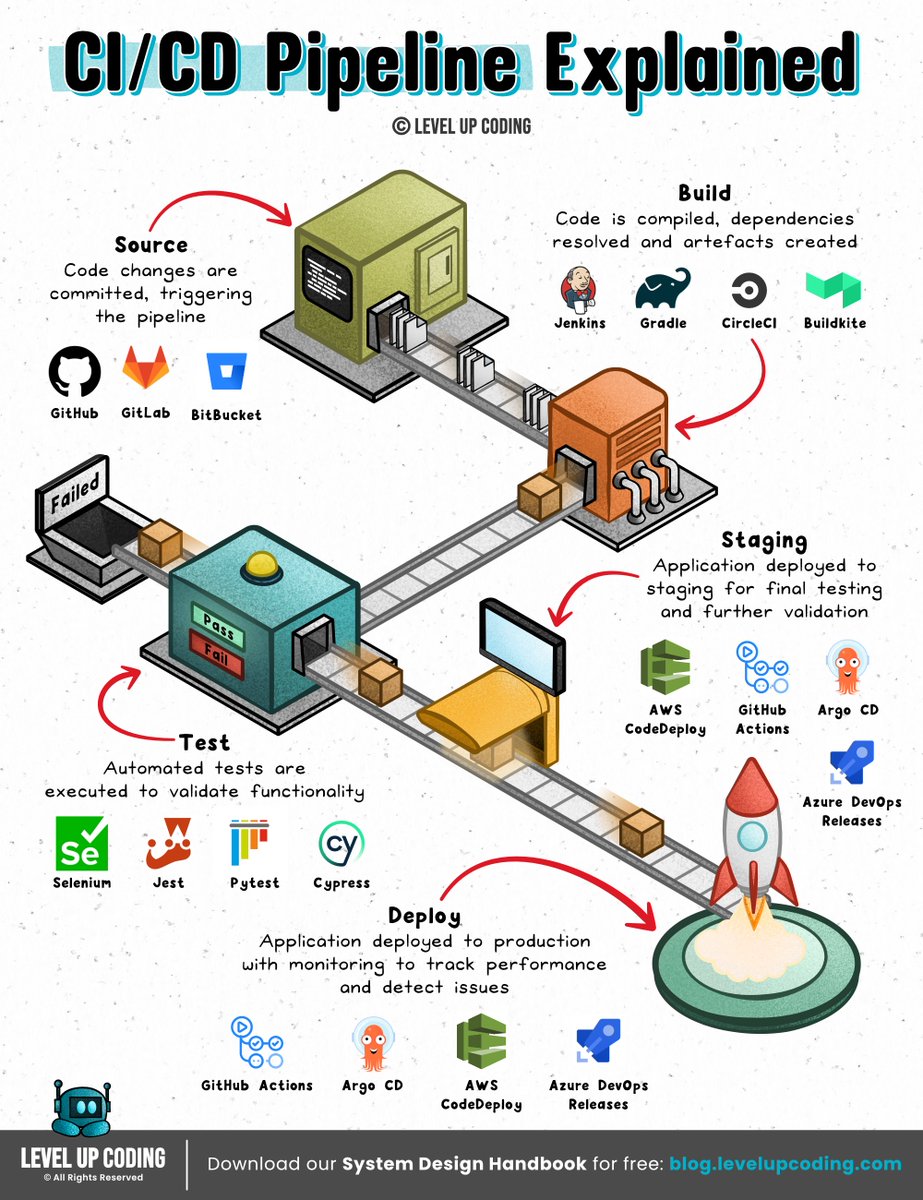
How CI/CD pipelines work
(explained in 2 mins or less):
A CI/CD pipeline is an automated workflow that facilitates continuous integration (CI) and continuous delivery or deployment (CD) by managing code building, testing, and release processes.
It integrates the various stages of the software development lifecycle (SDLC) into a seamless, repeatable process.
These stages include source code management, automated testing, artifact creation, and deployment orchestration.
Continuous ‘delivery’ and ‘deployment’ are sometimes used synonymously.
But there is a clear and important distinction between the two.
Delivery is about ensuring the software can be released at any time.
It requires manual intervention to deploy to production.
Deployment, on the other hand, does the release through automated workflows.
Learn more here: https://t.co/pPPVI1DEfC
What else would you add?
--
👋 PS: Get our System Design Handbook FREE when you join our newsletter. Join 30,001+ engineers: https://t.co/8uVCeyVa1w
--
📌 Save for later.
♻️ Repost to help other engineers learn CI/CD.
➕ Follow Nikki Siapno + turn on notifications.
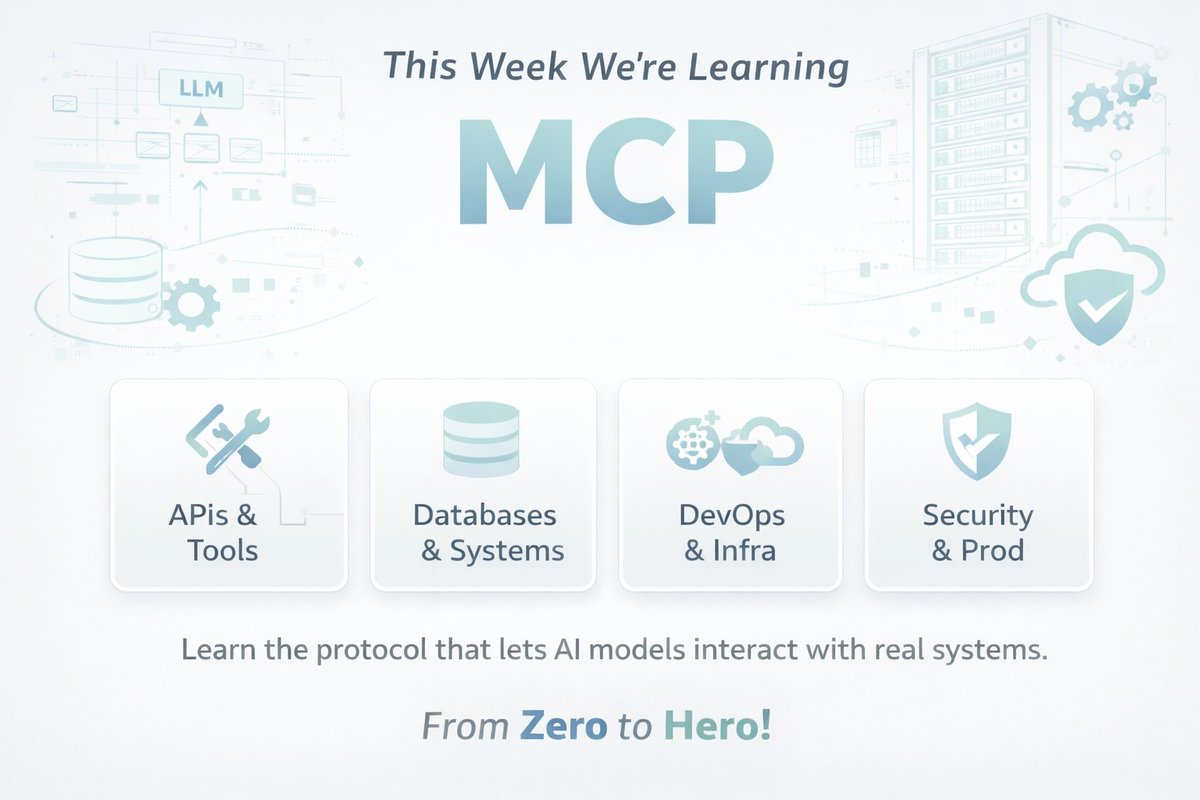
This week I’m diving deep into MCP (Model Context Protocol).
You’ll hear MCP a lot in the AI world this year.
It’s the protocol that lets AI models interact with:
• APIs
• Databases
• Developer tools
• Infrastructure
• Internal systems
In simple terms:
MCP = a standard way for AI to use tools.
Over the next 7 days, I’ll go from zero → building real MCP systems, and I’ll share everything I learn.
Plan:
Day 1 — MCP fundamentals
Day 2 — Build an MCP server
Day 3 — Connect MCP to APIs
Day 4 — MCP resources & context
Day 5 — Designing tools for LLMs
Day 6 — Build an AI DevOps assistant
Day 7 — MCP in production
I’ll post 2 updates daily so we can learn together.
If you're a:
• Backend engineer
• DevOps engineer
• AI builder
You’ll want to understand MCP.
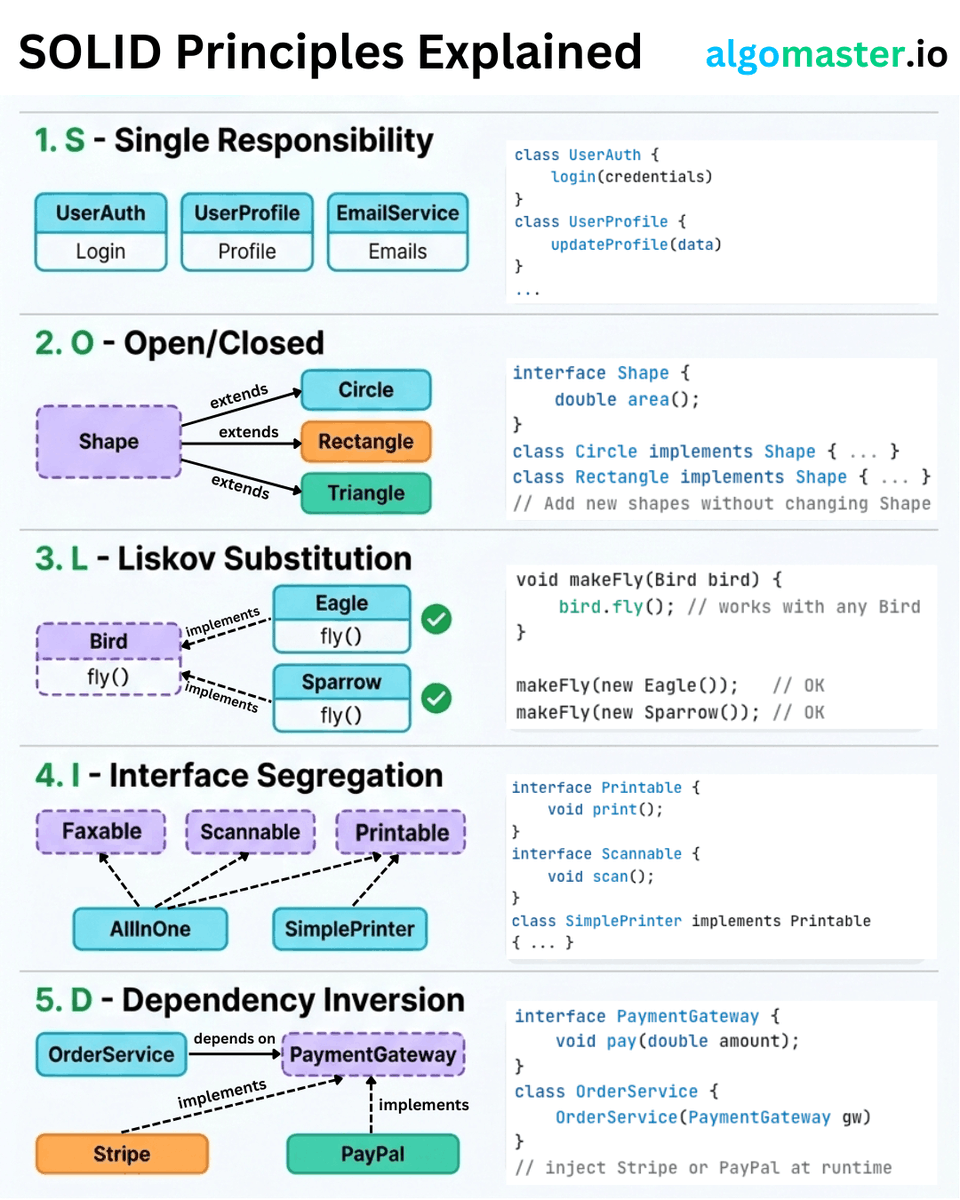
SOLID Principles Explained with Clear Examples:
𝐒 - 𝐒𝐢𝐧𝐠𝐥𝐞 𝐑𝐞𝐬𝐩𝐨𝐧𝐬𝐢𝐛𝐢𝐥𝐢𝐭𝐲 𝐏𝐫𝐢𝐧𝐜𝐢𝐩𝐥𝐞
A class should have only one reason to change.
- Example: Instead of one giant User class that handles authentication, profile updates, and sending emails, split it into UserAuth, UserProfile, and EmailService.
𝐎 - 𝐎𝐩𝐞𝐧/𝐂𝐥𝐨𝐬𝐞𝐝 𝐏𝐫𝐢𝐧𝐜𝐢𝐩𝐥𝐞
Classes should be open for extension but closed for modification.
- Example: Define a Shape interface with an area() method. When you need a new shape, just add a Circle or Triangle class that implements it.
𝐋 - 𝐋𝐢𝐬𝐤𝐨𝐯 𝐒𝐮𝐛𝐬𝐭𝐢𝐭𝐮𝐭𝐢𝐨𝐧 𝐏𝐫𝐢𝐧𝐜𝐢𝐩𝐥𝐞
Subtypes must be substitutable for their base types without breaking behavior.
- Example: If Bird has a fly() method, then Eagle and Sparrow should both work anywhere a Bird is expected.
𝐈 - 𝐈𝐧𝐭𝐞𝐫𝐟𝐚𝐜𝐞 𝐒𝐞𝐠𝐫𝐞𝐠𝐚𝐭𝐢𝐨𝐧 𝐏𝐫𝐢𝐧𝐜𝐢𝐩𝐥𝐞
Don't force classes to implement interfaces they don't use.
- Example: Instead of one fat Machine interface with print(), scan(), and fax(), break it into Printable, Scannable, and Faxable. A SimplePrinter only implements Printable.
𝐃 - 𝐃𝐞𝐩𝐞𝐧𝐝𝐞𝐧𝐜𝐲 𝐈𝐧𝐯𝐞𝐫𝐬𝐢𝐨𝐧 𝐏𝐫𝐢𝐧𝐜𝐢𝐩𝐥𝐞
High-level modules should not depend on low-level modules. Both should depend on abstractions.
- Example: Your OrderService should depend on a PaymentGateway interface, not directly on Stripe or PayPal.
The real power of SOLID is not in following each principle in isolation. It's in how they work together to make your code easier to change, test, and extend.
♻️ Repost to help others in your network
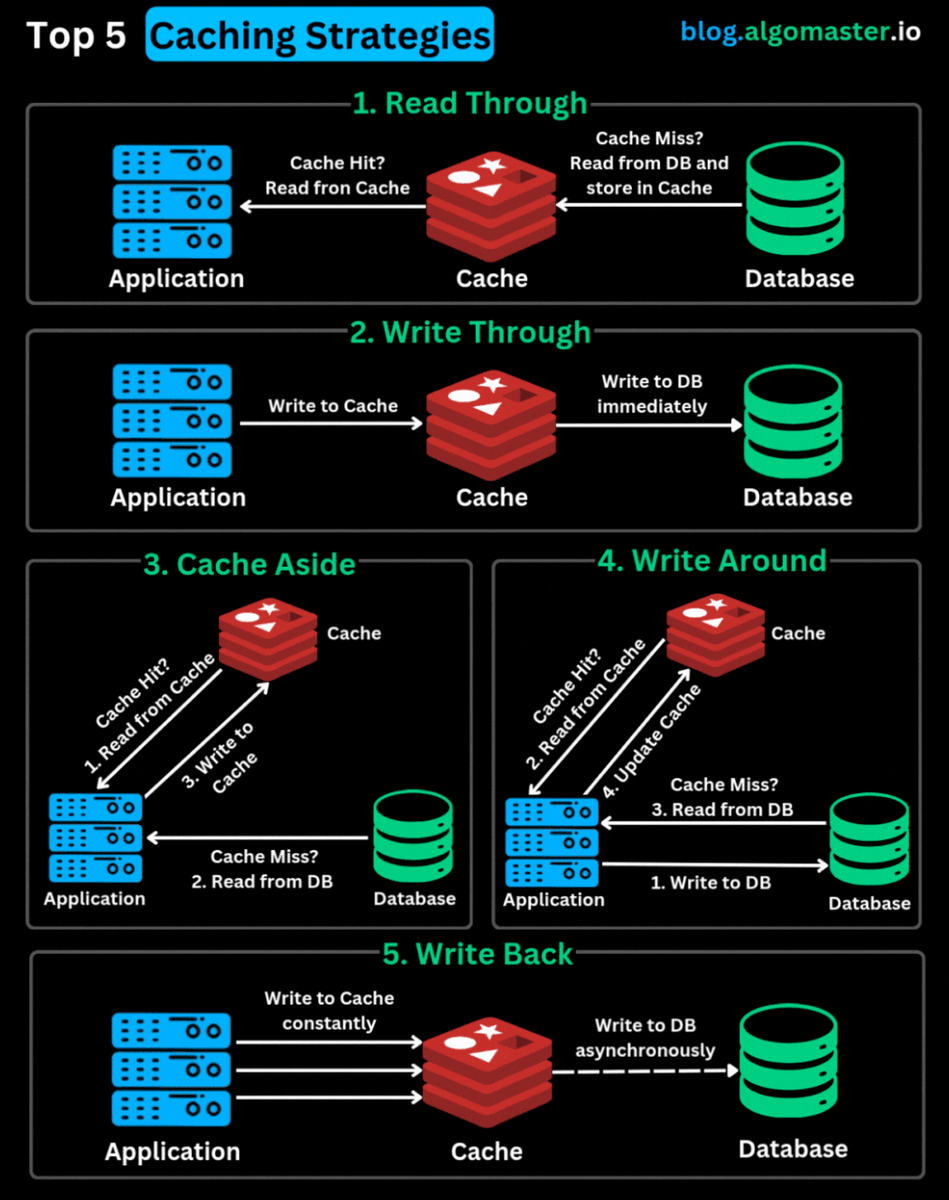
Top 5 Caching Strategies You Should Know:
1. 𝐑𝐞𝐚𝐝 𝐓𝐡𝐫𝐨𝐮𝐠𝐡: The application checks the cache first. On a cache miss, the cache itself fetches data from the DB, stores it, and returns it to the application. Best for read-heavy apps like CDNs and social feeds.
2. 𝐖𝐫𝐢𝐭𝐞 𝐓𝐡𝐫𝐨𝐮𝐠𝐡: Every write updates both the cache and DB at the same time. Ensures cache always stays fresh. Best for systems needing strong consistency (e.g., finance apps).
3. 𝐂𝐚𝐜𝐡𝐞 𝐀𝐬𝐢𝐝𝐞 (𝐋𝐚𝐳𝐲 𝐋𝐨𝐚𝐝𝐢𝐧𝐠): The app looks in the cache first. On a miss, it fetches from the DB and explicitly updates the cache. Best for read-heavy workloads where slight data staleness is okay.
4. 𝐖𝐫𝐢𝐭𝐞 𝐀𝐫𝐨𝐮𝐧𝐝: Writes go straight to the DB, skipping the cache. Cache gets updated only on a read. Best for write-heavy systems with rare immediate reads (e.g., logging, analytics).
5. 𝐖𝐫𝐢𝐭𝐞 𝐁𝐚𝐜𝐤: Writes go to the cache first, and are asynchronously persisted to the DB later. Minimizes write latency. Best for high-performance, write-heavy systems.
Which of these caching strategies have you used in production? Let me know in the comments.
♻️ Repost to help others in your network
RAG, AI Agents, MCP, and A2A aren’t competitors.
They’re different layers of the same AI system.
Once you see this mental model, modern AI architecture becomes much clearer 👇
1️⃣ RAG = Better answers
RAG is about retrieval + grounded generation.
Flow:
User question → retrieve relevant data → add context → LLM generates answer with sources.
Use RAG when you need:
• answers from company docs
• reduced hallucinations
• citations and traceability
RAG solves the knowledge problem.
Once the model has enough context to answer, its job is done.
2️⃣ AI Agents = Do the work
Agents move beyond answering.
They plan, act, and iterate.
Typical loop:
Plan → Observe → Act → Reflect → Repeat
Use agents when tasks require:
• multi-step decisions
• tool usage
• executing workflows in real systems
• verifying outcomes
Agents solve the execution problem.
3️⃣ MCP = Standard tool access
MCP (Model Context Protocol) is the plumbing layer.
It standardizes how LLMs connect to tools and resources.
Think:
“One universal interface for AI → tools.”
Use MCP when you need:
• consistent access to APIs and services
• structured connections to SQL, CRM, files, etc.
• fewer custom integrations
MCP solves the tool connectivity problem.
4️⃣ A2A = Agents working together
A2A (Agent-to-Agent) enables multi-agent systems.
It handles:
• agent discovery
• delegation and routing
• permissions and handoffs
• events and status updates
Use A2A when you have:
• multiple specialized agents
• distributed AI systems
• cross-team or partner automation
A2A solves the coordination problem.
The real takeaway:
Modern AI systems often look like this:
RAG → grounding knowledge
Agents → executing tasks
MCP → connecting tools
A2A → coordinating agents
Different problems.
Different layers.
One architecture.
The real AI shift isn’t better prompts.
It’s better systems.
#AI #RAG #AIAgents #LLM #AIArchitecture #GenAI