I was on vacation so I didn't really post for a while!
Now I wanted to play around with Gemini Omni via the Gemini App.
Here is a small example with the "Anime" style chosen from the app with my own image and prompt
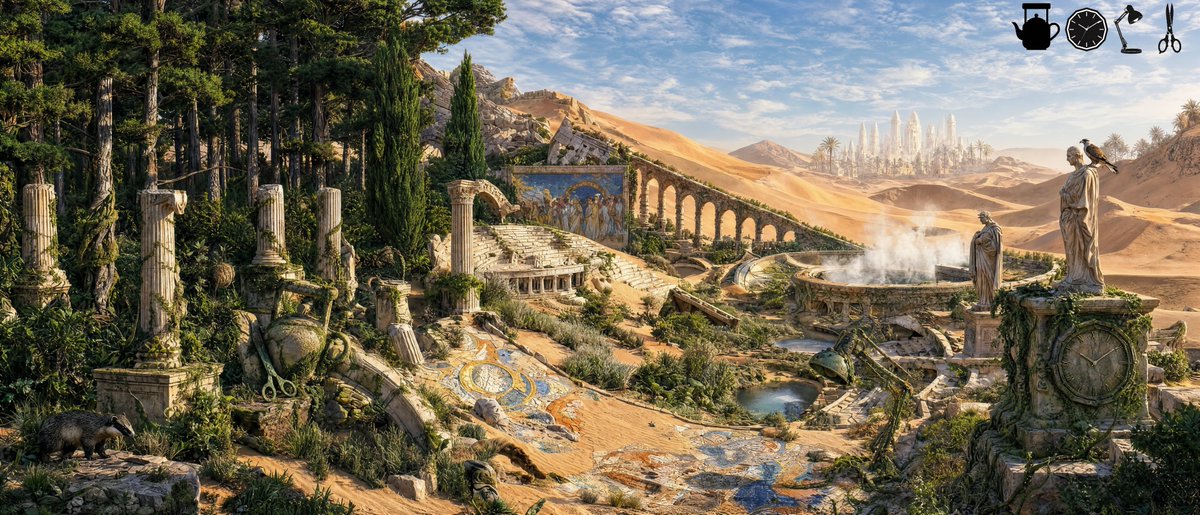
Find the hidden object | episode 04
Difficulty: Medium
Legend of the items at the top
Automation score: 7/10 - The model kept replacing the last object with another one or covering it with something else. Upscalers also changed a few details that I needed to tune down!
Models used: GPT Image 2, NB2, Luma Uni 1.1
Original idea by @GlennHasABeard
Find the hidden object | episode 03
Difficulty: Easy
Automation score: 7.5/10 - had to retry a bunch of times and adjust the prompts and the upscale resolution to get to something that looks ok
**Legend of items at the top**
Idea credit goes to @GlennHasABeard
Interestingly doing this one object at the time with minimal spatial instructions to the model results with the model overriding the previously added object with the new one! I guess it is that the object doesn't belong in the image's "original" structure
Find the hidden object | episode 02
Difficulty: Easy
Legend of items at the top
This one needed a few generations of each image until a "suitable" image was found. So automation score is 8/10
Original idea by @GlennHasABeard
Trying to replicate @GlennHasABeard's work, completely automated on @magnific spaces. This was fun to do and difficult as well.
I found adding item after another to be better than adding them at once even with the best models.
Multiple upscales and fixes are needed but in the end I managed to do the entire thing fully automated - tbh except adding the legend on the top right
Should I do this more - obviously the credit goes to @GlennHasABeard for his idea. If I see some engagement to this I might do this more often and maybe drop one every day
Models used:
- NB2
- GPT Image 2 High
- Luma Uni 1.1 High
- Magnific creative upscaler
- a couple of LLMs for prompting
Trying to replicate @GlennHasABeard's work, completely automated on @magnific spaces. This was fun to do and difficult as well.
I found adding item after another to be better than adding them at once even with the best models.
Multiple upscales and fixes are needed but in the end I managed to do the entire thing fully automated - tbh except adding the legend on the top right
Should I do this more - obviously the credit goes to @GlennHasABeard for his idea. If I see some engagement to this I might do this more often and maybe drop one every day
Models used:
- NB2
- GPT Image 2 High
- Luma Uni 1.1 High
- Magnific creative upscaler
- a couple of LLMs for prompting
Here’s another one!
Saturo Gojo was really a pain to do!!
Due to censoring the models, a lot of things had to be done with older/dumber models.
The upside I just decided to make a script that picks two frames that are similar from the different ending of a video and then convert them into a GIF
Took inspiration from @deekaymotion let's walk line up, then used Gen AI to create a similar style animation. I've always respected the amount of effort and talent that was put into this, but trying to do made me respect it even more.
What was used:
- Luma-Uni 1.1 High for character concept
- GPT 2 for sprite sheet
- Seedance 2 Fast for the animation
- Had to remove some frames myself
- Upscaled via Magnific Creative
- Then converted to GIF
@dmitryrechkin@levelsio Tbh I think it is a matter of getting used to it! I mainly use CLI but I’ve been trying the apps a bit to get a feeling but nothing impressed me just yet
Took inspiration from @deekaymotion let's walk line up, then used Gen AI to create a similar style animation. I've always respected the amount of effort and talent that was put into this, but trying to do made me respect it even more.
What was used:
- Luma-Uni 1.1 High for character concept
- GPT 2 for sprite sheet
- Seedance 2 Fast for the animation
- Had to remove some frames myself
- Upscaled via Magnific Creative
- Then converted to GIF