HTTPS encrypts the data exchanged between your browser and a website, but your ISP may still see which websites you visit. A VPN encrypts traffic between your device and the VPN server, helping hide your browsing destinations and IP address from your local network and ISP.
HTTPS protects your communication, while a VPN adds network-level privacy.
Deleted doesn’t always mean gone. 🔍
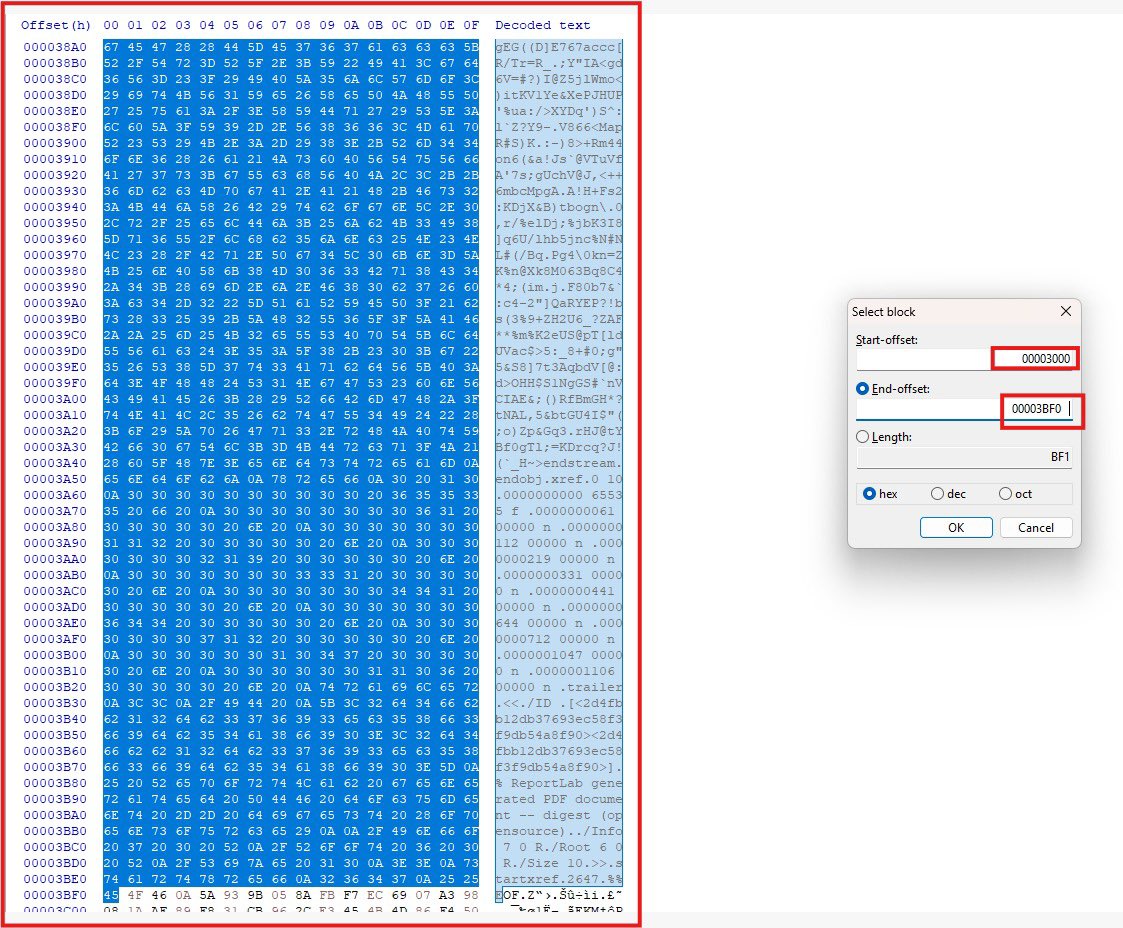
In this digital forensics lab, I manually carved a PDF from raw bytes by identifying its %PDF header and %%EOF marker. From hexadecimal data to a readable document recovering evidence one byte at a time.
#Digitalforensic#DFIR
Did you know that the QR codes we scan at restaurants and other places can lead to malicious sites? It's funny how little cybersecurity awareness we have in this country.
This is AI generated but these leaders are careful too.
Covering a phone’s camera is a simple physical precaution against spyware such as Pegasus, which can covertly activate cameras on a compromised device. An opaque cover blocks the lens, limiting the capture of sensitive surroundings, documents and private activities even when software protections fail.
However, covering the camera does not secure the phone. Spyware may still record audio, access messages and steal files. A camera cover offers an extra layer of privacy, not complete protection against surveillance.
Your cellphone can help you check for hidden cameras in a hotel or rental, although it cannot guarantee that a room is free of surveillance devices. Start by inspecting objects facing private areas such as the bed, shower or changing space. Pay attention to clocks, chargers, decorations, vents and unusual openings where a small lens could be concealed.
Darken the room and slowly shine your phone’s flashlight across these objects from different angles. A camera lens may produce a small, bright reflection. However, glass, polished metal and screws can also reflect light, so any reflection needs closer inspection before drawing a conclusion.
Your phone’s camera may also reveal infrared light emitted by some night-vision cameras. Test this by pointing a television remote at your phone’s camera and pressing a button. If a flashing light appears on the screen, that camera can detect the remote’s infrared signal. Try both the front and rear cameras. With the room dark and the flashlight switched off, scan for unexplained white or purple dots. This method will miss cameras that do not emit detectable infrared, and other devices may also produce infrared light.
A Wi-Fi scanning app can provide additional clues by identifying accessible devices on the same network. However, a hidden camera may record to a memory card or use a separate network or cellular connection. Finding no suspicious devices therefore does not establish that the room is clear.
If you discover a suspicious object, photograph it and its location without dismantling or handling it. Move to a private location and report your concern to hotel management or the booking platform. If it appears to be secretly recording a private area, contact local police and preserve the potential evidence.
I will go for B.
Move compatible devices to the 5 GHz band.
The 2.4 GHz band has fewer non-overlapping channels and is commonly shared by neighboring Wi-Fi networks, Bluetooth devices, and other equipment. In a crowded office environment, this can increase interference and competition for airtime, resulting in poor performance and disconnections.
Moving compatible devices to 5 GHz provides access to more non-overlapping channels and generally less congestion, improving connection stability and throughput. However, adequate access-point coverage is necessary because 5 GHz has a shorter range and penetrates walls less effectively.
Increasing the DHCP lease duration, disabling WPA3, or changing the default gateway address would not address wireless interference.
Good take Zoe. Also know that the crucial missing detail is the memory-corruption vulnerability. Ordinary decompression mathematics alone did not compromise the phone. An integer-overflow bug enabled memory corruption; the attackers then repurposed JBIG2’s logical operations to manipulate memory and perform computations supporting the next exploit stage.
“Running raw code before the phone even buzzed” is someway than precise. The analysis establishes execution without user interaction, but doesn’t establish that exact notification timing.
The initial computation also involved emulated logic, rather than simply executing a conventional program embedded in a picture.
This is a historical, patched exploit: Apple released the fix for CVE-2021-30860 in September 2021 with iOS 14.8.
Good write up though.
Celebrite Touch on the bench: numbered cables, SIM adapter slots, and a desk that looks like an evidence table after a raid. Every cable has a purpose, every port has a story,
Digital
forensics, where the data never really disappears,
Some of these big companies and banks, errr don’t let their cybersecurity hiring requirements intimidate you.
You’d be surprised how many job descriptions look copied from other organisations, with little thought about what the role actually requires. They’ll ask about tools they don’t even use, and sometimes the people interviewing you barely understand those tools themselves.
What’s the point of demanding experience with Nessus, Autopsy, Elastic, Splunk, Security Onion and a long list of other tools if you cannot explain how those skills relate to the job?
Tools can be learned. Understanding security fundamentals, investigating problems and applying sound judgement matter far more than ticking every box on a shopping list.
If you see a role and have the skills to do the work, apply. Be honest about what you know, show what you can do, and let them assess you.
Don’t reject yourself before you’ve even submitted your application.