I made a free stream overlay for Riftbound
Setting up a Riftbound stream from scratch means spending an afternoon in OBS moving text boxes around, so I'd rather see more locals and community events streamed than everyone having to rebuild the same thing.
The setup is simple:
→ One Browser Source in OBS
→ One control panel on a second screen, laptop or phone
→ Copy your private overlay link
→ Add it to OBS at 1920×1080
→ You're ready to go
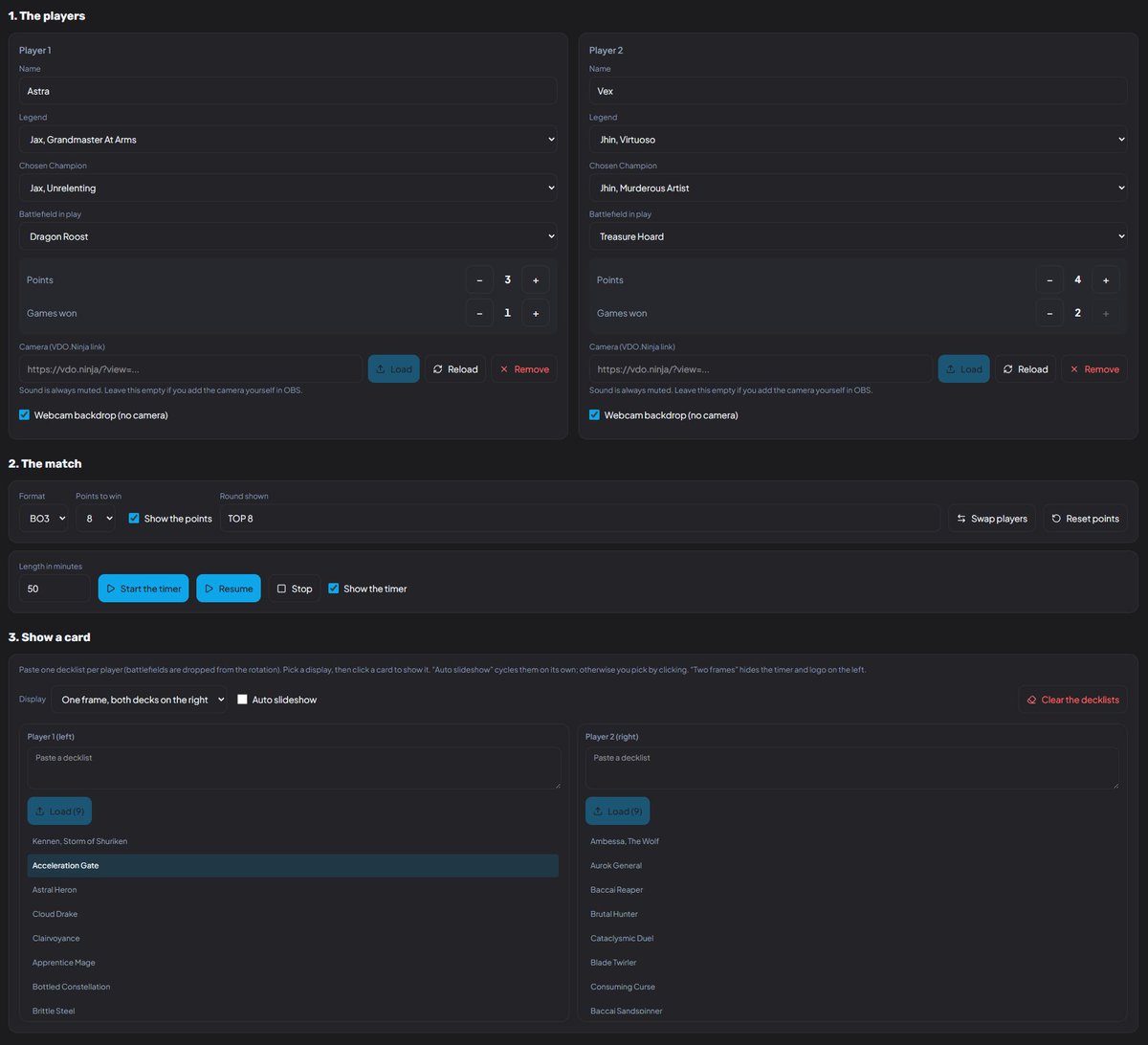
The dashboard lets you control:
• Player names
• Legends & Chosen Champions
• Battlefields
• Points & games won
• Match format / points to win
• Round name
• Match timer
• Transparent webcam frames for both players
• VDO Ninja cameras
• Static backgrounds if you don't have cameras
• Tournament name & logo
• Player side swapping
You can also paste both players' decklists directly into the dashboard.
From there, click any card to display it on stream, run an automatic slideshow, show one player's cards at a time, or display both.
Everything updates live without restarting OBS, and the dashboard also works from a phone next to the playmat.
It's still early, so if you use it and something breaks - or there's something you'd like added - let me know.
#Riftbound
Emails for those selected in the T1 2025 Worlds Champion Signature Edition drawing have gone out today!
Check your inbox or spam folder for an email from [email protected]. Please watch out for impersonators and only trust emails from the official address above.
I made a free stream overlay for Riftbound
Setting up a Riftbound stream from scratch means spending an afternoon in OBS moving text boxes around, so I'd rather see more locals and community events streamed than everyone having to rebuild the same thing.
The setup is simple:
→ One Browser Source in OBS
→ One control panel on a second screen, laptop or phone
→ Copy your private overlay link
→ Add it to OBS at 1920×1080
→ You're ready to go
The dashboard lets you control:
• Player names
• Legends & Chosen Champions
• Battlefields
• Points & games won
• Match format / points to win
• Round name
• Match timer
• Transparent webcam frames for both players
• VDO Ninja cameras
• Static backgrounds if you don't have cameras
• Tournament name & logo
• Player side swapping
You can also paste both players' decklists directly into the dashboard.
From there, click any card to display it on stream, run an automatic slideshow, show one player's cards at a time, or display both.
Everything updates live without restarting OBS, and the dashboard also works from a phone next to the playmat.
It's still early, so if you use it and something breaks - or there's something you'd like added - let me know.
#Riftbound
I worked with @_RedSeeds a month ago on Riftbound Visions. It’s a very functional tool that lets you display cards on stream when they’re played. It’s really great to use during streams. Please use it with my stream overlay !
Already made some changes based on feedback!
You can change the background directly from the files. I also made a PSD file with a ready-made template.
You can upload the tournament logo directly from your PC.
I made a version of the overlay without cameras; it replaces them with the Legend images.
I made a free stream overlay for Riftbound
Setting up a Riftbound stream from scratch means spending an afternoon in OBS moving text boxes around, so I'd rather see more locals and community events streamed than everyone having to rebuild the same thing.
The setup is simple:
→ One Browser Source in OBS
→ One control panel on a second screen, laptop or phone
→ Copy your private overlay link
→ Add it to OBS at 1920×1080
→ You're ready to go
The dashboard lets you control:
• Player names
• Legends & Chosen Champions
• Battlefields
• Points & games won
• Match format / points to win
• Round name
• Match timer
• Transparent webcam frames for both players
• VDO Ninja cameras
• Static backgrounds if you don't have cameras
• Tournament name & logo
• Player side swapping
You can also paste both players' decklists directly into the dashboard.
From there, click any card to display it on stream, run an automatic slideshow, show one player's cards at a time, or display both.
Everything updates live without restarting OBS, and the dashboard also works from a phone next to the playmat.
It's still early, so if you use it and something breaks - or there's something you'd like added - let me know.
#Riftbound
🇫🇷 Pour les francophones :
J’ai créé un overlay gratuit pour streamer du Riftbound avec une source navigateur dans OBS.
Joueurs, légendes/champions, champs de bataille, score, chrono, cams sans fond/VDO Ninja et affichage des cartes depuis vos decklists !