CMSL 1.9.1 should arrive in PS Gallery today. Supports 26h2 - sorry for the delay in this support. Also FIPS support for Get-HPWarrantyInfo command (i know who requested that😀)
I just shared this with my family, and you all should do it too.
You’ve probably noticed it feels like everything is getting hacked right now. At this point, you should assume everything about you is exposed in one way or another.
Your socials, your medical history, your old passwords, your phone number.
I ran through this checklist last week, and I’d do it as soon as you can. Like today.
These are the 5 steps I took, plus prompts that get your AI to do most of the work for you.
1. Freeze your credit at all three bureaus.
If you only do one thing on this list, do this one. It’s free. It takes about 10 minutes per bureau. It stops anyone from opening a new card or loan in your name. You can unfreeze it any time you need to apply for something.
Equifax: https://t.co/pl6xcLfiL1
Experian: https://t.co/UuBOD2z0vA
TransUnion: https://t.co/5Nwo4DQyR4
2. Put limits on your credit cards.
Log into each card and set a spending limit wherever the app lets you. Start with the cards you never use. If a card has no limit option, turn on the lock toggle until you need it.
My advice is to set every limit a little above what you actually spend in a month. You can always raise it later.
3. Kill old API keys and cap your spend.
Go into every AI provider you use: Anthropic, OpenAI, Cursor, Gemini, OpenRouter, wherever you’ve made a key. Delete every key you aren’t actively using. Then set a spend limit at the org level.
When I checked mine, my one-person account had a $200,000 limit. Anyone holding one of my old keys could have run up that whole bill, and I had no idea. I dropped it to $100 lol. Check yours. The default is probably way higher than you think.
If you’ve ever pasted a key into a chat, a doc, or a GitHub repo, treat it as leaked. Delete it and make a new one.
Paste this into your AI with browser access:
"Help me lock down my AI API accounts. Open each of these consoles in my browser: [list your providers]. For each one:
1. List every API key, when it was created, and when it was last used.
2. Flag any key not used in the last 30 days. Ask me before deleting anything.
3. Show me the current org-level spend limit and monthly budget, and where to change it.
Don't create new keys and don't touch billing or payment info. Give me a summary table at the end."
4. Unshare everything.
Assume anything with a public link has already been found. That includes Google Docs, Sheets, Slides, Notion pages, Claude artifacts, and any page an agent built for you. Nothing should be “anyone with the link.” Everything should be invite-only.
My rule now is simple. If I’m not sharing it with a specific person, it’s locked.
Paste this into your AI:
"Search my Google Drive for every file shared as "Anyone with the link" or public on the web. Then do the same for my Notion pages and my published Claude artifacts.
Give me a list with the file name, who can see it, and when it was last opened. Flag anything that looks sensitive: finances, IDs, medical, passwords, client info, contracts.
Don't change anything yet. Wait for my approval, then switch the ones I approve to restricted, invite-only access."
5. Have your AI build your personal audit.
This one is my favorite. Claude interviews you, then writes a custom prompt to check your last 30 to 60 days of activity. It also points out places you didn’t think to look.
"Act as my personal security auditor. Assume my personal data (email, socials, medical records, phone number, old passwords) has already leaked in a breach.
First, ask me 5 to 10 quick questions about the accounts, devices, banks, and tools I use.
Then write me a step-by-step prompt I can run with an agent that has access to my email and browser. It should review the last 60 days for signs of trouble, like:
- sign-ins, devices, or locations I don't recognize
- password reset or 2FA change emails I didn't request
- new accounts opened in my name
- charges or subscriptions I don't recognize
- connected apps and logins I forgot I gave access to
- email forwarding rules or filters I didn't set up
Then give me a ranked list of other areas I should lock down that I probably haven't thought of, highest risk first. Keep it in plain English."
Don’t save this for later. Freeze your credit today, then work through the rest this week. Future you will be really glad you did.
Big milestone achieved! 🚀 After months of deep technical work, @Brinkhoff_C and I have officially sent the 3rd edition of #MasteringMicrosoftIntune#AIEdition to the press! 📖
This isn't just a minor refresh or a standard Intune update. The endpoint management landscape has fundamentally shifted, and we realized early on that this edition required a massive rebuild to reflect where the platform—and the broader partner ecosystem—actually stands today.
What makes this edition different? We moved beyond traditional device management to focus heavily on modern, AI-first administration. We dive deep into real-world enterprise deployment strategies, covering:
Windows 11 & Windows 365: Modern cloud provisioning and virtualization.
Copilot & AI Agents: How AI is actively transforming IT administrative workflows.
Intune Advanced Management: Leveraging the Intune Suite for enterprise-grade control.
Zero Trust Architecture: Strict security enforcement, explicit verification, and identity-driven endpoint security.
We are also incredibly honored to have industry visionaries framing this edition with their forewords:
🔹 Michael Wallent – CVP, Management and Data Security, Microsoft
🔹 Mark Templeton – Former President & CEO, Citrix 🔹 Scott Manchester – CPTO, Nerdio
Writing a book of this scale is a huge effort. A massive thank you to our phenomenal technical reviewers: @Jgelijsteen, @dominiekverham, @ncbrady , and @SCCMentor. Thank you for spending countless hours stress-testing every chapter to ensure the content holds up to how this technology is actually deployed in the field.
The book is in production and on its way! You can secure your copy right here:👉 https://t.co/nZL8OF5aO3
#MicrosoftIntune #ZeroTrust #EndpointManagement #Windows11 #Windows365 #Copilot #MicrosoftSecurity
🧰 Process Explorer v17.2 adds efficiency mode, live kernel dumps, and NPU monitoring. ZoomIt adds dictation for snip captions; Sigcheck adds UTF-8 output. Plus bug fixes!
Get the tools at https://t.co/UDykmhDxqT.
See what's new on the Sysinternals Blog: https://t.co/BosDy3FZyE
CMTrace Open 1.6.2 is out! 🔥
If you spend time troubleshooting Intune and ConfigMgr, this release brings a lot of fixes and some useful additions:
- Expanded Event Viewer with reusable filters, triage highlights, persistent markers and a unified timeline
Live Windows Event Log tailing and portable evidence exports
- Error-code explanations directly in event details, plus 54 new ConfigMgr and Intune codes, bringing the database to 792
- More reliable log rotation handling and improved ReportingEvents.log parsing
- Better workspace recovery, so an error in one workspace doesn’t take down the whole window
- Second launches now open files in your existing window, and the Apple silicon DMG is signed and notarized.
Free and open source. Full details and downloads:
https://t.co/JrHAONVfZB
#Intune #ConfigMgr #OpenSource #cmtraceopen
Did you see the EPM docs got updated silently... without a real announcement?
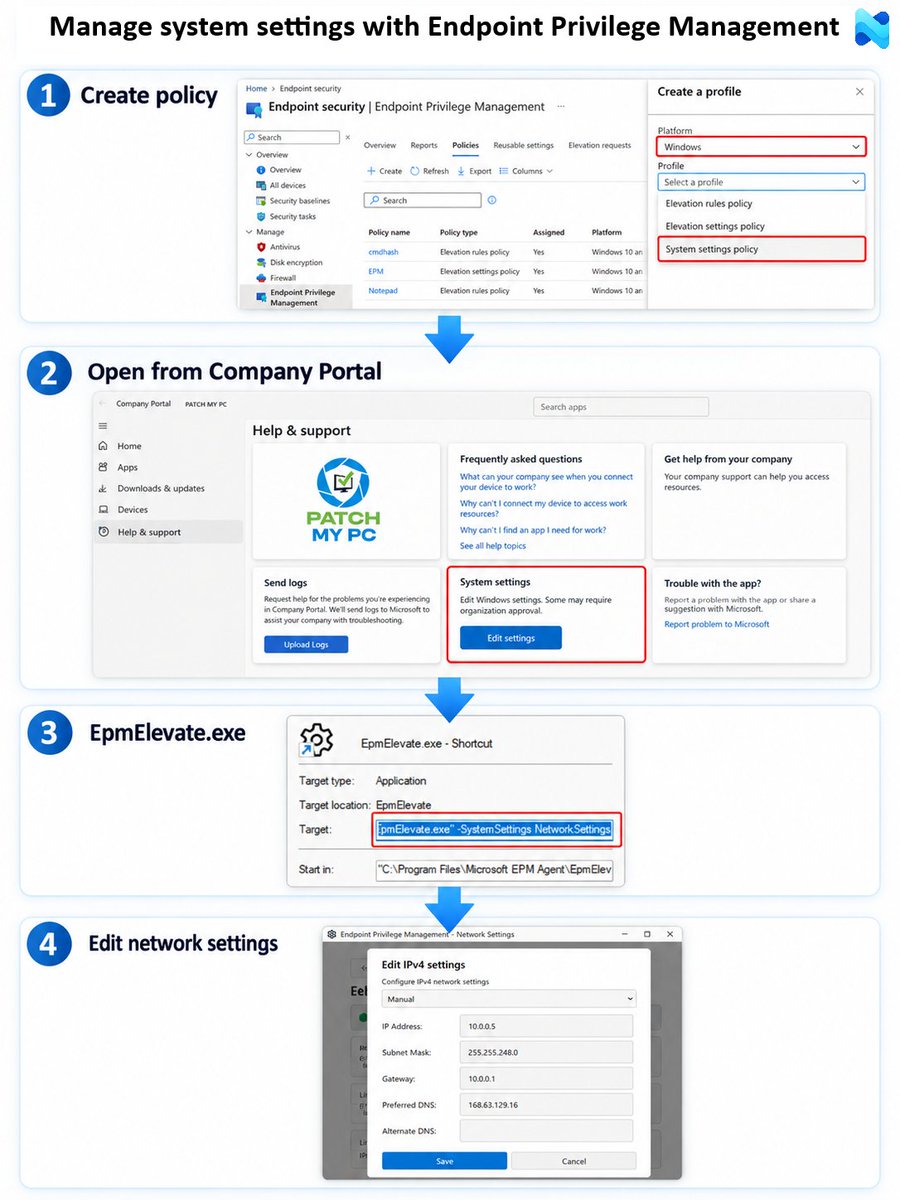
There’s now a new System settings policy in Endpoint Privilege Management.
Instead of only elevating an EXE, EPM can now let a standard user change a specific Windows system setting. Think more along the lines of the kind of setting you would normally change through Windows Settings or the old Control Panel.
The first documented example is Network Settings, which lets users change things like IPv4, IPv6, and DNS without giving them local admin rights. The Company Portal becomes the entry point, and behind the scenes EpmElevate.exe provides the dedicated elevated experience.
I took a closer look at how the policy, the Company Portal, and EpmElevate.exe all fit together. And another System Settings scenario is also hiding in there that Microsoft still hasn’t documented yet...
#Intune #MSIntune #Windows11 #EPM
https://t.co/ki4tTKfHRl
See which devices are current and which are missing updates — then close the gaps before they're exploited. Nail your patch compliance baseline with the Windows Autopatch report in Microsoft Intune. https://t.co/gvMfKUPIAj
The speed that AI can now discover and exploit vulnerabilities means that our defenses also need to adjust.
For the devices that you manage where you can afford to tighten deployment timelines, we'll explain updated recommendations and show you how to speed up patching. #WindowsPatching #Windows11 #PatchManagement #SysAdmin #Cybersecurity
Intune can finally tell Windows Update to ignore Group Policy.
I am not talking about the stupid “MDM wins if there is a conflict,” but actually skipping the Windows Update Group Policy path.
The IgnoreWindowsUpdateGroupPolicies setting changes the source selection itself. When enabled, Windows Update can bypass the live GP values and the cached GP fallback, then continue with the managed policy sources instead.
That makes this a very interesting setting for anyone moving from WSUS or legacy Windows Update GPOs to Intune. I took a closer look at how it works on the device and what Windows actually checks before Group Policy gets skipped.
#Intune #MSIntune #WindowsUpdate #Windows11
https://t.co/uUmMh7kfct
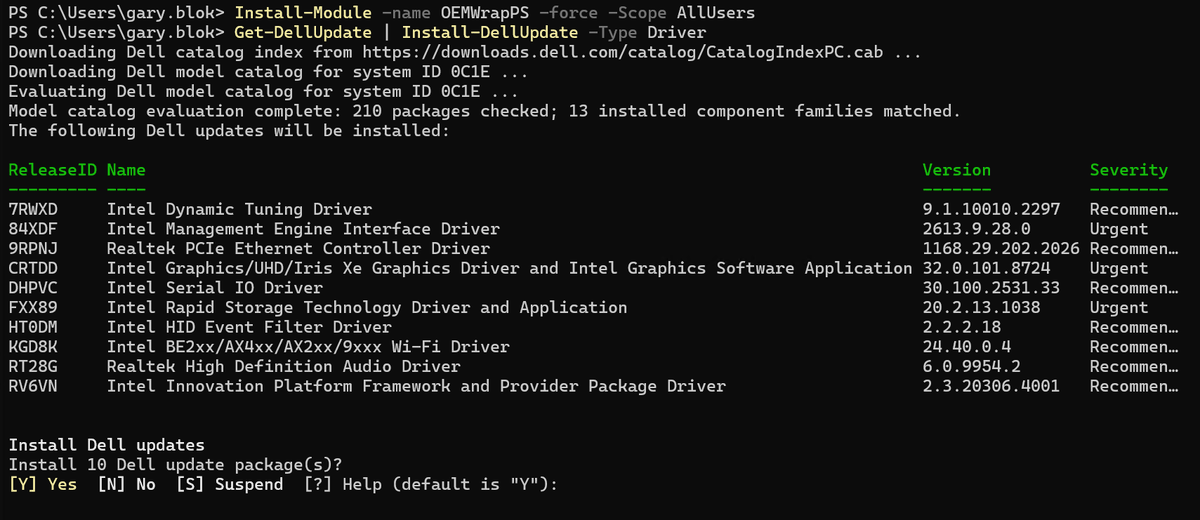
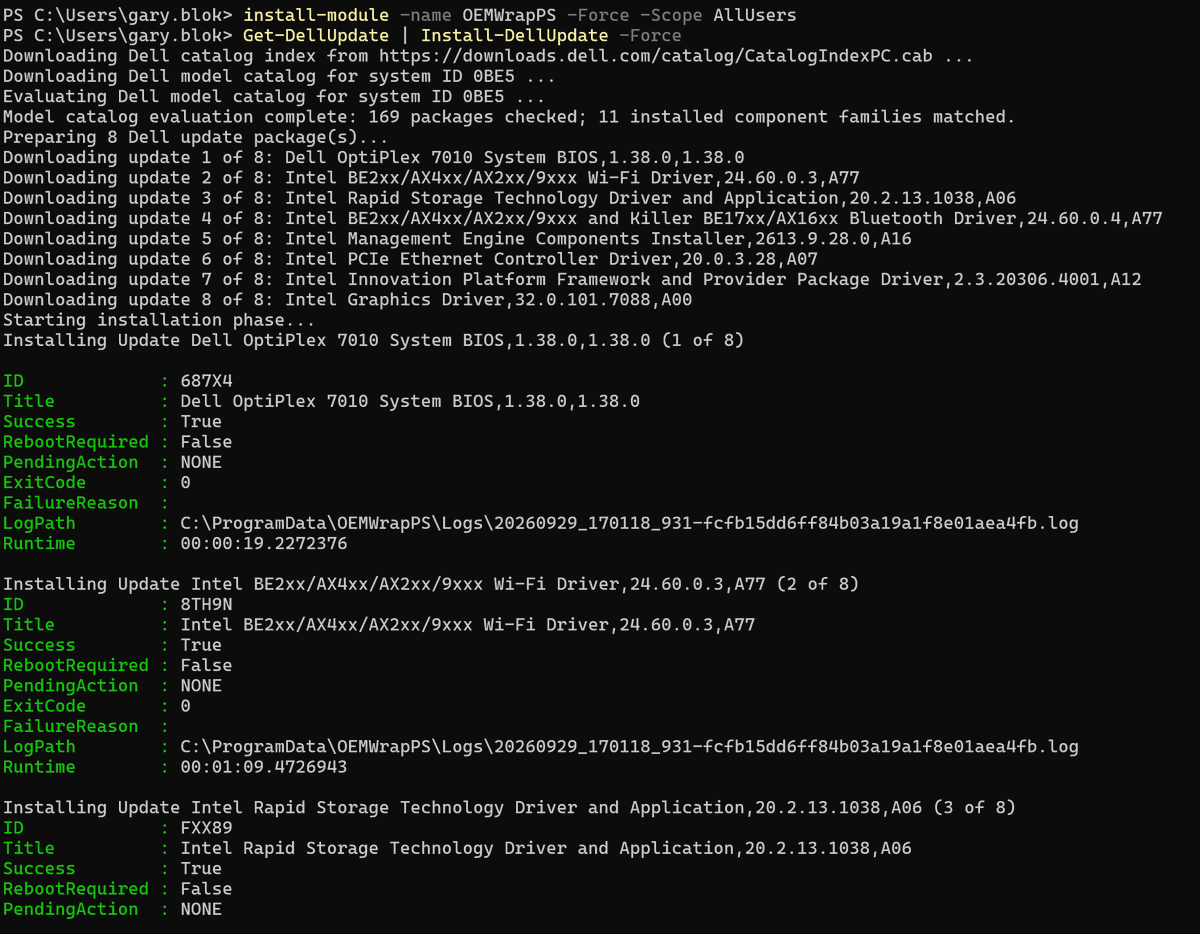
#PowerShell Gallery module OEMWrapPS, updated as I prep for https://t.co/2hXaTB5Y5l
Code: https://t.co/RwgXYtfLDo
Added:
Get-DellUpdate | Install-DellUpdate
Removes need for @Dell DCU, but there are still several functions to install / manage / invoke DCU
@SvenRiebe@mkaptano
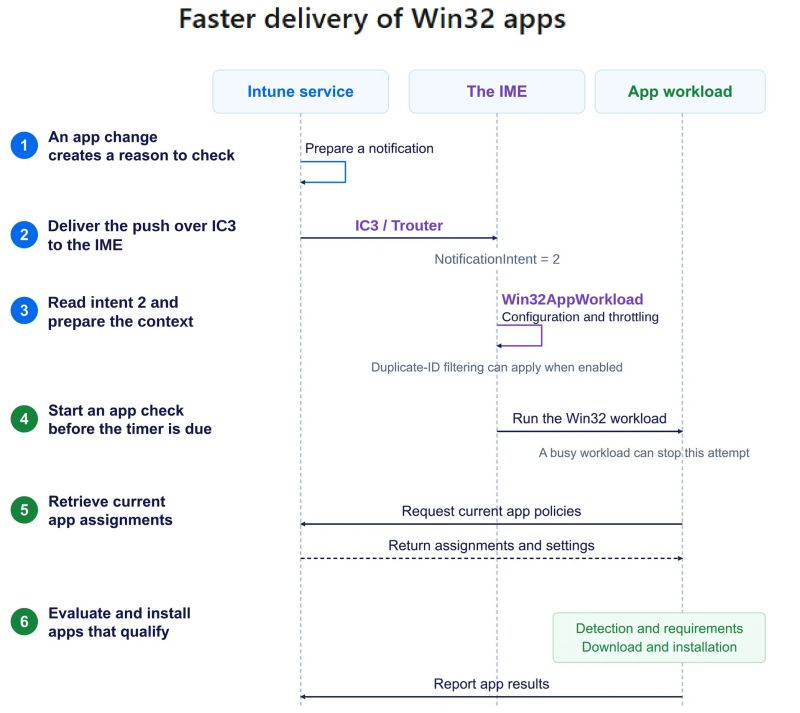
That 60-minute wait for new Required Win32 apps is gone!!
In my previous blog, I explained how Microsoft already fixed it for Windows Autopilot.
Now Microsoft is taking the next step.
New Win32 app changes can also wake the IME sooner instead of waiting for the normal polling interval (60 minutes). So, of course, I tested it.
I assigned a new Required app and watched the device.
A couple of minutes later, the IME kicked off the Win32App Workload, and this is where it gets interesting.
So what actually changed, how does the push reach the IME, and what happens after intent 2 arrives?
Read the full blog:https://t.co/YiDUhJsMtF
#Intune #MSIntune #Windows11
@IntuneSuppTeam .... the Intune Eng team is on a rolll :)
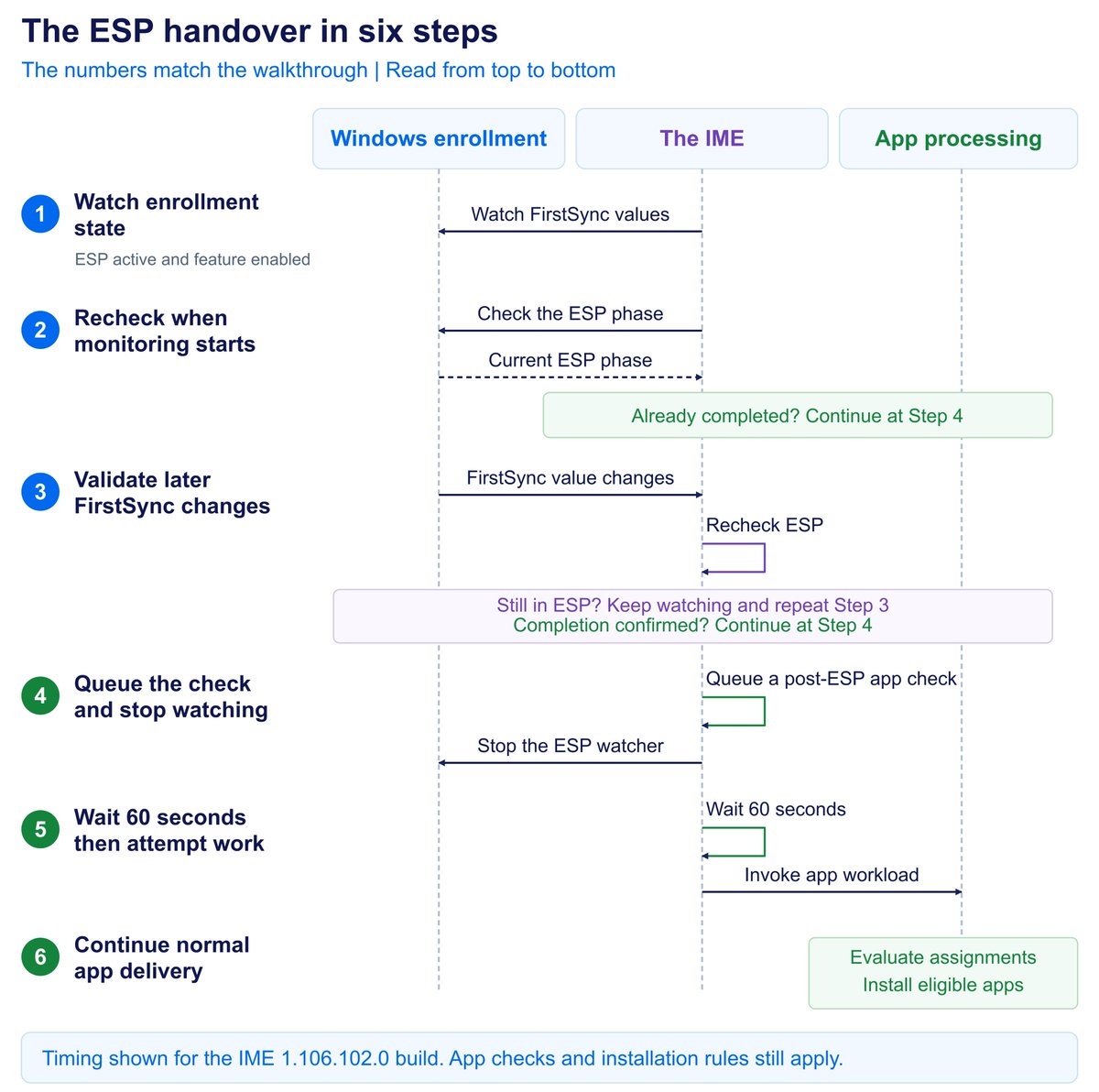
Required Apps No Longer Need to Wait 60 Minutes after Autopilot
Microsoft has announced faster Win32 app delivery in What’s new in Intune.
The other required Win32 apps no longer have to wait for the next hourly check after Autopilot ESP completes.
Learn how the IME detects the transition and starts app processing sooner.
https://t.co/eWrGrBi4mN
#Intune #MSIntune #WindowsAutopilot
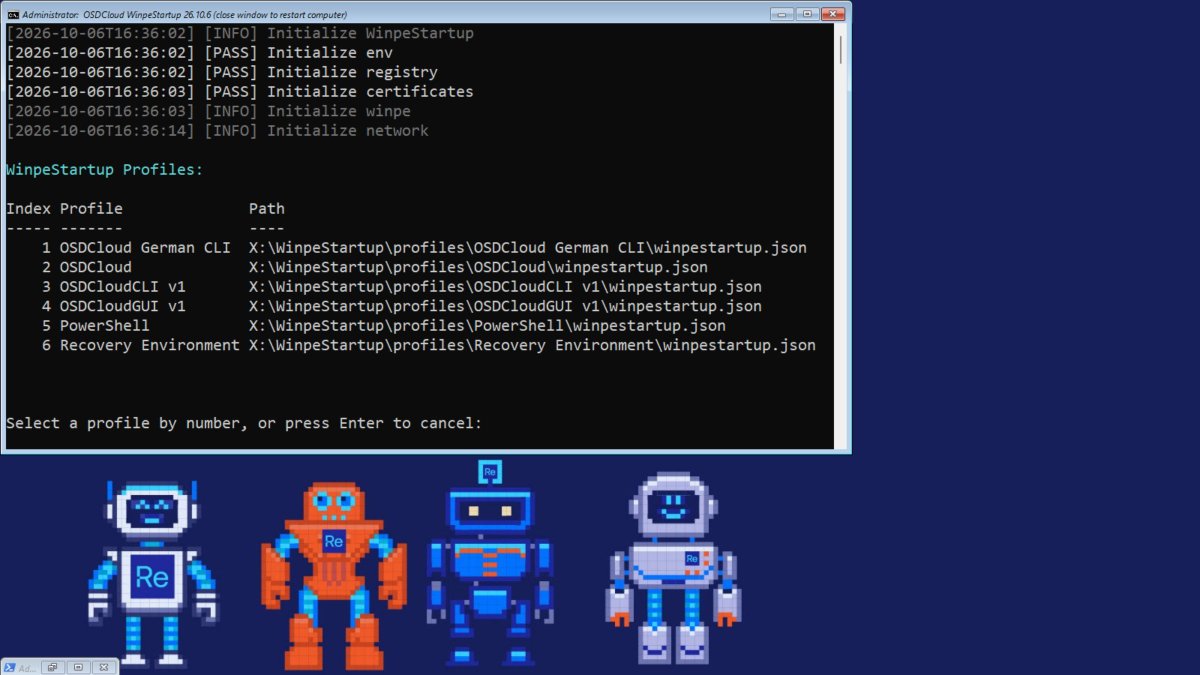
#OSDeploy PSModule was updated to version 26.9.25-preview. This #PowerShell module is used to automate building #OSDCloud Boot Media
🚀 Windows ADK updated to 10.1.26100.9457
🚀 WinRE updated to 26200.9457
https://t.co/mmG7Sx7Ut4
Join the @RecastSoftware webinar for updates
What's actually in the Microsoft Enterprise App Management catalog? 🔍
Get-EAMCatalog.ps1 pulls it all back from Microsoft Graph: 1,589 variants with versions, MSI/EXE, detection rules, and an HTML report 👇
https://t.co/vixyOjLsQ6
#MSIntune#MicrosoftGraph@MSEndpointMgr
More than 200 resource types. One baseline. Configuration Snapshots in Microsoft Entra Tenant Governance lock in your tenant config across Entra, Intune, Exchange, Teams, Defender, & Purview. Start here. https://t.co/bd8d0Dsmwv
Ensure your tenant configuration doesn't drift from defined security and compliance requirements with Microsoft Entra Tenant Governance. Capture configuration as code across 200+ resource types in Entra, Intune, Exchange, Teams, Defender, and Purview.
Turn that snapshot into a Monitor. It scans for drift every six hours and flags every policy change. #EntraTenants #MicrosoftEntra #TenantGovernance #ConfigurationDrift #Cybersecurity