Passionate about reducing redundant information that slows down-decision making to transform the way we do business. After over 5 years of experience in the fin
🚨 Anthropic just showed a 27-minute workshop on how to actually do prompts for Claude.
Taught by the people who built it.
Free. No registration. No paywall.
I've seen $300 courses that don't cover what they teach in the first 8 minutes.
Watch it and bookmark it now.
Skills, Subagents, MCP, and Hooks are not four versions of the same thing.
They solve four different problems. Mix them up, and your Claude Code setup starts breaking in ways no one can explain.
Here’s the decision tree I use:
SKILLS → “Load knowledge only when needed”
• Markdown file + helper code
• Loaded per task, not always on
• Best for: specialized knowledge, file formats, repeat workflows
Use when the same knowledge appears often but would bloat context.
SUBAGENTS → “Give a side task its own workspace”
• Separate session with its own memory
• Returns clean output, not the mess
• Best for: deep research, parallel work, messy exploration
Use when the main thread would get cluttered.
MCP → “Connect to external systems”
• Persistent server exposing tools/data
• Handles auth, state, multi-language
• Best for: APIs, databases, SaaS, internal tools
Use when the agent needs to reach something, not just know it.
HOOKS → “Enforce behavior every time”
• Triggered on lifecycle events
• Runs automatically, no exceptions
• Best for: validation, formatting, security, logging
Use when you can’t rely on the model to remember.
Mental model:
• Skills = what the agent knows
• Subagents = where it thinks
• MCP = what it can reach
• Hooks = what it must obey
They don’t compete. They stack.
Common mistakes:
• Building MCP when a Skill was enough
• Overloading main context instead of using Subagents
• Trusting the model instead of enforcing with Hooks
• Treating Skills like docs instead of tools
Hot take:
Most MCP servers should’ve been Skills.
People build connections when they need knowledge—and pay for it with latency, auth issues, and brittle systems.
Where do you draw the line between Skill vs MCP?
𝗖𝗟𝗔𝗨𝗗𝗘.𝗺𝗱 is NOT a README.
Most devs:
→ Add a few bullets
→ Maybe a build command
→ Call it “done”
Then complain:
“Claude writes bad code” 🤦♂️
No.
Your CLAUDE.md is just… useless.
Here’s how to fix it 👇
1️⃣ Use ALL 3 scopes (not just one)
• Global → ~/.claude/CLAUDE.md
• Project → ./CLAUDE.md
• Folder → ./src/CLAUDE.md
Merge order:
Global → Project → Folder (last wins)
Most people miss this.
2️⃣ Follow WHAT / WHY / HOW
• WHAT → stack, structure, dependencies
• WHY → decisions, patterns, anti-patterns
• HOW → commands, tests, deploy flow
Skip one = Claude guesses.
And it guesses wrong.
3️⃣ Be SPECIFIC
❌ “Write clean code”
✅ “camelCase vars, PascalCase components”
❌ “Test everything”
✅ “80% coverage, npm test --watch”
Vague = ignored
Specific = followed
4️⃣ Follow these 5 rules
• Run /init first
• Keep it < 500 lines
• Expect ~70% compliance
• Update monthly
• Reference configs (don’t copy)
The truth?
Top engineers aren’t better at prompting.
They’re better at designing CLAUDE.md.
Fix this → your AI code quality 10x 🚀
Agentic #PowerBI Semantic Models on Windows? Here is a blog post on how I completed the setup steps before creating the Agentic Semantic Model in #MicrosoftFabric. There were quite a few things I had to get done before it would work. https://t.co/NdduKSB33X
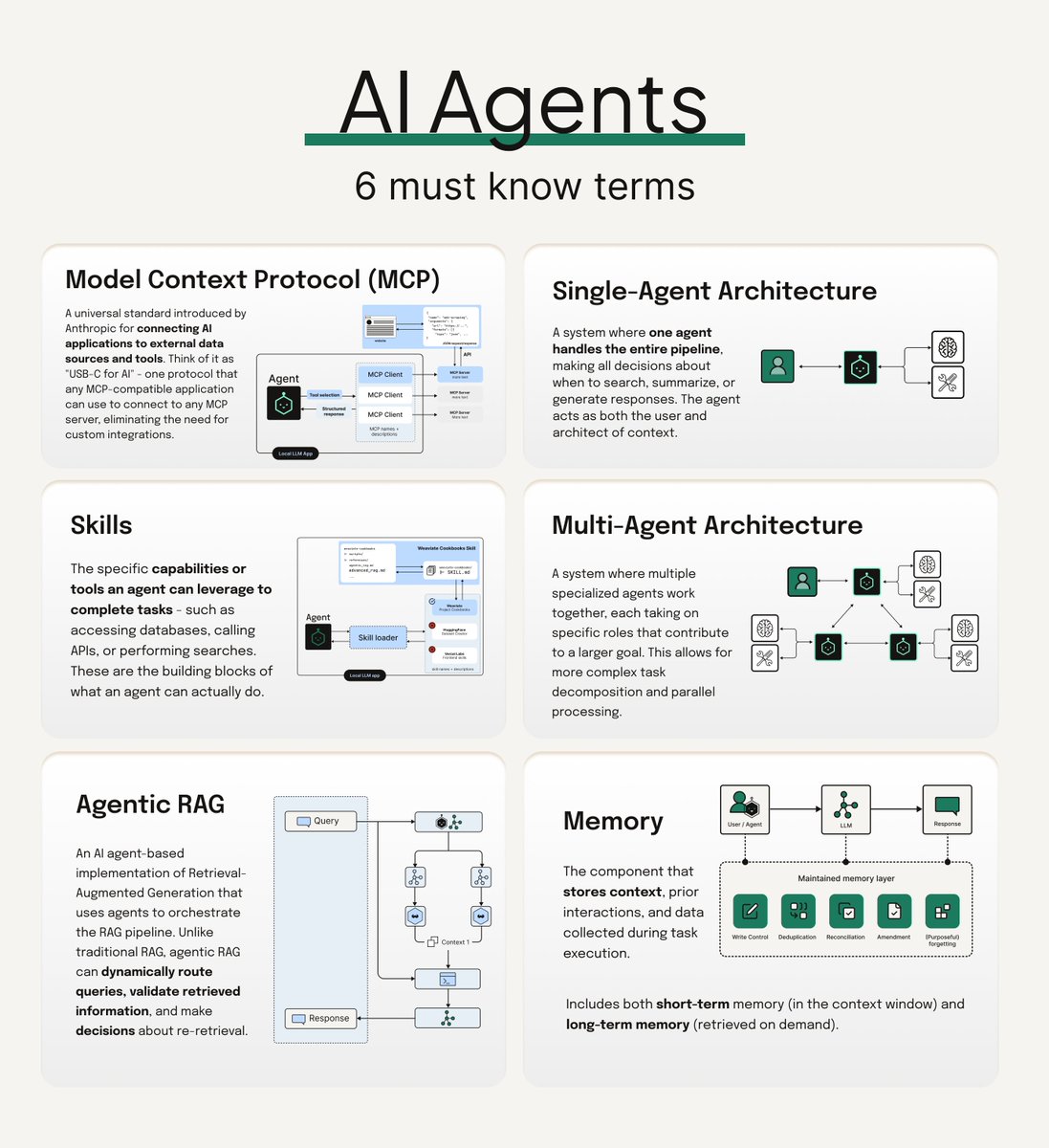
Here are the six most important terms you should know if you're working with agentic AI:
𝗠𝗼𝗱𝗲𝗹 𝗖𝗼𝗻𝘁𝗲𝘅𝘁 𝗣𝗿𝗼𝘁𝗼𝗰𝗼𝗹 (𝗠𝗖𝗣)
A standardized way for AI systems to access and interact with external data sources and tools. Think of it as a universal adapter that lets agents communicate with different services consistently.
𝗔𝗴𝗲𝗻𝘁 𝗦𝗸𝗶𝗹𝗹𝘀
Pre-built capabilities that coding agents can use to write better code. Weaviate's Agent Skills repository (https://t.co/pkUIDxkRVb) is a great example - it bridges coding agents like Claude Code, Cursor, and GitHub Copilot with Weaviate's infrastructure, so your agent gets the right context for cluster management, data imports, and search operations.
𝗔𝗴𝗲𝗻𝘁𝗶𝗰 𝗥𝗔𝗚
RAG pipelines that incorporate AI agents into the retrieval process. Unlike vanilla RAG's sequential flow, agentic RAG uses agents to route queries to specialized knowledge sources, validate retrieved context, and even reformulate queries.
𝗦𝗶𝗻𝗴𝗹𝗲 𝗔𝗴𝗲𝗻𝘁 𝗔𝗿𝗰𝗵𝗶𝘁𝗲𝗰𝘁𝘂𝗿𝗲
The simplest agentic setup - essentially a router. You have multiple knowledge sources (databases, APIs, tools), and one agent decides which to query based on the user's request. Clean and straightforward.
𝗠𝘂𝗹𝘁𝗶 𝗔𝗴𝗲𝗻𝘁 𝗔𝗿𝗰𝗵𝗶𝘁𝗲𝗰𝘁𝘂𝗿𝗲
Multiple specialized agents working together, each handling specific tasks. Orchestration frameworks like CrewAI can help coordinate these agents, managing the handoffs and ensuring everything works together smoothly.
𝗠𝗲𝗺𝗼𝗿𝘆
The component that 𝘀𝘁𝗼𝗿𝗲𝘀 𝗰𝗼𝗻𝘁𝗲𝘅𝘁, prior interactions, and data collected during task execution. Includes both short-term memory (in the context window) and long-term memory (retrieved on demand). Big differentiator in how well an agentic system works, especially in multi agent systems.
Did I miss any terms people should definitely know? Drop them in the comments 🔽 😄
You won't need any other project structure for Claude Code.
Just this one.
Weeks ago I shared an Agentic AI project structure.
It blew up.
But people kept asking:
→ "What about Claude Code specifically?"
→ "Where do Skills go?"
→ "How do I organize Hooks and MCP servers?"
So I built the definitive version.
Here's everything in one cheatsheet:
→ CLAUDE. md — Your project's memory layer
→ . claude/ — The entire extensions hub
→ commands/ — Slash commands as .md files
→ skills/ — Auto-activated workflows with SKILL. md
→ agents/ — Subagent definitions in .yml
→ plugins/ — Bundled distributable setups
→ . mcp. json — External tool connections
Plus the right side covers:
→ All 6 extension types explained
→ Hook events and when they fire
→ Skill folder structure (scripts, references, assets)
→ Popular MCP servers to connect
→ Context management thresholds
→ Getting started in 6 steps
→ Pro tips from real usage
This isn't theory.
Print it. Pin it. Reference it.
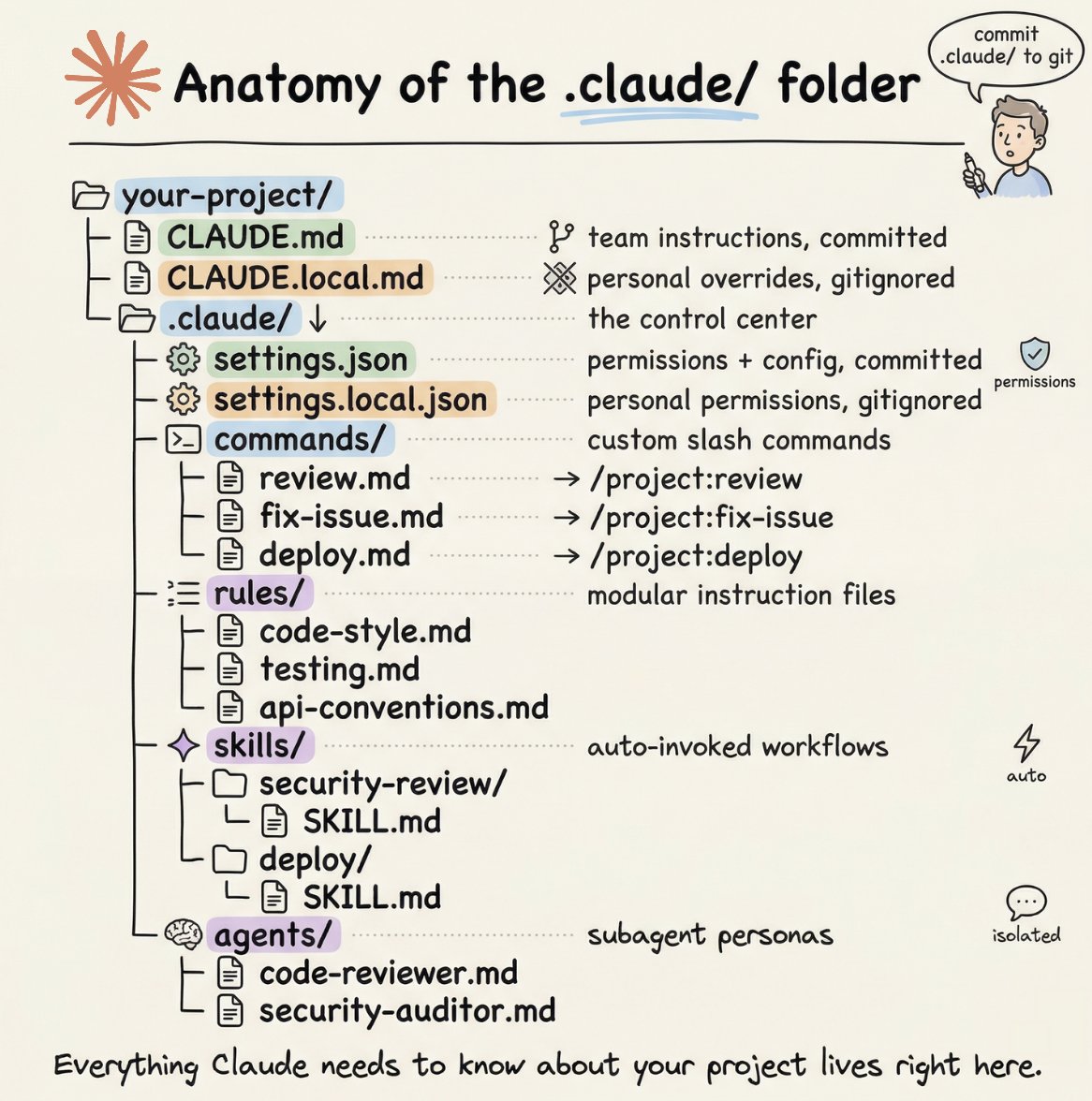
How to setup your Claude code project?
TL;DR
Most developers skip the setup and just start prompting. That's the mistake.
A proper Claude Code project lives inside a .𝗰𝗹𝗮𝘂𝗱𝗲/ folder. Start with 𝗖𝗟𝗔𝗨𝗗𝗘.𝗺𝗱 as Claude's instruction manual. Split it into a 𝗿𝘂𝗹𝗲𝘀/ folder as it grows. Add 𝗰𝗼𝗺𝗺𝗮𝗻𝗱𝘀/ for repeatable workflows, 𝘀𝗸𝗶𝗹𝗹𝘀/ for context-triggered automation, and 𝗮𝗴𝗲𝗻𝘁𝘀/ for isolated subagents. Lock down permissions in 𝘀𝗲𝘁𝘁𝗶𝗻𝗴𝘀.𝗷𝘀𝗼𝗻.
There are two .𝗰𝗹𝗮𝘂𝗱𝗲/ folders: one committed with your repo, one global at ~/.𝗰𝗹𝗮𝘂𝗱𝗲/ for personal preferences and auto-memory across projects.
The .𝗰𝗹𝗮𝘂𝗱𝗲/ folder is infrastructure. Treat it like one.
The article below is a complete guide to 𝗖𝗟𝗔𝗨𝗗𝗘.𝗺𝗱, custom commands, skills, agents, and permissions, and how to set them up properly.
Anthropic fucking killed it (again). biggest ai product launch of the year so far.
claude can now control your entire computer autonomously. anything you can do on a computer - claude can. your very own digital employee.
- any app, browser, file, spreadsheet, tool claude can intelligently access and operate.
- claude controls your entire screen (like a human), no connectors. this is a huge step-up in intelligence.
- best part: you can text claude to do things from your phone and it'll do work on your computer!
- in the last week anthropic has shipped 9 features that have built up to this: a fully automated digital human.
unreal
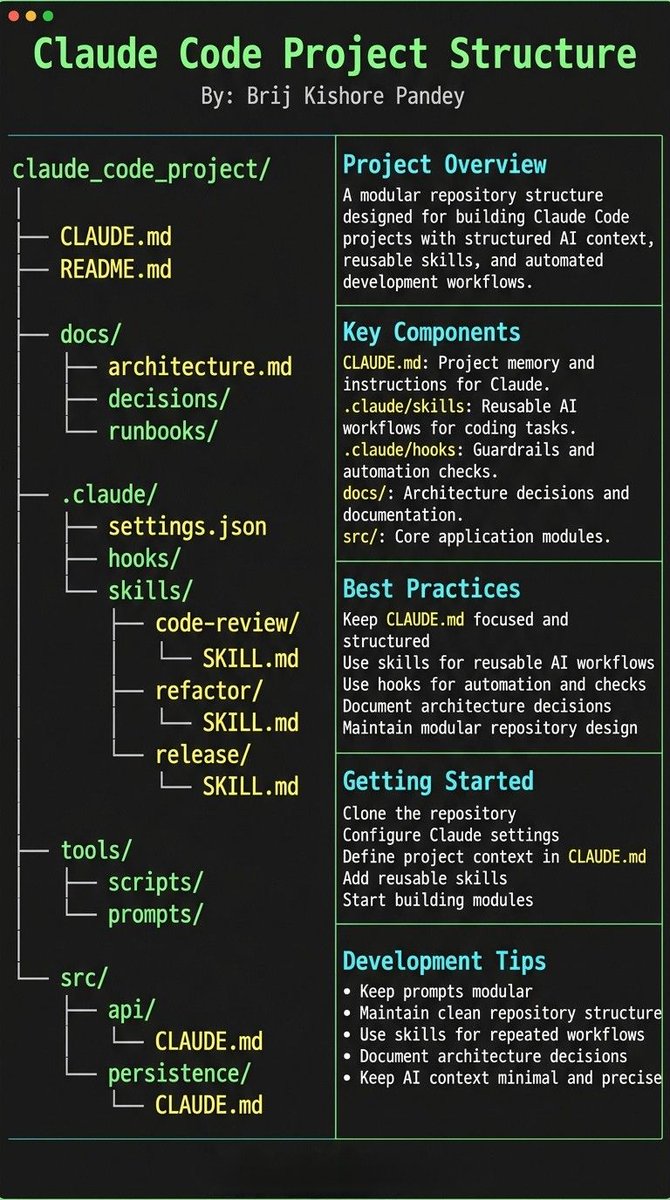
Most people think using Claude Code is about writing better prompts.
It’s not.
The real unlock is structuring your repository so Claude can think like an engineer.
If your repo is messy, Claude behaves like a chatbot.
If your repo is structured, Claude behaves like a developer living inside your codebase.
Your project only needs 4 things:
• the why → what the system does
• the map → where things live
• the rules → what’s allowed / forbidden
• the workflows → how work gets done
I call this:
The Anatomy of a Claude Code Project 👇
━━━━━━━━━━━━━━━
1️⃣ CLAUDE.md = Repo Memory (Keep it Short)
This file is the north star for Claude.
Not a massive document.
Just three things:
• Purpose → why the system exists
• Repo map → how the project is structured
• Rules + commands → how Claude should operate
If CLAUDE.md becomes too long, the model starts missing critical signals.
Clarity beats size.
━━━━━━━━━━━━━━━
2️⃣ .claude/skills/ = Reusable Expert Modes
Stop repeating instructions in prompts.
Turn common workflows into reusable skills.
Examples:
• code review checklist
• refactoring playbook
• debugging workflow
• release procedures
Now Claude can switch into specialized modes instantly.
Result:
More consistent outputs across sessions and teammates.
━━━━━━━━━━━━━━━
3️⃣ .claude/hooks/ = Guardrails
Models forget.
Hooks don’t.
Use hooks for things that must always happen automatically.
Examples:
• run formatters after edits
• trigger tests after core changes
• block sensitive directories (auth, billing, migrations)
Hooks turn AI workflows into reliable engineering systems.
━━━���━━━━━━━━━━━
4️⃣ docs/ = Progressive Context
Don’t overload prompts with information.
Instead, let Claude navigate your documentation.
Examples:
• architecture overview
• ADRs (engineering decisions)
• operational runbooks
Claude doesn’t need everything in memory.
It just needs to know where truth lives.
━━━━━━━━━━━━━━━
5️⃣ Local CLAUDE.md for Critical Modules
Some areas of your system have hidden complexity.
Add local context files there.
Example:
src/auth/CLAUDE.md
src/persistence/CLAUDE.md
infra/CLAUDE.md
Now Claude understands the danger zones exactly when it works in them.
This dramatically reduces mistakes.
━━━━━━━━━━━━━━━
Here’s the shift most people miss:
Prompting is temporary.
Structure is permanent.
Once your repository is designed for AI:
Claude stops acting like a chatbot...
…and starts behaving like a project-native engineer. 🚀
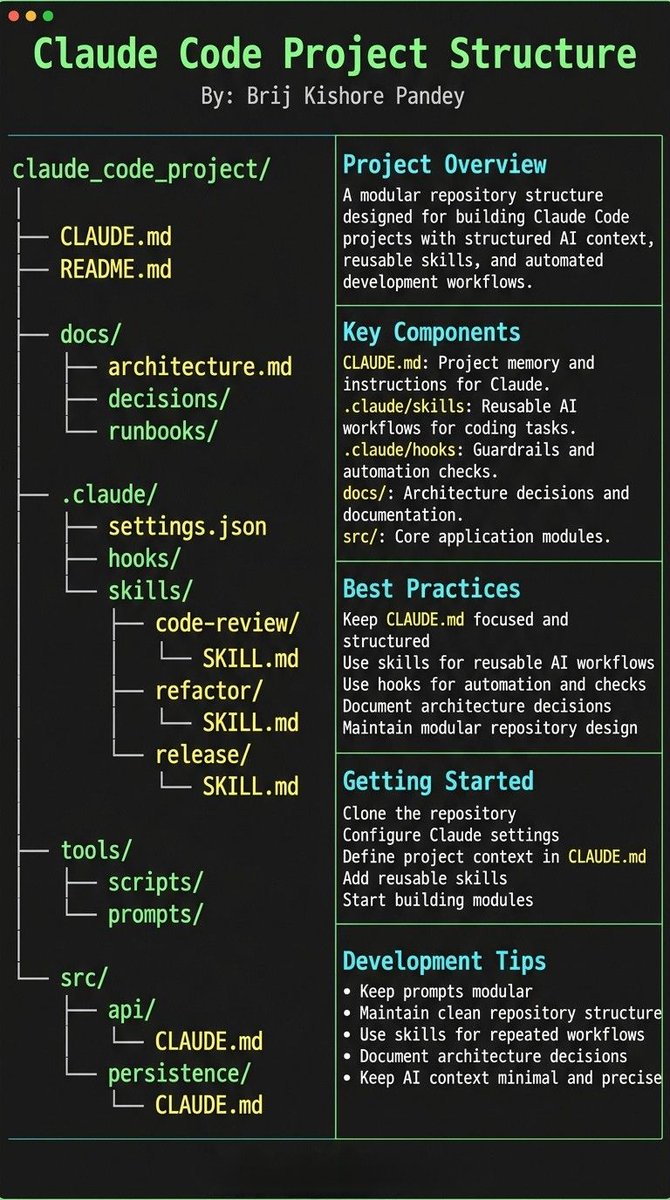
Most people treat CLAUDE.md like a prompt file.
That’s the mistake.
If you want Claude Code to feel like a senior engineer living inside your repo, your project needs structure.
Claude needs 4 things at all times:
• the why → what the system does
• the map → where things live
• the rules → what’s allowed / not allowed
• the workflows → how work gets done
I call this:
The Anatomy of a Claude Code Project 👇
━━━━━━━━━━━━━━━
1️⃣ CLAUDE.md = Repo Memory (keep it short)
This is the north star file.
Not a knowledge dump. Just:
• Purpose (WHY)
• Repo map (WHAT)
• Rules + commands (HOW)
If it gets too long, the model starts missing important context.
━━━━━━━━━━━━━━━
2️⃣ .claude/skills/ = Reusable Expert Modes
Stop rewriting instructions.
Turn common workflows into skills:
• code review checklist
• refactor playbook
• release procedure
• debugging flow
Result:
Consistency across sessions and teammates.
━━━━━━━━━━━━━━━
3️⃣ .claude/hooks/ = Guardrails
Models forget.
Hooks don’t.
Use them for things that must be deterministic:
• run formatter after edits
• run tests on core changes
• block unsafe directories (auth, billing, migrations)
━━━━━━━━━━━━━━━
4️⃣ docs/ = Progressive Context
Don’t bloat prompts.
Claude just needs to know where truth lives:
• architecture overview
• ADRs (engineering decisions)
• operational runbooks
━━━━━━━━━━━━━━━
5️⃣ Local CLAUDE.md for risky modules
Put small files near sharp edges:
src/auth/CLAUDE.md
src/persistence/CLAUDE.md
infra/CLAUDE.md
Now Claude sees the gotchas exactly when it works there.
━━━━━━━━━━━━━━━
Prompting is temporary.
Structure is permanent.
When your repo is organized this way, Claude stops behaving like a chatbot…
…and starts acting like a project-native engineer.
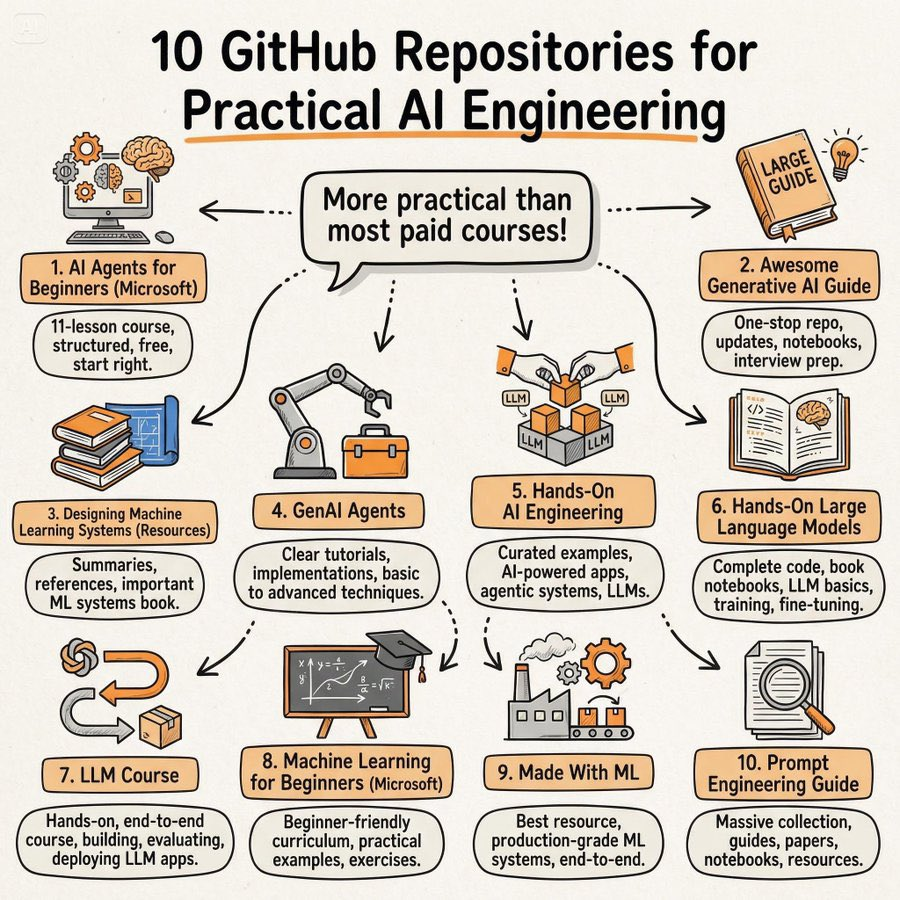
10 GitHub repositories that will teach you more practical AI engineering than most paid courses:
1. AI Agents for Beginners (Microsoft)
https://t.co/xzfpzAcKXj
2. Awesome Generative AI Guide
https://t.co/K6wPAReKfr
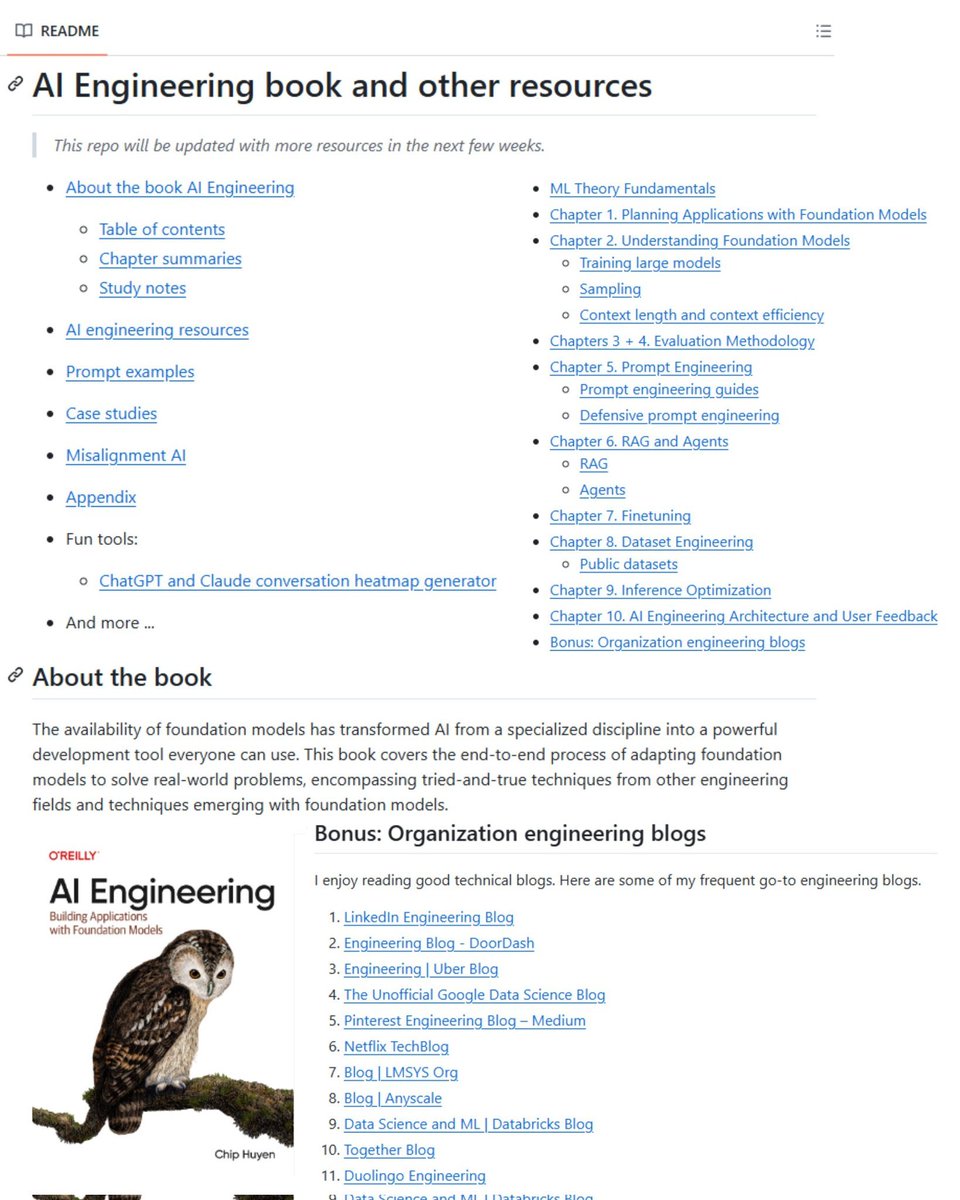
3. Designing Machine Learning Systems (Resources)
https://t.co/TMNhZKf1Lw
4. GenAI Agents
https://t.co/E2qko18eMW
5. Hands-On AI Engineering
https://t.co/x7s8foTkbM
6. Hands-On Large Language Models
https://t.co/AOVmopcNaL
7. LLM Course
https://t.co/nMccKpz8Lr
8. Machine Learning for Beginners (Microsoft)
https://t.co/VXFdlypvq0
9. Made With ML
https://t.co/1T9iUmNvO9
10. Prompt Engineering Guide
https://t.co/6O5MaxIJxa
This blog details the setup on how to compare which semantic model (DirectLake or Import Mode) in #MicrosoftFabric performs best in terms of query response and capacity consumption. https://t.co/sdjF1ysBPm
If you want to learn these for FREE:
SQL
Microsoft Excel
Data Visualization
Data Analysis
Business Analysis
Resume Tips
Project Management
Interview Tips
Check this Google drive link: https://t.co/4zBuvcC54i
Don't forget to retweet.
cc: @OlamideTowobola