Could you rebuild your Windows configuration from memory?
Most people can’t.
Settings and tweaks end up scattered across screenshots and old guides.
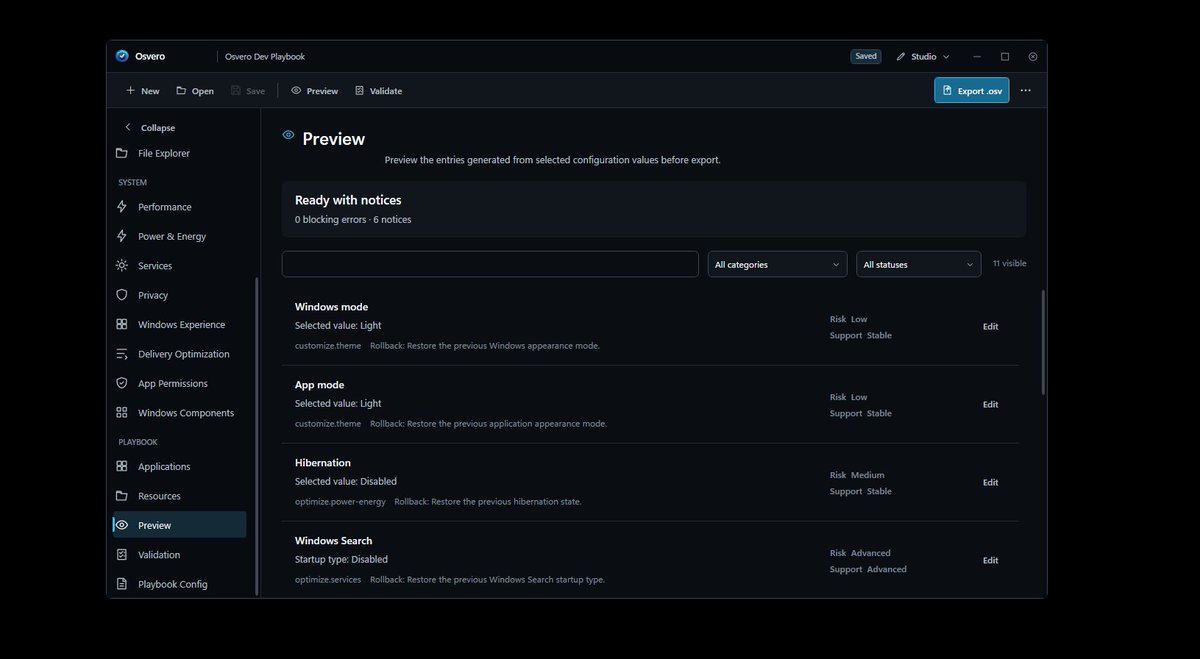
Osvero is a new Windows app for building portable Playbooks you can review before applying and reuse later.
See it in action ↓
A custom Windows setup shouldn’t require a folder full of scripts.
With Osvero, choose the settings, apps, Windows features and system options you want, then package them into a reusable Playbook. Review it before applying, reuse it when needed, and keep your configuration in one structured format.
Build your Windows configuration once. Keep it as a Playbook.
What if your Windows setup wasn’t something you had to rebuild from memory?
Osvero is a Windows configuration platform built around reusable Playbooks.
A Playbook can describe the settings, apps and system choices that make up your setup.
Before applying it, you can review what will change.
Instead of relying on scattered tweaks, scripts and old notes, you keep your configuration in one structured, reusable form.
That’s the idea behind Osvero:
make Windows customization easier to understand, repeat and control.
What if your Windows setup wasn’t something you had to rebuild from memory?
Osvero is a Windows configuration platform built around reusable Playbooks.
A Playbook can describe the settings, apps and system choices that make up your setup.
Before applying it, you can review what will change.
Instead of relying on scattered tweaks, scripts and old notes, you keep your configuration in one structured, reusable form.
That’s the idea behind Osvero:
make Windows customization easier to understand, repeat and control.
@PCMag Process count and idle RAM are useful observations, but they aren’t performance metrics by themselves.
The interesting part is what changes under an actual workload — responsiveness, frametimes, latency, stability — and what trade-offs were introduced to get there.
Osvero is getting closer to a complete Windows Playbook workflow.
Two areas moved forward recently:
→ a much broader catalog of Windows settings and configuration options
→ a new account system for signing in to the app
The goal is simple:
make Osvero more capable without making it harder to understand.
More options. Same focus on clarity and control.
Osvero is getting closer to a complete Windows Playbook workflow.
Two areas moved forward recently:
→ a much broader catalog of Windows settings and configuration options
→ a new account system for signing in to the app
The goal is simple:
make Osvero more capable without making it harder to understand.
More options. Same focus on clarity and control.
Your Task Manager is useful — but it isn’t a benchmark.
70 processes instead of 170?
3 GB RAM instead of 6 GB?
20 services disabled?
Those numbers can be interesting.
But the real question is:
Did performance improve?
Did responsiveness improve?
Did stability improve?
What trade-offs were introduced?
Good optimization should be measurable, not just visible.
Windows customization shouldn’t require blind trust.
Before applying any system change, you should be able to answer:
What will change?
Why does it matter?
Can I undo it?
That’s the philosophy behind Osvero.
Review first. Apply deliberately. Keep a way back.
Playbooks actually need preview and user validation.
Some playbooks tools are not showing what software will actually change in your OS. Making some privacy risks.
Make your privacy at first place!
Windows customization has become a collection of things you’re supposed to remember.
A tweak from one guide.
A PowerShell command from another.
A setting buried three menus deep.
Months later, you know your PC feels “yours” — but you may not know exactly why.
Osvero is being built around a different idea:
Your Windows configuration should be something you can understand, review and reuse.
Windows optimization has a weird obsession with small numbers.
Fewer processes.
Less RAM used.
Fewer services running.
They look satisfying in a screenshot, but the numbers that matter are the ones you can actually feel and measure: responsiveness, stability, frametimes and real workload performance.
A cleaner Task Manager is not the same thing as a faster PC.
🚨 We’re looking for Windows users who actually tweak their PCs.
Osvero is opening its first Founding Beta.
We want a small group to test the full Windows Playbook workflow:
➡️ open an .osv Playbook
➡️ review proposed changes
➡️ apply the configuration
➡️ verify the result
➡️ test rollback
This is an early build.
We’re looking for people who will find bugs, question unclear behavior and tell us what doesn’t make sense.
Want to help shape Osvero before the first public release?
Apply below ���
How many Windows tweaks have you made that you no longer remember?
A Registry edit from an old guide.
A service you disabled years ago.
A privacy setting buried somewhere in Windows.
A PowerShell command you ran once and forgot.
The hard part isn't making the changes.
It's remembering what you changed — and why.
How much of your current Windows configuration could you actually explain today?
Could you rebuild your Windows configuration from memory?
Most people can’t.
Settings and tweaks end up scattered across screenshots and old guides.
Osvero is a new Windows app for building portable Playbooks you can review before applying and reuse later.
See it in action ↓