You see why Oyinbo beef dey soft
But our own cow - they'd have walked from Maiduguri to Oyo 8 times in their lifetime.
Why Naija beef no go hard like rubber 😭😭😭
See as cow dey enjoy soft life.
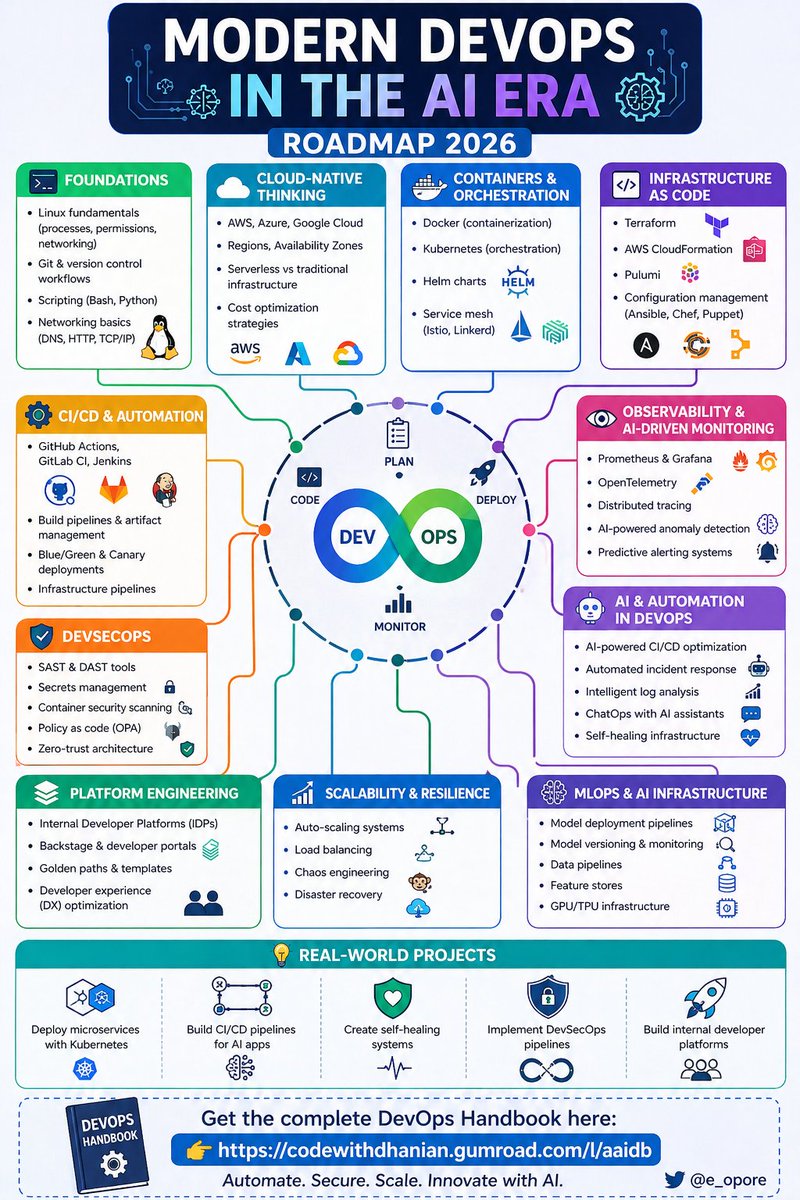
DevSecOps Explained 🔐⚙️
🟢 Core Philosophy:
→ DevSecOps: Integrating security into every stage of the DevOps lifecycle
→ Shift Left: Detect and fix vulnerabilities early in development
→ Culture: Shared responsibility across Dev + Sec + Ops
🟠 Build & Deploy Securely:
→ CI/CD: Automate builds, testing, and security checks
→ QA Integration: Embed testing early in the dev lifecycle
→ IaC: Use Infrastructure as Code for consistent, secure environments
🟣 Security Practices:
→ Threat Modeling: Identify risks before they become incidents
→ Vulnerability Management: Continuously scan and prioritize fixes
→ Security Scans: Use SAST + DAST to catch issues in code and runtime
🟡 Runtime Protection:
→ Container Security: Secure images and runtime environments
→ Key Management: Protect secrets, API keys, and certificates
→ Access Control: Enforce least privilege across systems
🔵 Continuous Monitoring:
→ Logs: Track system and application behavior
→ Traffic: Monitor network activity for anomalies
→ Alerts: Detect and respond to threats in real time
Build fast → Secure early → Ship confidently
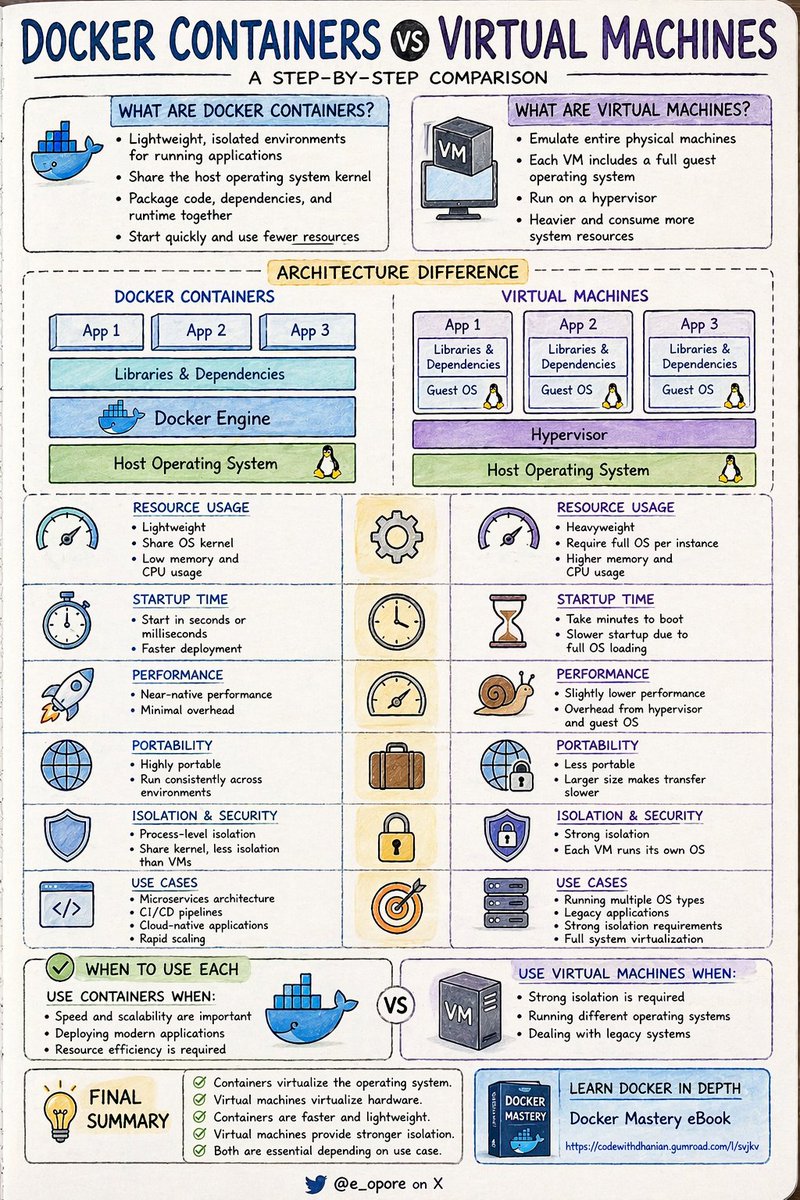
DOCKER CONTAINERS VS VIRTUAL MACHINES
A STEP-BY-STEP COMPARISON
WHAT ARE DOCKER CONTAINERS
-> Lightweight, isolated environments for running applications
-> Share the host operating system kernel
-> Package code, dependencies, and runtime together
-> Start quickly and use fewer resources
WHAT ARE VIRTUAL MACHINES
-> Emulate entire physical machines
-> Each VM includes a full guest operating system
-> Run on a hypervisor
-> Heavier and consume more system resources
ARCHITECTURE DIFFERENCE
-> DOCKER CONTAINERS
-> Application
-> Libraries and dependencies
-> Docker Engine
-> Host OS
-> VIRTUAL MACHINES
-> Application
-> Libraries and dependencies
-> Guest OS
-> Hypervisor
-> Host OS
RESOURCE USAGE
-> CONTAINERS
-> Lightweight
-> Share OS kernel
-> Low memory and CPU usage
-> VIRTUAL MACHINES
-> Heavyweight
-> Require full OS per instance
-> Higher memory and CPU usage
STARTUP TIME
-> CONTAINERS
-> Start in seconds or milliseconds
-> Faster deployment
-> VIRTUAL MACHINES
-> Take minutes to boot
-> Slower startup due to full OS loading
PERFORMANCE
-> CONTAINERS
-> Near-native performance
-> Minimal overhead
-> VIRTUAL MACHINES
-> Slightly lower performance
-> Overhead from hypervisor and guest OS
PORTABILITY
-> CONTAINERS
-> Highly portable
-> Run consistently across environments
-> VIRTUAL MACHINES
-> Less portable
-> Larger size makes transfer slower
ISOLATION AND SECURITY
-> CONTAINERS
-> Process-level isolation
-> Share kernel, less isolation than VMs
-> VIRTUAL MACHINES
-> Strong isolation
-> Each VM runs its own OS
USE CASES
-> CONTAINERS
-> Microservices architecture
-> CI CD pipelines
-> Cloud-native applications
-> Rapid scaling
-> VIRTUAL MACHINES
-> Running multiple OS types
-> Legacy applications
-> Strong isolation requirements
-> Full system virtualization
WHEN TO USE EACH
-> USE CONTAINERS
-> When speed and scalability are important
-> When deploying modern applications
-> When resource efficiency is required
-> USE VIRTUAL MACHINES
-> When strong isolation is required
-> When running different operating systems
-> When dealing with legacy systems
QUICK TIP
-> Containers virtualize the operating system
-> Virtual machines virtualize hardware
-> Containers are faster and lightweight
-> Virtual machines provide stronger isolation
-> Both are essential depending on use case
LEARN DOCKER IN DEPTH
-> Grab the Docker Mastery eBook
-> https://t.co/sC9bTrAJWt
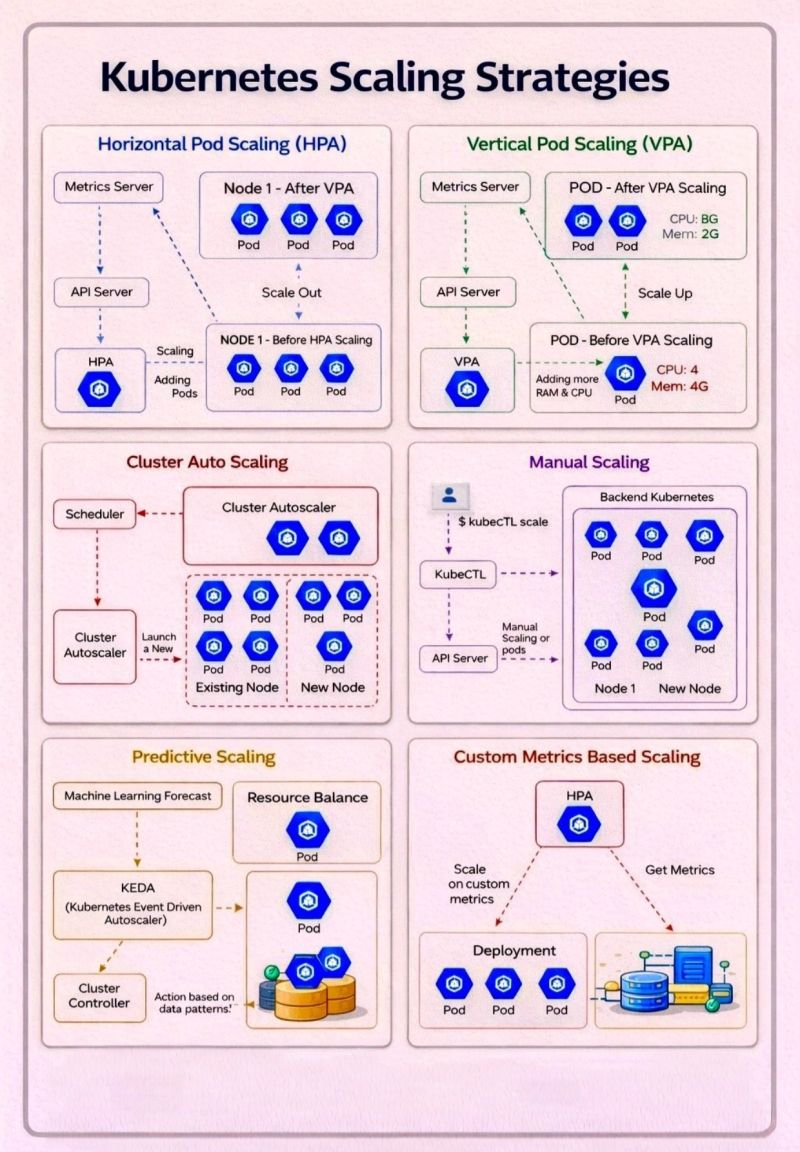
🚀 Kubernetes Scaling Strategies - Beyond Just “Add More Pods.”
Scaling in Kubernetes isn’t one-size-fits-all. It’s a toolkit of strategies, each solving a different problem depending on workload patterns, resource constraints, and business needs.
Here’s a quick breakdown of the key approaches:
🔹 Horizontal Pod Autoscaling (HPA):
Scale *out* by adding more pods based on metrics like CPU or memory. Ideal for handling traffic spikes and stateless applications.
🔹 Vertical Pod Autoscaling (VPA):
Scale *up* by adjusting CPU and memory for existing pods. Useful when workloads are stable but resource needs are unpredictable.
🔹 Cluster Autoscaling:
Automatically adds or removes nodes based on scheduling demands. Ensures your cluster always has the right capacity—no more, no less.
🔹Manual Scaling:
Still relevant for controlled environments or predictable workloads. Gives full control, but requires active management.
🔹 Predictive Scaling (KEDA, ML-based):
Move from reactive -> proactive. Anticipate demand using historical data and event-driven triggers.
🔹 Custom Metrics Scaling:
Go beyond CPU/memory. Scale based on business metrics like queue length, request rate, or user activity.
Key takeaway:
The real power comes from combining these strategies- not choosing just one. Smart scaling = better performance + optimized cost.
How are you handling scaling in your Kubernetes workloads today? Are you still reactive, or moving toward predictive systems?
KUBERNETES BACKUP & DISASTER RECOVERY (ANALOGY)
Think of Kubernetes like a large digital city. Backup and disaster recovery is the system that ensures the city can be rebuilt quickly if something goes wrong.
WHAT NEEDS TO BE BACKED UP
→ cluster state is like the city blueprint
→ stored in (all configurations and metadata live here)
→ workloads (deployments, pods, services) are like buildings
→ persistent volumes (databases, files) are like valuable assets inside buildings
→ secrets and configmaps are like secure vaults and documents
ETCD BACKUP (CONTROL PLANE SNAPSHOT)
→ etcd acts like the master city archive
→ taking snapshots is like saving the entire city blueprint
→ periodic backups ensure you can rebuild cluster state
→ stored securely outside the cluster (external storage)
→ without etcd backup
→ entire cluster configuration is lost
APPLICATION & DATA BACKUP
→ backing up only cluster config is not enough
→ need to protect actual data (persistent volumes)
→ volumes are like warehouses storing business data
→ use volume snapshots or storage-level backups
→ databases require consistent backups (avoid corruption)
→ tools like help automate this
BACKUP TOOLS (AUTOMATION LAYER)
→ velero acts like a disaster recovery team
→ backs up:
→ kubernetes resources (yaml configs)
→ persistent volumes (data snapshots)
→ stores backups in object storage (like remote safe vaults)
→ supports scheduled backups (automatic safety checks)
DISASTER SCENARIOS
→ node failure → like a building collapse
→ cluster failure → entire city goes down
→ accidental deletion → someone destroys buildings by mistake
→ data corruption → records inside buildings are damaged
DISASTER RECOVERY PROCESS
→ restore etcd snapshot → rebuild city blueprint
→ restore kubernetes resources → reconstruct buildings
→ restore persistent volumes → refill data inside buildings
→ validate applications → ensure everything works again
HIGH AVAILABILITY (PREVENTION)
→ multiple control plane nodes reduce risk
→ replication ensures system stays alive even if parts fail
→ load balancing distributes traffic
→ this is like having multiple city control centers instead of one
CROSS-REGION BACKUPS
→ store backups in different locations
→ protects against regional failures (like natural disasters affecting a city)
RECOVERY STRATEGIES
→ full cluster restore → rebuild entire system
→ partial restore → recover specific apps or namespaces
→ point-in-time restore → go back to a specific moment before failure
BEST PRACTICES
→ schedule regular backups
→ test recovery frequently (don’t wait for disaster)
→ encrypt backup data
→ store backups outside cluster
→ monitor backup success
END TO END FLOW
→ cluster runs applications
→ etcd stores cluster state
→ velero backs up configs and volumes
→ backups stored in remote storage
→ disaster occurs
→ restore process rebuilds cluster and data
REAL WORLD ANALOGY SUMMARY
→ kubernetes cluster = city
→ etcd = blueprint archive
→ persistent volumes = warehouses of data
→ velero = disaster recovery team
→ backup storage = remote safe vault
→ restore process = rebuilding the city
Grab the KUBERNETES EBOOK:
https://t.co/1JQaCCcyWQ
System Design Series - Day 8/30
API Gateway Patterns – The Front Door of Your Microservices
API Gateway is the single entry point for all your clients.
Without it:
- Mobile/web clients call 10+ different services directly
- Authentication is duplicated everywhere
- Rate limiting, CORS, logging → repeated in every service
- Services are fully exposed to the internet
With it:
- One clean URL for clients
- Centralized auth, rate limiting, routing, aggregation
- Backend services stay hidden and secure
Here’s everything you need to know about API Gateway patterns.
What is an API Gateway?
Think of it as the hotel front desk
Without a front desk:
- Guests wander around looking for rooms
- No security check
- Housekeeping and room service have no coordination
With a front desk:
- Single check-in point
- Routes guests to correct room
- Handles security, coordination, and requests
API Gateway does exactly that for your microservices.
The Problem It Solves
Before API Gateway:
Mobile app needs user profile + orders:
→ Calls User Service directly
→ Calls Order Service directly
→ Calls Payment Service directly
Problems:
- Client knows internal service URLs
- Multiple network calls (slow on mobile)
- Auth tokens sent to every service
- No centralized rate limiting or logging
- Services exposed to the internet
After API Gateway:
Mobile app calls one URL:
https://api.example. com/profile
Gateway handles everything internally:
- Authenticates once
- Routes and aggregates calls
- Returns combined response
Benefits:
- 1 network call from client
- Services completely hidden (security win)
- Centralized cross-cutting concerns
- Much better client experience
Core Responsibilities:
1. Routing
Maps external URLs to internal services
GET /api/users → User Service
GET /api/orders → Order Service
2. Authentication & Authorization
Validates JWT/OAuth once at the gateway.
Services trust the gateway.
3. Rate Limiting
Prevents abuse (e.g., 100 requests/min per user).
4. Request Aggregation
Combines multiple backend calls into one response for the client.
5. Protocol Translation
Client uses REST → Service uses gRPC (handled at gateway).
Advanced Patterns
- Circuit Breaker → Prevents cascading failures when a service is down
- Request/Response Transformation → Convert old → new API formats
- Caching → Cache frequent responses at the gateway level
- Logging & Monitoring → Centralized observability
When to Use API Gateway
Use it when:
- You have multiple microservices
- External clients (mobile, web, third-party)
- You need centralized auth, rate limiting, or aggregation
Don’t use it when:
- Simple monolith (overkill)
- Only internal service-to-service communication
- Ultra-low latency is critical (extra hop)
Popular Solutions
- Kong (open-source, powerful plugins)
- AWS API Gateway (managed, serverless)
- NGINX + Lua (DIY, lightweight)
- Traefik, Envoy, KrakenD
Summary
API Gateway is not just a proxy.
It is the security layer, traffic manager, and aggregator for your entire backend.
It simplifies client code, hides internal complexity, and centralizes cross-cutting concerns.
Trade-offs:
- Extra network hop (adds latency)
- Becomes a critical component (make it highly available)
Used correctly, it’s one of the most valuable pieces in any microservices architecture.
Tomorrow (Day 9): Inter-Service Communication Patterns
Questions about API Gateway?
Drop them below 👇
#SystemDesign #APIGateway #Microservices #Backend
Docker Clearly Explained: The Ultimate Guide 🐋
➡️ Core Architecture:
→ Docker Engine: The primary software that combines the CLI and the background Daemon to manage your container environment.
→ Docker Daemon: The background service that does the heavy lifting, managing objects like images, containers, and networks.
→ Dockerfile: A text file containing the "recipe" or instructions needed to build a specific Docker image.
→ Docker Image: A read-only template that acts as a blueprint for your application and its dependencies.
→ Docker Container: A live, isolated instance of an image that runs your application consistently on any system.
➡️ Storage & Connectivity:
→ Docker Registry: A central library, like Docker Hub, where you store and share your container images.
→ Docker Volume: Provides a way to persist data outside the container, ensuring your files aren't lost when a container is deleted.
→ Docker Network: A secure communication bridge that allows your containers to talk to each other.
➡️ Essential Commands:
→ Images: docker pull, docker run, docker image ls.
→ Containers: docker ps -a, docker stop, docker rm, docker exec.
→ Resources: docker volume create, docker network ls.
Expecting an elephant, lion, or rhino to climb a tree is equal to expecting a cloud engineer to handle architecture, DevOps, data, security, and all other aspects.
Not all cloud professionals are the same.
To make it clear, I broke down these spider charts. 👇
55K+ read my DevOps and Cloud newsletter: https://t.co/wwkI6UOSo4
Sign up to get 'The Practical Linux Guide for DevOps Engineers'
What do we cover:
DevOps, Cloud, Kubernetes, IaC, GitOps, MLOps
🔁 Consider a Repost if this is helpful
The ultimate DevOps cheat sheet for your daily workflow:
➔ Foundations: Master CI/CD, IaC, and monitoring to build a solid DevOps culture.
➔ Git: Essential commands for version control, from initializing repos to pushing code.
➔ Docker: Quick reference for building images, running containers, and managing services.
➔ Kubernetes: Core kubectl commands to list pods, describe resources, and view logs.
➔ Terraform: The standard workflow for initializing projects and applying infrastructure changes.
➔ Multi-Cloud: CLI snippets for managing resources across AWS, Azure, and Google Cloud.
➔ Ansible: Simplified syntax for managing inventories and executing automation playbooks.
➔ Security: Critical best practices for secret management and rotating access keys.
7 things you should master BEFORE touching Kubernetes
1. Linux basics :
File permissions, processes, networking
If this is weak -- everything breaks later.
2. Git properly [ not just commit & push ] :
Rebase, merge conflicts, branching strategy
Real teams live here.
3. Docker fundamentals :
Build images, reduce size, debug containers
Kubernetes = just an orchestrator on top of this.
4. Networking basics :
DNS, ports, load balancing, HTTP vs HTTPS
Most K8s issues are actually networking issues.
5. CI/CD pipelines :
GitHub Actions or Jenkins
Automate build > test > deploy.
6. Cloud basics [ AWS/GCP/Azure ] :
Compute, storage, IAM
Don’t jump into EKS without understanding EC2.
7. Debugging mindset :
Logs > metrics > guesswork
This is what separates beginners from engineers
Bookmark this before you waste months on K8s.
What would you add here?











![fromcodetocloud's tweet photo. 7 things you should master BEFORE touching Kubernetes
1. Linux basics :
File permissions, processes, networking
If this is weak -- everything breaks later.
2. Git properly [ not just commit & push ] :
Rebase, merge conflicts, branching strategy
Real teams live here.
3. Docker fundamentals :
Build images, reduce size, debug containers
Kubernetes = just an orchestrator on top of this.
4. Networking basics :
DNS, ports, load balancing, HTTP vs HTTPS
Most K8s issues are actually networking issues.
5. CI/CD pipelines :
GitHub Actions or Jenkins
Automate build > test > deploy.
6. Cloud basics [ AWS/GCP/Azure ] :
Compute, storage, IAM
Don’t jump into EKS without understanding EC2.
7. Debugging mindset :
Logs > metrics > guesswork
This is what separates beginners from engineers
Bookmark this before you waste months on K8s.
What would you add here?](https://pbs.twimg.com/media/HFt4dN3aYAAiNDa.jpg)