Linux is more than just an OS. 🐧
It powers most of the internet and helps developers understand how computers, servers, networking, and real systems work.
Developers love Linux because of its freedom, control, performance, and powerful open-source tools. @kabalabg
🐧 Day 6/30 — #Linux
Every Linux user eventually needs to edit configuration files, scripts, logs, and application settings.
Knowing how to use a text editor is a fundamental Linux skill.
Editing Files in Linux – Vi, Vim, Nano, and GUI Editors
Linux offers both terminal-based and graphical text editors, each designed for different workflows and experience levels.
Popular Linux Editors:
→ Vi
→ Vim
→ Nano
→ GUI Editors
Vi Editor
Vi is the classic text editor found on almost every Linux system.
Benefits:
→ Lightweight
→ Available by default on most distributions
→ Useful for server administration
Basic Commands:
→ i = Enter insert mode
→ Esc = Exit insert mode
→ :w = Save file
→ :q = Quit editor
→ :wq = Save and quit
Vim Editor
Vim (Vi Improved) extends Vi with advanced features.
Benefits:
→ Syntax highlighting
→ Auto-completion
→ Powerful navigation shortcuts
→ Plugin ecosystem
Many developers and system administrators prefer Vim for daily work.
Nano Editor
Nano is one of the easiest Linux text editors for beginners.
Basic Commands:
→ Ctrl + O = Save file
→ Ctrl + X = Exit editor
→ Ctrl + K = Cut line
→ Ctrl + U = Paste line
Nano is ideal if you're new to Linux and want a simple editing experience.
GUI Editors
Desktop Linux distributions also provide graphical editors such as:
→ Gedit
→ Kate
→ Mousepad
These editors work similarly to Notepad or other desktop text editors.
Why This Matters:
→ Edit configuration files
→ Write shell scripts
→ Manage server settings
→ Update application files
→ Become comfortable working entirely from the terminal
Learning at least one terminal editor is essential because many Linux servers operate without a graphical interface.
🐧 Grab Linux Ebook: https://t.co/DeHjJ1Wubf
#Linux #LinuxTutorial #Vim #Vi #Nano #Terminal #OpenSource #DevOps #SystemAdministration #100DaysOfCode
Day 5/30 Linux File Permissions
Today we explored Linux file permissions and learned how Linux controls access to files and directories.
Read (r), Write (w), Execute (x) permissions
user, Group, and Others
chmod → change permissions
chown → change file own
@kabalabg@iammelody
Day 4/30 Working with Files in Linux
Today we learned how to create, view, copy, move, and delete files using the Linux terminal.
Commands covered:
touch → create files
cat → view file contents
cp → copy files
mv → move or rename files
rm → delete files
Follow for more info
Linux is more than just an OS. 🐧
It powers most of the internet and helps developers understand how computers, servers, networking, and real systems work.
Developers love Linux because of its freedom, control, performance, and powerful open-source tools. @kabalabg
Hey techies !!
I'm looking to connect with people interested in:
→ Frontend
→ Backend
→ Full Stack
→ DevOps
→ LeetCode
→ AI/ML
→ Data Science
→ UI/UX
→ Freelancing
→ Startups
Say hi & let's grow together 👋
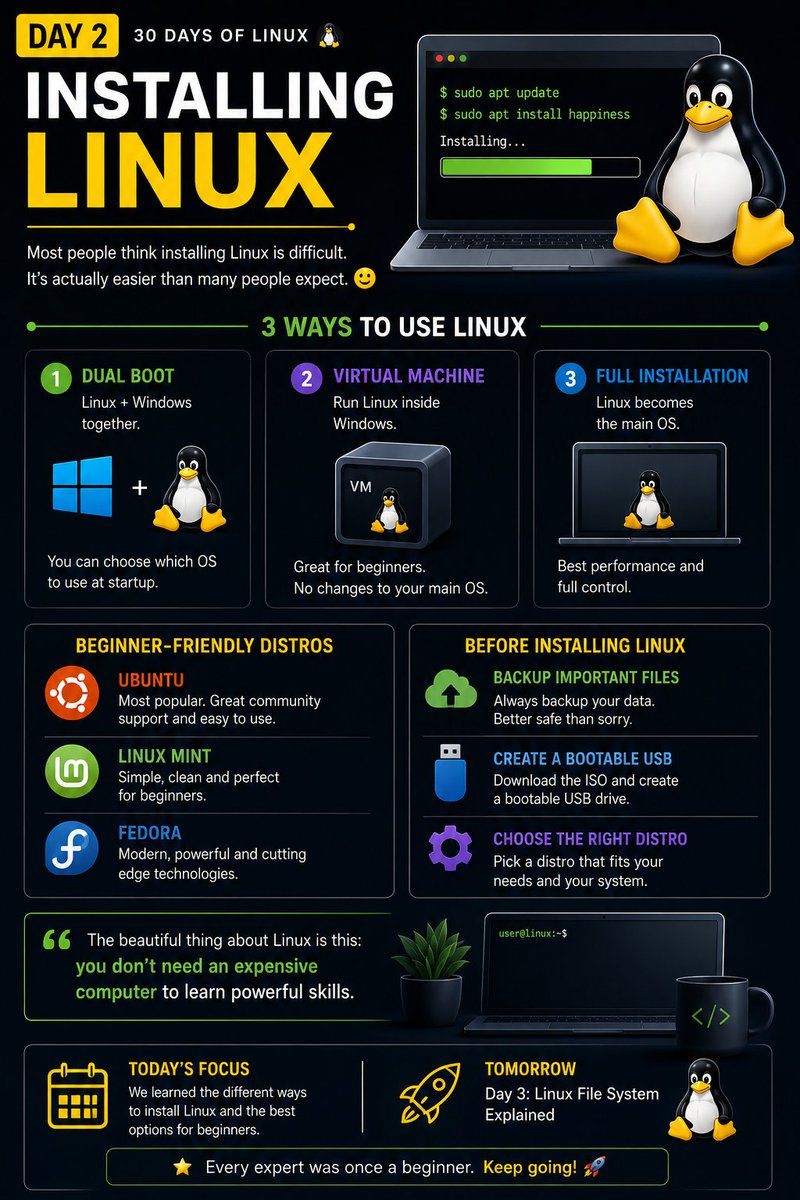
Day 2 . Installing Linux
A lot of people think Linux is difficult until they actually try it
Today we learned different ways to install Linux: • Dual boot
• Virtual machine
• Full installation
We will also explore beginner friendly distros like Ubuntu, Fedora, and Linux Mint
Hey @X algorithm 👋
I’m looking to #connect with people interested in:
• Frontend
• Backend
• Full-stack
• DevOps
• App Development
• SaaS
• AI / ML
• Data Science
• LeetCode & DSA
• Freelancing
• Startups
• Building in public
If that’s you, let’s connect 🤝
@FulStackDevMoyo@X Let’s connect 🤝.And if you’re into tech, come learn and build with us too — Frontend, Backend, Linux, DevOps, AI, freelancing, startups… all of it.
Let's build a community of people learning, building, and helping each other win on this internet thing .
@ladicodez Cheers to a new month man .Let’s really make June count. And if you’re serious about leveling up this month, come study Linux with us tooWe’re doing 30 days of Linux learning terminals, scripting, permissions, networking, and the real stuff developers use daily.
@Jordandev40 For real. I’m trying to connect with more people that are actually building stuff too. The conversations hit different when everyone’s creating, learning, and figuring things out together 💪💯