

Top Tweets for #200daysofcodechallenge

Day 181 - #200DaysOfCodeChallenge
Reading UI docs.
Covered:
styles,
flexbox layout,
images,
colors.
Project coming soon.
#LearningInPublic
Day 172 - #200DaysOfCodeChallenge
Changed a few things due to persistence issue.
Still looking for a proper fix.
Studied OOP.
Thinking about starting a bigger project next.
#LearningInPublic
Day 171 - #200DaysOfCodeChallenge
Skipped persistence issue for now.
Added live updates using snapshots.
Added notes database.
Next: fix UI + improve structure.
#LearningInPublic
Day 170 - #200DaysOfCodeChallenge
Gave C++ exam.
Starting app dev again after exams.
Revising previous work.
#LearningInPublic
Day 169 - #200DaysOfCodeChallenge
Studied C++ OOP today:
Constructors
Destructors
Inheritance
Understanding OOP concepts better.
#LearningInPublic
Day 168 - #200DaysOfCodeChallenge
Gave Maths exam.
Studied C++.
Practiced inheritance questions.
#LearningInPublic
Day 164 - #200DaysOfCodeChallenge
Continued the auth app.
Facing issues with
getReactNativePersistence.
Tried fixes + searched online,
still debugging.
Suggestions welcome.
#LearningInPublic
Day 161 - #200DaysOfCodeChallenge
Revisited old concepts.
Studied C++ fundamentals.
Planning next project or marathon.
Exams are near.
#LearningInPublic
Day 158 - #200DaysOfCodeChallenge
Worked on dashboard + timer UI.
App looks better now.
Next: reusable components + better folder structure.
#LearningInPublic
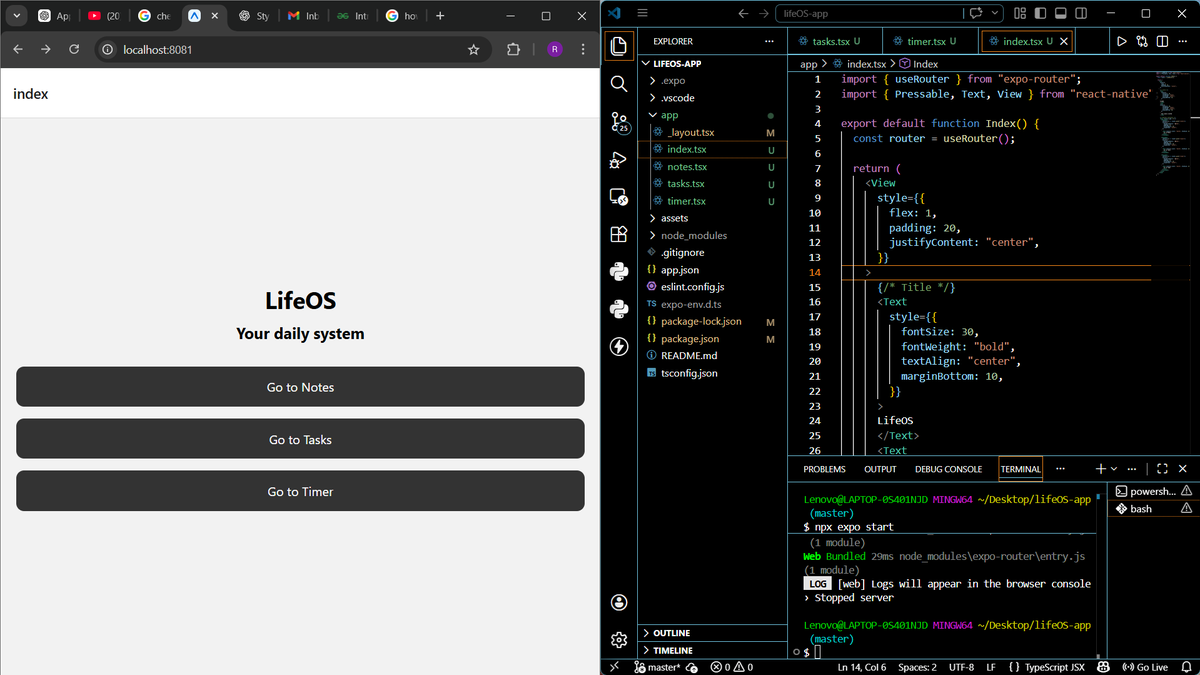
Day 154 - #200DaysOfCodeChallenge
Started a new app: LifeOS
Features planned:
• Homepage
• Notes
• Tasks
• Timer
Still learning, but enjoying building it.
#LearningInPublic

Day 110 of #200DaysOfCodeChallenge
Today I improved the checkout experience in my React E-commerce app by fixing and restructuring the delivery option selection system.
What I worked on 👇
• Refactored delivery option selection logic
• Replaced div-based click handling with proper <label> + radio input structure
• Connected delivery option updates to backend using Axios
• Triggered cart reload after updating delivery option
• Fixed UI state so the selected option updates instantly
• Improved accessibility and proper form behavior
This part of the build taught me something important:
UI bugs are rarely about styling — they’re usually about state and structure.
Using the correct semantic HTML (like labels with radio buttons) makes your UI behave naturally without hacks.
Yesterday I added cart interactions.
Today I made checkout smarter and cleaner.
The more I build, the more I realize:
Clean structure > Quick fixes
Proper state management > DOM tricks
Backend sync > Fake UI updates
This checkout flow is starting to feel like a real production app.
On to Day 111 🚀

Day 109 of #200DaysOfCodeChallenge
Today I worked on improving user experience in my React E-commerce app by implementing real-time UI feedback when adding products to the cart.
What I worked on 👇
• Connected the “Add to Cart” button to the backend using Axios
• Used async/await to handle cart updates properly
• Refetched cart data after every successful addition
• Implemented conditional rendering to show a dynamic “Added ✓” confirmation
• Used React state + setTimeout to auto-hide the confirmation popup
This part of the build really reinforced something important:
Great apps aren’t just about functionality — they’re about feedback.
Users need to know their action worked. Small UI signals (like a success checkmark) dramatically improve experience.
Instead of using a basic alert(), I implemented proper state-driven UI feedback — which feels much more like a production app.
Learning how to control UI state after async backend operations is where frontend starts to feel powerful.
The app is slowly moving from “tutorial project” to “real product architecture.”
On to Day 110 🚀

Day 109 of #200DaysOfCodeChallenge
Today I worked on improving user experience in my React E-commerce app by implementing real-time UI feedback when adding products to the cart.
What I worked on 👇
• Connected the “Add to Cart” button to the backend using Axios
• Used async/await to handle cart updates properly
• Refetched cart data after every successful addition
• Implemented conditional rendering to show a dynamic “Added ✓” confirmation
• Used React state + setTimeout to auto-hide the confirmation popup
This part of the build really reinforced something important:
Great apps aren’t just about functionality — they’re about feedback.
Users need to know their action worked. Small UI signals (like a success checkmark) dramatically improve experience.
Instead of using a basic alert(), I implemented proper state-driven UI feedback — which feels much more like a production app.
Learning how to control UI state after async backend operations is where frontend starts to feel powerful.
The app is slowly moving from “tutorial project” to “real product architecture.”
On to Day 110 🚀
Day 108 of #200DaysOfCodeChallenge
Today I focused on connecting the frontend to a real backend and making the app truly dynamic instead of static.
What I worked on 👇
• Set up a backend to manage products, delivery options, orders, and payment summaries
• Implemented data fetching using useEffect
• Integrated Axios for cleaner API requests
• Converted static UI into dynamic data-driven components
• Split Checkout into smaller components (OrderSummary & PaymentSummary)
• Practiced writing asynchronous logic using async/await
• Debugged a real async bug caused by forgetting await
This part of the build reinforced something important:
*Frontend doesn’t control the data — the backend does. React simply reacts to state changes.
*Async/await isn’t just syntax sugar — forgetting one keyword can break an entire page.
*Clean component separation makes scaling much easier than stuffing everything into one file.
Today felt different.
The project moved from “tutorial UI” to something that behaves like a real application.
Still building the foundation, but now the frontend and backend are actually talking to each other.
On to Day 109 🚀

Day 108 of #200DaysOfCodeChallenge
Today I focused on connecting the frontend to a real backend and making the app truly dynamic instead of static.
What I worked on 👇
• Set up a backend to manage products, delivery options, orders, and payment summaries
• Implemented data fetching using useEffect
• Integrated Axios for cleaner API requests
• Converted static UI into dynamic data-driven components
• Split Checkout into smaller components (OrderSummary & PaymentSummary)
• Practiced writing asynchronous logic using async/await
• Debugged a real async bug caused by forgetting await
This part of the build reinforced something important:
*Frontend doesn’t control the data — the backend does. React simply reacts to state changes.
*Async/await isn’t just syntax sugar — forgetting one keyword can break an entire page.
*Clean component separation makes scaling much easier than stuffing everything into one file.
Today felt different.
The project moved from “tutorial UI” to something that behaves like a real application.
Still building the foundation, but now the frontend and backend are actually talking to each other.
On to Day 109 🚀
Day 107 of #200DaysOfCodeChallenge
Today I continued building out an E-commerce app with React + Vite, focusing on structure and scalability instead of rushing features.
What I worked on 👇
• Set up multi-page routing using React Router
• Created core pages: Home, Checkout, Orders, Tracking
• Refactored the Header into a reusable component
• Updated all links to work properly with routing
• Built the HomePage product grid UI using reusable layout patterns
• Practiced separating UI concerns (components vs pages)
This part of the build really reinforced something important:
*Real apps aren’t about fancy logic, they’re about clean structure, navigation, and component separation.
*Routing + component reuse is where React starts to feel powerful, especially when you think ahead about scale and maintainability.
Still early in the build, but the foundation is getting solid.
On to Day 108 🚀

Day 107 of #200DaysOfCodeChallenge
Today I continued building out an E-commerce app with React + Vite, focusing on structure and scalability instead of rushing features.
What I worked on 👇
• Set up multi-page routing using React Router
• Created core pages: Home, Checkout, Orders, Tracking
• Refactored the Header into a reusable component
• Updated all links to work properly with routing
• Built the HomePage product grid UI using reusable layout patterns
• Practiced separating UI concerns (components vs pages)
This part of the build really reinforced something important:
*Real apps aren’t about fancy logic, they’re about clean structure, navigation, and component separation.
*Routing + component reuse is where React starts to feel powerful, especially when you think ahead about scale and maintainability.
Still early in the build, but the foundation is getting solid.
On to Day 108 🚀
Day 106 of #200DaysOfCodeChallenge
Another solid hands-on day deepening the React foundations.
Migrated the chatbot project into a clean, modern setup and broke everything into proper modular
what clicked today ?
• Setting up a proper React project from CLI using Vite + npm
• Understanding the command line (giving instructions to the computer)
• npm – downloading & managing external packages/libraries
• create-vite – the fastest way to bootstrap a solid React app
• Moved our existing chatbot code into the new Vite structure
• Added ESLint to catch JS problems early and keep code clean
• JavaScript modules – splitting code into separate .jsx + .css files per component
• Organized components: ChatInput, ChatMessage, ChatMessages, etc., each in their own file
The big win today was shifting from a single messy file to a real project structure — better maintainability, reusability, and scalability.
Small refactor, huge clarity boost. Loving how these fundamentals make everything feel more professional already.

Day 106 of #200DaysOfCodeChallenge
Another solid hands-on day deepening the React foundations.
Migrated the chatbot project into a clean, modern setup and broke everything into proper modular
what clicked today ?
• Setting up a proper React project from CLI using Vite + npm
• Understanding the command line (giving instructions to the computer)
• npm – downloading & managing external packages/libraries
• create-vite – the fastest way to bootstrap a solid React app
• Moved our existing chatbot code into the new Vite structure
• Added ESLint to catch JS problems early and keep code clean
• JavaScript modules – splitting code into separate .jsx + .css files per component
• Organized components: ChatInput, ChatMessage, ChatMessages, etc., each in their own file
The big win today was shifting from a single messy file to a real project structure — better maintainability, reusability, and scalability.
Small refactor, huge clarity boost. Loving how these fundamentals make everything feel more professional already.
Day 105 of #200DaysOfCodeChallenge
Today was a full practical day.
Built and styled a simple chatbot UI from scratch while practicing core React concepts that actually matter when building real products.
Here’s what I worked through 👇
• Styling React components with plain CSS
• Using Flexbox to create a flexible chat layout
• Conditional rendering with the ternary operator (? :) directly inside JSX
• Managing component state with React hooks
• useEffect to run logic after component updates
• useRef to reference DOM elements inside React
• Implemented auto-scroll for new chat messages
The focus wasn’t just “making it work” — it was understanding why each piece exists and how they connect inside a real UI.
Chat interfaces are great practice because they force you to think about:
State updates
Component structure
DOM interaction
User experience details (like scrolling)
Small project, but a lot of important concepts clicked today.

Day 105 of #200DaysOfCodeChallenge
Today was a full practical day.
Built and styled a simple chatbot UI from scratch while practicing core React concepts that actually matter when building real products.
Here’s what I worked through 👇
• Styling React components with plain CSS
• Using Flexbox to create a flexible chat layout
• Conditional rendering with the ternary operator (? :) directly inside JSX
• Managing component state with React hooks
• useEffect to run logic after component updates
• useRef to reference DOM elements inside React
• Implemented auto-scroll for new chat messages
The focus wasn’t just “making it work” — it was understanding why each piece exists and how they connect inside a real UI.
Chat interfaces are great practice because they force you to think about:
State updates
Component structure
DOM interaction
User experience details (like scrolling)
Small project, but a lot of important concepts clicked today.
Day 104 0f #200DaysOfCodingChallenge
Understanding APIs: How the Web Actually Talks to Itself
If you’ve ever wondered how websites fetch data, how apps communicate, or how Web3 dApps pull prices, NFTs, or user data, this is the foundation you must understand:
👉 APIs (Application Programming Interfaces)
What is an API?
An API is a structured way for one system to request data or actions from another system.
Think of it like:
A menu (you choose what you want)
A waiter (API)
A kitchen (server / database)
You ask → API processes → Response returns.
Understanding API Endpoints
An endpoint is a specific URL that performs a specific action.
General structure:
BaseURL / Endpoint
Example:
https://t.co/W2TCj5WR5e
Here:
BaseURL → https://t.co/l7Iu0mRUwc
Endpoint → /posts
Each endpoint does one clear job.
Common HTTP Methods
REST APIs rely on standard HTTP methods:
GET → Fetch data
POST → Create data
PUT / PATCH → Update data
DELETE → Remove data
This consistency is what makes APIs predictable and scalable.
GET: Fetching All Posts
Endpoint:
GET /posts
Returns:
A list of posts
No authentication required
Data formatted as JSON
Why this matters:
Clients don’t need database access
They only need the endpoint
Server controls everything
GET: Fetching a Specific Resource
GET /posts/{postId}
Example:
/posts/1
This uses a path parameter.
Path parameters:
Identify a specific resource
Are fixed in structure
Change per request
Used when you want one exact item, not a filtered list.
Query Parameters vs Path Parameters
Query Parameters:
/posts?userId=1
Used for:
Searching
Filtering
Sorting
Path Parameters:
/posts/1
Used for:
Identifying a single resource
Knowing the difference is critical for API design.
POST: Creating Data
POST /posts
This request sends data inside the request body.
Example:
{
"title": "Hello World",
"body": "This is my first post"
}
Why POST exists:
Data is not exposed in the URL
Secure
Structured
Scalable
What Is JSON and Why It’s Used
JSON (JavaScript Object Notation) is the universal language of APIs.
Why JSON?
Lightweight
Human-readable
Machine-friendly
Language-agnostic
Serialization:
JSON.stringify(data)
Deserialization:
JSON.parse(json)
This is how data moves across the internet.
Async, Await, and Why APIs Don’t Freeze the Browser
APIs are asynchronous because:
Network calls take time
JavaScript must stay responsive
Conceptually:
async → This function returns a Promise
await → Pause until the Promise resolves
This applies to:
APIs
Databases
Web3 smart contracts
Blockchain transactions
Axios: Cleaner API Requests
Axios simplifies HTTP requests.
Instead of chaining .then() calls:
await axios.get(url)
Why Axios is preferred:
Cleaner syntax
Better error handling
Automatic JSON parsing
Widely used in production
API Authentication vs Authorization
This is a critical distinction.
Authentication:
Who are you?
Authorization:
What are you allowed to do?
You can be authenticated but not authorized.
Types of API Authentication
1️⃣ No Authentication
Public APIs
Rate-limited
2️⃣ Basic Auth
Username + password
Base64 encoded (not encrypted)
3️⃣ API Keys
Simple access control
Common in SaaS APIs
4️⃣ Token-Based Authentication
Most secure
Used in OAuth, JWT, Web3 APIs
What Makes an API RESTful?
A REST API must:
✔ Use standard HTTP methods
✔ Return structured data (JSON/XML)
✔ Separate client and server
✔ Be stateless
✔ Be resource-based
This architecture allows:
Scalability
Independent development
Long-term maintainability
Real-World API Examples
Weather apps → OpenWeather API
Crypto prices → CoinGecko API
Email newsletters → Mailchimp API
Web3 apps → Blockchain indexers
APIs are the invisible infrastructure of the internet.
Key Takeaway
APIs are not just “data fetchers”.
They are contracts between systems.
Understanding APIs means:
You can build real apps
You can integrate any service
You can scale products properly
You can work confidently with backend & Web3 systems
📘 Full structured guide + examples here: https://t.co/lTBVJg2g5o


🎉 Day 200 of #200DaysOfCodeChallenge 💻
🥳Today, I've practice some questions of finding output in C++ and just go through with some concept of oops.
#200daysofcoding #learning #practice #CodingJourney #LeetCode #DSA #coding #Cpp #OOPS #complete #revision #development
🎉 Day 199 of #200DaysOfCodeChallenge 💻
Today, I've done nothing much just revise previous topics and prepare for my tomorrow assessment .
#200daysofcoding #learning #practice #CodingJourney #LeetCode #DSA #coding
🎉 Day 198 of #200DaysOfCodeChallenge 💻
Today, I've just practice some questions of strings.
#200daysofcoding #learning #practice #CodingJourney #LeetCode #DSA #coding
Trends for you
Most Popular Users

Elon Musk 
@elonmusk
240.2M followers

Barack Obama
@barackobama
119.3M followers

Donald J. Trump
@realdonaldtrump
111.6M followers

Cristiano Ronaldo
@cristiano
109.5M followers

Narendra Modi
@narendramodi
106.9M followers

Rihanna
@rihanna
97.4M followers

NASA
@nasa
92.1M followers

Justin Bieber
@justinbieber
90.7M followers

KATY PERRY
@katyperry
87.1M followers

Taylor Swift
@taylorswift13
80.9M followers

Lady Gaga
@ladygaga
72.5M followers

Kim Kardashian
@kimkardashian
69.5M followers

Virat Kohli
@imvkohli
69M followers

YouTube
@youtube
68.6M followers

Bill Gates
@billgates
63.5M followers

The Ellen Show
@theellenshow
62.5M followers

CNN
@cnn
61.9M followers

Neymar Jr
@neymarjr
61.6M followers

X
@x
60.9M followers

Selena Gomez
@selenagomez
60.2M followers