

Top Tweets for #ArduinoUNO

Arduino-Based Real-Time Alarm Clock Using RTC and I2C LCD
Designed and developed a Real-Time Alarm Clock System using Arduino Uno, DS1307 RTC Module, 16×2 I2C LCD Display, push buttons, and a buzzer. The system displays the current date and time in real-time and allows users to configure alarm settings through an intuitive button-based interface.
Key functionalities include real-time clock monitoring, alarm hour and minute configuration, audible alarm notifications, and continuous LCD updates. The DS1307 RTC module ensures accurate timekeeping with battery backup support, maintaining time information even during power interruptions.
Technologies & Components Used: • Arduino Uno
• DS1307 RTC Module
• 16×2 I2C LCD Display
• Push Buttons
• Piezo Buzzer
• Embedded C (Arduino IDE)
• RTClib & LiquidCrystal_I2C Libraries
• I2C Communication Protocol
Skills Demonstrated: • Embedded Systems Development
• Microcontroller Programming
• RTC Interfacing
• I2C Communication
• Hardware-Software Integration
• Circuit Design and Debugging
• User Interface Development
This project enhanced my understanding of embedded system design, peripheral interfacing, real-time applications, and user-centric hardware development.
📕 https://t.co/FehAXCKPbl
#Arduino #EmbeddedSystems #Electronics #Microcontroller #ECE #EmbeddedProgramming #ArduinoProjects #HardwareDesign #IoT #Engineering #RTC #I2C #ProjectDevelopment #StudentProject #ArduinoUno

🚀 Arduino Simulation Project in Wokwi! 🚀
✴️I Excited to share my first project built using the Wokwi Simulator: Railway Gate Automation System using Arduino Uno.
📕 https://t.co/FehAXCKPbl
🔹 Features:
🔸Automatic railway gate control using a servo motor.
🔸Train arrival and departure detection using push buttons (sensor simulation).
🔸Red and Green LED indicators for gate status.
🔸Buzzer warning system for approaching trains.
🔸Real-time status monitoring through Serial Monitor.
💡 Through this project, I gained hands-on experience with:
🔸Arduino programming (Embedded C/C++)
🔸Servo motor interfacing
🔸Digital input/output control
🔸Simulation and testing using Wokwi
🔸Basic embedded systems design
🔸This project strengthened my understanding of embedded systems and automation concepts. Looking forward to building more projects in Arduino, IoT, and ECE core domains.
#Arduino #Wokwi #EmbeddedSystems #ECE #ElectronicsEngineering #IoT #Automation #LearningByDoing #EngineeringStudent #ArduinoUno #Projects


🚀 Understanding the Arduino UNO – The Foundation of Embedded Systems! 🔧💡
Today, I created a detailed infographic explaining the complete pin configuration of the Arduino UNO, one of the most widely used microcontroller development boards for beginners and professionals alike.
The diagram covers:
✅ Digital I/O Pins (D0–D13)
✅ PWM Pins for Motor and LED Control
✅ Analog Input Pins (A0–A5)
✅ Power Supply Pins (5V, 3.3V, GND, Vin)
✅ UART Serial Communication (TX/RX)
✅ USB Programming Interface
✅ Microcontroller Architecture Overview
✅ Pin Functions and Practical Applications
Understanding the pin configuration is the first step toward building exciting projects such as IoT systems, robotics, drones, flight computers, autonomous vehicles, smart agriculture solutions, and industrial automation systems.
As engineers, mastering the fundamentals of hardware interfaces allows us to design more reliable, efficient, and scalable embedded solutions. Every advanced system starts with a strong understanding of its core components.
📚 Learning never stops. Every pin has a purpose, and every project begins with understanding how these pins interact with sensors, actuators, communication modules, and the real world.
📕 https://t.co/FehAXCKPbl
#Arduino #ArduinoUNO #EmbeddedSystems #ElectronicsEngineering #Microcontroller #IoT #Robotics #EngineeringEducation #STEM #Programming #CProgramming #EmbeddedC #HardwareDesign #Innovation #Technology #Learning #EngineeringStudents #Electronics #Automation #TechCommunity #ShivamSingh

❓ Why Does My Arduino Reset Automatically During the Project?
Your project runs perfectly for a few seconds…
Then, suddenly, the Arduino restarts.
📕 https://t.co/FehAXCKPbl
This is one of the most frustrating problems in embedded systems because:
⚠️ The code looks correct
⚠️ The wiring seems fine
⚠️ But the system behaves unpredictably
In most cases, the issue is NOT software.
Let’s understand the real causes 👇
---
🔴 1. Brown-Out Reset (Hidden Power Problem)
Arduino requires a stable voltage to operate properly.
When the voltage suddenly drops below a safe level:
* The microcontroller resets automatically
* Program execution restarts
* Outputs turn OFF temporarily
This is called:
⚡ Brown-Out Reset
Common reasons:
* Motors drawing high current
* Weak USB power
* Poor power supply regulation
---
⚡ 2. Motor Noise & Back EMF
Motors are noisy electrical devices.
When motors start or stop:
* Sudden current spikes occur
* Reverse voltage (Back EMF) is generated
* Electrical noise enters the Arduino supply lines
Result:
⚠️ Random resets
⚠️ Serial communication failure
⚠️ Sensor instability
✅ Solution:
* Flyback diodes
* Motor drivers
* Separate motor supply
* Proper filtering
---
🔌 3. USB Power Limitations
Many students power everything directly from:
❌ Laptop USB port
But USB current is limited.
When the project includes:
* Motors
* Relays
* GSM modules
* WiFi modules
* LEDs with high current
…the USB supply becomes unstable.
Result:
⚠️ Voltage drop
⚠️ Sudden reset
⚠️ Unstable operation
✅ Use:
* External regulated power supply
* Proper current-rated adapter
---
🔄 4. Ground Loops & Missing Common GND
Grounding mistakes are one of the biggest hidden issues in embedded systems.
Without proper common grounding:
* Signal references shift
* Noise increases
* Communication becomes unstable
Rule:
👉 ALL modules must share a proper COMMON GND.
---
🟡 5. Improper Decoupling (Very Common)
Microcontrollers require stable local filtering.
Without capacitors:
* Noise reaches the controller
* Voltage fluctuates rapidly
* Resets become frequent
✅ Use:
* 0.1µF ceramic capacitor near ICs
* Electrolytic capacitors across supply rails
This is standard industry practice.
---
🧠 Real Embedded Engineering Starts Here
Professional embedded development is NOT just writing code.
It includes:
✔ Power integrity
✔ Noise reduction
✔ Grounding strategy
✔ Hardware protection
✔ Signal stability
This is what separates:
❌ Beginners
from
✅ Embedded engineers
---
📩 Message me if:
* Your Arduino resets randomly
* Your motor project becomes unstable
* Sensors fail during operation
* Your hardware works inconsistently
I help students with:
✔ Embedded debugging
✔ Arduino troubleshooting
✔ Power electronics integration
✔ Motor & sensor interfacing
✔ Final-year project consultation
#PowerElectronics #ArduinoUNO #EmbeddedSystems #HardwareDebugging

🚀 Exploring the Roots of Innovation: Arduino Origins
Ever wondered how the world’s most popular open-source electronics platform started? Here is a quick dive into the history of Arduino! 💡
🏛️ The Birth of a Revolution
Arduino was born in 2005 at the Interaction Design Institute Ivrea (IDII) in Italy.
It was created as a low-cost, easy-to-use tool for students and hobbyists to build digital devices.
👥 The Visionaries (Founders)
The project was brought to life by a dedicated team:
🇮🇹 Massimo Banzi
🇪🇸 David Cuartielles
🇺🇸 Tom Igoe
🇮🇹 Gianluca Martino
🇺🇸 David Mellis
⚡ The Iconic Hardware
The Arduino Uno R3 remains the "Gold Standard" for beginners and pros alike.
Featuring the ATmega328P microcontroller, it’s the bridge between imagination and reality. 🛠️
💻 The Language of Logic
Arduino simplifies complex programming! It is primarily based on:
🔵 C
🔵 C++
These powerful languages provide the foundation for the Arduino IDE, making coding accessible yet incredibly efficient.
📕 https://t.co/FehAXCKPbl
🌟 Key Milestones
🗓️ 2005: First prototypes emerged from the Wiring project.
🌍 2006-2007: Public release and global adoption.
🔓 Open Source: Both hardware and software remain open for everyone to innovate.
#Arduino #Electronics #Robotics #Coding #STEM #ArduinoUno #TechHistory #Programming #EmbeddedSystems #Innovation @arduino


@arduinounoboy I wouldn’t say they’re very similar, TPAB is Kendrick after just getting some commercial acclaim and tryna grapple with how to handle this and use his platform now. Morale is fully internal, about how he has treated ppl & how he can do better as a man. There are some similarities
@arduinounoboy Arguable but I don’t think so, Morale is the closest Kendrick has came to touching TPAB
🔥 Smart Smoke Detection System using Arduino UNO
Proud to showcase my latest hardware project—a real-time Smoke Detection & Alert System built using Arduino and an MQ135 gas sensor.
This system continuously monitors air quality and instantly alerts when smoke levels become dangerous—perfect for safety-focused IoT applications 🚨
📌 Quick Note:
PPM (Parts Per Million) is a unit used to measure gas concentration in air—indicating how many gas molecules are present per million air molecules 🌫️📊
🎥 What You’ll See in the Video Output:
🟢 Normal Smoke Level (300–400 ppm)
📟 LCD: Smoke: XXX ppm
📟 LCD: NOT HARMFULL
💡 Green LED ON
🔕 Buzzer OFF
🔴 Harmful Smoke Level (400+ ppm)
📟 LCD: Smoke: XXX ppm
📟 LCD: Harmfull Smoke
💡 Red LED ON
🔔 Buzzer ON
⚙️ Key Features:
✔️ Real-time smoke monitoring in PPM
✔️ Live display on 16×2 I2C LCD
✔️ Dual-LED status indication
✔️ Automatic buzzer alert for danger
✔️ Compact & low-cost safety solution
🧰 Components Used:
• Arduino UNO
• MQ135 Gas Sensor
• 16×2 LCD with I2C
• Active Buzzer
• Green & Red LEDs
• Resistors, Breadboard & Jumper Wires
🎯 Applications:
🏠 Smart Home Fire Alerts
🏭 Industrial Safety Monitoring
🔥 Fire Detection Systems
🚨 Emergency Warning Devices
🧪 Air Quality Analysis
🧠 What I Learned:
• MQ135 sensor interfacing
• PPM-based threshold logic
• I2C LCD communication
• Designing real-time alert systems
• Writing structured Arduino programs
🔗 Project Code on GitHub:
👉 https://t.co/S6WqvPOPrG
🔥 Top 6 Arduino eBooks V1 for $20
https://t.co/XaKuVoaDGM
🔖 #Arduino #EmbeddedSystems #IoTProject #SmokeDetection #MQ135 #ArduinoUNO #FireSafety #GasSensor #HardwareProject #EngineeringProjects #StudentInnovation #LearningByDoing #TechSkills #IoTSafety #Electronics

Touch sensor based led trigger!
With arduinoUNO


In embedded programming, the Blink program is like the Hello World program, it’s usually the first program we write to test that the board and code are working properly
#Arduinouno #Embeddedprogramming
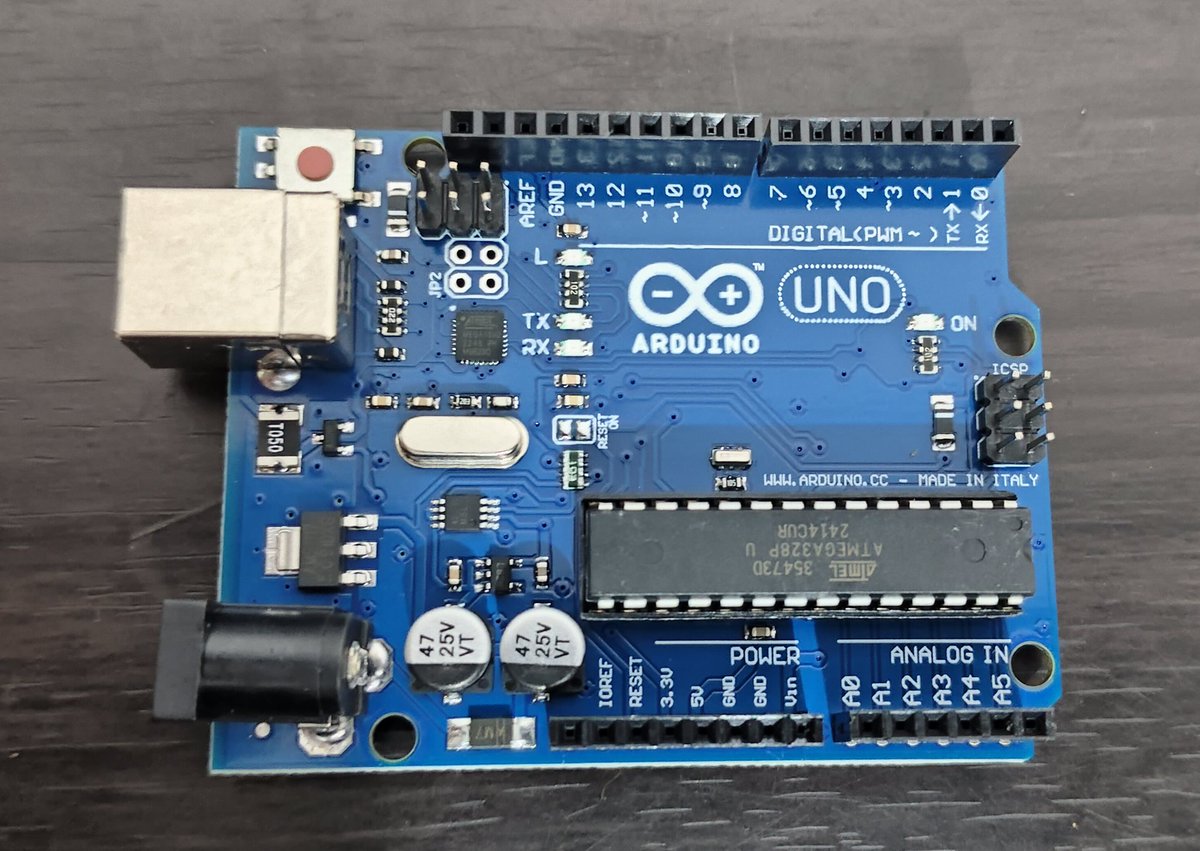


@arduinounoboy @Femi_forge This is me


@arduinounoboy @BenEzimoha 03 adolescence
4YEO
Too deep for the intro
Love yourz
The list goes on.

@arduinounoprojx I mean, can you run programs on this simulator

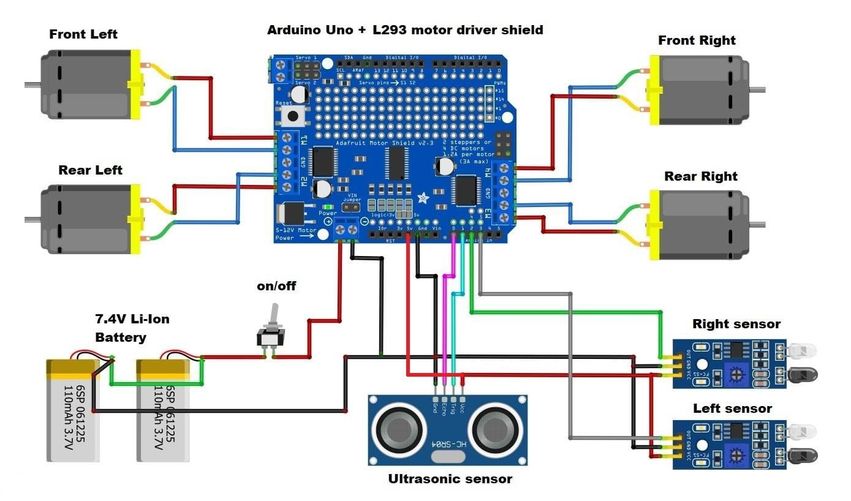
Unleash your creativity with the Arduino Uno and L293 Motor Driver Shield! Perfect for any DIY robotics project. #ArduinoUno #L293MotorDriver #RoboticsDIY #CircuitDesign


ArduinonPrpje seti ve 26 derslik canlı online Arduino Eğitimi kazanmak için yapmanız gerekenler çekiliş postumuzun altında, herkese bol şans #cekilis #çekiliş #cekilisvar #çekilişvar #çekilişzamanı #arduinouno… https://t.co/5prDU1maFl


Diseño de medidor de ritmo cardiaco
#Arduino #arduinouno #electronic #electronica #proyectos… https://t.co/2eqObKdsA5
Usando un viejo proyecto de led con arduino
#Arduino #arduinoUno #electronic #electronica… https://t.co/S0GEO61HB1

Slowly but surely getting there
#productdesign #industrialdesign #arduinouno #processing #arduino #algorithm
Slightly obsessed with this force sensing resistor.
#arduino #processing #arduinouno #algorithm #industrialdesign #productdesign
So this is the processing side of things.
#processing #arduino #arduinouno #prototype #industrialdesign #productdesign #3dprinting
Start of a prototype for a project. More pics soon.
#productdesign #industrialdesign #prototype #arduino #arduinouno #processing

Last Seen Hashtags on Sotwe
Most Popular Users

Elon Musk 
@elonmusk
239.6M followers

Barack Obama
@barackobama
118.6M followers

Cristiano Ronaldo
@cristiano
114.3M followers

Donald J. Trump
@realdonaldtrump
111.7M followers

Narendra Modi
@narendramodi
106.9M followers

Rihanna
@rihanna
98.6M followers

NASA
@nasa
92.1M followers

Justin Bieber
@justinbieber
91.7M followers

KATY PERRY
@katyperry
89.9M followers

Taylor Swift
@taylorswift13
83.9M followers

Lady Gaga
@ladygaga
75.4M followers

Virat Kohli
@imvkohli
73.3M followers

Kim Kardashian
@kimkardashian
70.8M followers

YouTube
@youtube
68.6M followers

Neymar Jr
@neymarjr
66.3M followers

Bill Gates
@billgates
65.1M followers

Selena Gomez
@selenagomez
63M followers

The Ellen Show
@theellenshow
62.1M followers

CNN
@cnn
61.7M followers

X
@x
60.6M followers