

Top Tweets for #CentOS

AI Overview CentOS (Community Enterprise Operating System) is a free Linux system. It was a copy of Red Hat Enterprise Linux (RHEL). Traditional CentOS Linux is now discontinued. The project now focuses on CentOS Stream, which tests new updates before they go to RHEL.History and StatusCentOS Linux 7: End of life was June 30, 2024. No more updates.CentOS Linux 8: Ended early in December 2021.CentOS Stream: The current rolling preview version used to build RHEL.Popular AlternativesRocky Linux: A free copy of RHEL built to replace old CentOS.AlmaLinux: Another free, community-run RHEL https://t.co/GpK3xpKV57 Hat Enterprise Linux (RHEL): The official paid version with full support.If you are planning to move away from an old CentOS server, tell me which version you are using and what software you run, and I can suggest the best replacement system.WikipediaCentOS - WikipediaCentOS (/ˈsɛntɒs/, from Community Enterprise Operating System; also known as CentOS Linux) is a

@jasintech But from what I understand CentOS (Stream) is upstream of Fedora and RHEL is upstream of CentOS.

@LXIXthenumber Yeah CentOS is the free version of RedHat. But yall are saying fedora.

Nice/ I just meant that originally CentOS was a reliable rebuild of RHEL that was currently released, they inverted their strategy a bit and CentOs is now where new RHEL releases are essentially baked and iterated on
If you want the traditional enterprise Linux and reliability without paying RHEL fees, Rocky Linux is solid
CentOS is now the source code for the upcoming RHEL release instead of an open source rebuild of current RHEL releases.
If you want to run a free/os version of RHEL like CentOS was before 2021(when they switched the approach) Rocky and or Alma Linux are your best bet
I've got experience with Rocky but not Alma. It was fine for a RHEL style server
I don't know if RHEL is worth the licensing fee unless you are in a corporate environment where it would be useful (more of a CYA, lol) to have that Enterprise "support"
@AgeOfJayy Well I know I want to use redhat someday. CentOS is the same source code.
I am going to use CentOS for my company until I can afford RedHat.

@jasintech Solid start. CentOS is a great way to learn real Linux fundamentals.

@jasintech Awesome step... CentOS 7 is a fantastic, rock-solid distro for mastering Linux administration, networking, and bash scripting.

@jasintech Centos 7 was one of the first linux distro I worked with professionally. That is a good one in my opinion. :)
Just finished downloading CentOS 7 for my Linux class and getting my environment set up. Looking forward to learning more about the Linux command line, system administration, networking, & scripting.
One step closer to becoming more comfortable working in Linux! 🐧💻 #Linux

@wineisareine Pake centos katanyaa, tp pas uas soalnya pilgan


Linux Operating Systems and their Minimum RAM Requirements
🟠 Ubuntu - 6 GB
⚪ Tiny Core Linux - 64 MB
🐶 Puppy Linux - 256 MB
🏹 Arch Linux - 512 MB
🧱 Debian - 512 MB
🕊️ Lubuntu - 1 GB
🔵 Fedora - 2 GB
🎩 Red Hat Enterprise Linux - 2 GB
🦎 openSUSE - 2 GB
🌿 Linux Mint - 2 GB
🪟 Zorin OS - 2 GB
🛡️ Kali Linux - 2 GB
⛰️ Manjaro - 2 GB
🏔️ Rocky Linux - 2 GB
🎯 CentOS Stream - 2 GB
🚀 Pop!_OS - 4 GB
🎮 SteamOS - 4 GB
Which Linux distro are you running?

Heads-up for Linux admins.
Information about two serious Linux kernel vulnerabilities has leaked publicly. Together, they are being referred to as Dirty Frag.
❌ Dirty Frag is a Local Privilege Escalation vulnerability, meaning a regular local user could potentially gain root privileges.
❌ There is currently no official patch available. Only temporary workarounds are being discussed.
❌ The issue affects Linux kernels released since 2017.
❌ No CVE has been assigned yet. The details appear to have surfaced before maintainers had time to prepare and test a proper fix.
❌ A working exploit is reportedly available and has been tested on distributions such as Ubuntu, RHEL, CentOS, and openSUSE.
✅ Temporary mitigation may involve disabling the following kernel modules:
`esp4`, `esp6`, `rxrpc`
⚠️ Be careful: disabling `esp4` and `esp6` may break IPsec functionality, so test before applying this in production.
For now: monitor vendor advisories, review exposure, and prepare to patch as soon as updates become available.
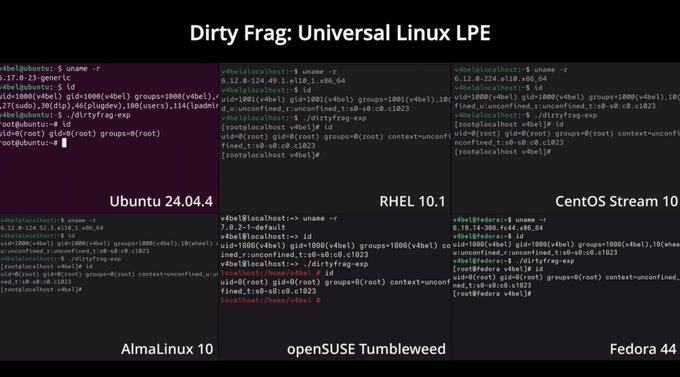

⚠️ Dirty Frag — New Linux Root Exploit, No Patch Yet
Just dropped. A new Linux kernel flaw chains two bugs to get root on Ubuntu, RHEL, Fedora, CentOS & more.
Full details → https://t.co/zQYSKiUDua
#dirtyfrag #copyfail #linux #security #infosec


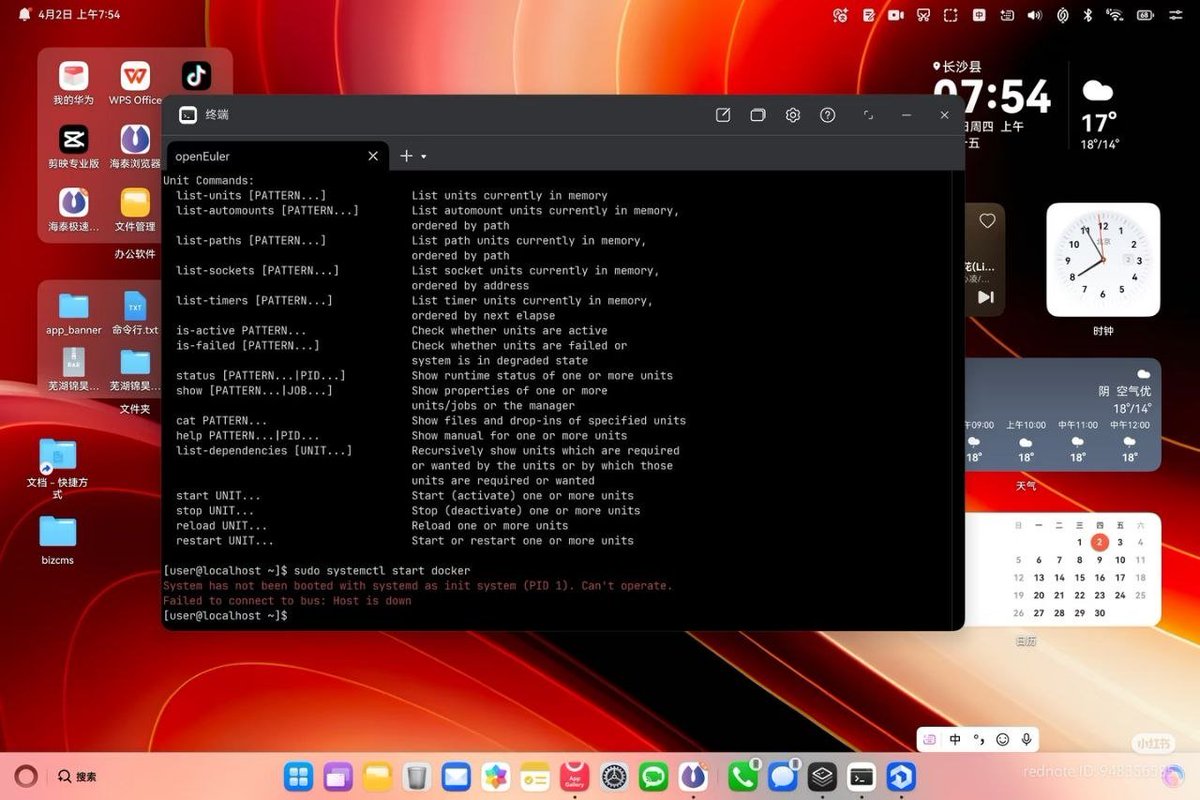
You cannot use the apt package manager on openEuler (Converged Development Engine, a.k.a Fusion Development Engine) because it is a RPM-based distribution. It uses dnf (and its predecessor yum) to manage software, similar to Fedora, CentOS, or RHEL.
https://t.co/eo7pBuvJYx
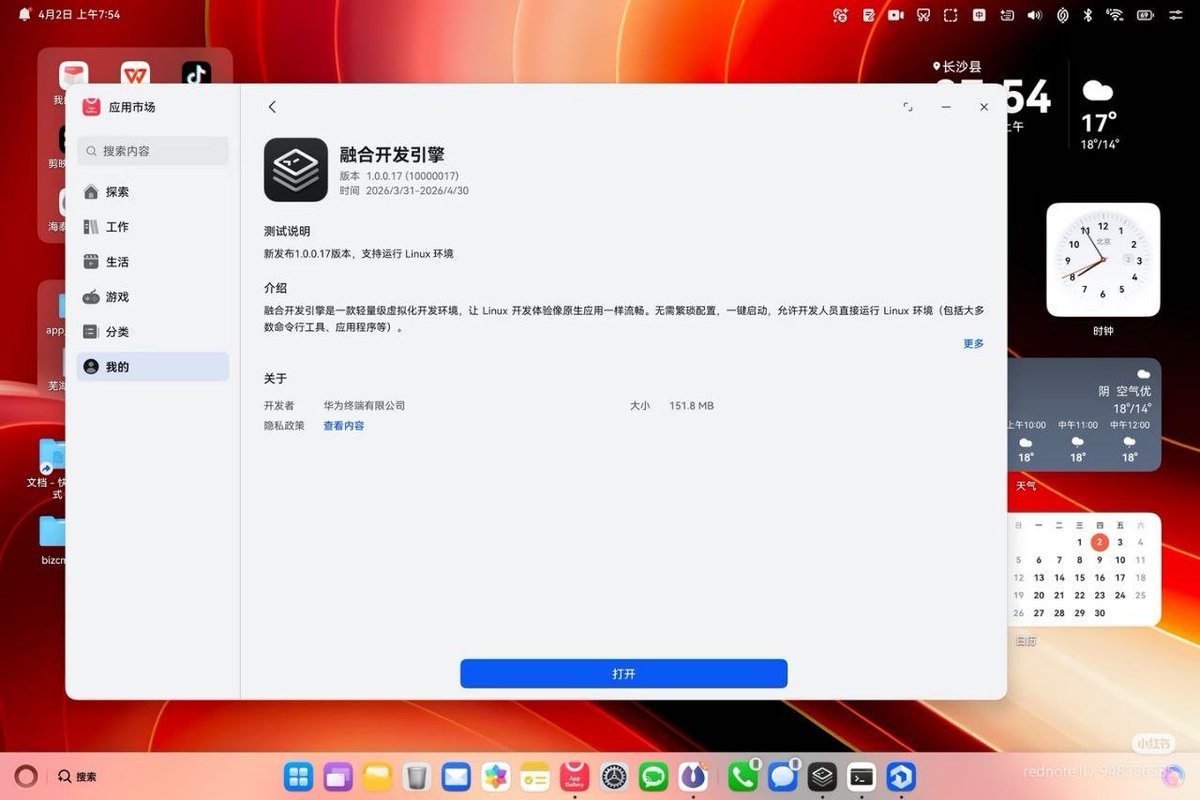
Harmony PC ' s experimental applications have been launched with a unified development engine .
The HarmonyOS integrated development engine allows you to run Linux environments on the HarmonyOS system .
#Fusion #OpenEuler #Tools #Developers #Huawei
https://t.co/ggt61pczTT


FREE DevOps Playground
Practice infrastructure automation with a fully configured Ansible control host, six hosts (3 x CentOS and 3 x Ubuntu), web-based terminals, systemd environment, and test environment.
https://t.co/aqvHJeoN34

The Linux Command Cheatsheet
➛ File & Directory Essentials:
ls -lah - List all files with sizes in human-readable format
tail -f {file} - Stream file contents in real-time
cd - - Switch to the previous directory
mkdir -p path/to/nested/dir - Create nested directories in one command
rm -rf {dir} - Force delete directory and all contents
cp -r {source} {dest} - Copy directory recursively
find . -name "*.log" - Search for files by name pattern
➛ System & Process Management:
top or htop - Interactive process viewer with CPU/memory usage
ps aux | grep {process} - Find specific running processes
kill -9 {PID} - Force kill a process immediately
systemctl status {service} - Check status of a system service
systemctl restart {service} - Restart a service
uptime - Show system uptime and load average
free -h - Display memory usage in human-readable format
➛ User & Permissions:
chmod +x {file} - Make file executable
chmod 755 {file} - Set read/write/execute permissions
chown user:group {file} - Change file owner and group
sudo !! - Run previous command with sudo privileges
whoami - Display current username
id {user} - Show user ID and group memberships
su - {user} - Switch to another user account
➛ Networking:
curl -I {url} - Fetch HTTP headers from a URL
wget {url} - Download file from the internet
netstat -tulpn - List all listening ports and services
ss -tulpn - Modern replacement for netstat
ip addr show - Display network interfaces and IP addresses
ping -c 4 {host} - Send 4 ping packets to test connectivity
traceroute {host} - Show network path to destination
➛ Disk & Storage:
df -h - Show disk space usage for all mounted filesystems
du -sh {dir} - Show total size of a directory
du -h --max-depth=1 - Show size of immediate subdirectories
lsblk - List all block devices and partitions
mount | grep {device} - Show where a device is mounted
ncdu - Interactive disk usage analyzer
➛ Debugging & Monitoring:
tail -n 100 /var/log/syslog - View last 100 lines of system log
journalctl -f - Stream systemd logs in real-time
journalctl -u {service} - View logs for specific service
strace {command} - Trace system calls for debugging
dmesg | tail - View recent kernel messages
lsof -i :{port} - Show which process is using a port
watch -n 1 {command} - Run command every second and display output
➛ Package Management:
Debian/Ubuntu:
apt update && apt upgrade - Update package lists and upgrade all packages
apt install {package} - Install a package
apt remove {package} - Remove a package
dpkg -l | grep {name} - Search installed packages
RHEL/CentOS/Fedora:
dnf update - Update all packages
dnf install {package} - Install a package
dnf remove {package} - Remove a package
rpm -qa | grep {name} - Search installed packages
➛ Search & Text Processing:
grep -r "pattern" {dir} - Recursively search for text in files
grep -i "pattern" {file} - Case-insensitive search
awk '{print $1}' {file} - Print first column from file
sed 's/old/new/g' {file} - Replace all occurrences of text
cat {file} | wc -l - Count lines in a file
sort {file} | uniq - Sort and remove duplicate lines
head -n 20 {file} - Show first 20 lines of file
➛ Archiving & Compression:
tar -czf archive.tar.gz {dir} - Create compressed tar archive
tar -xzf archive.tar.gz - Extract tar.gz archive
zip -r https://t.co/1aMWf43iNB {dir} - Create zip archive
unzip https://t.co/1aMWf43iNB - Extract zip file
gzip {file} - Compress file with gzip
➛ Cleanup & Maintenance:
apt autoremove - Remove unused packages (Debian/Ubuntu)
journalctl --vacuum-time=7d - Delete logs older than 7 days
rm -rf ~/.cache/* - Clear user cache directory
find /tmp -mtime +7 -delete - Delete files in /tmp older than 7 days

@devops_nk i work daily with ubuntu and centos as our build runners, recently been working with talos which is specifically focused to work for kubernetes

@devops_nk Ubuntu, Centos

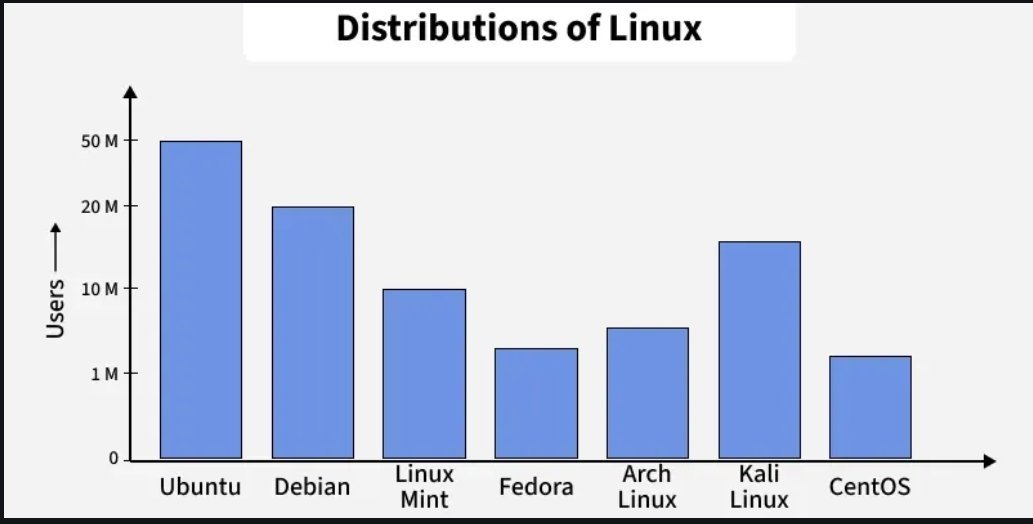
Most popular Linux distributions.
which one are you using ? 🐧
- Ubuntu (Beginner-friendly)
- Kali Linux (Built for cybersecurity)
- Debian (base for many distros)
- Fedora (loved by developers)
- Arch Linux (highly customizable)
- CentOS (Enterprise servers)
- Linux Mint (Simple & familiar)
Comment your distro or the one you want to learn next. 👇
Linux: Operating System Evolution (1991–2026) 🐧
🐧 1991: Linux 0.01 (First kernel release by Linus Torvalds)
🐧 1992: Linux 0.96 (First version with X Window System)
🐧 1993: Slackware 1.0 (One of the oldest surviving distros)
🐧 1993: Debian 0.01 (Foundation release)
🐧 1994: Red Hat Linux 1.0
🐧 1996: Linux 2.0 kernel (Multi-processor support)
🐧 1998: GNOME 1.0 & KDE 1.0 (Desktop environments)
🐧 2001: Linux 2.4 kernel (USB & Bluetooth support)
🐧 2003: Fedora Core 1 (Community-driven Red Hat successor)
🐧 2004: Ubuntu 4.10 "Warty Warthog" (Revolutionized desktop Linux)
🐧 2006: Linux 2.6 kernel becomes mainstream
🐧 2011: Linux 3.0 kernel
🐧 2012: Arch Linux gains popularity among enthusiasts
🐧 2015: Windows includes WSL (Windows Subsystem for Linux)
🐧 2015: Linux 4.0 kernel
🐧 2019: Linux 5.0 kernel
🐧 2020: CentOS 8 shifts to CentOS Stream
🐧 2021: Rocky Linux & AlmaLinux emerge (CentOS replacements)
🐧 2022: Linux 6.0 kernel (Rust language support added)
🐧 2024: Ubuntu 24.04 LTS "Noble Numbat"
🐧 2025: Fedora 42 & Debian 13 "Trixie"
🐧 2026: Linux 6.12+ kernel continues evolution 🚀
🚨 Linux in One Liners
1. Linux → the kernel, not the full operating system. It talks to hardware.
2. Kernel → controls CPU, memory, disk, network. The brain of the system.
3. Operating System → kernel + tools + libraries + apps.
4. Distribution (Distro) → Linux kernel bundled with tools. Example: Ubuntu, CentOS.
5. GNU Tools → basic commands like ls, cp, grep. This is why people say GNU/Linux.
6. Terminal → where you type commands.
7. Shell → program that reads your commands. Bash is common.
8. File System → everything starts from /. No drive letters.
9. Root User → admin user with full control.
10. Permissions → decide who can read, write, or run files.
11. Process → a running program.
12. Service → program running in background.
13.Package Manager → installs software. apt, yum, dnf.
14.SSH → connect to another machine securely.
15.Logs → files that record system activity and errors.


Spence es mucho mejor que porro
No tira centos inútiles ya con eso es un montón

Learning L I N U X Day 1
1. The Linux Philosophy and StructureCore Idea:
Linux:
is open-source, Unix-like OS (e.g., Ubuntu, CentOS, Debian).
Everything is a file: devices, directories, even processes. It's modular—install what you need via package managers (apt for Debian-based, yum/dnf for Red Hat).
Kernel vs. Distro:
Kernel is the heart (handles hardware). Distros add user-friendly layers
(e.g., Ubuntu for beginners, Arch for advanced).
Why for DevOps?
Servers are mostly Linux; debugging a pod in K8s often means SSH-ing into a Linux node. Mindset: Think "automation-first"—use CLI over GUI for scripts that scale.
Pro Tip: Use tree command (install with sudo apt install tree) to visualize: tree / -L 1.
#DevOps #Linux #SoftwareDevelopment #SoftwareEngineering #BuildInPublic #LearnInPublic
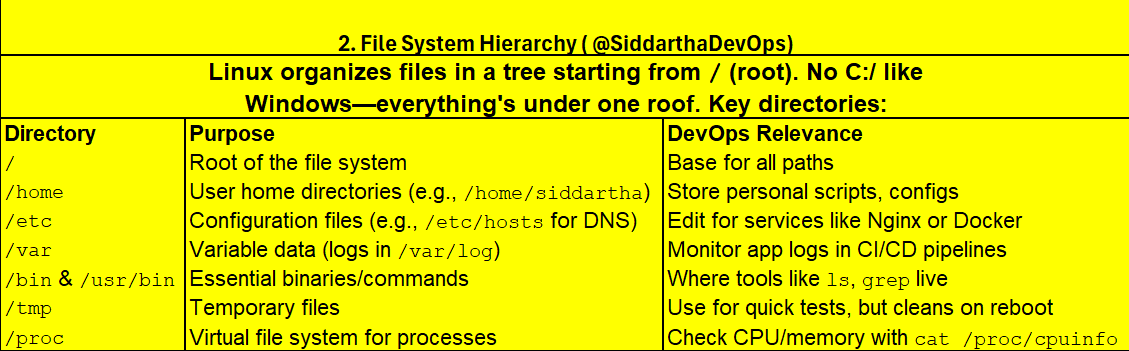

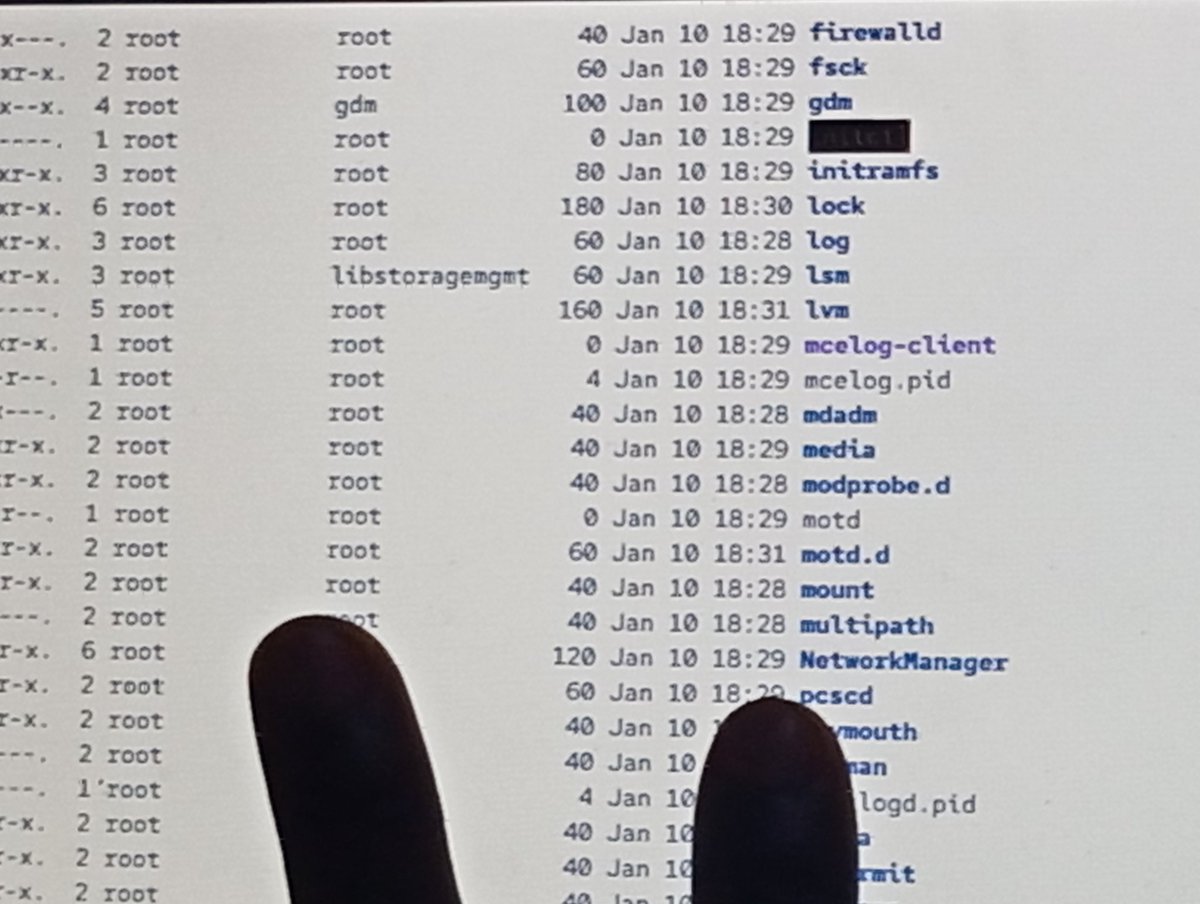
Tried accessing all the file systems currently in my CentOS VM after today's lesson,
And also, how to identify and differentiate between Directories, Files and Links too.
It was Bulky but actually fun doing.
Is there any crucial Linux file system that is not on the 2nd image?


@fromcodetocloud Yeah , I have experience in centos
Last Seen Hashtags on Sotwe
Most Popular Users

Elon Musk 
@elonmusk
239.8M followers

Barack Obama
@barackobama
118.6M followers

Cristiano Ronaldo
@cristiano
114.3M followers

Donald J. Trump
@realdonaldtrump
111.7M followers

Narendra Modi
@narendramodi
106.9M followers

Rihanna
@rihanna
98.6M followers

NASA
@nasa
92.1M followers

Justin Bieber
@justinbieber
91.7M followers

KATY PERRY
@katyperry
89.9M followers

Taylor Swift
@taylorswift13
83.9M followers

Lady Gaga
@ladygaga
75.4M followers

Virat Kohli
@imvkohli
73.3M followers

Kim Kardashian
@kimkardashian
70.8M followers

YouTube
@youtube
68.6M followers

Neymar Jr
@neymarjr
66.3M followers

Bill Gates
@billgates
65.1M followers

Selena Gomez
@selenagomez
63M followers

The Ellen Show
@theellenshow
62.1M followers

CNN
@cnn
61.7M followers

X
@x
60.6M followers